





matthrolf
Members
-
Joined
-
Last visited
-
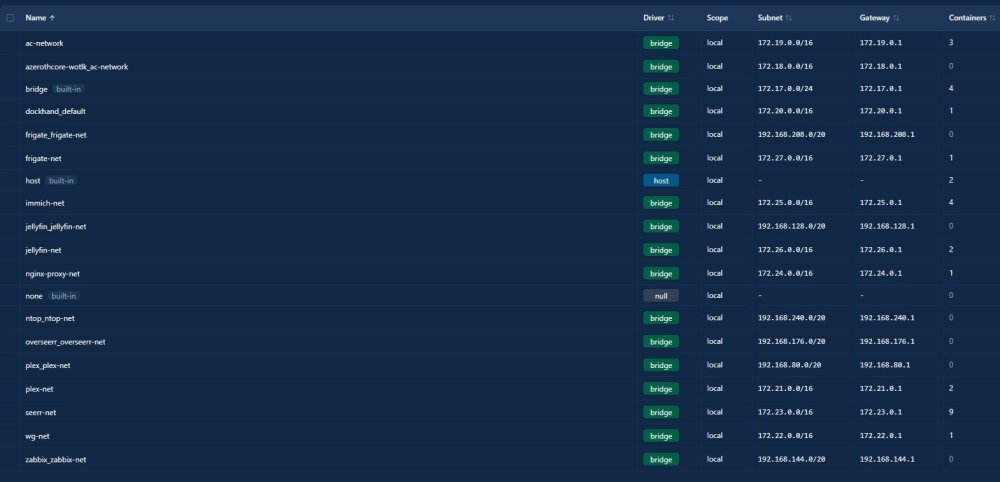
I am not the person who has the nvidia card. The advice posted above solved my problem, and the result is the screenshot above. Below is an example of using the default settings, and this host has run out of subnets:
-
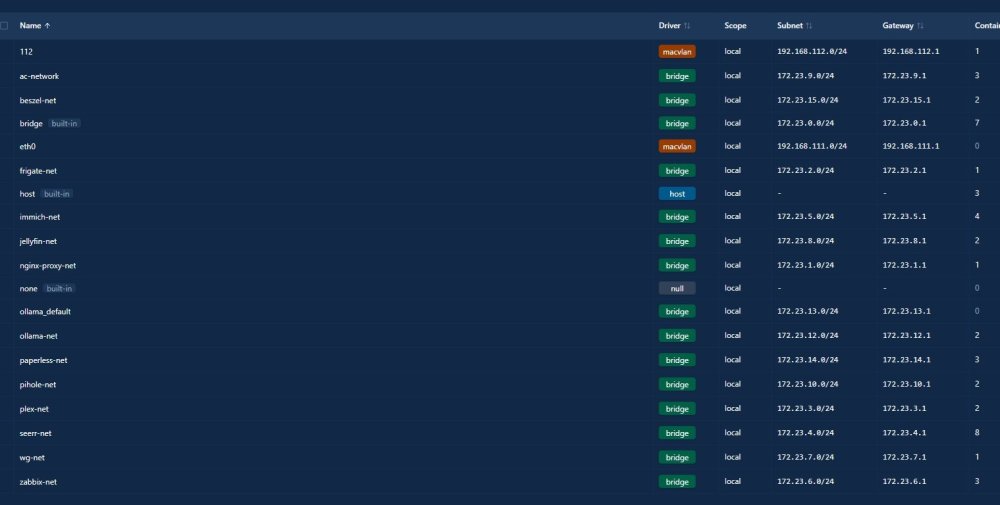
I too have over 30 stacks with separate networks, and the /16 networks chew up an insane amount of address space. Limiting the networks to /24 or smaller makes the route table much cleaner. Since the configuration to change from /16 to /24 does not survive a reboot, this script is needed. We aren't running out of addresses in a subnet. We are running out of SUBNETS. The problem with using a 16 bit mask is that chews up 65,536 addresses per subnet. By using 24 bit masks we get 256 subnets in the space of the original 16 bit mask. https://en.wikipedia.org/wiki/Subnet Specifically, the section on Subnet host count. Attached below are just some of the stack networks on my unraid
-
Using edge, and 7.2.2 in dark mode notifications are not able to be read unless they are highlighted because they are using the light colored font.
-
My searches on the forum suggest inputting something in the docker.cfg file on the flash drive. I have found the file, but don't understand the format I need to use to make these settings persistent across OS reboots: { "default-address-pools": [ { "base": "172.23.0.0/16", "size": 24 } ] } Thanks for any advice you can offer!
-
What is the best way to make the default config file persistent? I am looking to change my network subnets, and have it persistent across unraid reboots with something like this: { "bip": "172.17.1/24", "default-address-pools":[ {"base":"172.23.0.0/16","size":24}, ] }
-
From debug below, is it not filling the variables in the link? Full disclosure, I just changed my web interface to port 82. I tried changing back to 80 with no change in results. docker.js?v=1749406518:7 Uncaught SyntaxError: Failed to execute 'open' on 'Window': Unable to open a window with invalid URL 'http://[ip]:[port:80]/'. at HTMLAnchorElement.action (docker.js?v=1749406518:7:129) at HTMLDocument.dispatch (dynamix.js?v=1758227634:5:40035) at v.handle (dynamix.js?v=1758227634:5:38006) 5docker.js?v=1749406518:7 Uncaught SyntaxError: Failed to execute 'open' on 'Window': Unable to open a window with invalid URL 'http://[ip]:[port:80]/'. at HTMLAnchorElement.action (docker.js?v=1749406518:7:129) at HTMLDocument.dispatch (dynamix.js?v=1758227634:5:40035) at v.handle (dynamix.js?v=1758227634:5:38006) action @ docker.js?v=1749406518:7 dispatch @ dynamix.js?v=1758227634:5 v.handle @ dynamix.js?v=1758227634:5 docker.js?v=1749406518:7 Uncaught SyntaxError: Failed to execute 'open' on 'Window': Unable to open a window with invalid URL 'http://[ip]:[port:8096]/'. at HTMLAnchorElement.action (docker.js?v=1749406518:7:129) at HTMLDocument.dispatch (dynamix.js?v=1758227634:5:40035) at v.handle (dynamix.js?v=1758227634:5:38006) action @ docker.js?v=1749406518:7 dispatch @ dynamix.js?v=1758227634:5 v.handle @ dynamix.js?v=1758227634:5 docker.js?v=1749406518:7 Uncaught SyntaxError: Failed to execute 'open' on 'Window': Unable to open a window with invalid URL 'http://[ip]:[port:81]/'. at HTMLAnchorElement.action (docker.js?v=1749406518:7:129) at HTMLDocument.dispatch (dynamix.js?v=1758227634:5:40035) at v.handle (dynamix.js?v=1758227634:5:38006)
-
Hi, I have restarted nginx, and the extreme sluggishness independent of browser or platform does not abate. There are no obvious processes consuming ram or cpu cycles that I can blame. It is only the Unraid UI that is experiencing sluggishness. All the other docker hosted services are running as expected. It is also perfectly responsive to SSH. Please let me know how I can assist with gathering logs to make this more than just an anecdotal report.
-
The reported network traffic is inaccurate after upgrading from 7.1.4 to 7.2 beta 2. Including a screen shot of the dashboard section, sh int from the switch, and one app generating traffic at the time. Please let me know how I can gather any data to help with this.
-
Thank you, I feel stupid. It was set to auto. All works well now.
-
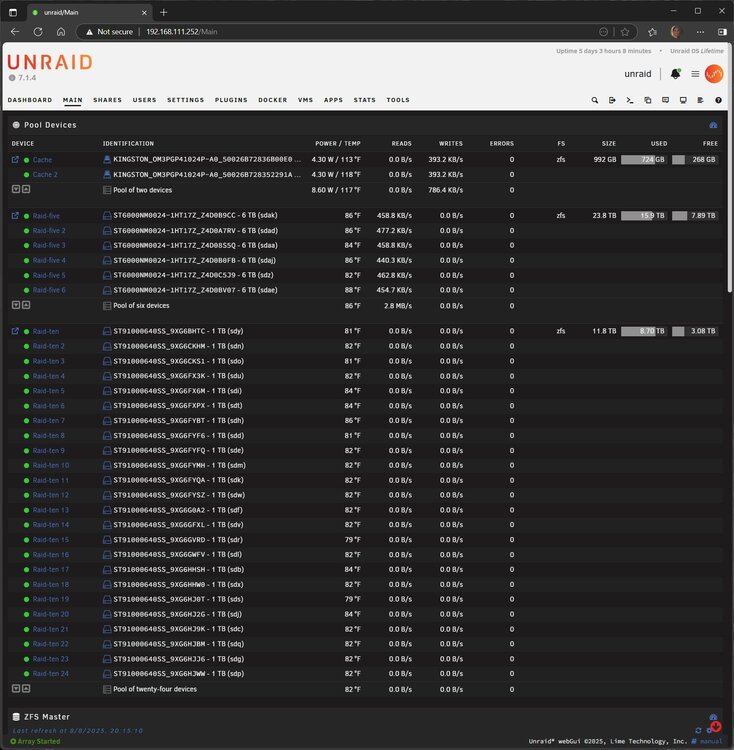
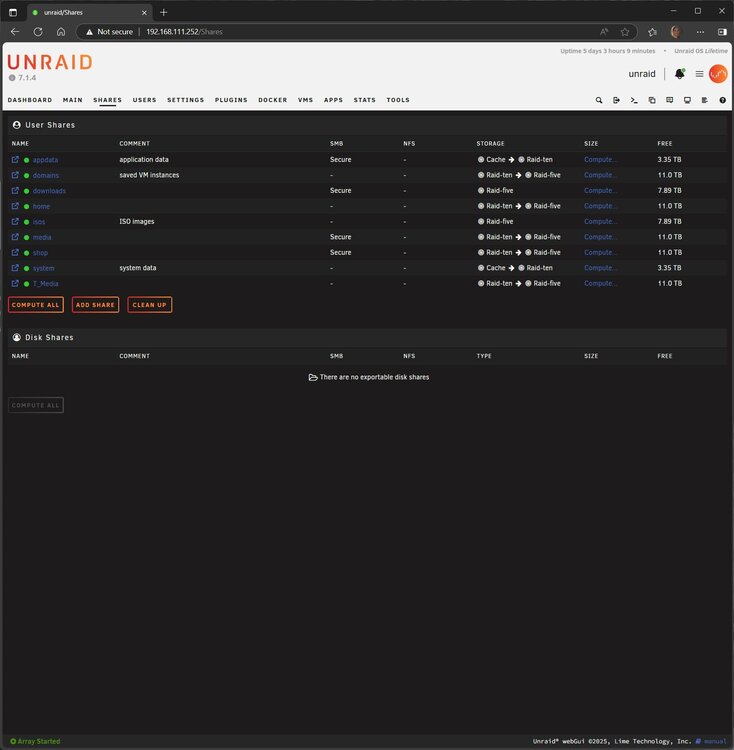
Is there an easy way to have ZFS pools show up in Disk Shares? Right now I am having to manually create the SMB shares in the config: [raid-ten$] path = /mnt/raid-ten browsable = no # Secure public = yes writeable = no write list = matt case sensitive = auto preserve case = yes short preserve case = yes vfs objects = catia fruit streams_xattr fruit:encoding = native [raid-five$] path = /mnt/raid-five browsable = no # Secure public = yes writeable = no write list = matt case sensitive = auto preserve case = yes short preserve case = yes vfs objects = catia fruit streams_xattr fruit:encoding = native
-
Hi, I am labbing 7.1 beta 2, and attempting a ZFS expansion which is supposed to be supported in ZFS 2.3.1, and the UI us not allowing me to do so. I have a 3 device vdev pool, and I increased the number of pool slots to 4, and selected the drive I wish to add. Then I attempt to start the array, and it will not with the error of wrong pool state. What is the suggested method of utilizing raidz expansion?




