





Aiden0rchad
Members
-
Joined
-
Last visited
Everything posted by Aiden0rchad
-
Here's a good guide on how pools work and how to create them:
-
I got this weird issue also but all I had to while I connected locally on the same network as my server, I turn off Tailscale on my pc/phone then access it locally from its IP and it works. I only turn on Tailscale on my devices when I'm out of my local network and I'm able to connect to it.
-
Sounds like a solid upgrade for sure. Your old xeon has a significant idle power consumption about 36W on idle, while the 12700K can go 6-7W on idle with the right power states. The full power consumption is even worse on that xeon per watt. Hardware transcoding on the 12700K is pretty amazing, I recently also just upgraded to a i5-13500 and I was blown away by the performance with the UHD 770 (12700k also has the same iGPU). Jellyfin handles it like a beast and I am so happy that I upgraded. Coming from a 5800X and raw dogging transcoding from CPU, its was night and day difference. It also makes a lot of sense in terms of performance since you'd have higher clock speeds and more cores and threads. I would also take advantage of CPU pinning your docker apps to the E cores and VMs to the P cores. One thing I would also recommend is to make sure that you run that ram in non XMP. it would definitely make it more stable and consume less power. XMP voltages run at 1.35V while stock is at 1.2V. Ram speeds are negligible in terms of performance in a server sense. Give your son a nudge and tactically acquire his old PC 😉
-
Tried it before, circa 2020. It was a buggy mess and iGPU didn't work at first. I did give it a whirl around 2023 and it seems like it was fairly stable after the bios updates, bios tweaks, and more. But it was a piece of work to get it just right, ASPM and system power states wasn't working correctly so that server wasn't able to save power to its full potential. That said I think it does work fine with a little TLC, as long as you don't mind the higher power draw and a bit of heat. In your case it is good upgrade than your i3-2100 since that thing is a bit dated and its power hungry. Transcoding does work with AMD AMF on Jellyfin, haven't tested in plex (I don't support them).
-
I recently just upgraded my server from a 5800X B550 to a i5 13500 Z790. All I can tell you is that, WOW the performance difference is amazing. I never had transcoding before and was doing it raw from CPU, it definitely bogged down my system when someone decided to watch a 4k stream HDR and had to transcode it to a lower bitrate. One biggest benefit I got from it was that the power consumption and heat was wayyy lower than I expected. I do feel like a 13600K is a bit overkill since having a K series won't likely be overclocked. I believe that a 13500 is the best bang for your buck. What you want to have in a server is stability, so don't go try overclocking it. I'd love to under clock my CPU but I feel like that goes against the spirit of servers and risk instability. lol I don't even have XMP turned on. Also the 13500 also has the same iGPU which is UHD 770, so they are on the same performance in terms of transcoding. If you really need that clock speed then the 13600K would be a better choice, it does come with a price with a higher wattage/power consumption. Went with the 13500 since it was a lot more cheaper than the 13600K and I wanted to quiet down my server and have it produce less heat in my office (temps in my office went from 80'C to 71'C 5800X > 13500, I did also get rid of my gaming rig and run MacBooks now so that might also help). I run about 15 docker apps and 5 VMS and haven't seen my server stressed a tiny bit. I even thought about getting the 13500T to get that even lower TDP but those are a tad bit more expensive. That said I am a strong proponent of splurging on a really good MOBO with all the pro or workstation features. Good example would like the the Asus Pro WS W680-ACE since it has 2 x16 PCIe slots that's dedicated to CPU lanes(runs at x8/x8 though, but that's pretty good already). Most Z and B series motherboards would not have those features since the rest of the lanes will connected to the chipset. I have tried the 7600G series from AMD and the iGPU performance feels like its not there or not mature enough to beat intel's quicksync/QSV, It works but tone mapping is lacking in performance and I couldn't get the same amount of simultaneous streams.
-
Just giving you an update, the crash happened again and I decided to chatGPT the heck out of it. When I went to the brass tacks with all the errors, it found that there was corruption happening in my "docker.img" file. I recommended me to wipe it and reinstall all the docker images I had. Another thing that it recommended me to do was to scrub my "btrfs" so that I did. So far running it in all its paces has no crashes now. @trurl Thank you for your help and teaching me about parity correction and scanning information.
-
Not at all, stayed at 0 error after correcting them. I feel like I might be good to go, reboot and give it whirl?
-
You are correct, most likely it came from an unclean shutdown since I had weird issues from my display when I was first booting up my server after the migration which forced me to force it to turn off. Here is the last parity check without correction nocorrection_server-diagnostics-20250409-1143.zip
-
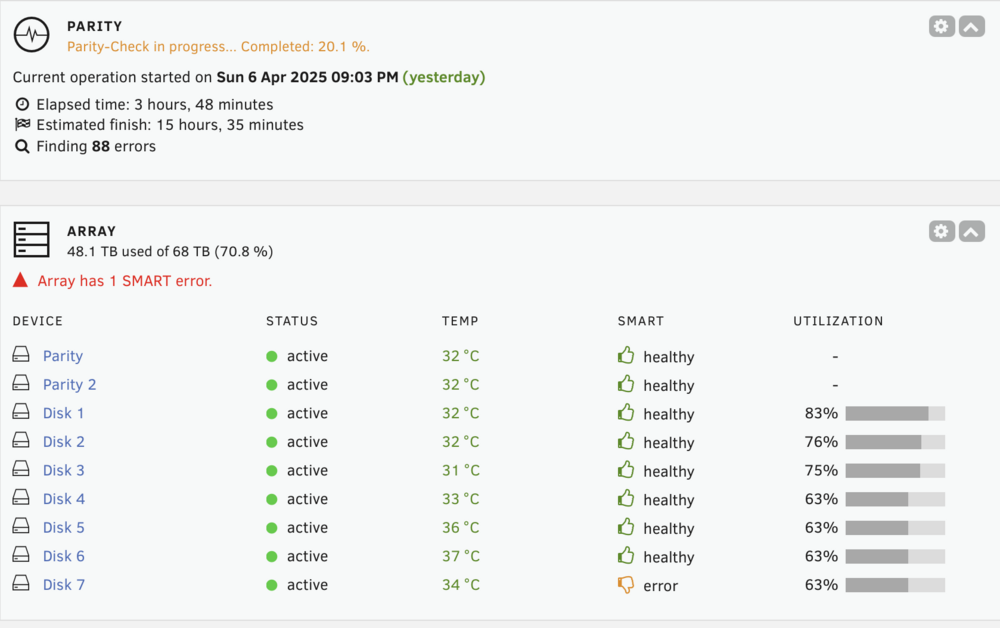
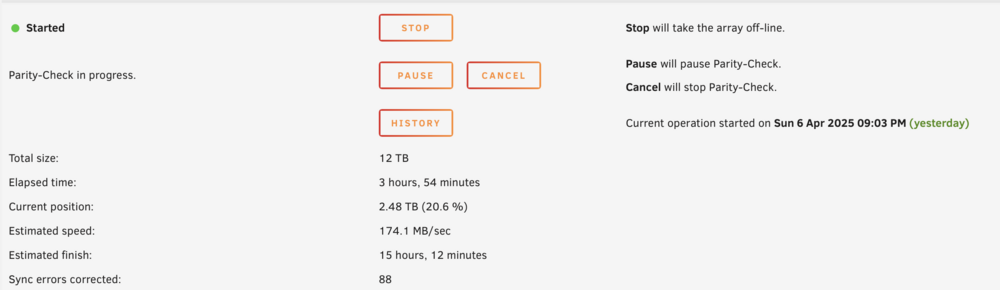
88 errors, like the one in the image above
-
Just finished with the correcting parity check. Here are the results: 1stCorrection_server-diagnostics-20250408-0313.zip
-
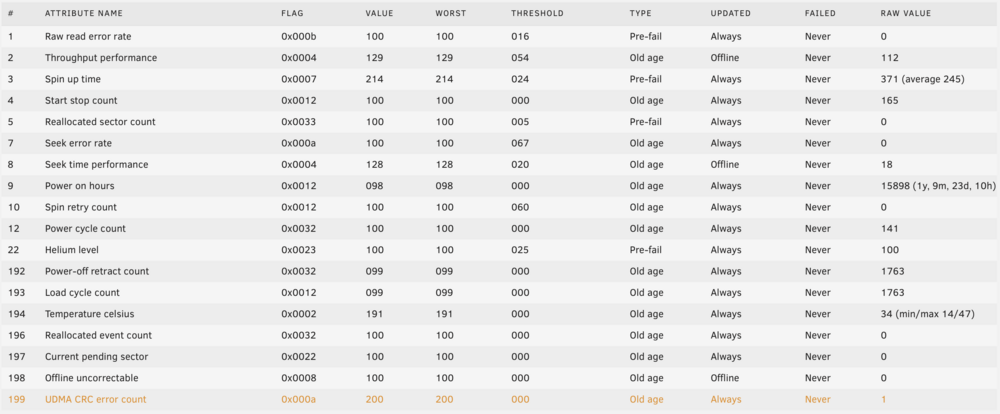
Just an update @trurl This might be the cause of the issue. Looks like it might be due to a loose or bad cable on one of my SSD drives. From inspection the wire is a bit too short and tugging on it a bit.
-
Makes perfect sense. Thank you for the info. Nope, I let the machine stay dead after getting this crash 5 times. should I let this parity check run? how do I make it "correcting"?
-
I see! I always thought that parity checks are error correcting if they don't match up. Would it be best remove the parity drives, format them then add them back? Sorry for my ignorance, still starting out in this homelab journey.
-
I didn't run it manually, but it must've been my scheduled parity check at the beginning of the month. I suspect it must be a bad processor/motherboard since this ram came from my AMD system and it ran perfectly there. I've ran memtest and it never found anything though. with 3 passes. Unless there are different parameters I need to run, I just boot up memtest and let it do its thing without touching it. About that btrfs scum error, could you please point me to the right direction to fix that? or will the parity check/correction do that it self?
-
Thanks for taking a look at my post, Here is my Diagnostics ZIP file server-diagnostics-20250406-1353.zip
-
Hi all, for the past year Unraid worked perfectly fine with my AMD hardware (B550 and 5800X). I really wanted to get HW transcoding without using a GPU so I decided to migrate to a Z790 DDR4 and an Intel i5 13500. Everything worked fine after the hardware migration but as soon as I start using my jellyfin to watch things, I get crashes. I really tried hard to figure out whats causing the issue but I can only see maybe some realtek nic timeouts and possibly memory failure. I've ran memtest and got 3 passes so im not sure whats going on. I'm including my syslog here to anyone that might be able to help me. syslog.txt




