





Fisgard731
Members
-
Joined
-
Last visited
-
I have a N2 and I am having issues with the 7 indicator lights Flasing all the time (all drive and network plugged in. all working fine. I als want to turn off the RGB bar (whats the point of it). I contacted LincPlus and they provide me with an address of http://tower.local:50000 . I have tried accesing it locally and on the internet with no joy. can you advise how I get the "led" folder and the "reset" folder and where is the Go File as I do not seem to have this file. Regards Fisgard731
-
I upgraded Unraid ti the latest stable version and lost docker access. Noticed that Poo1 drive was displaying as BTFS and when I had set discs to NFS before the upgrade. Set the disc setting back to pool and magically Docker came back to the fold.
-
Today I received a Sandisc Flash Drive and several drives from Amazon that say they are "USB Flash Drive 32 GB USB 2.0 Memory Stick Mini USB Drive". I bought the additional drives As I had read the report regarding "Multiple recent support issues with SanDisk brand USBs, we don't recommend buying SanDisk USBs for Unraid at this point", I decided to use one of the other drives as the Sandisc drive may be a counterfit device. I checked that the drive was formated as FAT32, I then tried using Unraid Creatorto upload Unraid OS 7.0.1 onto the drive. I got the same response that the drive was Blacklisted. I checked the GUID only to find that it had the same number of 2109-0817-0000-followed by twelve zeros. the same as the Sandisc drive originally in the N2. I tried the second no name drive and came up with the same blacklisted results as the initial Drive supplied in the N2. So I cleared a Lexar drive I used previously for uploading the OS on my car satnav and reformatted and tried again with the same results. I know removed every thing about crater and unraid from my Macbook, empted the Waste Bin and restated the Mac. Carried out a search on my Mac to check I had deleted all Unraid and creator files from the hard and re-dowloaded Creator and followed the guide to creating a bootable flash drive and I got the same warning notice that the disc was Blacklisted wuith the same number as the oringinal file (2109-0817-0000-followed by twelve zeros). I have also tries installing manually several time with the two unbranded flash drives. For some reason Unknown to me, my MacBook Pro or the Unraid creator software is retaining the the blacklisted GUID. Being a unraid novice I am at a loss as to what is going on, as there seems to be a lot of reported issues with the Unraid Creator regarding blacklisting on Mac and Windows machines.
-
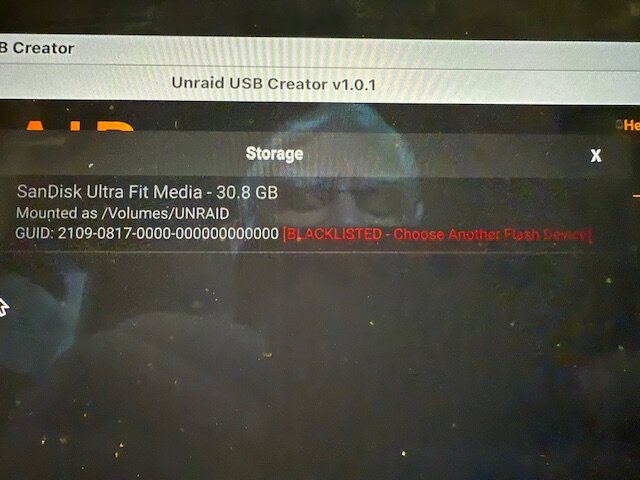
The Flash Drive in my Lincstation N2 has stopped working and and I an tring to upload Unraid version 7.0.1 onto this drive. when I select Storage on Unraid USB Creater I get a message that in forms me my drive has been BLACKLISTED and to chose another drive. Why has my drive been Blacklisted and how do I remove it.
-
I have Lincstation N2 and I seem to be unable to change the drive format from BTRFS to either XFS of ZFS. al other drive formats including XFS and ZFS are greyed out apart from BTRFS. This happens both in Array and Pool. I am unable to supply photos of the greyed out formats as I can no longer log or open my device onto my device. I do not have a monitor to plug into the N2 to see what is happening during start up. I need to know if I can download Unraid OS 7.0.1 fron the site and re-install into my flash drive for the N2 to reboot the device, as I have realised that I have thrown away the notepad I wrote my logon password on.
-
I was fortunate to be able to purchase a "Lincstation N2 NAS" off of Ebay at a very good price and as far as I can see, it checks out to be a genuine N2, I have watched on You Tube all the videos for the N1 I could access and the videos giving the thumbs up for the N2. I was trying on Ebay to see if I could buy a second hand N1. The N2 I bought is running the latest version of Unraid 7.0.1. Are there any videos out there that expliains a complete setup on a N2 using Unraid 7.0.1 , as I am a NAS and Unraid novice . I have followed some video on You Tube that dealt with earlier version of the OS and I do not want to go back to a earlier OS version. I have got to the point that the earlier Unraid OS You Tube videos do not seem to have the same setup procedure, as in 7.0.1. Also I am using a Macbook Pro M1 (mac OS = Sequoia 16.4) that the version of Unraid that is on the N2 seems to be content with. I would like help in transfering my photos from Mac Photo (Raw as well as JPEG) library and the 2 Olympus camera libraries, OM Workspace and Olympus Master 2, that I use to upload from my camera and the wifes camera since we migrated to digital photography over 25 years ago. I also have photos on a 'WD My Passport for Mac' and many CD's. I would also like to be able to access the photo librariy, as my intention is to combine all the files from the 3 libraries and the rest into 1 Library (suggestion for a good library to use). it is my intention to convert all my negatives into a digital format. I would like to set uo my Mac to access the photo files on the NAS. I hope someone can help me in this matter, Once I sort the photographs out, I can follow a similar process and sort out my music, word and excel files.
