





SG2Unrai48
Members
-
Joined
-
If your curious https://viseron.netlify.app
-
I switched to using Viseron which needs the 4.22 driver and no more Kernel Panics...
-
I'm not sure either. I'm clutching at straws I guess but I found something similar albeit on a Raspberry Pi using the 'newer kernels'... https://community.hailo.ai/t/bug-report-find-vma-called-before-mmap-read-lock-issued-in-usr-src-hailo-pci-4-23-0-linux-vdma-memory-c/19001
-
Frigate seems to be working with the Hailo-8 but the logs fill up with repeated message like the example.tower-one-diagnostics-20260613-1914.zip
-
Installing Hailo RT Driver seems to work on Unraid 7.3.0 but I see these messages in the logs: [ 226.772448] Modules linked in: macvlan xt_nat xt_tcpudp ipvlan br_netfilter xt_conntrack xt_MASQUERADE xfrm_user xfrm_algo ip6table_nat xt_set ip_set nfnetlink iptable_nat nf_nat nf_conntrack nf_defrag_ipv6 nf_defrag_ipv4 xt_addrtype md_mod ip6table_filter ip6_tables iptable_filter ip_tables x_tables af_packet cfg80211 rfkill bridge 8021q garp mrp stp llc bonding tls amdgpu amdxcp mfd_core edac_mce_amd drm_panel_backlight_quirks gpu_sched edac_core intel_rapl_msr drm_buddy intel_rapl_common drm_ttm_helper ttm drm_client_lib drm_exec i2c_algo_bit drm_suballoc_helper kvm_amd drm_display_helper drm_kms_helper kvm drm cec ghash_clmulni_intel aesni_intel i2c_piix4 agpgart i2c_smbus rapl i2c_core k10temp hailo_pci(O) ccp crc16 wmi_bmof r8169 realtek tpm_crb sr_mod led_class tpm_tis cdrom tpm_tis_core tpm video libaescfb wmi ecdh_generic ecc backlight button zfs(PO) spl(O) [ 226.772574] hailo_vdma_buffer_map+0x9c/0x5a0 [hailo_pci] [ 226.772581] hailo_vdma_buffer_map_ioctl+0x10a/0x210 [hailo_pci] [ 226.772587] hailo_pcie_fops_unlockedioctl+0x1ec/0x4d0 [hailo_pci]
-
For "How do you pass the USB Coral TPU to this container? USB device path is /dev/bus/usb", I use this:
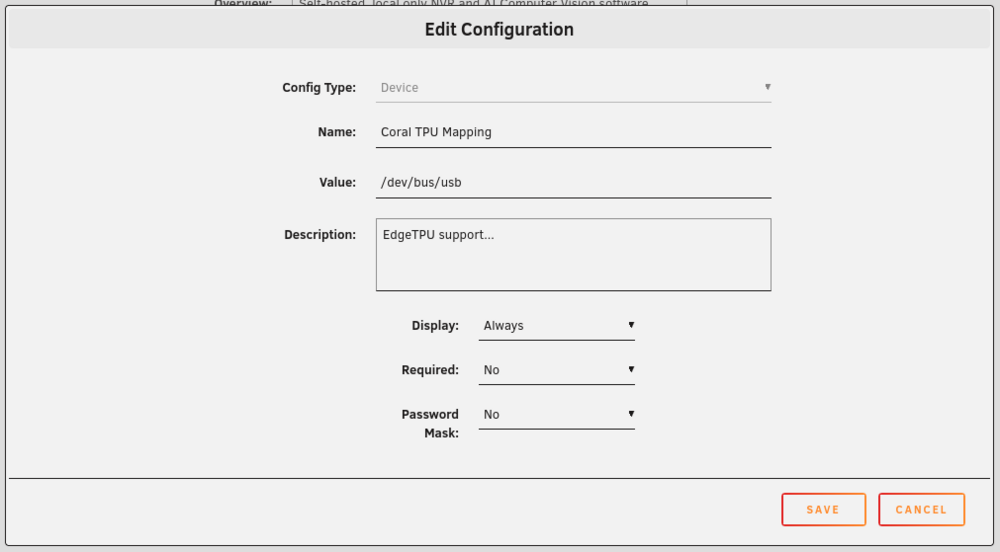
-
Is there some trick to have the Viseron icon show in in the Docker list (it's just showing as a question mark)? The Icon URL in the container is : https://github.com/roflcoopter/viseron/raw/master/docs/static/img/viseron-logo.png which works in a browser. I know it's only cosmetic and everything else seems to be working nicely... Thanks Fixed! I have found my issue and the Icon now shows correctly... ( while looking for the reason the Hailo model was not downloading I found a firewall issue blocking Viseron's access to the Internet). Thanks
-
GPU Goes to 100%... Not sure where to start with this as the system runs 'normally' for several days or weeks then the GPU goes to 100% load... Using the GPU Statistics plugin, the GPU is shown as Vendor: GPU, Driver: AMDGPU, Device: Radeon Vega Series... Once the GPU goes to 100%, I stop all docker and VM instances but that does not help. The only thing I have configured to use the GPU is Frigate (a Docker application). Rebooting Unraid brings the GPU usage back to the usual 3-5% Has anyone seen this behaviour and/or know of any utility to help identify the process consuming the GPU? Thanks...
-
Not sure where to start with this as the system runs 'normally' for several days or weeks then the GPU goes to 100% load... Using the GPU Statistics plugin, the GPU is shown as Vendor: GPU, Driver: AMDGPU, Device: Radeon Vega Series... Once the GPU goes to 100%, I stop all docker and VM instances but that does not help. The only thing I have configured to use the GPU is Frigate (a Docker application). Rebooting Unraid brings the GPU usage back to the usual 3-5% Has anyone seen this behaviour and/or know of any utility to help identify the process consuming the GPU? Thanks...

