





Lextor1975
Members
-
Joined
-
Last visited
-
Bin ich also nicht alleine so verwirrt....😂 Wobei...Offiziel sind z.B. die 18 auch 2 mal da....
-
Hallo Zusammen, Ich habe mir vor ein paar Tagen den Joplin Server installiert und dazu Postgres 12.5 Heute musste ich auf der Arbeit etwas ähnliches machen auf einer Synology., nur das dort Postgres 18 installiert wurde. War es nicht die beste Idee die Version 12.5 zu installieren? Kann man das Updaten auf 18? Oder Muss ich neu Installieren? Und warum ist unter den Apps so vieles an Postgres zu finden...verschiedenste Versionen...mit und ohne sql Bezeichnung Und z.B. sogar 2 mal Version 18....2 mal Version 17 und 16... Und gibt es einen Unterschied mit und ohne der Bezeichnung SQL? Vielen Dank euch...
-
Unglaublich...Du hast recht...der USB Stick ist defekt gewesen um genau zu sein sogar 2 Stück....daher dachte ich ich mache was falsch....mein Backup ist wieder da......nur, wie bekomme ich denn jetzt die neue USB Stick ID mit der Liftetime Lizenz verknüpft....? Das kommt mir entgegen: Die Lizenzschlüsseldatei stimmt nicht mit dem USB-Flash-Startgerät überein. Bitte kopieren Sie die richtige Schlüsseldatei in das /config-Verzeichnis auf Ihrem USB-Flash-Startgerät. Sie können auch versuchen, Ihren Schlüssel zu kaufen oder zu ersetzen.
-
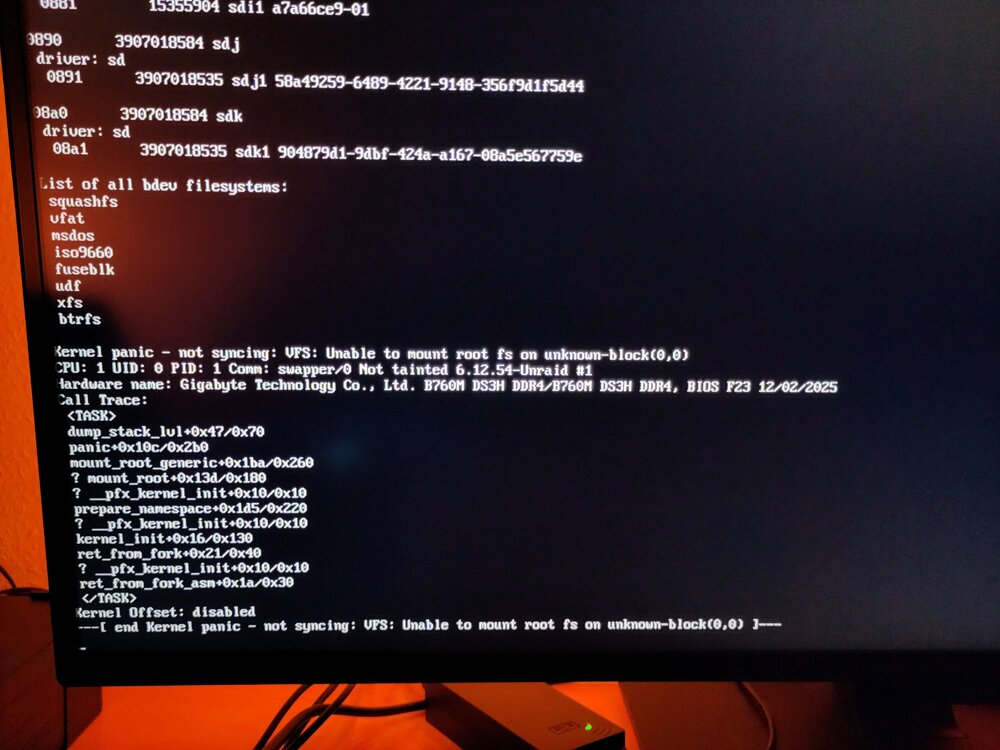
Hallo, Ich hatte das Update auf 7.25. durchgeführt...nur startetet dann der Server nicht mehr.... Dann hatte ich den Stick im Verdacht, ist aber ok...habe das Zip Backup eingespielt 7.24 mit dem Unraid Creator.... Und dann kommt folgende Meldung beim Booten von Unraid.... Was ist zu tun?
-
Ohne weitere Hardware wäre mir natürlich am liebsten. Ich verbinde mich über VNC mit der VM...kann man den OnBoardChip (Sound) durchreichen?
-
Hallo zusammen, Ich möchte gerne den Sound in einer VM Win11 nutzen. Die Ansprüche an Qualität sind jetzt nicht enorm. Würde so eine USB Soundkarte gehen? https://www.galaxus.de/de/s1/product/sandberg-usb-to-sound-link-usb-soundkarte-7025258 Oder geht es irgendwie sogar die onBoard Soundkarte durchzureichen? Dann würde ich mir den Umweg sparen... Vielen Dank... Gruß Lextor
-
Alles klar...danke Dir....das war was ich wissen wollte.... Schönes Wochenende....
-
Vielen Dank.....und dann noch eine Frage....was würdest Du bei der Verteilung ändern? Oder wie interpretiere ich dein Zwinckern? 😀
-
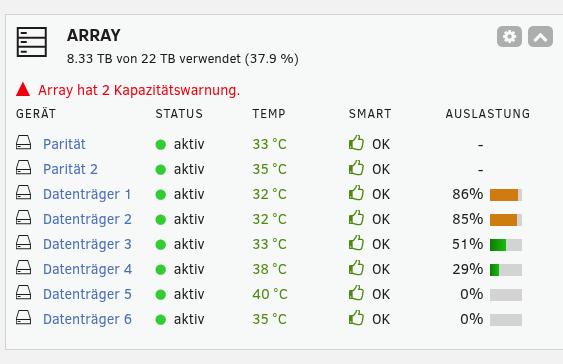
Hallo zusammen, Hätte eine Frage zu einer Meldung, und Handlungsempfehlung. Mein Array meldet: "Array hat 2 Kapazitätswarnung.", siehe auch Screenshot. Das bereits eine weile....bislang hab ich mich nicht sonderlich darum gekümmert...es läuft alles bestens....aber nun wollte ich mal fragen... Sollte ich was tun? Muss ich was tun? Warum werden Daten nicht so verteilt, das die Schwellwerte für die Meldung nicht erreicht werden? Vielen Dank.... Gruß Lextor
-
Hi nochmals... Habe es hinbekommen....aus unerfindlichen Gründen ist nach dem Start die WOL Funktion laut Ethernettool immer auf d nicht auf g gestellt. Mit einem Script habe ich es so eingerichtet, das wenn das Array startet das Script ausgeführt wird: ethtool -s eth0 wol g Wenn ich dann ausschalte, so bleibt der Zustand g aktiv und wartet auf das Magic Paket. Danke bis hierher... Gruß Lextor
-
Hi, Ich versuche / schaue es mir nochmal an und melde mich dann...
-
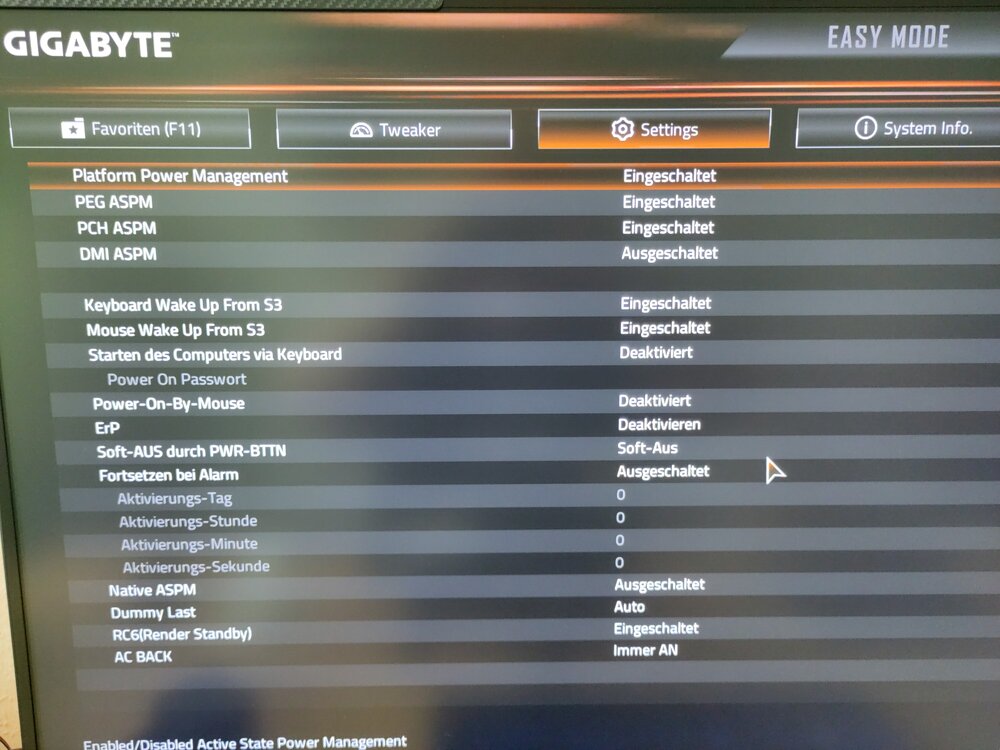
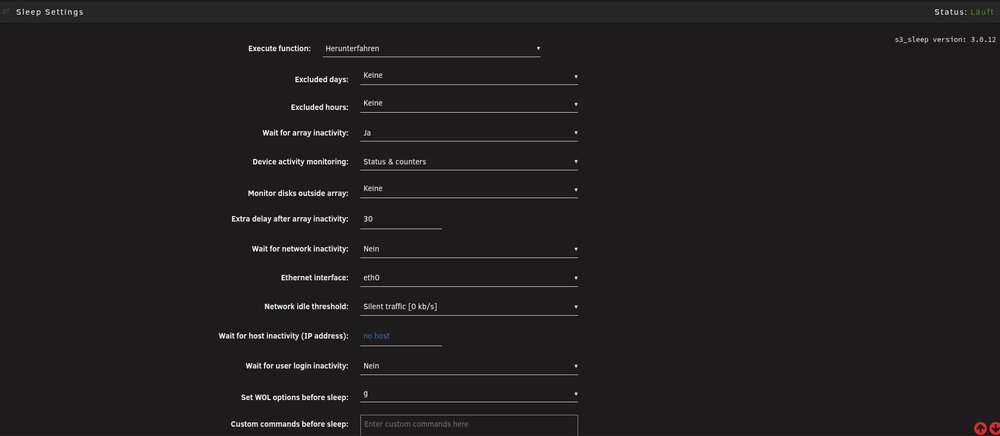
Hallo zusammen, Ich würde gerne mit Hilfe des Dynamix S3 Plugins meinen Server per WOL (Magic Paket) starten. Bislang habe ich es nicht hinbekommen, VPN ist nicht aktiv. Weder von meinem Linux Laptop, Zorin OS mit dem Befehl: wakeonlan <macadresse> noch über die FritzBox mit starten des Gerätes per WOL in den Netzwerkeinstellungen. Zu meinem Setup: Mainboard ist das: GIGABYTE B760M DS3H DDR4 Unraid 7.2.4 s3_sleep version: 3.0.12 Meine UEFI Einstellungen sind im Bild dargestellt…. Meine S3 Dynamix Sleep Einstellungen ebenfalls… Was übersehe ich...was kann ich noch überprüfen? Vielen Dank euch….
-
Hello everyone, I'd like to use the Dynamix S3 plugin to boot my server via WOL (Magic Packet). So far, I haven't been able to get it to work; the VPN is not active. Neither from my Linux laptop (Zorin OS) using the command: wakeonlan macaddress, nor via the FritzBox by enabling WOL in the network settings. Here’s my setup: Motherboard: GIGABYTE B760M DS3H DDR4 Unraid 7.2.4 s3_sleep version: 3.0.12 My UEFI settings are shown in the image… My S3 Dynamix Sleep settings are also shown… What am I missing… what else can I check? Thank you all very much…
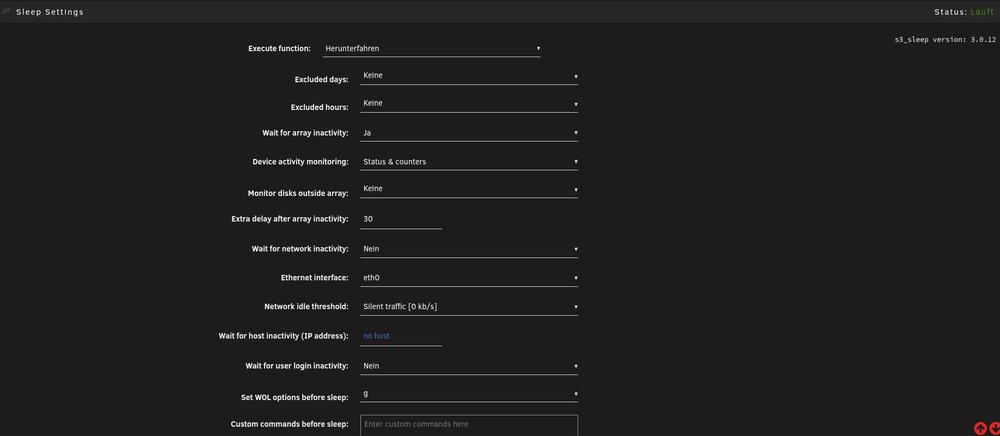
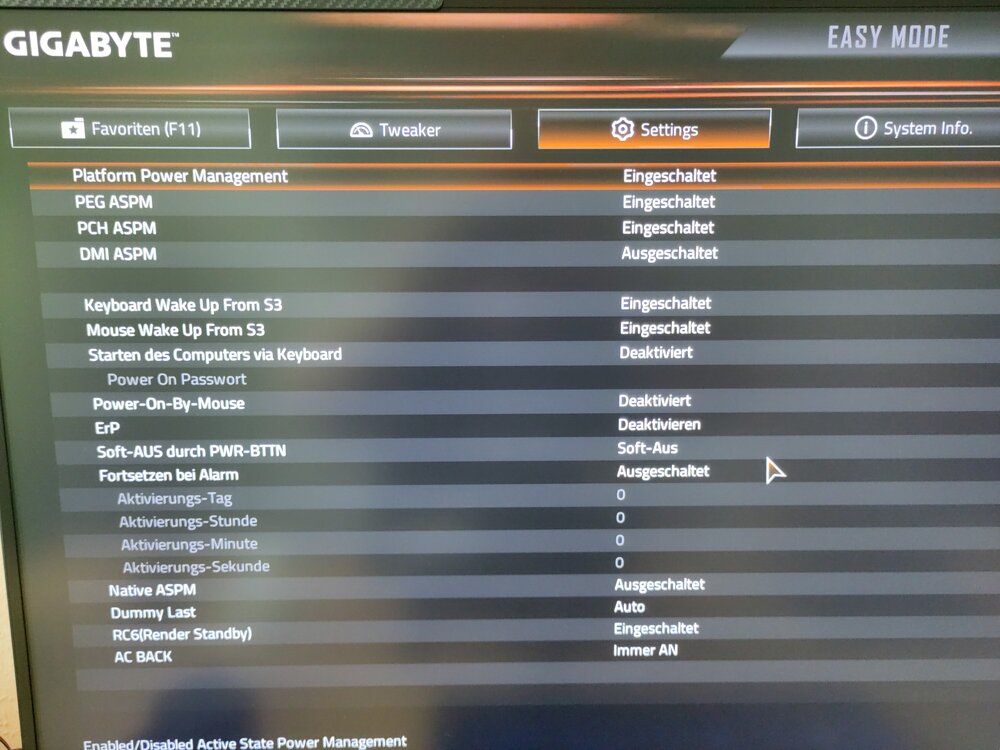
-
Hallo alturismo, Das war es...der Punkt 4 "Host Access" war nicht aktiviert....ich danke Dir vielmals.... p.s. ich weiß, das ich meine lokalen IPs hätte posten können....aber irgendwie bin ich einfach anders, als andere 😉 Nochmals Danke.....
-
Hallo, Folgendes Problem habe ich mit den NGINX Proxymanager. Der NGINX ist unter Unraid installiert und hat IP xxx.xxx.xxx.80 im Netzwerk(ändert sich auch nicht) Zu dieser IP habe ich in der FritzBox den Port 80 und 443 weitergeleitet. Ich habe eine feste IPv4 , bei der ich den Reverse DNS auf meine Domain bei meinem ISP geleitet habe. Bei meinem Domainbetreiber habe ich den A-Record auf die IPv4 geleitet. Im NGINX habe ich die Domain eingerichtet, per http auf die xxx.xxx.xxx.35 (unraid-Server) geleitet und den entsprechenden Port, z.B. Jellyfin 8096. In den SSL zertifikaten habe ich entsprechend eines per Lets Encrypt abgefragt, aber es kommt immer ein Interner Fehler. Einmal hatte es geklappt mit dem Zertifikat, aber dann konnte ich unter der Domain nur 502 BadGateway sehen. Die „Congratulationsseite „vom NGINX ist auch vorhanden. Kann mir da jemand weiter helfen, stehe etwas auf dem Schlauch… Danke… Gruß Lextor


