





omegajvn
Members
-
Joined
-
Last visited
Everything posted by omegajvn
-
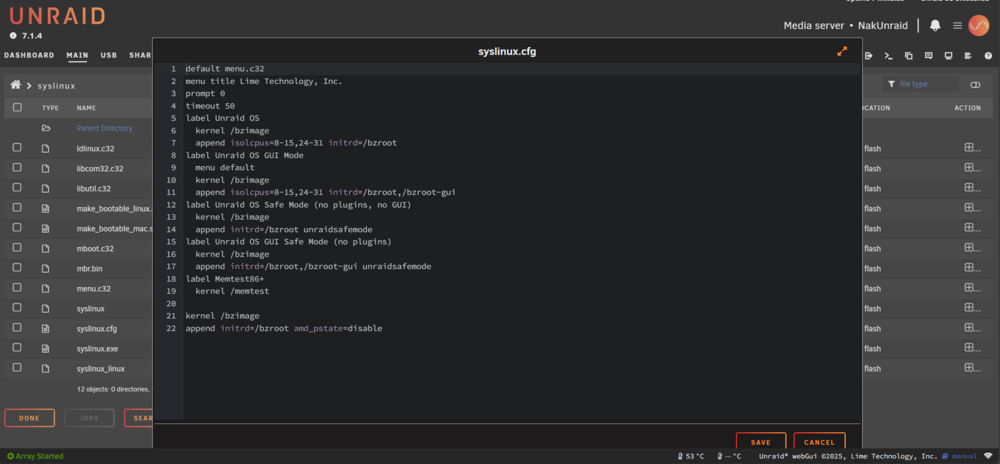
High Jorge. I added that code like you said, and it didn't do anything for me. I will have the Balanced Mode greyed out. Did I do it incorrectly? I went to Flash drive -> syslinux (folder) -> syslinux.cfg Once I added that code and rebooted, it was the same. Any ideas? Thank you.
-
Ryzen 5950X. I did see a post regarding the 9700X Power Mode as well. So I simply need to add the following code to my syslinux.cfg file in order to utilize the older CPU drivers, which will then in turn bring back the expected behavior before I experienced in Unraid 7.0.3? kernel /bzimage append initrd=/bzroot amd_pstate=disable
-
I'm not sure why, but when I updated from unraid 7.0.4 to 7.1.2, the Balanced mode became greyed out (not selectable), and the low power and high performance options don't change anything. Can we have these brought back to their former glory? My server would only pull 165W on the previous low power mode, now it won't go below 205W (both times are with all my disks off). Thank you
-
Apparently I'm just dumb. I just remade the VM using Q35 instead of i440FX, and I've not had an issue since (at least VM-wise)
-
So you're saying everything "should" be fine?
-
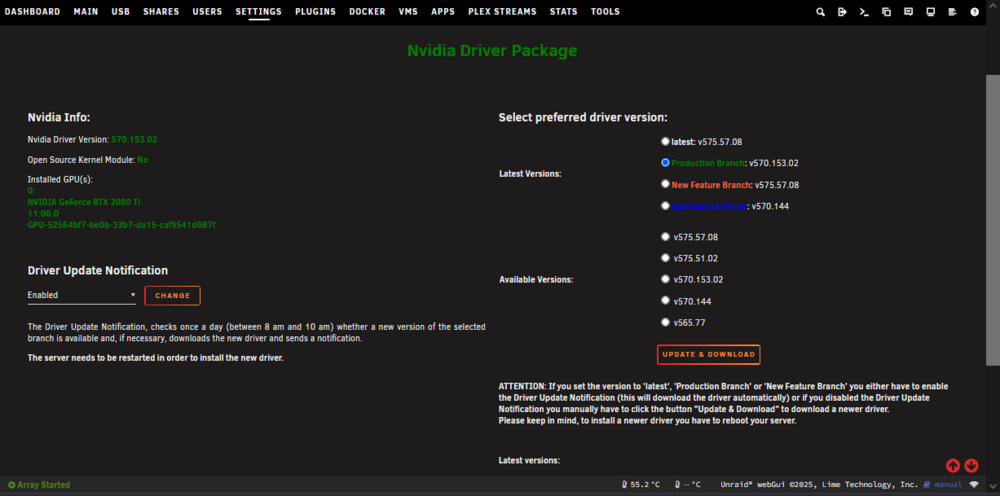
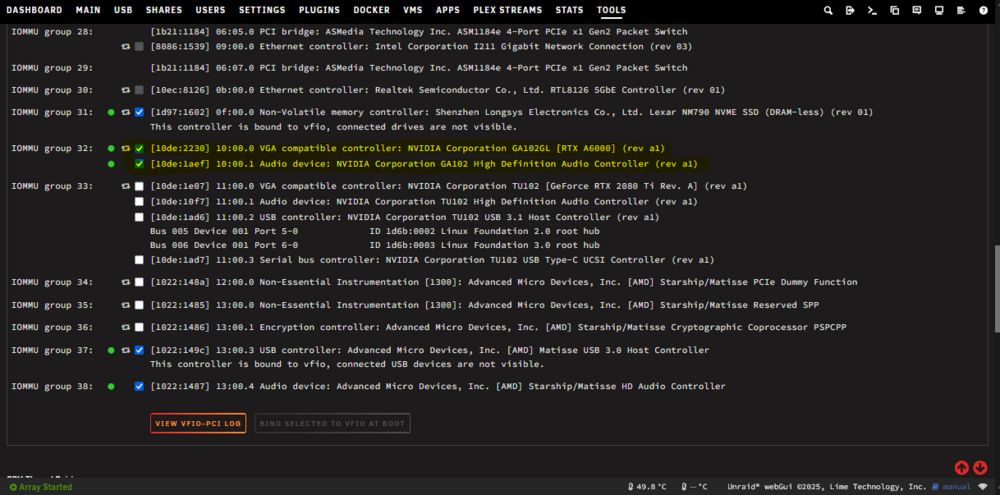
I also have my RTX A6000 set as passthrough, so unraid doesn't even see it as a graphics card to have installed drivers. Only my 2080 Ti shows up as a GPU with drivers installed with the Nvidia driver addon. I attached some images.
-
Do you mean the nvidia driver installed in Unraid? Allow me to throw a slight wrench into that......I have my old RTX 2080 Ti installed in unraid as the Plex transcoder (it was the best nvenc I had lying around at the time). I would need it for that. Is there a way to separate one card to not have drivers?
-
It only happens to one that has my graphics card passed through. The single VM of Windows 10 that uses virtual graphics never has this problem and is up 24/7
-
Thank you for the reply. I've set the VM operating system (Windows 10 and 11) to not sleep. What is meant by underlying storage? I have my appdata, isos, and Virtual Machines folder installed to two 2TB SSDs in a BTRFS RAID 1 and only 302 GB of capacity is being used. I attached diagnostics. Thank you for your help! nakunraid-diagnostics-20250616-0651.zip
-
My VM’s keep pausing, and when I try to resume them, I get this message: “internal error: unable to execute QEMU command 'cont': Resetting the Virtual Machine is required“ Can someone please help? Let me know if you need anything else.
-
Hello. I'm using Unraid as a Plex server and a workstation through a Windows VM. It would be nice to be able to add jobs while there is another one already working. For example, I'm new to Unraid and consolidating movies and tv shows from multiple 4TB hard drives, to a few 12TB drives. When using the built in File Manager, once a job is started, you can't do anything else with files. You can't even calculate the total capacity of other files while this is happening. I'd like to be able to queue up other jobs while the original one is executing so that once the first one is complete, it moves on to the next one I made instead of waiting for me to do another one. While on that subject, when calculating multiple files/folders sizes, could the popup windows simply say the size of all the selected files/folders instead of listing every single item in that popup window. One last thing, if we could be able to use the Shift key to select multiple items at a time, that would be wonderful. I know there are other File managers that you could install via Community Apps, but I feel like doing these few changes to the built-in File Manager would make almost all those other ones unnecessary. Plus it is VERY convenient to simply use what is built in, rather than having to get another one. Thank you very much!
-
Thank you for the reply! I have disabled C-states and set the typical current idle. I’ve even set my ram to 3200 instead of the 3600 that it is rated for. I do have an under volt going, so I might try and disable that and maybe set a constant voltage while it is rebuilding. I will have to look into all those other.Ryzen utilities in that page.
-
Hello all. I'm new to Unraid. In my array, I have one 20TB parity drive and nine 4TB drives. I'm trying to upgrade the 4TB drives to 12TB drives. However, I've replaced one of the 4TB drives with a 12TB drive and during the rebuild, it keeps freezing and becoming unresponsive. If I access from a different computer, it loses connection. If I'm connected to the server with a monitor/keyboard, the GUI freezes. It's random when it happens, at 5%, 20%, 7%, whenever. I've done memtest86 and I know the memory is good. The cpu is new as I just bought it less than 6 months ago. I have NO problems with the system, except during data rebuild. I know that when the system had Windows installed to it, my corsair command xt fan controller hub was constantly disconnecting and reconnecting. Would that do anything during a rebuild? The commander xt shows up alot in logs. I've tried to run it in Safe mode with the rebuild as well and it still locked up. I've also removed all my bound devices, turned off VMs, turned off Docker as well. Still freezes. Any thoughts? System specs: CPU: Ryzen 9 5950X MoBo: Asrock x570 Taichi RAM: 4x 16GB 3600CL19 Gskill Trident Z Royal running at 3200 MT/s CL18 for stability Raid card: Adaptec 71605 running in HBA mode. GPUs: RTX A6000 x1 for video/image editing in Windows VM, RTX 2080 Ti x1 for Plex transcoding and handbraking
-
I'm not sure who created this driver add-on, and I don't even know if I'm in the right place for this, but I just wanted to say: THANK YOU SO MUCH!!!!!! I originally bought a Brostrend 5Gbe network card off of Amazon for my windows 11 plex machine. I decided I didn't like windows as a plex server and my buddies and I at work were looking into Unraid, TrueNAS, etc. Decided to go for Unraid for drive flexibility. After getting everything installed, I went to the Brostrend website and they only had Windows drivers. I went to my Amazon order and the page for the NIC even said only for Windows! I was quite sad for a while. I was browsing through the App section of unraid and found an RL8125 driver addon. Kept looking for the RL8126 driver and found it!!! WORKED LIKE A CHARM!!!! Again.................THANK YOUUUUUUUU!!!!!!!!!!!!!!!



