





omegajvn
Members
-
Joined
-
Last visited
Everything posted by omegajvn
-
I am running the latest version at 3.6……….but maybe that’s broke something. Good point, I’ll look into that. I wonder if it could be an issue with my cpu and the newer kernel. Maybe there is something wrong with it internally since all I/O goes through the CPUs I/O die. Still weird how it doesn’t happen on 7.2.7 or older
-
I wonder what could be causing my issue then. I have an H12SSL-NT motherboard. Maybe that’s the issue? Not sure why going beyond 7.2.7 causes the problem though.
-
Well, to provide everyone with an update, it seems like a kernel level USB regression that affects the Epyc platform. I’ve since moved to internal boot, purchased a TPM 2.0 module, and am going to move licensing off of the USB drive altogether.
-
Sure do! The unfortunate thing is that it is always abrupt when it happens, apparently. No one has ever been able to find what is wrong from the syslog. It’s an apparent USB issue. I’m hoping that moving to internal NVMe SSD boot fixes the unresponsive occurrences as USB issue no longer the boot device
-
I'm not going to try troubleshooting this anymore. I've made the jump to internal boot + data on one of my internal NVMe SSDs. I don't believe there should be issues anymore as USB is no longer the booting bus.
-
Issue it sadly NOT fixed. I wasn't able to make it to 3 days without it becoming unresponsive. I went straight to the servers GUI and it was frozen. I keep a keyboard attached to it and the cursor in the username field was frozen, nor would it accept keyboard input.
-
Just an update for everyone. I've installed 7.3.2 and as of time of writing, my system uptime is at 1 day and 12 hours. Version 7.2.8 couldn't last that long before going unresponsive due to USB issues. It is early to call, I'm still waiting longer to confirm, but I think the kernel update in version 7.3.2 may have fixed the issue I had.
-
I’ll give 7.3.2 a go if it had a kernel update. Maybe that fixes the issue.
-
Why would this happen in 7.2.8+, but not on 7.2.7 or older? Can this be forwarded on to the development team? I’ve tried different USB ports and used my add-on USB expansion card. My system hasn’t been able to last even 24 hours again. I don’t have this issue on 7.2.7 or older. I think this may be an issue with a kernel level usb driver
-
Out of abundance of caution, I decided to replace the USB drive. Went from a Samsung Bar Plus USB 3.1, to a SanDisk Cruzer Blade USB 2.0. I still had this issue occur. I've included my syslog from today (Aug 4, 2026) only. syslog-192.168.1.100 (Aug 4).log
-
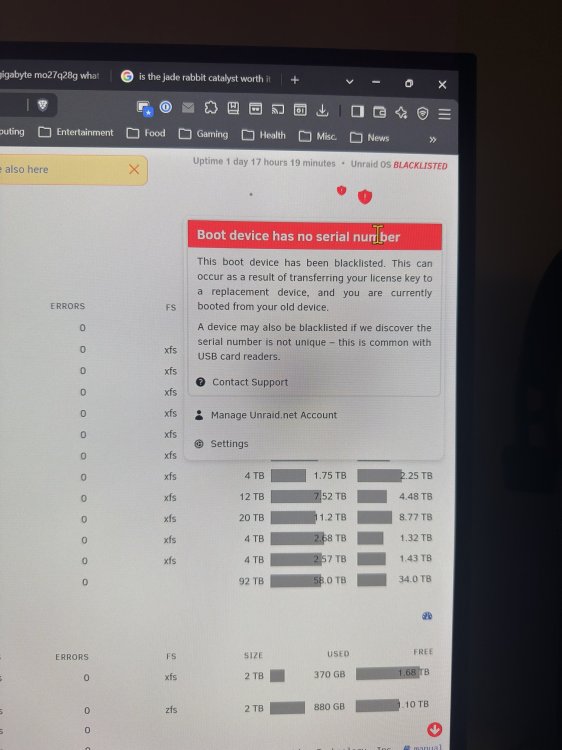
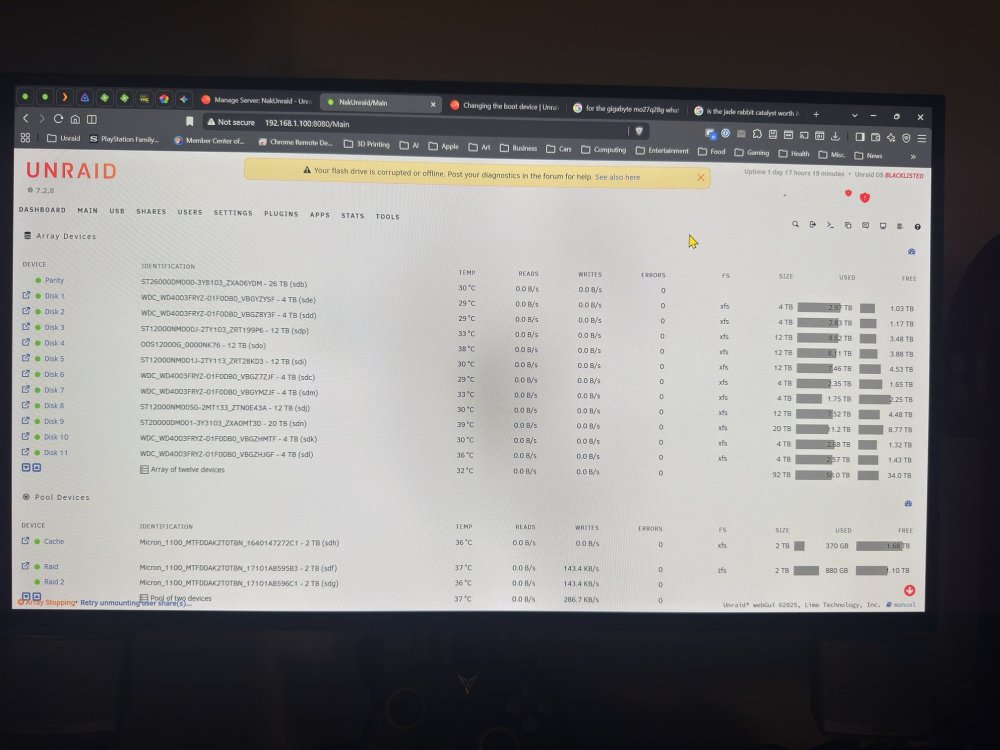
Hello all. This is initially an issue I faced previously. Link here: Unraid 7.3.1 system becomes unresponsive That was going from 7.2.0, to 7.3.1. I then downgraded back to 7.2.0 because of the issues I experienced with 7.3.1. I upgraded to 7.2.7 and never had issues like before. I recently upgraded to 7.2.8 due to the many security features. The issue began again. So far, it has happened to me twice since installing 7.2.8. This time, I was able to still get some sort of connection to my Unraid server. However, it was a bit odd. I've attached some images to show it, as well as my syslog (which is rather long. I'm paying attention mostly to the end toward July), and diagnostics. It shows my Unraid OS os "Blacklisted" for some reason. I've purchased a Lifetime license, so I'm not sure what that's about. The center message points to my USB drive being corrupt or offline. It's a fairly new (maybe a year old?) Samsung Bar Plus 128GB usb drive. I have a Supermicro H12SSL-NT motherboard with an AMD Epyc 7452 CPU, just FYI. Any ideas? Thanks! syslog-192.168.1.100.log nakunraid-diagnostics-20260802-1906.zip
-
My system has been online for 12 days and nine hours at the time of writing. It’s pretty safe to say that at this point it is definitely not a hardware related issue.
-
What’s your current uptime? Previously, how long would your uptime be vs after your finding? Is this an Unraid feature or one installed from the store? I have snapshots for my VMs but no dedicated app
-
Just a quick update. I downgraded back to 7.2.0, then upgraded to 7.2.7 successfully. Rebuilt my parity as 2 drives fell out of the array for some reason. The only issue I've experienced is that it takes a bit longer for VM's to startup. Might be from security vulnerability fixes? Not sure. But at time of writing, the uptime has been 3 days 22 hours 57 minutes. This is the longest time that I've gone without any issues, as opposed to when I was on 7.3.1. I'm now convinced that it is not a hardware issue, but one with 7.3.1. I'm not trying to be harsh, but I think there is more ironing out that needs to happen with the 7.3.X update.
-
I am inclined to agree. I went back to 7.2.0, and I'm currently rebuilding parity and I'm at 1 day and 15 hours in (2 disks fell out of the array for some reason). I've had multiple "unresponsive states" occur with 7.3.1. If I go another 24 hours without it occuring, it will be the longest time it's gone without the issue happening. If that does come to pass, it is definitely a 7.3.0/7.3.1 issue. I'll try upgrading to 7.2.7 for the security updates, but I'll wait the last 7.3.X update prior to 7.4.X to have these bugs ironed out.
-
Yes sir. I moved back to 7.2.0. For some reason 2 of my disks dropped out of my array. I had to performance a New Config with Preservation to get them back in. Currently rebuilding parity. Once that is done, I'm going to backup, then upgrade to 7.2.7. I noticed that the docker version changes from 7.2.0 to 7.2.7. Maybe this could trigger the issues I was seeing previously. Maybe not. We'll see.
-
Yea the abrupt stop in logs is what's most annoying. At this point I'm ready to just reflash my USB drive back to the 7.2.0 image I made prior to upgrading to 7.3.1. Very frustrating...
-
Any thoughts on what it could be? I know other people are having very similar issues...
-
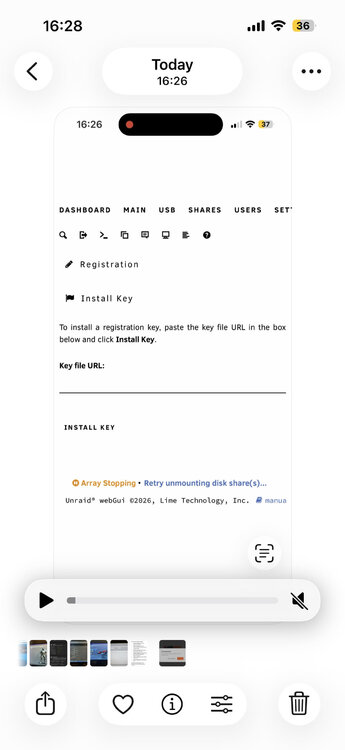
@JorgeB My apologies if I shouldn't be tagging you. Let me know if I can do this or not. It the issue just happened again today. I've attached the Diagnostics and Syslog-Server. I think it happened at Jun 22 08:40:48 in the logs. I also noticed when I tried to access my server via my tailscale IP address, the GUI was trying to put me through the new Onboarding Wizard. I thought it was weird that I could access it when this happened, but I have no idea why it would put me through the onboard wizard when I already did that. I attached a screenshot of my phone when I accessed it. While going through the wizard, the screenshot is what came up for a split second. I had to screen record to capture the image. It looks like there was something wrong with the license? omegajvn1-diagnostics-20260622-1655.zip syslog-192.168.1.100.log
-
Like many others that I've seen on the forums lately, I too am suffering from my server becoming unresponsive after some amount of time. My server has been unable to go more than 3 days without this issue happening. I have to manually reboot the system (holding the power button to shut it off) for it to become responsive. Obviously, I'll continue to cancel a Parity Check because of this. I've looked at the syslog-previous because I'm trying to diagnose this and it just looks like it abruptly ends. I've tried inputting this into Gemini, which also says the same thing. The GUI is unreachable from another PC on the network. I can ping my servers IP address from my gaming PC, but trying to SSH into it, I get a connection refusal. I have a Windows 11 VM running on it. In the VM, I've seen it once where Unraid turns on all disks that are not on and then it starts the process of stopping the array. It never seemed to get there completely as eventually, my VMs just die. My server never reboots. It just stays powered on and completely unusable. I was considering downgrading back to 7.2.0 that I came from. I'm glad I'm not the only one experiencing this. I'm on an AMD Epyc Platform. Motherboard: Supermicro H12SSL-NT, BIOS 3.6 CPU: Epyc 7452 RAM: Samsung ECC RDIMM 3200 PCIe ACS Override is set to Both, as well as disabling the following features for trying to troubleshoot: USB Autosuspend, NVMe Deep Power States, PCIe ASPM, and PCIe Port PM Containers running: Immich via Docker Compose Plus, two instances of Handbrake, Emby, JellyFin, Plex, Tautulli, VM_Custom_icons (these have not changed from when I was on 7.2.0, which I was not experiencing this issue). I've attached a recent diagnostics zip file. I'm going to wait for when this happens again and I'll provide a syslog. I currently setup the syslog-server. nakunraid-diagnostics-20260619_1102.zip
-
I am also suffering from this issue as well. My server has been unable to go more than 3 days without this issue happening. I have to manually reboot the system (holding the power button to shut it off) for it to become responsive. Obviously, I'll continue to cancel a Parity Check because of this. I've looked at the syslog-previous because I'm trying to diagnose this and it just looks like it abruptly ends. I've tried inputting this into Gemini, which also says the same thing. The GUI is unreachable from another PC on the network. I can ping my servers IP address from my gaming PC, but trying to SSH into it, I get a connection refusal. I have a Windows 11 VM running on it. In the VM, I've seen it once where Unraid turns on all disks that are not on and then it starts the process of shutting down the array. It never seemed to get there completely as eventually, my VMs just die. My server never reboots. It just stays powered on and completely unusable. I was considering downgrading back to 7.2.0 that I came from. I'm glad I'm not the only one experiencing this. I'm on an AMD Epyc Platform. Motherboard: Supermicro H12SSL-NT, BIOS 3.6 CPU: Epyc 7452 RAM: Samsung ECC RDIMM 3200 PCIe ACS Override is set to Both, as well as disabling the following features for trying to troubleshoot: USB Autosuspend, NVMe Deep Power States, PCIe ASPM, and PCIe Port PM Containers running: Immich via Docker Compose Plus, two instances of Handbrake, Emby, JellyFin, Plex, Tautulli, VM_Custom_icons (these have not changed from when I was on 7.2.0, which I was not experiencing this issue). If you require anything of me, let me know. I can provide it. I have a Diagnostics Zip if that helps.
-
I believe that is for when you have an extra slot/port available to simply add an extra drive into the array for doing all the moves. I don't. I'm trying to replace my old parity (20TB) with a new drive (26TB) and move the 20TB to replace an old 4TB. I guess I have no problem simply replacing the 20TB with the 26TB, let it build, then replace the 4TB with the 20TB in two moves instead of trying to do this in a single move. Unless I'm missing something.
-
Thanks Jorge! Hypothetically, if I had an extra physical slot, could I install the 26TB, make it my second parity, and move the 20TB (first/original parity) to a data drive? Would this keep parity the entire time, or is it even possible? Also, I've read that Unraid does not care what physical slot/port that a drive is connected to. It only cares about the serial number of the drive for identification. If I wanted to relocate the physical location of the parity drive, could I do that here at the same time? For instance, the 20TB parity drive is at the top of my stack and I want to move it to the bottom. Currently, the 4TB is at the bottom. Basically want to do a flip. Could I move that 4TB to the spot where the 20TB is now, and put the 26TB where the 4TB slot? I'd then just need to select the 26TB to be put in the Parity slot, like I would have to do otherwise if I simply replaced the 20TB in that top slot? (I apologize if that sounded confusing)
-
Hello all! I have a scenario I'd like to run by everyone. I have: 1 x 20TB disk (parity) 4 x 12TB disks (data) 5 x 4TB disks (data) I've been slowly upgrading my 4TB disks as I've had those for years and decided to make an Unraid configuration. My PC case has 10 available 3.5 inch drive slots. All are currently occupied. I bought a 26TB drive. I want to replace the 20TB parity drive, and move the 20TB parity drive to replace one of the 4TB drives. Am I able to install the 20TB drive with the 26TB and remove the 4TB simultaneously, or do I need to: Replace the 4TB with the 26TB > let that rebuild > move the 26TB drive to the parity slot, move the 20TB to the 26TB slot. Thank you for any info/help!!! :-)
-
Oh! Ok I understand. I did that and I now have all 3 Power Mode options available. But I do see what you mean about the newer driver being better. My Ryzen 5950X is able to boost past its base clock (3.4 Ghz) with the newer driver to 4.7 Ghz, whereas with this option (or prior to Unraid 7.1) it would top out at its base clock again.



