aquall0379
Members
-
Joined
-
Last visited
Everything posted by aquall0379
-
host: Beelink GTi14 Ultra AI PC Intel® Core™ UItra 7 155H Thunderbolt enclosures:MILLENNION 8858T3 The Thunderbolt enclosures working fine with 6.12.15, all the disk can use in a array. But afte upgrade to 7.1.12, the disk can't be recognized. gt14-unraid-diagnostics-20250530_0616.zip
-
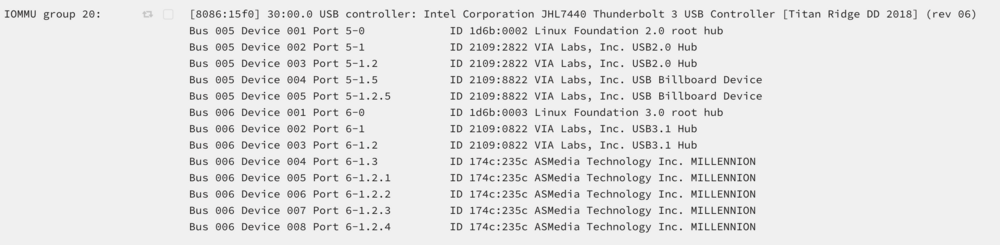
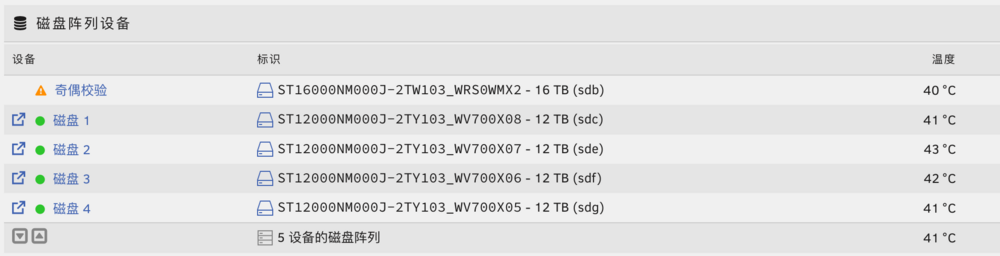
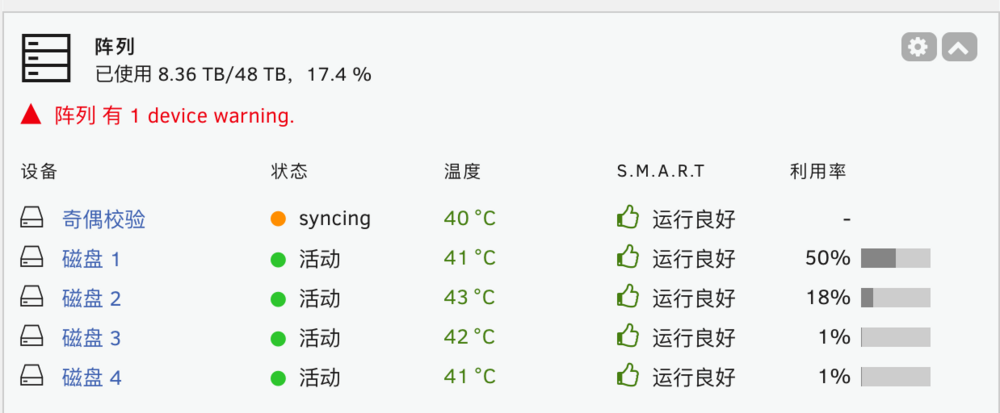
在 7.1.2 版本中,将USB ThunderBolt 设备直通后,奇迹发生了,可以看到雷电磁盘柜了,也可以正常使用阵列。 In version 7.1.2, after passing the USB ThunderBolt device, a miracle happened. The Thunderbolt disk enclosures can be seen and the array can be used normally. 将这个设备直通,绑定 VFIO 设备:Pass this device through and bind the VFIO device: 这个JHL7440 控制器不要直通,如果也选上了,反而看不到设备!This JHL7440 controller should not be passed through directly. If it is selected, the device will not be visible! 重启后就可以看到设备了!smart 和温度信息正常!After restarting, you can see the device! Smart and temperature information are normal! 不得不说,这个坑够深的,希望能在后续版本得到正式解决。 在 6.12.15 版本是没有这个问题的,不需要直通 雷电接口就可以直连磁盘柜了。 我的设备: 主机:MinisForum MS-01 雷电磁盘柜:MILLENNION 8858T3 I hope it can be officially solved in the subsequent versions. There is no such problem in version 6.12.15. You can directly connect the enclosures without the direct pass-through Thunderbolt . My equipment: Host: MinisForum MS-01 Thunderbolt disk enclosures: MILLENNION 8858T3