





RimuJim
Members
-
Joined
-
Last visited
-
I just wanted to add an update here for anyone having this issue. I can confirm that after adding the bootloader as detailed in this thread, I have now been able to apply all updates through to 7.3.2 without issue.
-
thanks @James Miller I can confirm that the limine BOOTX64.EFI file and the above config settings fixed this issue for my 2012 Mac mini. I did have the issue that I could not start the array, as Unraid said I was missing a cache pool. I did not have a pool before, but there was an empty reference to one. I deleted it and then all was well. Does anyone know if this workaround will likely break in a future update? Or is it something that might get added to the official release?
-
@James Miller did you just use the config settings posted above? I have a mini with this issue too.
-
@JorgeB Do you have any information on how to switch between Legacy boot and EFI boot?
-
Thanks for giving it a go!
-
Does anyone know if 7.2.1 fixes this issue?
-
Thanks. Has this been added a an offical bug report?
-
I have down-graded to 7.1.3 by copying the bz.* files back to the usb from my back up and everything works as it did before. This is 2012 Mac mini. Does this signal a kernel issue? This is what ChatGPT thinks:It’s almost certainly due to a USB/xHCI initialization regression introduced in Linux 6.10.x — not Unraid-specific code. When enough users report it (and they will — Mac minis, older NUCs, and small-form Intel boards are common Unraid hosts), the Unraid team typically: Either backports the older USB driver behavior, or Adds a boot-time workaround (kernel parameter, delay, or firmware quirk). So once the kernel maintainers fix it upstream, Unraid will inherit the fix.
-
ok I did all that and still get the same error...
-
Thanks for that. I will download the current release and copy over the bz* file and then should I run the make bootable script?
-
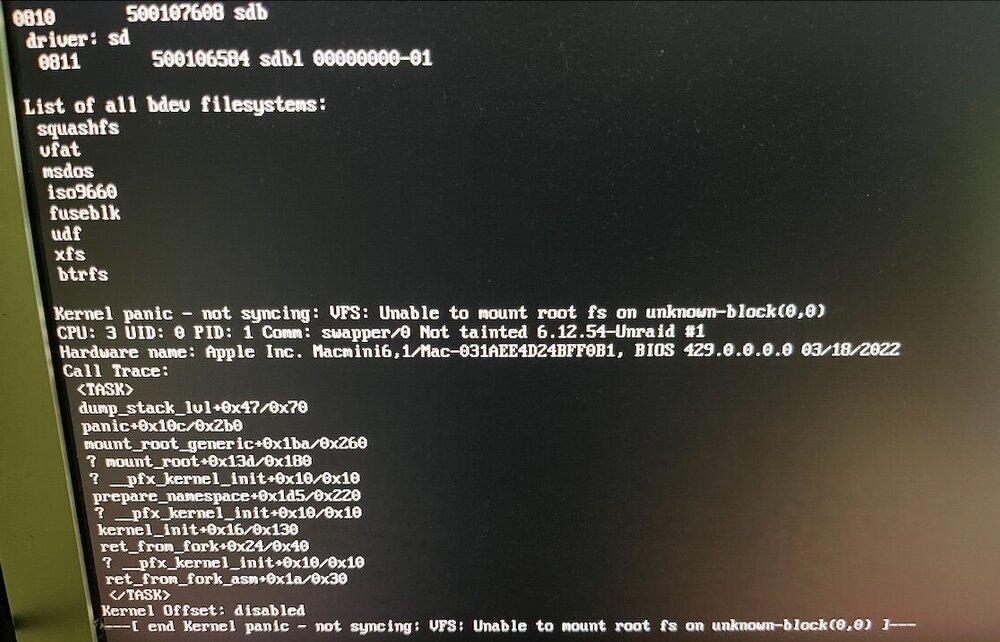
I just ran the 7.2 update on this machine and everything went file until the reboot step, then I got this. Does this mean the flash drive is buggered? I have backup of the flash drive made just before I did the upgrade, but I would like to move to 7.2 if possible. thanks!
-
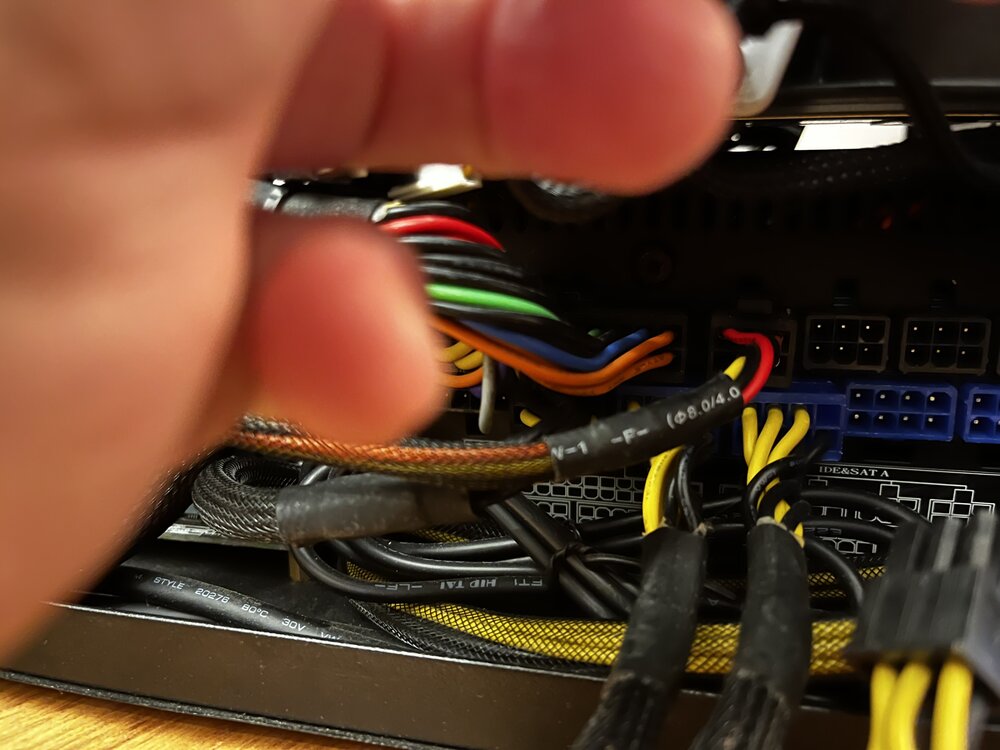
My Uraid system built in a small form factor case using a Silverstone ST75F-P power supply. From what I can tell this silverstone should be modular, but it will not power up unless I have all the cables plugged into it. The case is very small and it is next to impossible to close with the extra cables that I don’t need. In the attached photo it is the two harnesses plugged into the bottom blue sockets that I don’t need. Is there something I’m missing? What can I do?
-
That worked! Thanks for your help! Can I assign the same IP address to the wifi interface as I use when the machine is wired? I only occasionally need to use this machine via wifi and it would be nice if it booted up to the same ip address no matter witch connection was being used.
-
thanks for taking a look diagnostics-20251024-2115.zip
-
I have Ugreen UG-2020204 Ac650 Usb WIFI stick that stays in disk mode when inserted. I got it to work once in the help of chatGPT, but then I did a reboot and its back to CDROM Mode. Is there an easier way to doe this? Apprent I need usb_modeswitch and their used to be a community app that had that, but I can find it... root@server:~# lsusb Bus 001 Device 001: ID 1d6b:0002 Linux Foundation 2.0 root hub Bus 001 Device 002: ID 0781:5567 SanDisk Corp. Cruzer Blade Bus 001 Device 003: ID 0bda:1a2b Realtek Semiconductor Corp. RTL8188GU 802.11n WLAN Adapter (Driver CDROM Mode) Bus 002 Device 001: ID 1d6b:0003 Linux Foundation 3.0 root hub Bus 003 Device 001: ID 1d6b:0002 Linux Foundation 2.0 root hub Bus 004 Device 001: ID 1d6b:0003 Linux Foundation 3.0 root hub


