





Zerix
Members
-
Joined
-
The C states part is interesting, my I226 does not like ASPM and this looks like a good replacement. Any chance you could run lspci -vvv and post the output for the E610?
-
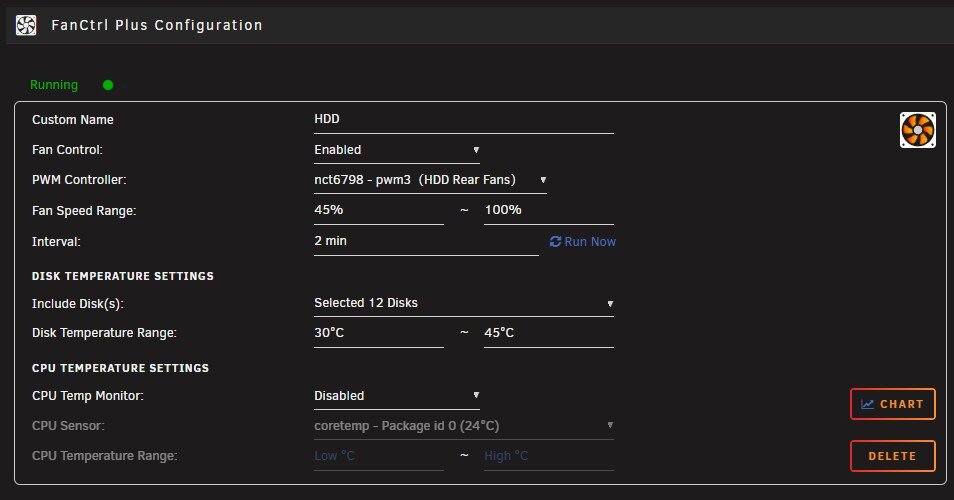
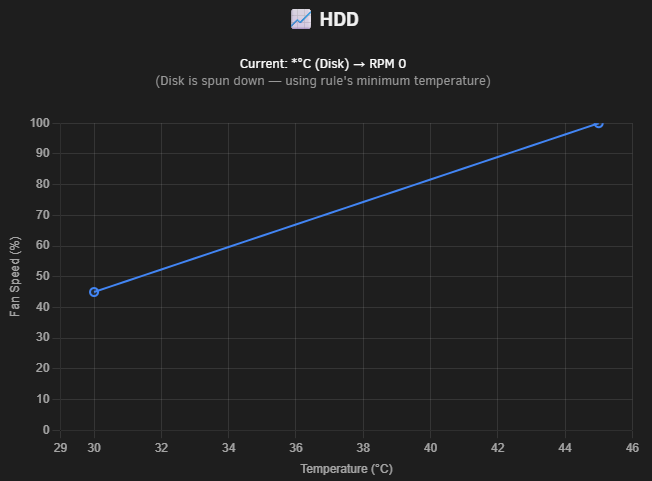
Thank you for the quick reply and the workaround options. On my motherboard it doesn't seem to fallback to the motherboard's minimum speed, the fans just go to 0 rpm. I have a few bits of hardware in the same airflow path as the array but they don't have temp probes, a minimum fan speed feature would be appreciated. Either maintaining the minimum speed even when the array is spun down (tick box) or a separate option for setting a speed when the array is spun down would be good.
-
I've been testing this out today and it works great but with one small issue, minimum fan speed isn't kept when the array is spun down. Ideally, at least for me, I want the fans to spin slowly even if the array is spun down, from the changelog etc it seems that they should keep the minimum fan speed range even when the drives are spun down. I've confirmed the fans can spin at the minimum speed range I've set (45%). Is this a bug or could a keep fans spinning feature be added?

-
Thanks, yeah that's what the log is saying, cache to /mnt/user0/ I'll have a look at the share settings and maybe just reapply them and see if anything changes.
-
Hi, I'm having an issue were the moved files don't appear to be following the share allocation method (Unraid 7.1.4, Plugin v2025.09.06). Share is set to high water but files moved files are still hitting disk1 not one of the last two which have plenty of space before the first high water mark. These are files that are moved due to the cache being too full (Move All from Primary->Secondary (cache:yes) shares when disk is above a certain percentage: Yes), set to move when cache is above 85% and free down to 50%. The share includes all disks. Mover settings below, anything pointers at what to look at or that I've done wrong?
.thumb.png.846cfdcbcfffebadb2b637223066183e.png)


-
So this is ASPM related, maybe just my setup, maybe i226-LM. Not powertop or any tweaks (tested with a clean install) just OS controlled ASPM. This is a modern board so OS controlled ASPM is the default in the bios, thus the kernel allows L0s/L1 states. Apparently some of the ASPM states that the NIC advertises as supported don't work very well, at least not with my system combo. Disabling ASPM completely on just the NIC appears to have solved the issue, SMB copies are showing the full 113MB/s 1Gbe line rate, iperf bidir is still funky though. Given SCP worked before but SMB didn't this is probably a latency/timing thing messing with the way SMB specifically works. Potentially a BIOS, igc driver, NIC firmware update or other low level thing can fix it in the future but specifically disabling L0s/L1 bits fixes the issue for the moment (will test a little more).
-
Gotta love motherboard manufacturers, according to them yes but just updated it from the intel website. No change unfortunately, I think the issues with this NIC were more drop outs anyway. The windows transfer speed and rsync from the mini pc are still way below line speed and pretty stable below line speed too, both using different NICs with nothing maxing out on the system resources.
-
On the SMB side, an rsync transfer from the mini pc to the unraid box (vers=3.1.1, cache=none)= ~19-22MB/s transfer speed: Remount and retry without the cache=none argument, starts fast but after 5-10 seconds stabilises out at the same ~20 MB/s. There is plenty of cpu power/ nvme on both ends, scp works at line rate and SMB is showing low speed from two sources to the Unraid box = SMB issue? what can I look at?

-
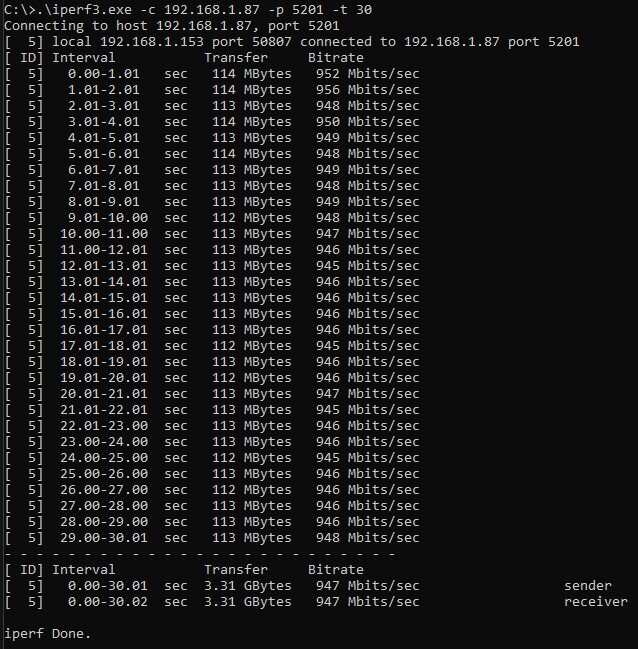
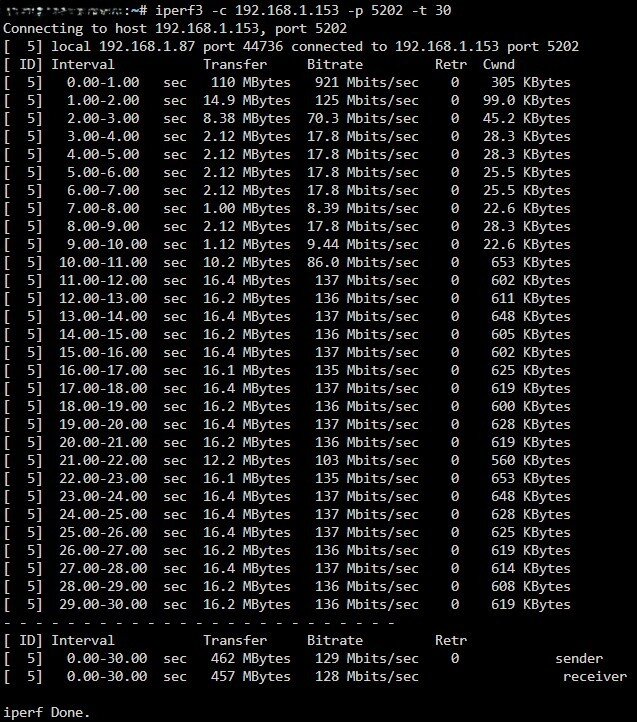
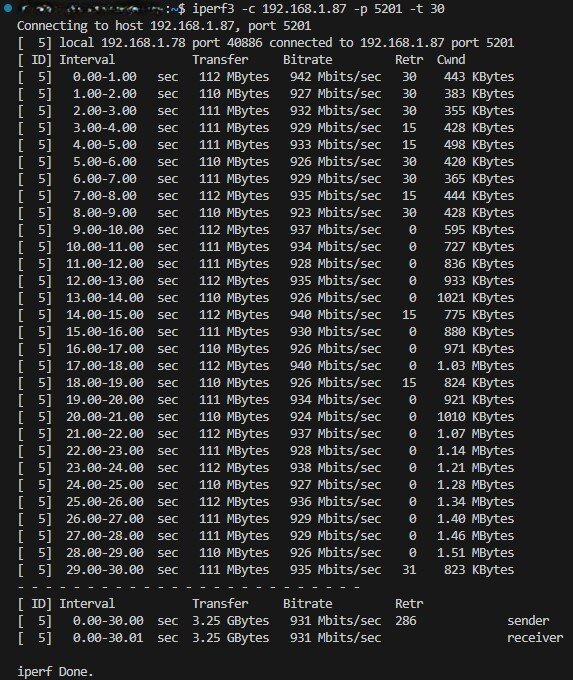
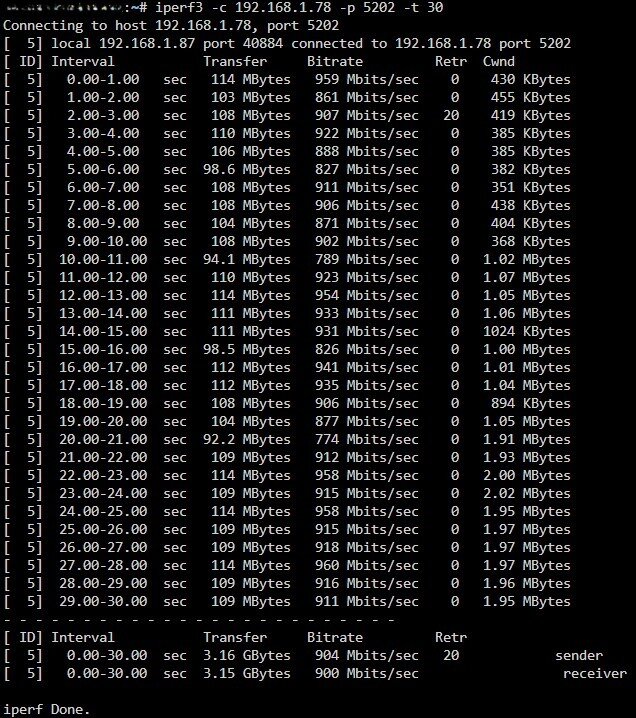
So I've now tried this, both from the windows machine and mini pc, one after the other. Windows client -> Unraid Server: Unraid client -> Windows server: Then the set from the mini pc, Mini pc client -> Unraid Server: Unraid client -> Mini pc server: Potentially just a windows issue or an i225 issue on that front. Anything to be gleaned from the higher cwnd on the unraid -> min pc test or is this just due to the higher transfer speed? The network side/stack is probably okay then, just windows/i225 wonkiness, SMB is a different question.
-
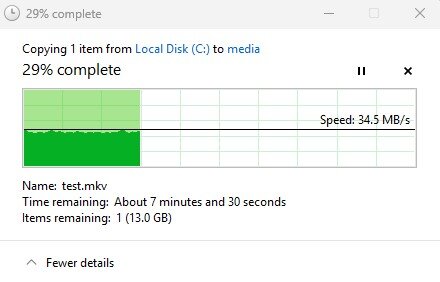
I would normally agree but the initial transfer from the Synology was a line speed. Just ran a copy via the SMB mount in windows file explorer and then by SCP and SSH, both to the same location, both with a substantial speed difference. With the initial transfer from the Synology the SMB server would have been the Synology side and the client Unraid, when Unraid is acting as the server the speed drops. The external network to the Unraid machine doesn't seem to be the issue here, maybe a network stack/ smb server issue?

-
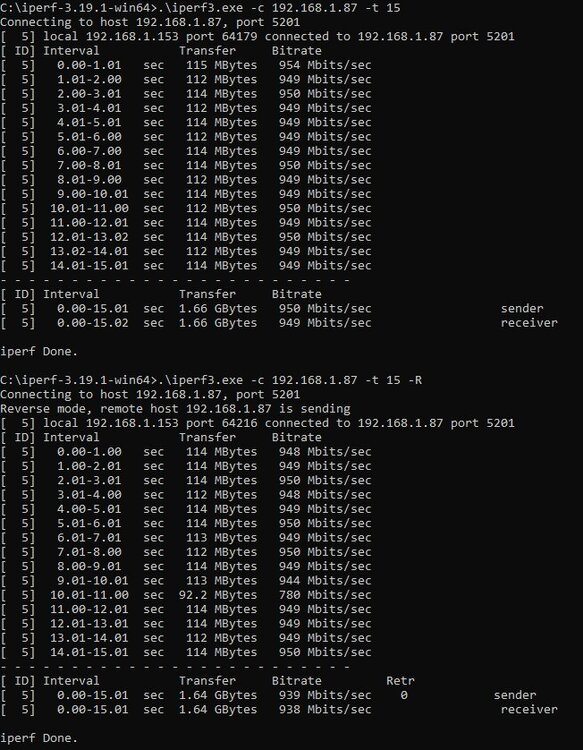
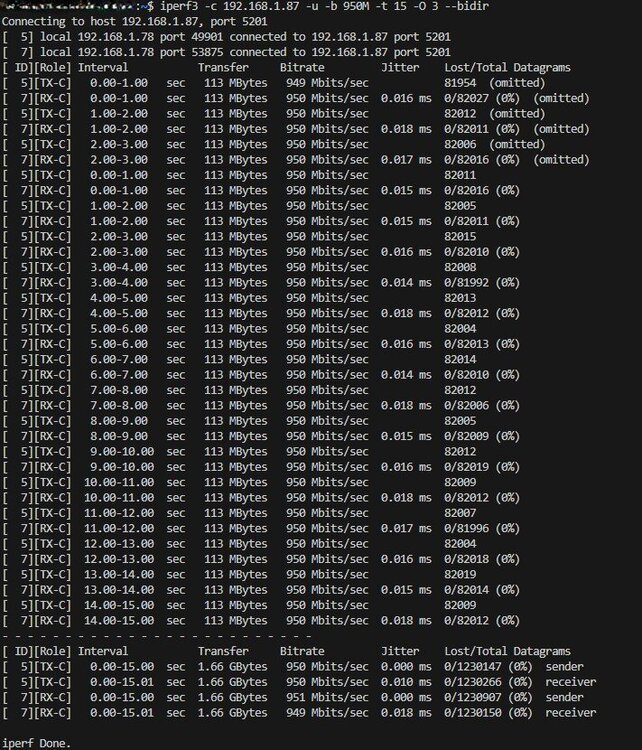
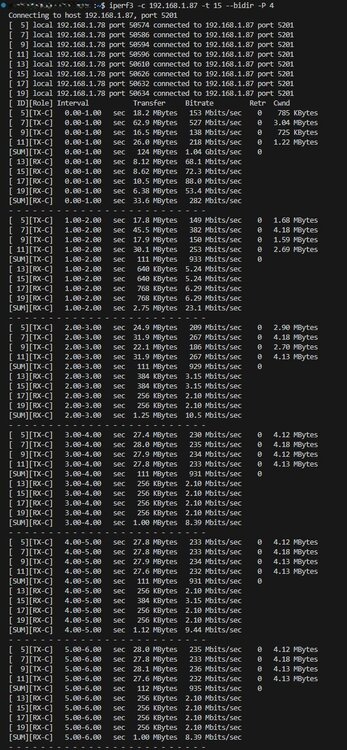
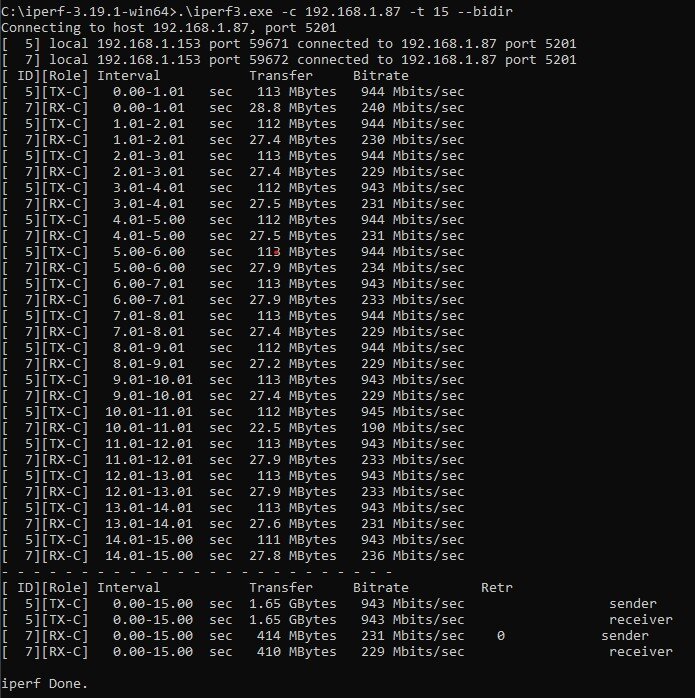
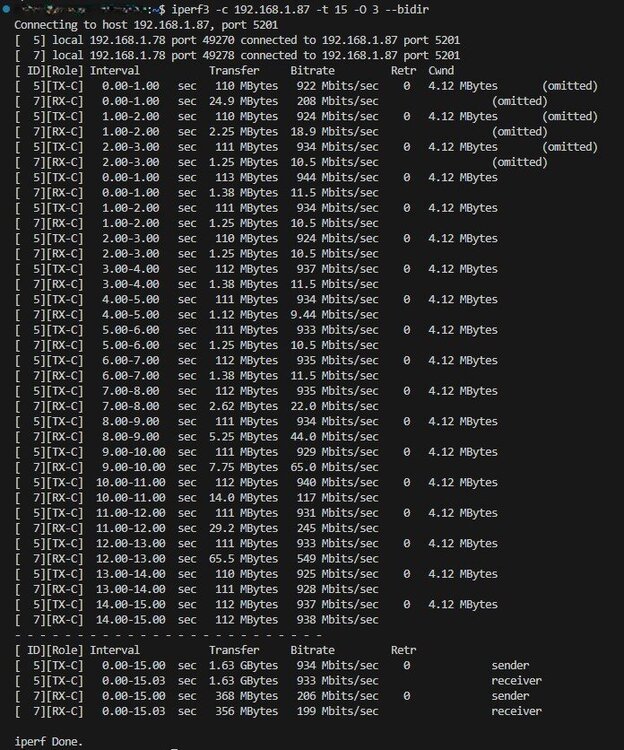
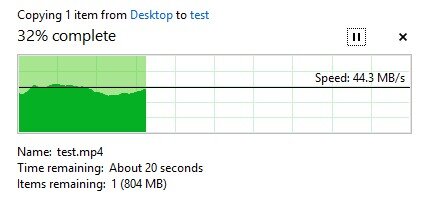
New to Unraid and seem to be going down a networking rabbit hole with slow SMB transfers to a 2TB ZFS mirror NVME write cache. I'm using Unraid as purely storage (so no docker etc on the Unraid box) with compute on a mini pc. Unraid: Asus Pro WS W680-ACE (i226 NIC), Intel 13500T, 32GB ECC RAM, 2x Seagate 530R (ZFS Mirror), 12x WD Red Pro (array, 2 drive parity) Mini PC: Lenovo P3 Tiny (i219 NIC), Proxmox, Ubuntu server VM (24.04) Windows PC: Asus Crosshair X670e (i225 NIC), Win11 I initially spun up the array (no cache) without parity transferred all my data from a Synology then added parity and cache drives. This was transferred by SMB mount via unassigned devices then rclone. For the few days this was running I got full 1GbE line speed direct to the array. Following this I noticed slow write speeds (40 MB/s) to the unraid cache from windows firstly, this is write speed to the NVME cache (not the now parity protected array), I confirmed this by making a new share just on the cache only and testing that, same speed. However the same is true to the array, but with dual parity that is some what expected. This speed is consistently slow to the cache from multiple devices including the mini pc, so different NICs, OS's etc. I use a few plugins, powertop and force the SMB version/encryption in smb extras. So I next tried deleting the changes (keeping plugins) no change, next safe mode, no change, next clean install (copying across share and drive assignments+ license), no change, increase zfs_arc_max, no change, NIC flow control on/off, no change. On the network side I've run iperf3, one way and -R, both show full speed (TCP) and steady. Using -bidir (TCP) on the mini pc shows TX at line speed but very slow to start RX (10 Mbits/sec) ending at line speed. On the windows pc, TX is at line speed and RX is consistently slow (230 Mbits/s). First thought was network switches and cables, so I changed those. Both an Aruba switch (the normal one in use) and a Qnap one showed no difference. To make it more confusing I ran iperf3 as UDP and got full line speed in -bidir, further suggesting the network set up is not the issue here. When the cache writes back to the array, speed doesn't seem to be an issue and the drive temps all seem okay too. I'm not completely sure but I'm guessing this low RX is the cause of slow smb transfers but could be wrong?? I'm running out of things to try here, any suggestions or help would be appreciated. diagnostics-20250814-2301.zip
-
Hi, I've just started using PWM fan on a new Unraid install, after having issues with the popular alternative fan control plugin. I ran into two small issues, that I could see others falling into or I might just have a misconfiguration. One, it looks like the 'pwm hdd' field is limited to 8 entries, fortunately/ unfortunately I have more than this. Currently, I've just added the extra drives to the settings file, it would be good if an option existed to include any sd* drives (minus the boot drive) rather than needing to list them all. Some people might just specify the hottest 2 drives, but that doesn't work if said drives are spun down and others are not. Second, I like to have my drives spun down as much as possible, but I would still like a little airflow through that section of my case. Current behaviour has the fan stop (at least with my settings) when the array is spun down. A check box to enforce the min rpm even when the array/ specified pwm hdd is spun down (no drive temps are available) would be a nice addition.
.png.7868e9c932330ebb0664375f30ae36d8.png)





