






Virtech
Members
-
Joined
-
Ran into this same "can't find any usable optical drives" issue after an Unraid update (7.3.2). Confirming that xra's PGID fix from earlier in this thread worked for me too, with one small correction: on my system the group that owns /dev/sr0//dev/sg8 is actually named cdrom, not log — worth checking both since it can vary by system. Posting the exact steps in case it helps someone else: Fix: Check which group owns your optical drive devices: ls -la /dev/sr0 /dev/sg8Get that group's GID number: getent group <groupname>(for me this was cdrom, GID 19 — yours may show log or something else) Edit the binhex-makemkv container in Unraid, set PGID to that GID number (leave PUID as-is). Click Apply to recreate the container. Reopen the MakeMKV GUI — drive should now be detected and "Open disc" available. That's it — no --group-add, capability flags, or udev rules needed. The key insight is that the container's PGID needs to match whatever group actually owns the device nodes on your specific host, which can differ by system/Unraid version.
-
Virtech changed their profile photo
-
I received an email from Plex stating they are making changes to the repository for updates. The email links to this article. Plex SupportEnable repository updating for supported Linux server dis...We recently migrated to a new repository for distributing Plex Media Server releases that impacts how certain Linux distributions receive... I assume this will be wrapped up in the CA and require no changes on my end?
-
I use Custom Tab to have an index of all the web interfaces of my containers. It's been working great so thanks. I recently updated Unraid to 7.2 and they improved the Unraid Web UI for mobile browsers. My index page displays properly when directly accessed in a mobile browser but within the Custom Tab I have to scroll over. I think this is because of the resolution setting for Custom Tabs. Is there a way to make the resolution of the custom tab dynamic so it displays well on both mobile and standard web browsers?
-
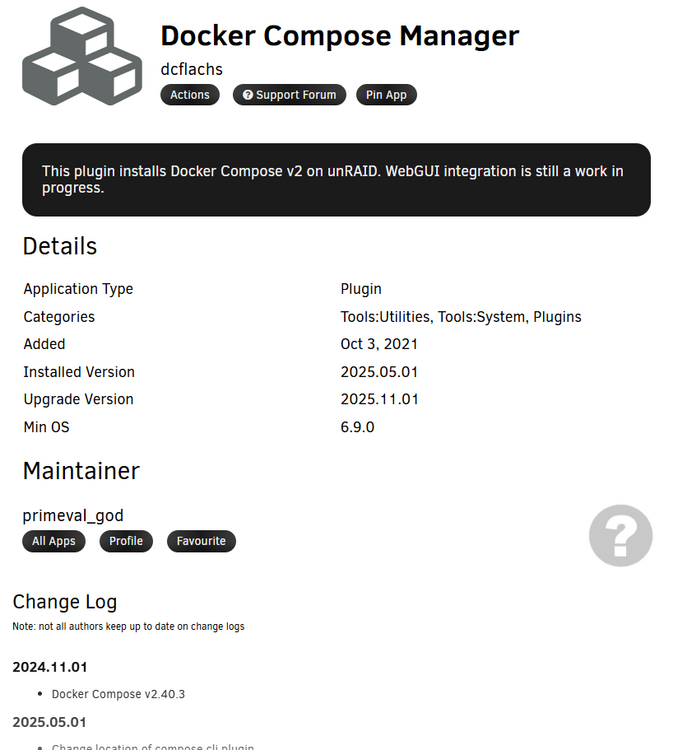
Just a heads up the wrong year (2024) is referenced in the change log for the most recent update. Caused me a small bit of confusion. Thanks for publishing this CA, it's very useful.
-
I demand a dog paw option! 🤣


