





Olivejuice
Members
-
Joined
-
Last visited
Everything posted by Olivejuice
-
Here is the new diagnostics file: olivejuice-diagnostics-20260303-1005.zip
-
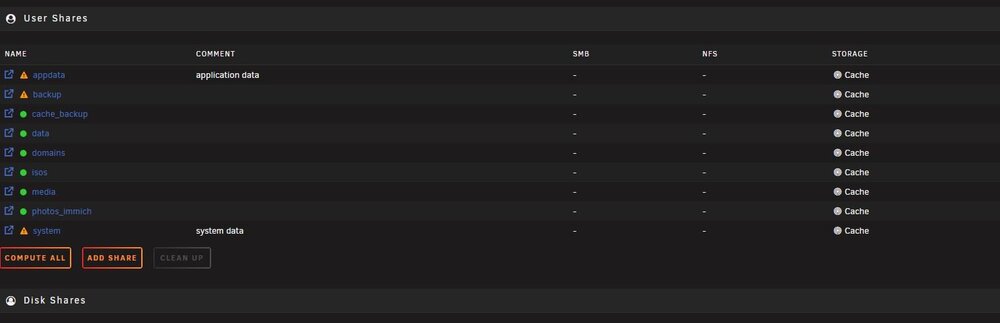
I recreated the custom network that I had before as it went missing during this whole process. The remaining containers that I installed were configured correctly, having used the custom network that I created. All of the previously install containers that missing the custom network, I changed in the config to my custom network and are all functioning correctly now. I am doing a server reboot at the moment and will then post a new diagnostics zip. Hopefully this will be my last question in this thread, so we'll see. All of my shares are now set to the cache as the storage location. Obviously this is incorrect. I am under the assumption that appdata and system should be set to cache but what about all of the others. Previously I had set most of my shares to array and a couple of them to cache-array but I was wondering if there is a preferred structure for this?
-
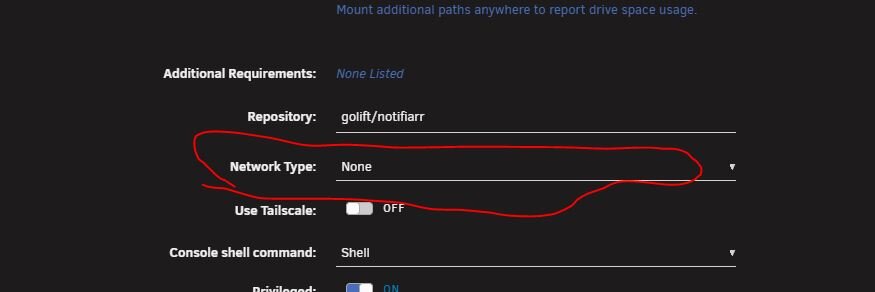
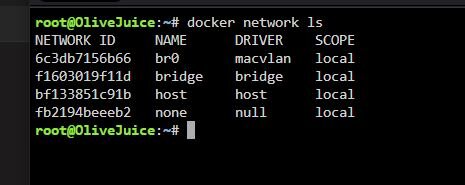
Here's something that I ran into: My custom network is missing and not selectable from the Network Type within the config of the container. I also opened the terminal and typed "docker network ls" and it is missing. I am assuming that I just recreate this and set all of the containers to my custom network? Why would I have lost my custom network? thoughts? The only reason that Plex worked correctly is because the netwok was set to "host".
-
@trurl Question: How were you able to determine that my NVME cache was corrupted from the diagnostics zip that I uploaded? Also, should I change my Docker data-root to xfs vDisk? How can I do this without losing any data? I learned that creating a vDisk limits the size that Docker will use which makes troubleshooting easier later if needed. I also learned that when Docker is set to run in a vDisk, it pulls only the missing layers that have not been pulled previously making it much faster and taking up less space because all of the layers are shared between the containers. Why would IBRACORP suggest using Docker data-root as directory instead of vDisk? He mentions in his video that it was because of the comments he received but doesn't explain why. Thank you so much for your time!
-
Ok, seems I'm making some progress..... Like I mentioned, I had made a backup and saved it on /mnt/disk1/cache_backup. I then enabled Destructive Mode in Unassigned Devices. I then went into the Main page and removed the NVME from the pool. At this point there was a RED X next to the dive. Pressing the RED X cleared the drive allowing me to format it. Once I formatted the drive I added it back to the pool and started the array. When I went back into my SHARES page all of the shared drives showed up, with the exception of my appdata share. Additionally the "Test" shares that I created earlier, were visible, which I then deleted. I then enabled Docker in the Settings tab and the appdata share magically appeared in the SHARES page along with all of the others. I opened the appdata share and all of my app data was there. I then went to the PLUGINS page and went into Appdata Backup and restored the appdata for my templates and configs to a backup from a week ago. I went back into the Docker tab it only had Notifiarr in it which was running. I was able to open up the webui without an issue. I then went into CA apps to begin reinstalling all of the containers, starting with RustDeskServer. I then went back into the DOCKER page and now magically Custom Folders was running and functioning like it was prior to all of this, with RustDeskServer running in its respective folder. Notifiarr was now missing. I went back into CA apps and going to Previously Installed, I installed Plex. I went back to the DOCKERS page and Plex was in its custom folder, running. I opened up the webui and everything was functioning as it should. I will continue reinstalling all of the previously installed CA apps and update this thread as needed or if I run into any issues. @trurl Thank you, Thank you!!!! You were a tremendous help and pointed me in the right direction, providing input along the way, to resolve my issue. You're an invaluable resource and I am thankful that you were here to help me. I will do my best to pay this forward through helping others when I can! Thank you again!
-
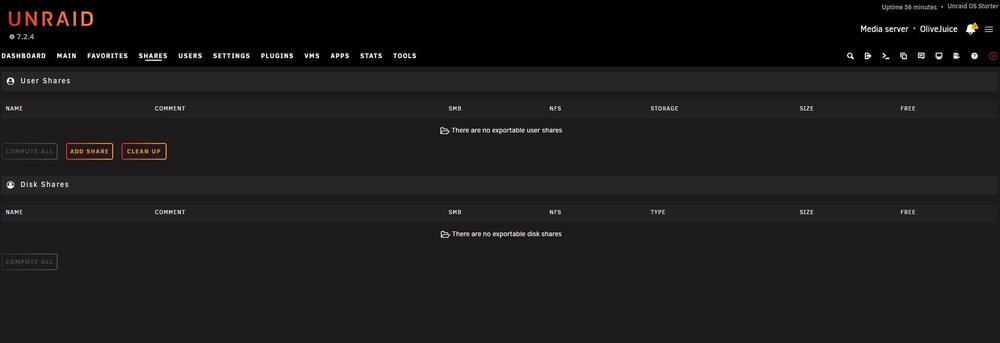
No, nothing is showing up and I am not able to create new shares. When I try to create new shares "test" and click ADD SHARE, Unraid processes the request but nothing shows up. But then nothing shows up in the shares folder.
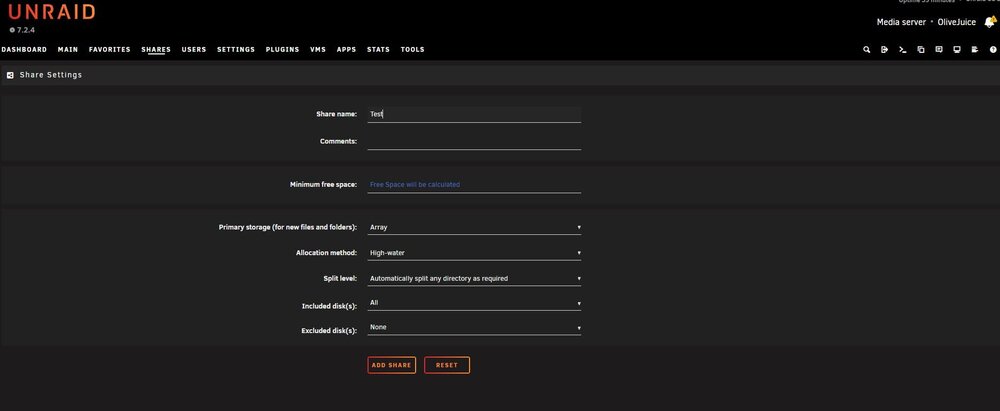
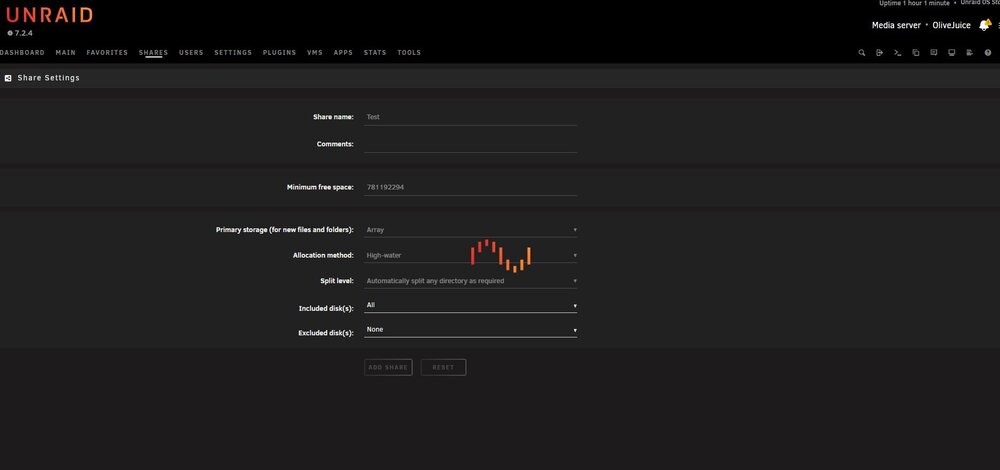
-
I will watch this now
-
I had seen to setup Docker data-root as "directory" vs vDisk in IBRACORP's video Zero to Hero #3 https://www.youtube.com/watch?v=t6Wb8ATE-lg&t=1239s Was this wrong? Should I change this? I was not able to run chkdsk on Windows because Windows does not detect the NVME cache drive with the Unraid appdata and system file folders on it. I didn't want to reformat the drive for fear of losing the data on it. I then mounted the NVME cache back into the Unraid server and went into maintenance mode when starting the array. I went into the cache and performed a Check Filesystem Status from Cache Settings and that came back as "no file system corruption detected". I then went into Self-Test and and performed a SMART short self-test and that came back "Completed without error" I then performed a SMART extended self-test and that came back "Completed without error" I then opened SMART error log and it shows this: I created a cache backup with the appdata and system folder files and saved it to /mnt/disk1/cache_backup incase I need to reformat the NVME drive and then potentially change it to xfs format as it is currently NTFS. What should I try now?.... I'm really not sure what to do, all I know is that I don't want to recreate everything from scratch. So far all of the data is still accessible.


-
Yes, I do have VM's but nothing that I couldn't re-installl, other than Home Assistant but that hasn't been completely setup either. All of the dockers have been installed from the Apps page. I looked over the document that you shared for reinstalling the docker containers and one thing that Im noticing is that it mentions vdisk, I set Docker data-root to directory not vDisk. Does this change anything? Back to my original post: will I have to recreate my share drives? If yes, will this delete all of the data stored on the drives?
-
I really appreciate your prompt reply! I am assuming that what you are suggesting is pulling the NVME out of the server, mounting it in a Windows machine, performing an error check and hope that Windows fixes the issue? As for using NTFS, I didn't know that I should have changed this to xfs like the other drives, still learning... Reformatting the NVME drive to xfs will wipe all of the data on it, this includes appdata and system. Should I copy these and re-write them to the NVME after reformatting to xfs? Then restore using appdata backup or Unraid Config Gauardian? I really appreciate your time and input!
-
Unraid v. 7.2.4 USER SHARES AND DOCKER CONTAINERS MISSING AFTER UNCLEAN SHUTDOWN. I have appdata backup installed with backups available. I have Unraid Config Guardian installed with backups available. All of the backups that I have saved are from Unraid v. 7.2.3 as my server was recently upgraded. Here's what happened: I was in the process of data migration, moving media from a local windows machine to my Unraid server media share when my Unraid server stalled. Data migration stopped, and retry failed on the Windows machine. I then rebooted Windows and while Windows was rebooting I attempted to stop the Unraid array. I ended up with the Unraid logo cycling nonstop. I tried to refresh the page that I was viewing the WebUI from and still had the Unraid logo cycling. I then pressed the power button briefly to do a soft shutdown of the server which failed. I then held the power button down, performing a hard shutdown. After rebooting my Unraid server and accessing the WebUI, I received a notification that an Unclean Shutdown had occurred. All of my share drives are missing in addition to half of my docker containers, what appear to have been the containers running at the time of shutdown. I have 4 drives, 1 parity, 2 HDD's, and 1 cache NVME, in addition to the USB Flash. All of the data stored on the array is viewable and accessible by browsing /mnt/disk1, /mnt/disk2, /mnt/cache, and /mnt/boot from the Main page on my server. So it appears that all of my data is still available. This is also how I am able to view the available backups for appdata backup and Unraid Config Guardian. All of my stored data, i.e. media and photos, is viewable using this method. I have not done anything with my Unraid server other than trying to create a "TEST" sharable drive which failed. What is the ideal way to restore my share drives and Docker containers prior to the unclean shutdown? Please help! I have attached diagnostics zip file for my server for reference. I also have Syslog Server enabled to send logs remotely but don't know how to access them. Yes, I am new to Unraid but a quick student. ;) olivejuice-diagnostics-20260302-1129.zip
-
Forgive me in advance if I am going about this the wrong way, and if so, please re-direct me. I installed Unraid Config Guardian and ran into an issue. During the configuration, I tried to set the "Mask Passwords" to false, default is "true", so that the "unraid-config.json" file shows the passwords that I have used in each of the containers. I set this field to "false" and when I preview the "unraid-config.json" file to view the information that has been backed up, all of the passwords are marked "MASKED". How do I fix this so that I can see the passwords if I need to do a server restore using the backup? Thank you!
-
THIS!!!! I just had the same issue with the bzfirmware checksum error. I installed the UNRAID USB Creator tool. Open the UNRAID USB Creator program. Selected the same Unraid version that I was using previously on my server. Used a NEW USB 2.0 flash drive on a USB 2.0 port "Black". Wrote the Unraid OS to the NEW flash drive. Copied the "Old" bz* & changes txt files on previously used USB flash drive to a backup location on my windows system labeled "OLD". Copied the 'New" bz* & changes txt files on the newly created USB flash drive to a backup location on my windows system. Deleted the "Old" bz* & changes txt files on previously used USB flash drive. Wrote the "New" bz* & changes txt files to the previously used USB flash drive, keeping all other files. Unmounted the USB flash drive. Plugged previously used USB flash drive, with the "New" bz* & changes txt files, into "Black" USB 2.0 port on server. Booted server and viola! My server booted up without any issues and was configured exactly as it was prior to the bx* checksum error. Thank you, thank you!


