





Azlith
Members
-
Joined
-
Last visited
Everything posted by Azlith
-
amazing! It works!!
-
@JorgeB Hi, sorry to bother you. Do you happen to have any ideas about this issue?
-
Hi Guys, When I try to sign in unraid connect, the process gets stuck at: "Please keep this window open while we perform some actions", After a while, it fails with: "Sign In Failed" I checked the browser network requests and found that the browser sends multiple requests to /graphql. {"operationName":"ConnectSignIn","variables":{"input":{"apiKey":"unraid_xxxxx","userInfo":{"email":"[email protected]","preferred_username":"[email protected]"}}},"query":"mutation ConnectSignIn($input: ConnectSignInInput!) {\n connectSignIn(input: $input)\n}"}However, the response is: {"errors":[{"message":"Unknown type \"ConnectSignInInput\".","locations":[{"line":1,"column":32}],"extensions":{"code":"GRAPHQL_VALIDATION_FAILED"}},{"message":"Cannot query field \"connectSignIn\" on type \"Mutation\".","locations":[{"line":2,"column":3}],"extensions":{"code":"GRAPHQL_VALIDATION_FAILED"}}]}Also, Unraid Connect keeps sending the following cloudState query: {"operationName":"cloudState","variables":{},"query":"query cloudState {\n cloud {\n ...PartialCloud\n __typename\n }\n}\n\nfragment PartialCloud on Cloud {\n error\n apiKey {\n valid\n error\n __typename\n }\n cloud {\n status\n error\n __typename\n }\n minigraphql {\n status\n error\n __typename\n }\n relay {\n status\n error\n __typename\n }\n __typename\n}"}But it receives this response: {"errors":[{"message":"Cannot query field \"cloud\" on type \"Query\". Did you mean \"rclone\"?","locations":[{"line":2,"column":3}],"extensions":{"code":"GRAPHQL_VALIDATION_FAILED"}},{"message":"Unknown type \"Cloud\". Did you mean \"CpuLoad\" or \"Float\"?","locations":[{"line":8,"column":26}],"extensions":{"code":"GRAPHQL_VALIDATION_FAILED"}}]}I have attached the diagnostics of my server below. tower-diagnostics-20260524-0025.zip
-
Get it, I will close it now.
-
ahhh, yes, it works. amazing.... thank you! Just for curious, is this because some necessary components were missed when I installed Unraid Connect via the WebGUI, due to a network failure?
-
Ah, yes, thank you for your imply. I am currently setting up this server and haven't had a chance to harden its security yet.
-
This is the diagnostics. Thank you for your help! @trurl tower-diagnostics-20260523-1812.zip
-
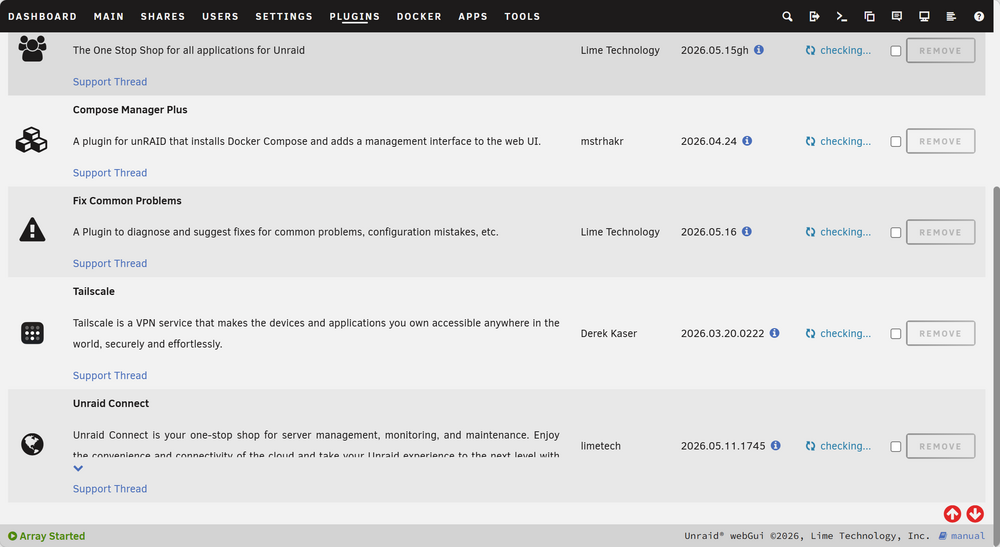
Hey, thank you for your reply, but I have installed these applications.
-
Hi Guys, I want to enable the remote access of my server according to https://connect.myunraid.net/help . But I cannot find the Unraid Connect icon after installing the Connect app, as shown in the figure of the guidelines. The uBlock is disabled. The capture of the guidelines: The capture of my server:

