





Shlacher
Members
-
Joined
-
Last visited
Everything posted by Shlacher
-
While I'm at it, there was a second template error that I had to fix in the "Data:" field. Originally it was "/mnt/cache/appdata/linkwarden". If you have the mover on Unraid configured to move data from the cache drive to your array, your preserved links (pdfs, screenshots, html file) will disappear. My option to fix was to amend the "Data:" field to say "/mnt/user/appdata/linkwarden". This allows Linkwarden to utilize the built in function of saving to the faster cache drive then moving to the array without breaking access to the preserved website formats.
-
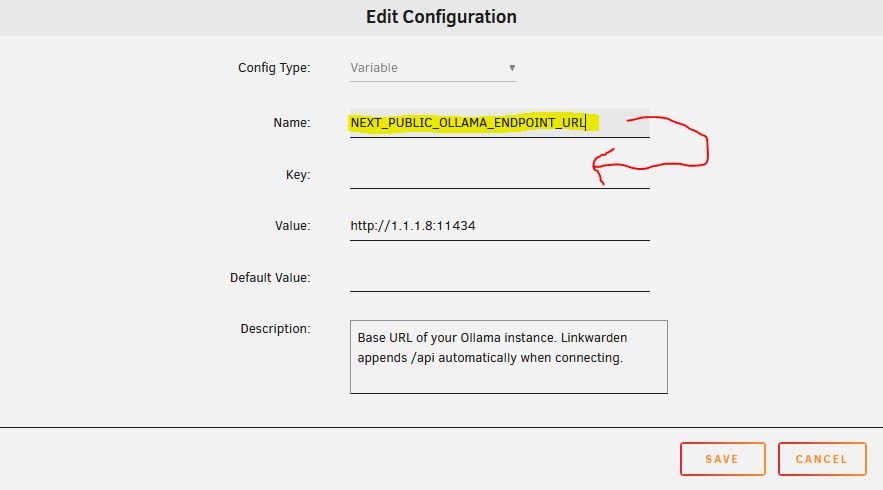
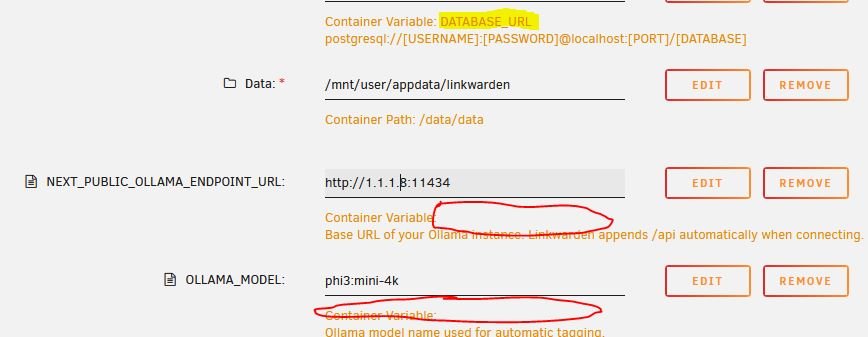
AI Tagging setting missing in PreferencesHello! This is a bug? that applies specifically to user of Unraid and the template for Linkwarden in the Community Apps store. I had the proper configuration to get AI Tagging working but the setting was missing from my webUI. Turns out to be a misconfiguration on the Unraid CA template itself. To fix, you need to edit the AI variable fields of the template. Both " NEXT_PUBLIC_OLLAMA_ENDPOINT_URL:" and "OLLAMA_MODEL:" Click edit and copy the contents of the "Name:" field into the "Key:" field. And that's it! Save yourself 2 hours of smashing head against keyboard to make it work.
-
It worked! Thanks @Kilrah and @Alex_P for the insight. Was over analyzing all the details in the migration docs, but you were right. The secret key was already in the template. I watched the logs as I started paperless for the first time after updating to v3. It performed all the migrations without issue.
-
Looks like a new major version of Paperless is out.. V3. https://docs.paperless-ngx.com/migration-v3/ Curious if anyone has upgraded yet? Is it as simple as hitting update or did you have to add/change a bunch of environment variables based on the v.3 migration guide. The CA_Template likely isn't getting an update..... the publisher in the app store seems like they are taking a step back from unraid templates. Welcome anyone's experience or insight before I dive into the update.

