





Stanley
Members
-
Joined
-
Last visited
-
Has anyone been able to update to v5.18.4? It was released over a month ago, and my container is still on 5.18.3. I guess it mirros the docker container, which is still on the old version?
-
The number 1 search result says to turn off DNSSEC. Do you have that on? For troubleshooting, turn it off.
-
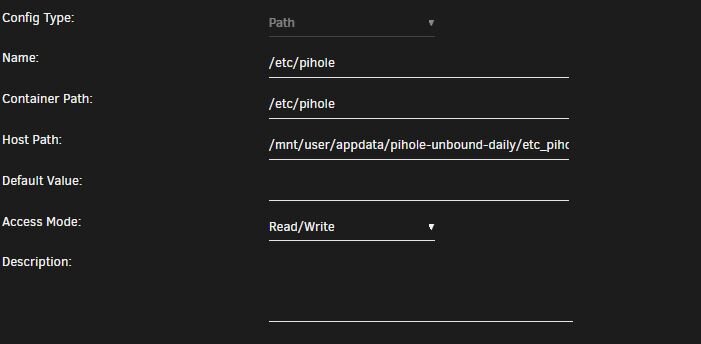
I just installed this a couple days ago, and was able to keep my settings. To keep blocking lists & white/black list persistent, I mapped the Container Path: /etc/pihole . I added a subfolder to the config folder so my Host Path is: /mnt/user/appdata/pihole-unbound-daily/etc_pihole-unbound . I haven't gone through a regular update yet, but my items remain after force updates (items were getting cleared out before making this adjustment)
-
If your DNS is set to CUSTOM1 127.0.0.1#5335 in the settings, and pihole is working, then unbound is working. I think there's a way to enable logging in unbound, but I've never bothered since it's never given me any issues. I've been testing this docker container and it's been running fine. The updates seem a bit sporadic, but I haven't had any issues.
-
Did you set up the /data (/mnt/user/Downloads) folder in Sonarr's Docker settings? Sonarr need to be able to access the folder Sab is the files.
-
In the image you provided, the completed download folder should be /data, not /mnt. If you click on the left arrow, you should go to the parent folder, and see the /data listed in there. Select /data, and you should be good to go.
-
Rikdegraaff, have you mapped the /mnt/disk7/UsenetDL folder in the SABnzbd docker? In the example above, you would reference /data to get to the /mnt/user/Downloads folder. By mapping the folders, you don't reference the actual folder path. You can replace the Downloads folder with the path you listed (/mnt/disk7/UsenetDL)
-
I saw a similar error a couple weeks ago. My error was "/usr/bin/env: ‘python’: No such file or directory." The solution I found somewhere (either here in the unraid forums, or in the Sab forums) was to change the first line of the "sabToSickBeard.py" file old: #!/usr/bin/env python new: #!/usr/bin/env python2 Does your top line have an "\r" in it? If so, you may need to remove it.
