






tillkrueger
Members
-
Joined
-
Last visited
Everything posted by tillkrueger
-
dang, that was fast! updated, and BINGO, jumped right into the UI without any errors and with my custom color settings retained. brilliant, just brilliant thanks so much binhex
-
you rock, binhex will hit that button, starting in about 30 then.
-
no, I do not only .config and tmp folders
-
the settings changes I made (colors) made it through a restart of the container, but I still get the warning that bookmarks cannot be saved ?
-
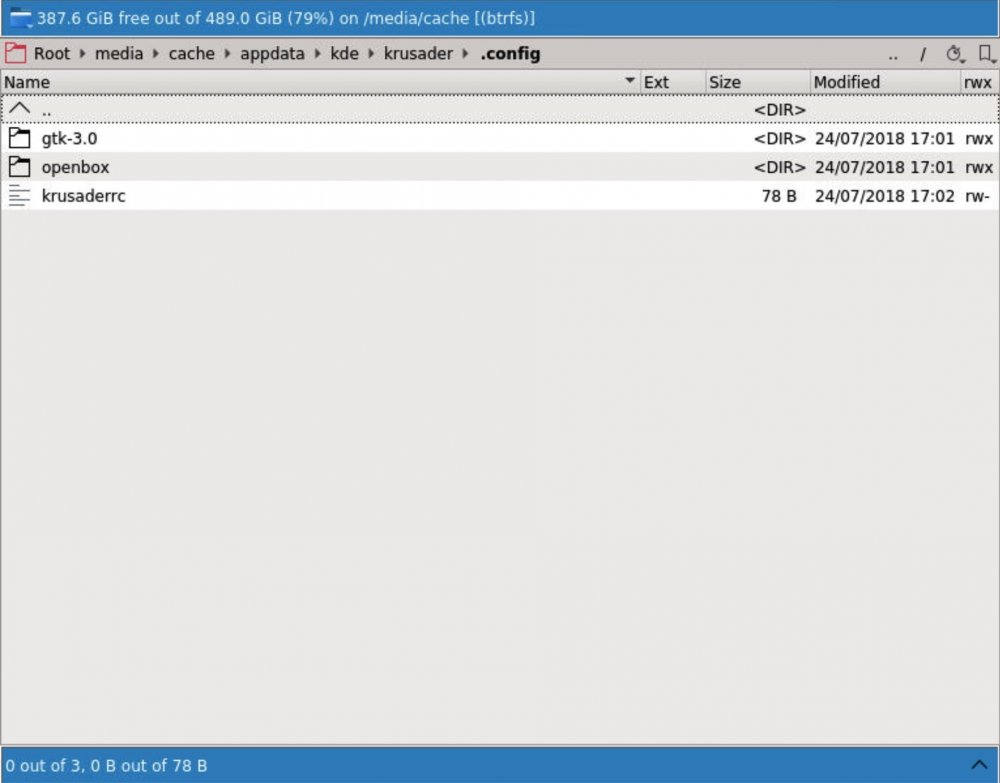
this is what I see then let me try out what you suggested
-
where is the config folder *supposed* to be, and at which point should it have been created in that place? Krusader starts up every time like it was never run before, so my settings always revert back to defaults...probably because it can't put its settings anywhere, right?
-
thank you...here is the output and the log file: root@unRAID:~# ls -al /mnt/cache/appdata/kde total 76 drwxr-xr-x 1 nobody users 220 Jul 24 11:50 ./ drwxrwxrwx 1 nobody users 268 Jul 24 12:08 ../ -rwxr-xr-x 1 nobody users 8196 Jul 24 11:50 .DS_Store* -rwxr-xr-x 1 nobody users 4096 Jul 24 11:50 ._.DS_Store* lrwxrwxrwx 1 nobody users 24 Jan 12 2018 cache-36ce81a7a6d7 -> /var/tmp/kdecache-nobody drwxr-xr-x 1 nobody users 20 Jul 24 17:01 krusader/ -rwxr-xr-x 1 nobody users 162 Jul 23 19:09 perms.txt* drwxr-xr-x 1 nobody users 68 Jul 24 11:50 share/ lrwxrwxrwx 1 nobody users 19 Jan 12 2018 socket-36ce81a7a6d7 -> /tmp/ksocket-nobody -rwxr-xr-x 1 nobody users 41047 Jul 24 18:42 supervisord.log* lrwxrwxrwx 1 nobody users 15 Jan 12 2018 tmp-36ce81a7a6d7 -> /tmp/kde-nobody supervisord.log
-
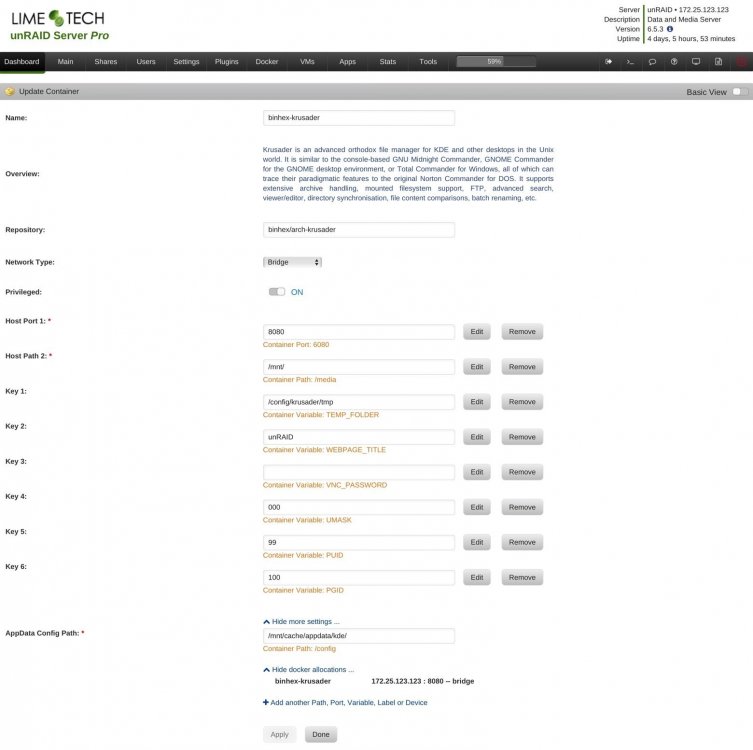
krusader is the only app I have installed, at the moment. inside the kde folder there is no config folder...is that where it should be? the only config folder I could find is appdata/share/config, but that can't be right... let me try this again. so I did: root@unRAID:/mnt/cache/appdata# chown -R nobody:users /mnt/cache/appdata/kde root@unRAID:/mnt/cache/appdata# chmod 755 -R /mnt/cache/appdata/kde restarted Krusader... but when I open the WebUI it again acts like it's the first time and warns me of the Bookmarks not being able to be written. I am sorry that I require so much help on getting this to run properly, and now I have to run for a meeting that I am a little late for...will check in again when I get back and thanks so much for all your help so far!
-
the krusader folder that I have is inside appdata, not inside binhex-krusader. My settings look like this:
-
well, since that was the only config folder I could find inside of the kde directory, I did this: root@unRAID:/mnt/cache/appdata/kde# chown -R nobody:users /mnt/cache/appdata/kde/share/config root@unRAID:/mnt/cache/appdata/kde# chown 755 -R /mnt/cache/appdata/kde/share/config then I stopped Krusader and started it again...upon starting (it seemed to think that was the first time I started it, looking for associated apps again), it again alerted me about not being able to save bookmarks in /home/nobody/.local/share/user-places.xbel what did I miss or do incorrectly?
-
you're right, Frank1940, I did forget that...thanks for the reminder!
-
the only config directory I can find is is mnt/cache/appdata/kde/share is that the one I should be performing the chmod commands on? I ssh'd in, btw, as you suggested.
-
I will try that as soon as my current move operation is finished. can I also use Transmit (the FTP client) to SFTP in and change the permissions of the config folder to 755?
-
ah, got it...here it is. quick additional question: > I installed the deprecated version of Krusader with the appdata path pointing to "krusader", and yours to "kde"...can I safely delete the "krusader" folder now, to avoid confusion? supervisord.log
-
I don't see a supervisord.log file in my flash/config folder...why would that be the case?
-
haha, yeah, you're right about that...thanks for clarifying!
-
Oops, and a second issue that just came up: while the first folder moving operation between disks worked perfectly, my most recent attempt to move a 119.5GB folder from one disk to another has ended in the progress window staying at 99% and not finishing and closing, as it did after my first two move operations. any ideas? Update: 5 minutes later the file-operation progress window did disappear and the folder shows as having been moved completely...maybe this was due to it being about 10 times as large as the first two folders I moved?
-
I am having *exactly* the same issue as jang430 (above ^) and would also love to know how to fix this and use Bokkmarks successfully. And thank you so much for this update to the excellent Krusader, which I have come to rely on for almost everything related to file-maintenance on my trusty old unRAID system. THANK YOU! (beers are a'coming)
-
finally got back from a long trip and was able to try this...Holy Cow! how cool is that?! I never knew of that window either. Thanks so much for posting this, Lev! Kudos given.
-
oh boy, I really do have sooo much to learn, still. thanks, Squid!
-
I trust your judgement on that, trurl...that may very well be true. would you know where that support thread is? I looked inside of the Plugins forum and inside of Docker Containers, but couldn't find a specific thread just for Krusader...I'll keep looking, but should you know, I'd greatly appreciate a link.
-
yup, Krusader's got the stuff to be *the* go-to Web GUI file-manager for unRAID...so close, and yet, still a few things to resolve...the disappearing transfer windows seems like an oversight, more so than a missing feature...after all, it is working, just not after clicking somewhere outside of it. do you know of a link to a support forum for it? is it a GitHub project?
-
it seems that there are quite a few people who are looking for a way to get the transfer window back (include me in that group)...has it been settled that there is simply no way, and that's that? who is the creator of Krusader and is there any chance at all that whoever is in charge of that project to address this? It's probably a long shot to hope for this feature to be added in the near future, but Krusader seems (to me) to be so close to being the perfect Web GUI replacement for Midnight Commander, that it would be a shame to see it stop so close to being just that. If the transfer queue could be added on as a separate pane at the bottom of the dual-pane file panel, it would be such a sweet way to manage unRAID's files without the use of a virtual machine on older systems (like mine), which don't really support VM's. although my Krusader docker just stopped working, out of the blue...but I'll start another thread for that.
-
I know it's an old thread, but in line with what I'll be doing for the next few days/weeks. Just to be sure, when I stop the array, then change the format of an empty disk, then start the array again and let unRAID reformat the empty disk to XFS, the parity is preserved, or not?
-
thanks for reposting, syrys (and for the original post, Squid)! that's the info I had a hard time finding again...followed them and changed the size to 100GB...probably excessive, but until I find the culprit, I don't wanna be bogged down again for a while.


