tillkrueger
Members
-
Joined
-
Last visited
Everything posted by tillkrueger
-
Bingo! Was in bed already, over here in Berlin, when you replied, but just did as you suggested, and it worked. I had to search for how that is done, and found this thread, explaining it. Go to Settings > Docker Turn On Advanced View (small slider in upper right) Set Enable Docker: to No (and Apply) Change Docker Size (and Apply Set Enable Docker: to Yes (and Apply) Thanks again and as always for being so helpful, Squid
-
Yes, I should have...sorry, here they are.
-
when trying to update my binhex-krusader Docker, I get this error: Error: failed to register layer: ApplyLayer exit status 1 stdout: stderr: write /usr/lib/tcl8.6/auto.tcl: no space left on device My Docker memory shows at 79%, so how can I free up enough space to update all of my Dockers without such errors?
-
Alright, then I won't worry for now... I'll return to this when things seem to turn south for real... Thanks!
-
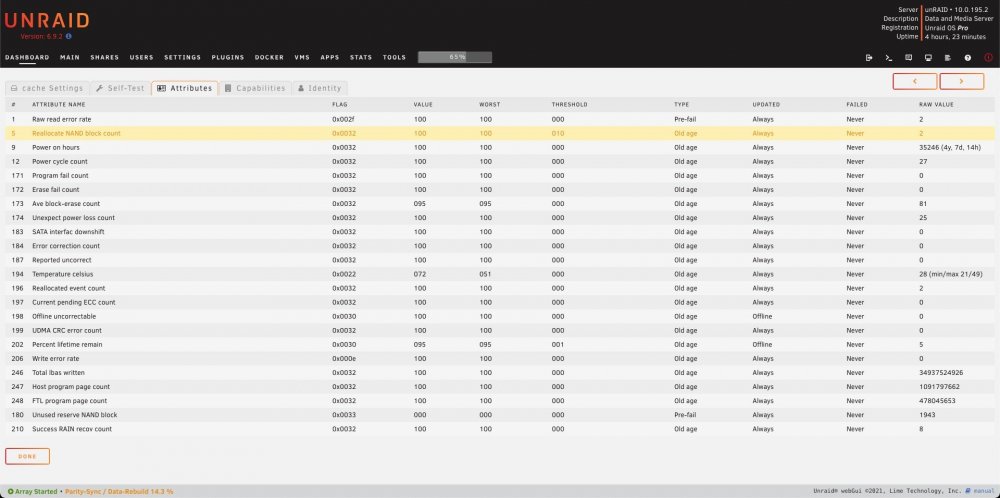
Aaaactually, the reason why I even went into the SMART page for that drive was because of the "error" warning I saw in the Dashboard...looks like there are errors pertaining to the NAND block count (see attached)...is that something to worry about, and if so, what to do?

-
Well, that settles it, then...cheers, JorgeB !
-
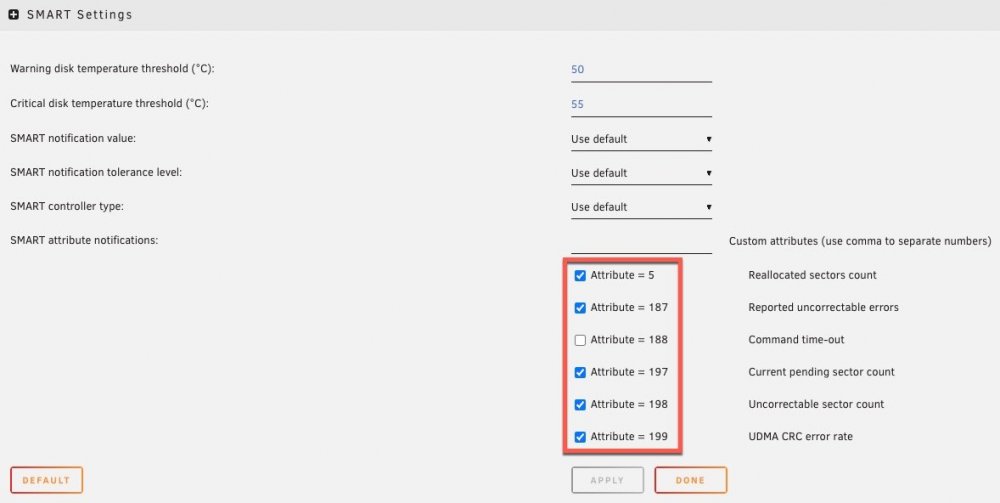
Oh, now that you ask, I may have misinterpreted these numbers (see attached) as the number of errors found...but maybe those numbers refer to the Attribute number given to label a particular error in the log file, when it is found?
-
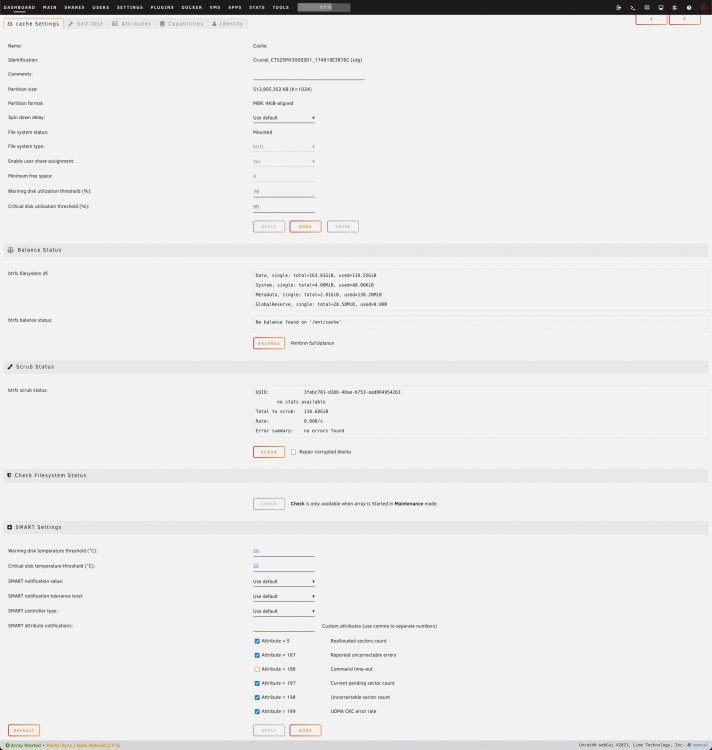
While my parity is rebuilding, I just noticed what looks like a concerning amount of errors on my cache NVM (see attached). Is this within the realm of the acceptable, or is my Crucial NVM near or at the end of its life (it's been in operation for a few years (maybe 3-5), but I don't really copy/move data around or onto the array but once of twice a year). Should I Scrub it with the "Repair corrupted blocks" option, or is it more complex than that?
-
Thanks for the quick response trurl ! I confirmed the error, as you suggested, and started the rebuild of the content to the new drive, without a Preclear...I remember how looong preclears take, and how rarely I did them in the past 15+ years of growing my unRAID. Here's to hoping that it will all return to normal (+2TB) soon. And thanks again for helping me along! Best from Berlin, Till
-
It's been a while (a year or more) that I've had to change anything on my unRAID server, but today, I wanted to upgrade the only remaining 6TB drive to an 8TB. I did a clean shutdown via terminal, directly on my unRAID, then took out the 6TB and replaced it with an 8TB WD80EDAZ shucked from a new WD My Drive enclosure. Now that I am back at home and have taken a look at what I am faced with, I am greeted by the following situation (see attached). So, the new drive shows a CRC error, and I don't want to do anything to jeopardize the health of my array. What is the safest way to proceed? If possible, could anyone give me very specific step-by-step directions to properly have this 8TB take the place of the removed 6TB drive? I faintly remember having to do a Preclear first, or is that not correct? Anyway, what to do, what to do?
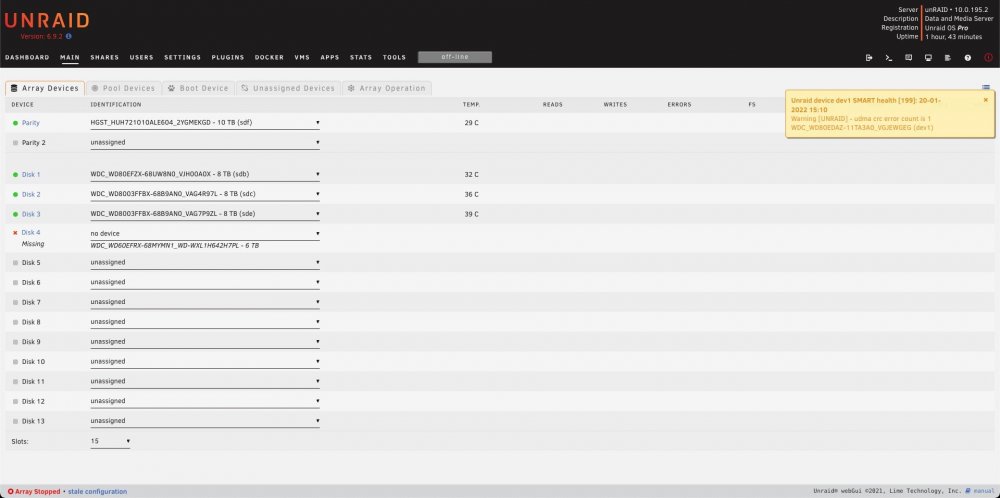
-
I am also now getting the same error message as you, discojon, when starting the WebGUI of my Nextcloud Docker: This version of Nextcloud is not compatible with > PHP 7.3. You are currently running 7.4.14 would you be able to let me know how exactly can I get it to work again? Where exactly is this config folder where you edited versioncheck.php?
-
Ok, I guess I can’t have it all with this, but I am glad to have an easier method to administer and connect to my unRAID by means of your Docker. Thank you! Sent from my iPhone using Tapatalk
-
After ZeroTier stopped working for me for some reason, I was advised to try your Tailscale Docker. So I installed the Tailscale Docker, got the network ID via Ragemachinest instructions and registered it via the link in the console, and now see it in my Tailscale Dashboard. Then installed Tailscale on my MBP. Still no sight of my unRAID system in my Network, though. Maybe I will first need to register my MBP with my Tailscale account as well? I don't see it in my Dashboard. Maybe I don't correctly understand the purpose of Tailscale, but since it was recommended to me as an alternative to ZeroTier, which after first configured showed my unRAID system in my Finder Network, I thought that Tailscale will also server this purpose (amongst other much more lower-level functions, I am sure). Am I misunderstanding what this Docker allows me to do? If the main function I want is to implement unRAID in my local network via the Finder Network *and* get to the unRAID webUI, will this work when correctly configured?
-
Thanks for this fantastic Docker, Dmitry! I do have some questions, though. My unRAID server is hosted at a friend's web agency here in Berlin, and is behind their firewall, accessible only by means of a VPN account they set up for me. It all works well for managing the server via its webUI, but to fully integrate my server into my network to be able to copy files to and from it, it hasn't been ideal. When I first installed and configured your zerotier Docker a few years ago, everything worked like a charm, and my heart skipped a beat from happiness when I saw my unRAID server pop up in my Finder's Network on macOS. Then, one day, I couldn't see my unRAID in my network anymore and after spending a few days trying to check all of the parameters, without finding the culprit, I gave up and disabled the Docker. Now that I have to travel a lot again, I am trying to get back to that glorious point, and have managed to get all my relevant computers (my iMac5K, MBP-2018, and unRAID) recognized as ONLINE in my.zerotier.com, but I can *not* see unRAID in my Finder's Network. Shouldn't it be visible there if everything is configured correctly? Once I leave my home-studio and work elsewhere, should all the computers I have configured at my.zerotier.com still appear in my Finder's Network? In order to log into my unRAID's webUI, should I be able to do so via zerotier alone, or will the company VPN still be necessary to do so? I'd really like to get back to the point of seeing my unRAID server and the iMac at my studio in my Finder's Network, like they did for a short while back then. Wonder what happened, and how to fix it. Any thoughts/advice from you and/or the community would be greatly appreciated. Thanks again for all that you do!
-
Hmm, to be honest, I didn’t know that there is a bookmarks panel for frequently used folders, so I couldn’t tell you. Never used the command line feature either, so I am sorry to say that I can’t be of any help with either one of your questions. But someone here surely must know.
-
I also used Dolphin before I started using Krusader, and felt much more drawn to the UI of Krusader...just seemed more refined and “tight” to me. And when I found binhex Krusader, that impression was further enhanced by binhex’s addition of the windows bar at the bottom, which allows direct access to all active windows of your Krusader instance, like the queue, the directory sizes tool, and everything else Krusader can do in parallel to being the excellent file manager that it is.
-
I am not aware of having used geoip, and don't even know what it is used for, or what part of Letsencrypt uses it. I saw it mentioned in this thread, and that it was deprecated, but shrugged it off as "well, I'm not using it, so that can't be it"...but maybe I did use it unknowingly? what is it used for or by?
-
After 3hrs with a *very* generous unRAID'er here in Berlin, Toobie, who is running a very similar setup as I am, we isolated the issues I was having to the updated letsencrypt Docker...after figuring out how to downgrade to the most recent previous version (by putting "linuxserver/letsencrypt:0.36.0-ls49" into Letsencrypt's "Repository" field in its settings...that is if you're on INTEL 64bit, not ARM!), the Docker re-installed itself and, lo-and-behold, my site could be reached again. Now what exactly caused it to not be reachable anymore after the upgrade to the newest version is beyond me (connection refused errors in all browsers), but I thought I'd post what fixed it for me here, in case someone else's site runs into the same issue. So happy that aptalca's amazing Letsencrypt is working again, and for the gracious gift of time that Toobie presented me with today, to get me back on track. Will have to be more careful with the "Update All" button from here on out.
-
Thanks denishay, and yes, that is exactly what I had hoped to accomplish when I posted this, but had no idea of how to. I have since found more info about the External Storage extension, and managed to get it to work like that with the help of the esteemed community, here. A lot of things to look out for a configure correctly before it works like that, even though that once configured correctly, it makes complete sense.
-
After updating the Docker today, and doing nothing that I can think of (what I did change in my settings and config files, I have since un-done), I can't connect to my domain anymore...log is attached, and letsencrypt.status.io appears to show some issues...is it something I did, or is there a problem outside of my control? 2019-08-05_log-02.rtf
-
your English is perfectly fine. I'm gonna experiment with this for a bit now...so cool! thanks for being so helpful.
-
ok, you really helped me gain a better understanding of what is what, and how to use it...thanks so much for that! so, does a member's reputation value, of which you have +46 (and I only +4, lowly me), get calculated from likes or upvotes, or what? I liked and upvoted your response that got me on the right path, but is that enough to gain you some reputation? it's the only way I can think of, right now, to express my appreciation.
-
...and I would need to add each of those mappings into the Docker container's settings first, before being able to reference them in External storage?
-
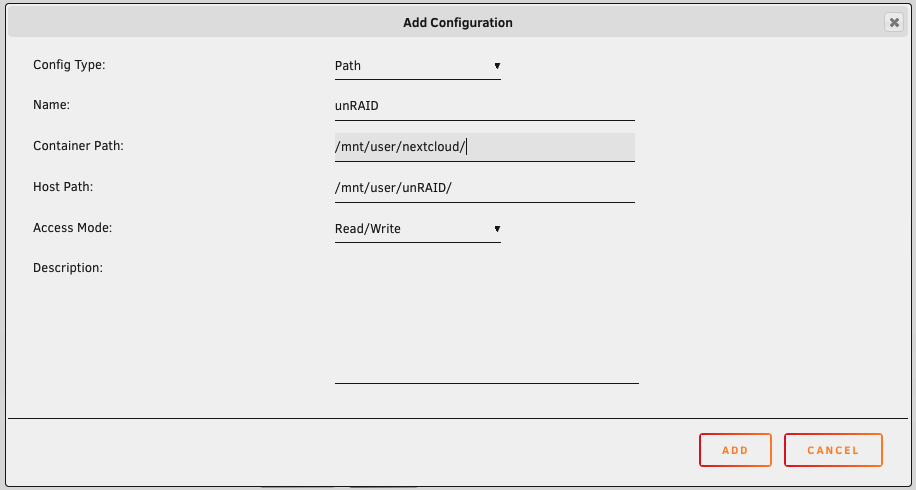
Ok, I used /Data in the Container path field, hit "Add", and verbose mode announced the successful addition. Then, in the "External storage" settings, I entered "Data" into the "Folder name" field, set "External storage" to "Local", "Authentication" to "None", "Configuration" to "/Data", and "Available for" to allow only "admins" for now, since I am the only user of this system, for now. I also enabled "Allow users to mount external storage", the clicked the checkmark, and...got a green checkmark for the first time!! 😄 And lo and behold, inside of my Nextcloud "All files" section, I now see "Data" and all of my unRAID folders inside of it. Brilliant, uldise, you just made my week! So, from there I can add addition path mappings, for example, directly into "Projects", "Media", "Clients", etc., I take it?
-
Before I hit "Add" and lose my Docker again, would this be correct?