





johner
Members
-
Joined
-
Last visited
Everything posted by johner
-
I think you may have suffered from a defect where the agent sqlite DB can get corrupted. I've uploaded a new version with this fix. However, you may need to delete the codex folder from the home path. How to recover a stuck agentIf your agent gets stuck on the "Waking..." screen or starts but complains about a corrupted database, follow these steps. You'll lose the affected agent's conversation history (which is already broken), but everything else — your workspaces, settings, and other agents — stays intact. Step 1 — Open a terminalIn Unraid's top-right toolbar, click the >_ terminal icon. A black terminal window opens with a prompt like root@Tower:~#. Step 2 — Confirm you're looking at the right placeType each command and press Enter after each: cd /tmp/unraid-aicliagents/work/root/home ls -la You should see directories starting with a dot — .codex, .copilot, .local, etc. Those are the per-agent state folders. If the cd command fails ("No such file or directory") or ls -la shows an empty list, the plugin's overlay isn't mounted for your user. Open and immediately close the plugin's terminal once in the web UI (this triggers the mount), then re-run the two commands above. Step 3 — Delete the broken agent's folderRun one of these commands for the agent that's misbehaving: ┌────────────────┬──────────────────────────────┐ │ Agent │ Command │ ├────────────────┼──────────────────────────────┤ │ Codex CLI │ rm -rf .codex │ ├────────────────┼──────────────────────────────┤ │ GitHub Copilot │ rm -rf .copilot │ ├────────────────┼──────────────────────────────┤ │ Kilo Code │ rm -rf .local/share/kilo │ ├────────────────┼──────────────────────────────┤ │ OpenCode │ rm -rf .local/share/opencode │ ├────────────────┼──────────────────────────────┤ │ Goose │ rm -rf .local/share/goose │ └────────────────┴──────────────────────────────┘ If you're not sure which agent is at fault, run more than one — each agent rebuilds its folder from scratch the next time it starts. You'll only lose conversation history for the agents you delete; your workspaces, settings, and other agents stay exactly as they were. Step 4 — Re-launch the agent and verify1. Back in the plugin's web UI, open a workspace that uses the agent you just cleared. 2. The "Waking..." screen should clear within 5–15 seconds and you should see a normal agent prompt. 3. Type a quick message ("hello") and confirm the agent responds. 4. Close that workspace and re-open it — confirm the hang doesn't come back. If the problem still happens, please post the last 50 lines of the plugin's debug log to the support thread. You can grab it in the terminal with: tail -50 /boot/config/plugins/unraid-aicliagents/debug.log
-
Should be fixed now, upgrade and let me know please.
-
It's there now, I haven't done much to configure and test it, I'd appreciate if you could. If you need to run an initial command to set it up, click the terminal icon in the drawer tab, it'll load a terminal overlay in the same worksapce where you can run what you need.
-
I released a new version, let me know if you have any issues or requests. It's a big release under the covers, I already have a new release planned to fix a couple issues since Unraid 7.3.0. It works though.
-
ok new version up, with all fixes/changes. Let me know how you go! I was also able to include this request:
-
how weird I was thinking about this today! Let me get the release out, then I'll circle back to this one.
-
Ok I fixed the other issues, I’ll take a look at fixing this one and make the values more configurable. I think swappiness is system wide, but will double check.
-
Hi, ok let me check, I’ve been working on other updates, I’m now away for a few days, so might take a week or so. Did you get it running by forking it? Thanks for letting me know.
-
Hey both, I’m away for 4days, it sounds like you’re both up and running. I’ll take a look to see if there are any race conditions etc. I’ll change it to auto save too, will be a better experience by the sounds!
-
hi, Thx again for the feedback, I’ll make a change to increase swapiness, I never really checked the actual limits! Does it allow you to create on HDD? I agree anything is better than OOM, I’ll tone down the ‘opinions’ 🤣 AI has helped me build this, it can be quite opinionated!
-
Oh interesting, I thought it was the other way around at one point! Let me check the index files. Thank you for reporting.
-
The plugin currently only supports NPM installers, as it's embedded in the versioning etc. solution. I have claude and gemini helping with a more generic feature, i'll test it on Goose first :-) given me a week or so as I'm still building out automated test cases, so testing all the moving parts takes time. Will you be willing to test it out?
-
hi, can you check the latest version and see if it still happens please? There are now per agent settings in the store tab to restrict the memory per agent, default is 4gb. Also, I have a second plugin, 'zram' it sets up an in memory compress swap, this has helped my poor old 12gb server instance a lot! install that and set to 75% of your memory. You sacriffice CPU for compression/decompression but can get upto 3x more memory. You can now also get it to set up a fall back to ssd if you have one that meets the criteria, so you should never run out of memory forcing VMs to be shutdown.
-
OK... new version out with LOTS of fixes and changes. Let me know if any issues and any features you want to see.
-
Hi, sorry I’ve been busy refactoring and uplifting the storage architecture, it will be a lot more standard and reliable. It’s nearly done, there are a lot of test cases to work through! Likely another day or so.
-
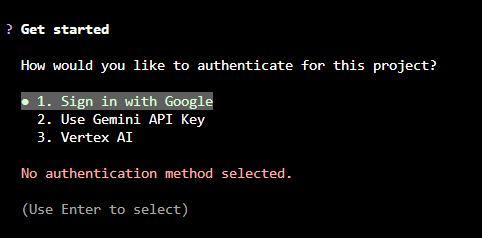
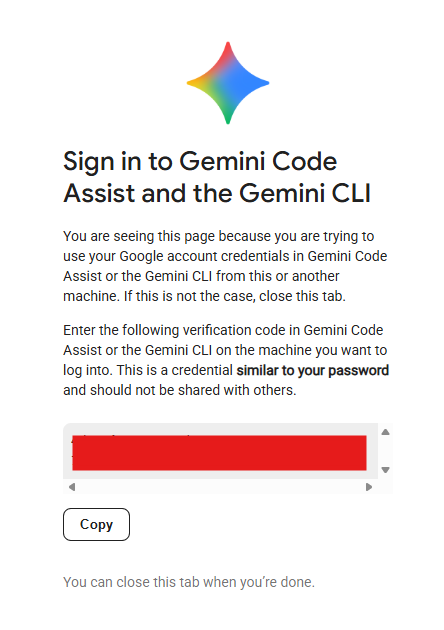
yes this is how i run. When you first run the gemini cli tool, you select the first option (Sign in with Google), it will then displace a web link, you click that, it'll open the google sign in page in you browser, and once you've given it permission, you copy the code, go back to Unriad AI CLI TAB and paste in the code, it will then persist this in the home storage for gemini cli for all worksapces you use it on. So on launch you'll see this, if not type /auth and select sign out and relaunch Then you'll get: You should be able to click the HTTPS link Click and sign in then: Click copy, and paste in the terminal (see first screenshot)



-
Ok so I think the best I can do is use a similar approach to limetech, and use squashFS, it'll give a similar outcome to a compressed btrfs loopdevice without the complexity. I'll split the agents across files to minimise risk of hitting the 4gb fat32 limit on the USB. I'll need to figure this all out!
-
The latest version should have a small terminal icon button on the little drawer tab to launch a pop up terminal with the home set and workspace path ready to go.
-
if you have the unassigned devices plugin you should be able to see if it's 'writing' to flash, which is what sloooows it down. I've tried a few different approaches, I'm moving any file operations into the runtime out of the plugin install/upgrade script, it'll take some time to then get it reliable while not in a focused upgrade session. You should be able to close the window and it'll run in the background. Ultimately I think the only real way to improve this is to avoid the USB and RAM drives, which means array and the problems that brings if down, or an unassigned device which isn't guarenteed. I'll see if I can find a better/more creative way! Thx for your patience.
-
Are you dropping into the unraid shell? as the cli tab doesn't allow dropping into the shell. I might add this option as the home path in the unriad shell is different (the default for root), it's automatically overridden in the cli tab. You might be able to temporarily override the unraid shell home path, google came up with: export HOME=/mnt/user/your_new_path cd $HOME
-
Hi, there is a 4gb limit on fat32 devices like the USB stick. Your /mnt/nvme/appdata is this an 'unassigned devices' direct disk mapping location or an array location? I've yet to test unassigned devices as I need to find or but one to put in, let me accellerate that! What agent(s) are you using?
-
ok I'll check the migration logic, thanks for letting me know and I'm glad you resolved it manually!
-
so in the new version there is a dedicated loop back file called agent.img on the USB (by default), it is mounted /usr/local/emhttp/plugins/unraid-aicliagents/agents
-
because I need it to run when the array is offline, which is the reason to not use docker. I've nearly finished testing an upgrade that allows a user to run agents from usb (read only) and home in ram and occasionally backed up to USB to (deltas) to minimise USB wear. With it a user will be able to move the agent store and/or home to arrary (if you don't mind it not being available when stopped), or ideally to an unassigned device mount which will still be available when the array is stopped.
-
I’ve nearly finished a version which changes the approach to avoid these issues, I’m about to sleep, so will work on it tomorrow, should be available in about 12-18h hopefully if no major issues.



