





johner
Members
-
Joined
-
Last visited
Everything posted by johner
-
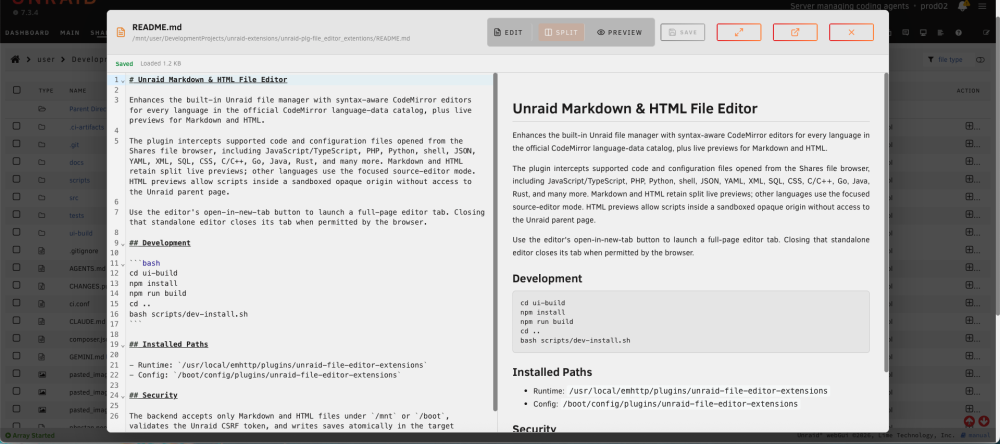
Hi, I have created a new plugin to allow you to swap the built-in Unraid text editor for a CodeMirror-backed editor with live preview and full-page mode, aimed at Markdown, code and HTML files opened via Shares > Browse. It adds split/preview editing, syntax highlighting, a sandboxed HTML preview, CSRF validation, and atomic saves. Other file types still use the native Dynamix editor. See here: https://github.com/johnpwhite/unraid-plg-file_editor_extentions It's not yet available in the CA App Store, in the mean time, you may install it manually with this link: https://raw.githubusercontent.com/johnpwhite/unraid-plg-file_editor_extentions/main/unraid-file-editor-extensions.plg It's been coded with Claude and uses my framework for testing and deployment so is reasonably robust. Shout if any issues. You can find it under Shares > Browse Screen shot Let me know if any bugs or you want additional features. Thanks John
-
The challenge is I'm not able to assess the implications/risks for all use cases. My intent was - get them there, raise awareness, let people vote, and they can be closed easy enough if it becomes a problem. Ideally, Limetech would have already raised these, so customers searching the CVE board would have found them, and got an opinion on if the product they bought has an issue with these/can be ignored, along with an ETA for resolution and release if they deemed they should be fixed. In this modern age, I'll be surprised if Limetech are not using AI to assess using their broad exposure to the user base (forum contnt), and expertise to process these - it's the future, I potentially jumped the gun! Thanks for taking the time to respond. John
-
great work. If people want to take it further, i took it too far with AI CLI Agents. https://forums.unraid.net/topic/197460-plugin-support-unraid-tab-for-ai-cli-coding-agents-antigravity-cli-gemini-cli-claude-code-opencode-kilo-code-pi-coder-codex-cli-factory-droid-cli-copilot-nano-coder-qwen-coder-goose/page/4/#findComment-1638985
-
I got my bot to log a https://product.unraid.net/?bucket_id=18101 issue for each package released with Unraid base OS that has one or more CVEs associated with it. I might get my account banned as there was about 60! lol. I recommend creating a plugin support thread for your plugin work vs working in here.
-
Ha! this is great, i got claude to integrate trivy on my nixos server master and scanned my two prod unraid hosts which lit up! I'm just getting it to review the security issues log above to see how to log them all individually :-) I might look to see if in my hybrid env with nixos and unraid if it makes sense to deploy your plugin - assuming you'll keep it alive. I like stuff i can 'see' (in the unraid UI) than stuff claude as scripted behind the scenes
-
thank you! I'm trying hard to move away from squashfs, so it only is used now for USB based home/agents, with internal boot I hope we won't need it if people have moved. Yes the migration has had a few issues, I worked through a numner with Claude, I'll get Fable on your feed back and get codex to double check. Thanks for your patience - i run the plugin on two unraid machines, with agents spread across them, talking to each other - it's fun watching them work together.
-
i created a zram plugin to compress swap into memory, it also supports a real swap like the plugin mentioned here. check CA App Store
-
Hi @Joly0 Sorry, I do accept, I let Claude and Codex do near all the work now, I have a reasonably good set of processes and controls, and this was a gap. It's working through merging and responding now. Currently I have a private repo with significantly more content such as test harness, tools, build scripts etc. I only push what is needed to release where I can as there is a lot of noise other wise - Including hiding the multitude of commits, so I was getting it to 'batch up' for release. I've got it to recreate the sub-commits going forward. Thanks for your submission, it's appreciated. Thanks John
-
Hi bobokun, thanks for the report. You found a real fault, and I can see it on my own test server too. What it is: The plugin has a small web endpoint for linked Relay clients. It was saved as a .page file, but it is not a menu page and has no page header. Unraid reads every .page file whenever it draws a page, so it logged "Invalid .page format" each time. It is harmless, but it fills the system log. The fix: The endpoint is now a plain PHP file that the plugin loads itself, so Unraid no longer sees it. The update also removes the old file. I checked that the message stops after the update, and Relay linking is not affected. When: The fix will come with the next update. I'll post here when it is out. Until then: you can ignore the message, because nothing breaks. If you want the log quiet, you can delete /usr/local/emhttp/plugins/unraid-aicliagents/AICliRelayMcp.page. The message will come back after a reboot or a plugin reinstall, that step on a newer build than the public one, so please only do it if you are comfortable with it. Thanks again for the clear report.
-
Hi all, thank you for the reports and the patience. A new release is now in the Community Applications store: version 2026.10.01.04. It also includes the release before it (2026.09.30.04), so if you are still on 2026.09.15.08 you get everything in one update. Please update soon if you run Unraid 7.3.2. In the old version the home backup step did not write a backup file on that Unraid version. The plugin then refused to merge your home, and every save packed the live database instead. This is fixed. The backup is now written and checked before the plugin uses it. Other fixes for problems you reported Storage on /mnt/user is allowed, but the plugin now advises against it. It also uses the real pool path when the share is set to "cache only". A rebuild of the agent layers no longer switches the agent in the middle of the build. A build that would lose the agent program is now refused. Cache folders are left out of the compressed layer instead of being deleted from your live home. The installer shows its progress lines again. A workspace order in the drawer now stays after an update. A new workspace waits until it is ready before it loads its terminal. New A workspace can continue by itself after a temporary model error, and you can schedule a Continue for any workspace. Voice: you can set up natural voice and local dictation from Settings. Please tell me if anything still goes wrong after the update. It helps most if you say your Unraid version and which agent you use.
-
Thank you, this is fixed in the next release (shortly - lots of fixes and updates!)
-
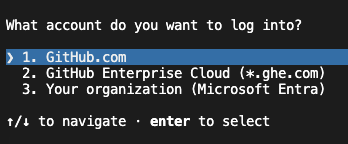
Hi, When you start the agent in a workspace, type /login, you'll then get a menu of options: Is this what you meant? Thanks John
-
Thanks, done: https://product.unraid.net/p/unraid-connections-new-plugin
-
Hi, I was dipping the toes into this as I didn't want to open people up to security risks by rushing in, I think this would be useful. I have a few defects to fix, I'll then focus on this idea - thank you!
-
Hi, I performed a fresh install on Unraid 7.3.2 from the app store, tested claude and codex, chrome and safari (both mac), all seems ok. Let me know if you were able to get more diagnostics. Thanks John
-
> Thanks > > ENOENT: no such file or directory, mkdir > /tmp/unraid-aicliagents/work/root/home/.cache/opencode/bin > > The current launcher already creates the required parent cache directory before OpenCode starts, so this is unlikely to be a simple missing-directory fix. It suggests either a timing race, a managed-home remount/sync occurring during launch, or an older launcher generation still being used. > > Before trying again, could you please provide: > > 1. The exact plugin and OpenCode versions. > 2. Whether both workspaces use OpenCode, and whether they use different workspace folders. > 3. Your configured agent-home/storage location — default, USB, pool, array, or Unassigned Device. > 4. Whether a backup, home consolidation, plugin upgrade, or storage-location change was happening around the same time. > 5. The relevant timestamp and debug-log lines covering the first workspace launch and the failed second launch. > 6. Whether pressing Enter to retry succeeds after the first workspace is closed. > > Please avoid repeatedly retrying if the server becomes unstable. The report that the host became unreachable after moving storage off USB is being treated as a separate host-stability concern
-
> Thanks for reporting this > > The confirmed problems are: > > - the Relay listener can survive an upgrade while still running old plugin code; > - Relay currently enables its external listener/key path too eagerly; > - workspace browsing can perform large directory scans through /mnt/user; (which can expose the Unraid shfs fuser hang issue I can't work around on Array style shares) > - agent workspaces also default to /mnt/user, which can put heavy filesystem pressure on Unraid’s user-share layer. > > Those last two are plausible contributors to the host becoming unreachable, although I cannot prove that from the report alone. I am treating them as high-priority stability work. > > To identify the remaining reports, could you please provide: > > 1. Plugin version, Unraid version, browser and browser version. > 2. For onboarding or JavaScript failures: the first browser Dev Tools Console error/stack and any failed Network request. > 3. For the terminal issue: which terminal is affected — the normal Unraid top-bar terminal, the AICliAgents terminal, or creating a new workspace — plus a screenshot/error and whether it works from the Dashboard in the same browser session. > > 4. If the server becomes unreachable again, please do not deliberately repeat it. After recovery, send the approximate time, Unraid Diagnostics, and /boot/logs/syslog-previous if available. > > That will let me separate browser/UI failures from the host-level filesystem issue and add targeted regression coverage
-
so a couple things, worth noting, if your Unraid host still boots off USB, the default settings are to install both the home and agents to a path on the USB, so any activity to bulk writ will be slow, such as agent upgrades, on home area consolidation. You can move these else where, ideally not on the array if you want it to function with the array offline - try an unassigned drive (see that plugin). I have added more onine feedback of status updates on home/agent activity (better progress tracking), that'll be available once I finish testing this new version. Also, I noticed agents that perform certain hard hitting commands against the \mnt\user paths it can block Unraids merged file system, this is a limitation of Unraid's fs as I understand it, abd so far I have a rule/memory line to tell the agent to use the underlying paths, such as \mnt\cache, or to be less aggressive with the find, grep etc. I might need some further context from you both, but let me see if claude can find anything suspicious in the code given the commentary. Thanks for being patient!
-
thanks for reporting, would you mind testing in the latest version please?
-
Hey @Squid , Would you mind checking out this plugin to see if it meets the criteria for the app store please?
-
I've updated the link, would you mind trying again please?
-
Sorry, didn’t get the diagnostics, and yes at one point I got it to group a ton of containers it was managing. It was a mix of auto and manual config.
-
only if you're still having issues with the new version, else skip it.
-
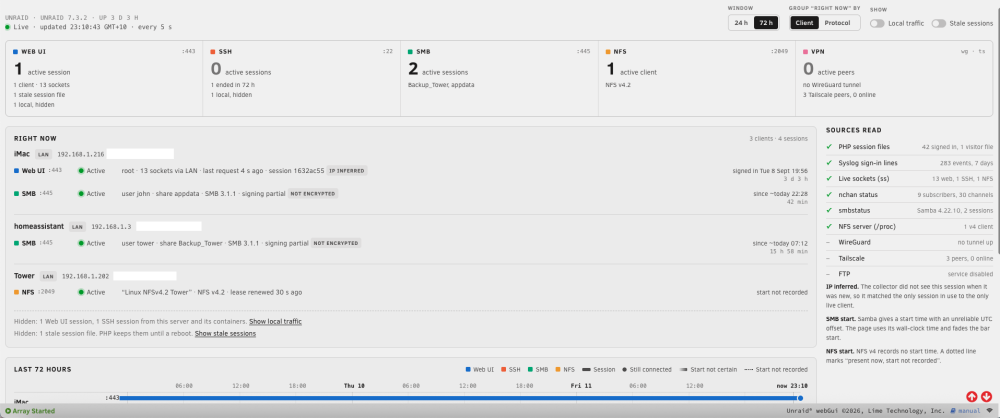
Hi, I have created a new plugin to allow you to see all the connections to your unraid servers: https://github.com/johnpwhite/unraid-plg-connections It's not yet available in the CA App Store, in the mean time, you may install it manually with this link: https://github.com/johnpwhite/unraid-plg-connections/raw/main/unraid-connections.plg It's been coded with Claude and uses my framework for testing and deployment so is reasonably robust. Shout if any issues. You can find it under Tools > Unraid OS > Connected Clients Screen shot (mac addresses redacted) Let me know your thoughts and asks! Thanks John
-
Hi, I had an issue, this is what my bot figured out. Thx! Bug: a folder whose id is not pure base64 can never be deleted — and trying freezes the pagePlugin: Folder View 3 (folder.view3) 2026.08.28 Symptom: duplicate folders the UI refuses to remove, and a page that freezes behind a spinner when you try to delete one. What I sawThree folders named "LLM infra" on the Docker page. Two were empty and would not delete. The config held these keys: grp_llm_infra LLM infra containers=[] <- stuck 5xJlQxP162Ql9LjIXLs LLM infra containers=[llamacpp,ollama,LiteLLM,litellm-db] <- the real one yqzdeavmb0bCdsOQ3A LLM infra containers=[] Root causegenerateId() mints ids from base64 with +, / and = stripped, so a folder id the plugin creates is always [A-Za-z0-9]{1,20}: // server/lib.php:1547 function generateId(int $length = 20) : string { return substr(str_replace(['+', '/', '='], '', base64_encode(random_bytes(...))), 0, $length); } But three code paths validate ids against the full base64 alphabet, which allows the three characters generateId() removes and forbids everything else — including _ and -: // server/delete.php:6 if (empty($id) || !preg_match('/^[A-Za-z0-9+\/=]+$/', $id)) { http_response_code(400); exit; } // server/update.php:6 if (!empty($id) && !preg_match('/^[A-Za-z0-9+\/=]+$/', $id)) { http_response_code(400); exit; } // server/lib.php:785 (updateFolderIds) if (!preg_match('/^[A-Za-z0-9+\/=]+$/', $folderId)) continue; So a folder keyed grp_llm_infra is unreachable by the plugin's own UI: Delete → HTTP 400, nothing happens. Edit / save settings → HTTP 400, nothing happens. Container membership → silently skipped, so the folder can never stop being empty. This is why the stuck folder showed containers: [] while its containerImages still named the containers someone had put in it. It is a permanent, self-inflicted orphan: the one operation that would clear it is the one operation its id forbids. The worse knock-on: deleting one of these freezes the pageThree of the four delete entry points await the POST with no rejection handling, after showing a full-screen spinner overlay: // scripts/shared.js:700 — fv3RmFolder, used by the Docker tab (docker.js:801) // and the VMs tab (vm.js:471) // scripts/dashboard.js:816 — rmDockerFolder, used by the Dashboard (dashboard.js:1074) $('div.spinner.fixed').show('slow'); await $.post('/plugins/folder.view3/server/delete.php', { type: type, id: id }).promise(); setTimeout(loadlist, 500); The 400 rejects the promise, the await throws, and nothing catches it. So: loadlist is never scheduled, the swal stays open with showLoaderOnConfirm: true — buttons disabled, spinner running, and div.spinner.fixed, shown one line earlier, is never hidden. The result is a full-screen overlay plus a locked modal with no way out but a page reload. It reads as "the browser hung when I deleted that folder". The page is not busy — it is covered by two spinners that nothing will ever dismiss. Only scripts/folderview3.js:240 (the Folder View settings page) wraps the POST in try/catch, and that one correctly reports "Failed to delete folder: Bad Request". So whether this bug is a readable error or a frozen page depends purely on which of the four screens you happened to delete from — and the three that freeze are the three people actually use. This is the fix worth taking first, independently of the id validation: every one of these callers needs the try/catch that folderview3.js already has, hiding the spinner in a finally. Then even an unexpected server error leaves a usable page. The knock-on: "Remove ALL folders" deletes nothingscripts/folderview3.js:276 loops every id inside a single try: for (const cid of Object.keys(dockers)) { await $.post('/plugins/folder.view3/server/delete.php', { type: 'docker', id: cid }).promise(); } The first 400 rejects the promise, the loop aborts, and the catch shows a generic "Failed to clear all folders". Object keys are in insertion order, so if the unreachable folder is early — mine was first — a bulk clear removes nothing at all and gives no clue why. That is what makes this look like "the folders cannot be deleted" rather than "one id is bad". Suggested fixWiden the three validators to cover any key that can legitimately be in the file, while still rejecting nothing the plugin needs to reject (the id is a JSON key, never a path): if (!preg_match('#^[A-Za-z0-9+/=_-]{1,128}$#', $id)) { ... } Then three behaviour fixes, the first of which matters most — it makes every failure readable instead of fatal to the page: Handle the rejection in every delete caller (shared.js:700, dashboard.js:816), the way folderview3.js:240 already does, and hide div.spinner.fixed in a finally. This one turns a frozen page into a readable error, whatever the server says. Never let a delete be refused for the id's shape. Deleting is the escape hatch. If any validation must stay, delete should be the one path that always accepts an existing key. Do not abort the bulk clear on one failure. Collect the failures, delete the rest, and report which ids were refused — the current generic error hides the single bad key. ReproAdd a folder to /boot/config/plugins/folder.view3/docker.json under a key containing _ or - (a UUID key does it, which is what automation tends to write). Reload the Docker page. The folder appears. Delete it from the Docker tab, the VMs tab or the Dashboard → the page freezes behind a spinner that never clears (400 in the network tab). Only a reload recovers it. Delete it from the Folder View settings page instead → a readable "Bad Request" error. Try "Remove ALL folders" → nothing is deleted at all, generic error. Workaround until it is fixedEdit /boot/config/plugins/folder.view3/docker.json by hand — back it up first, stop at a valid JSON object, and re-key the folder rather than deleting it, so its settings and membership survive: "grp_llm_infra": { ... } → "VHlVa0Cw7yvX13LPgDVe": { ... } Any key of 20 or fewer letters and digits works. Reload the Docker page and the folder behaves normally again. Note for anyone scripting this fileIf you register folders from a script, mint the key as [A-Za-z0-9]{1,20}. A UUID looks like the safe choice and is exactly the one that gets stuck.


