





johner
Members
-
Joined
-
Last visited
Everything posted by johner
-
Hi, Yes I had a similar issue with VMs stopping. There is a chance the RAM disk got exhausted, I’m working on moving the installers back to usb / alternative. In the interim, if you google ‘Unraid increase RAM disk’ or the like, you should be able to give it some breathing room. Else/and uninstall any agents you’re not using often until I fix. Thanks for reporting.
-
Sounds like a bug or two! I’ll try and fix those.
-
Is this in Claude? In Gemini I had to change a setting to use alt screen buffer. Have a google to see if something similar on the Linux version of Claude. I’ll review the other response too.
-
Hi, Try the new version. You should now be able to drop into the normal unraid shell (top right icon) or ssh: The commands are mapped to your persistant home and aliased, so you should now be able to run claude mcp add etc. Let me know how you go Thanks John

-
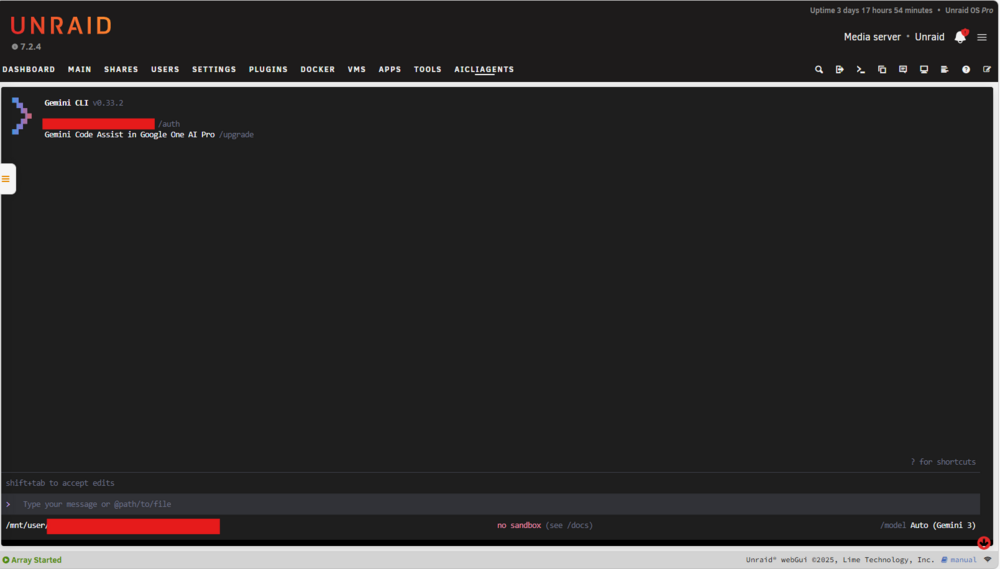
can you send a screen shot please? I'm not familiar with what the left side menu is, i'll go investigate though as curious now! UPDATE: I had a quick check of settings, and a google search, it appears you're using a custom theme - is that right? If not, can you point me to where the setting is please? This is how it renders on mine with the regular menu: The tab on the left to open the drawer can be moved up and down.
-
Hi Sanjay. I have updated the plugin, quite a few changes, a couple for you to test: 1) Gemini CLI now installs via npm like the others, you might need to uninstall then reinstall. Hopefully the docs are now there - i'm not sure what to look for to test. 2) I changed the active location for home to be /tmp/... this gives the highest performance, removes the wear concern, but you'll lose it on reboot 3) The plugin will allow you to manually back up on click of a button in settings, on a schedule, or automatically when all workspaces are closed. It backs up to usb as on reboot it will restore back into ram. 4) currently you can't change the home path due to the above changes, if you really want to make it editable again, let me know, but using the array defeats the point of the plugin of being there to help when you have array, or docker issues etc. Thanks John
-
Hi, I changed the approach to use npm yesterday, I haven’t pushed to GitHub yet as working through a couple defects on new features. I’ll try and get it out tonight or tomorrow (I’m in Australia). I can change the default but I wanted it to work with the array down and didn’t want to risk losing anything. I’ll get Gemini to add a backup feature :-) The location can be changed on the settings page. Thanks for your feedback!
-
haha using llms.txt could be a fund way to cause havoc with openclaw instances
-
wow this is exactly what we need. Assuming you lead the charge, have you tried to get support from @limetech to endorse this? I'd love to take this and convert to a skill and workflow (or a set of) for AI coding agents, and then publish them. In the interim, have you considered adding a https://llmstxt.org/ Thanks John
-
sure objections welcomed. This is not about code review, I hear your point though, however if one doesn't know what is right or wrong as the information is scattered in unofficial sources, a self assessment/review doesn't help, my point was more it's about quality/security checks pre-publish, given once a repo is added plugins and dockers are not automatically added implies someone is approving something against a check list I assume? I don't have time to stab in the dark, I'm using AI to help analyse existing plugins and unraid frmaework code, but it wont capture everything. I'll totally be research the slackware topic and caching and adding to my standards for agents to follow.
-
thank you for the feedback! I've really struggled to find the standards, I tried following the forum posts but it's just too difficult. Is there a dev portal/wiki with all of this valuable standards based info in? I'm building out a set of agent files to capture the standards, so far they have been reverse engineering from the Unraid web gui public repo that has both the ui framework (obviosuly) and example/system plugins. The future is agentic coding of these, I assumed the unraid team review them prior to adding them to the CA App Store? There's a lot of utility in these agents, Limetech and the community shold be embracing them - I really hope limetech come up with a formal set of skills and workflows so I can replace mine! Docker vs Plugin - for me I wanted to be able to use these tools to manage the server, if docker is disabled then understandably these wouldn't be available. I think I cover root as you can change the user (I didn't add the feature to auto create a new user, I have this on my list) and caching - updates follow a similar approach to plugins, where on the settings page it performs a check, then enables the upgrade option if the user wants to perform it. I'll double check old cahced versions get removed - a simple change if not. I spent a lot of time on the uninstaller to ensure everything gets clean up, with the exception of settings/home directory contents. I was thinking of adding an archive feature to auto archive then delete the working folders.
-
Ha! we had a similar idea! I got gemini and claude to add a tab with the terminal embedded for those that don't want to manually SSH/use the standard root one which times our and destroys the session. AI coding agents makes making plugins soooo easy now.
-
I'm using Gemini CLI, it's been such a great experience building plugin's with it, there is no way I would have had the time to do so before, so they would never have materialised. It does all the hard work of figuring out how to make useful stuff work with Unraids framework.
-
Thanks for the feedback! Let me know if you need any changes/features added.
-
hi @Squid I think this thread is ready to move to the plugin support area, is that something I can do myself? if not, would you do the honours please?
-
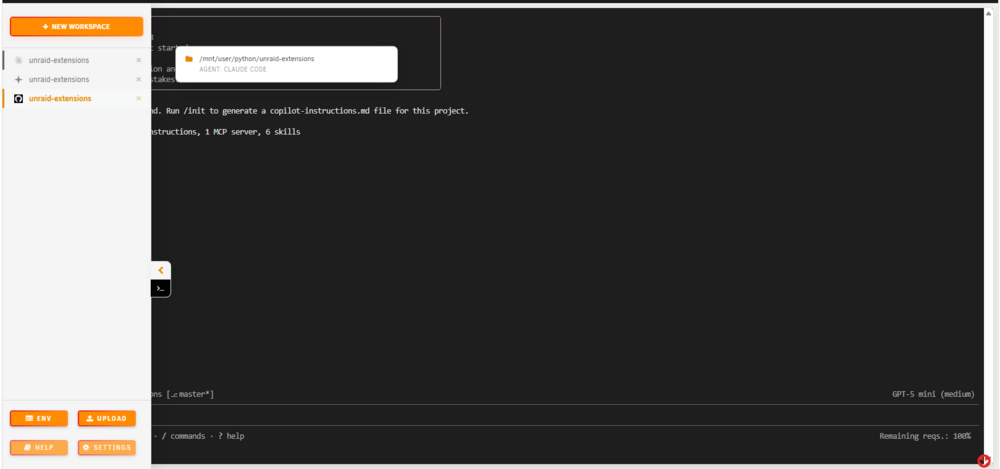
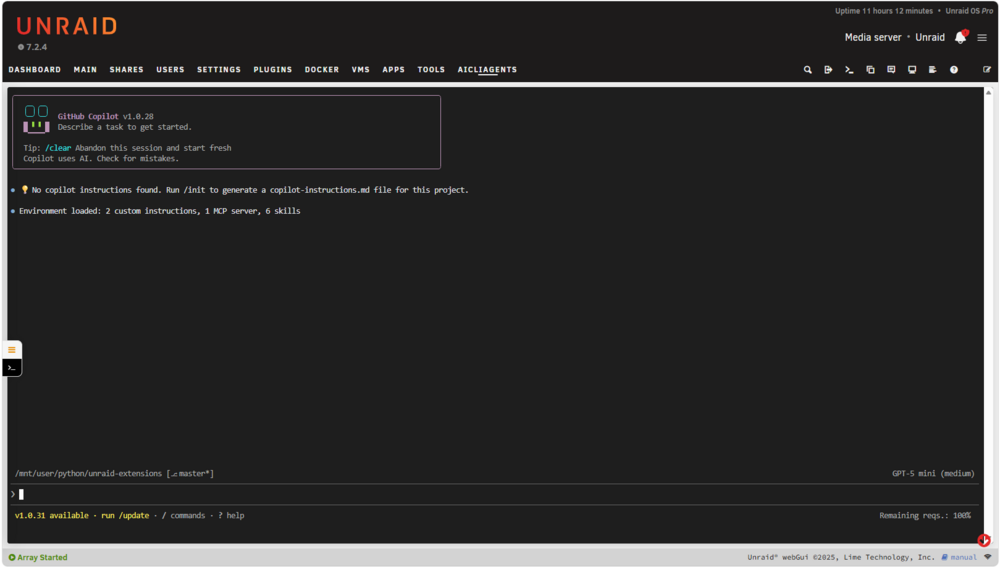
Hi, I have created a new plugin to enable you to embed multiple coding agents into a native tab. Supporting multiple sessions (sub tabs). You can use it for coding, monitror and manage your server, add MCP servers and do cool things etc. or whatever floats that boat of yours! It's on the CA Store, else you can manually install from here: https://raw.githubusercontent.com/johnpwhite/unraid-plg-aicliagents/main/unraid-aicliagents.plg It will pull (on install) a few public packages (tmux, node, npm etc.) so if you're uncomfrtable with this, review the plg file contents first so you can see what it pulls. I'd love your feedback, feature request, security concerns etc. Work space manager pops out, create new, manage ENV variables, upload screenshots/files, instantly switch between workspaces and agents: Example view of agent running: Jump into a home & work space mapped temp shell while into your flow: Install, upgrade, remove agents: Manage storage of agents and home:
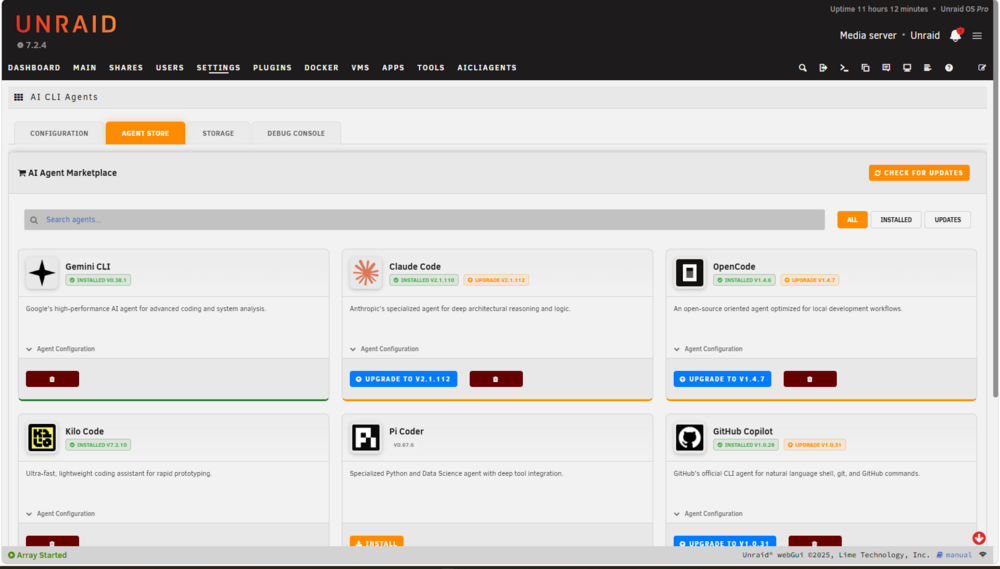
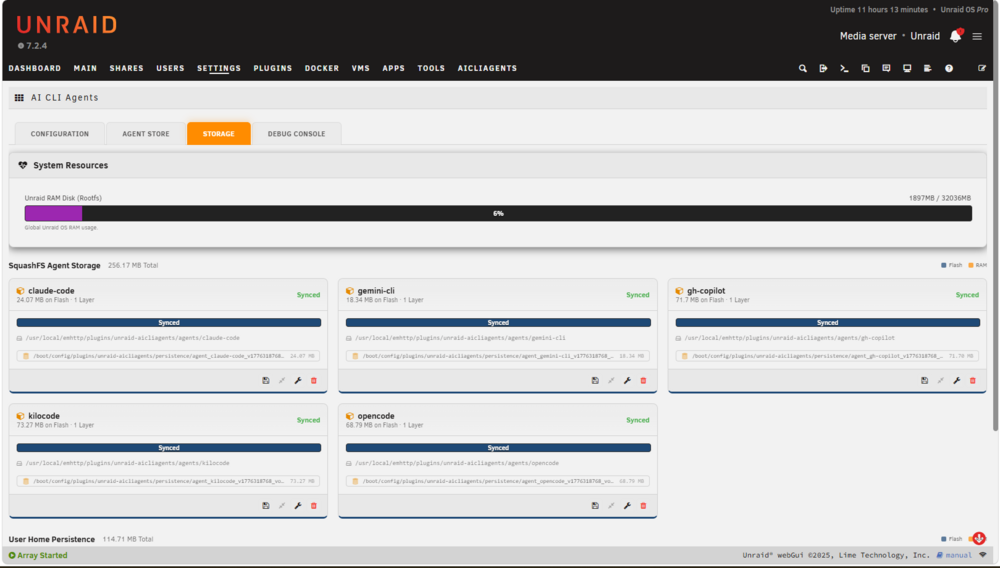
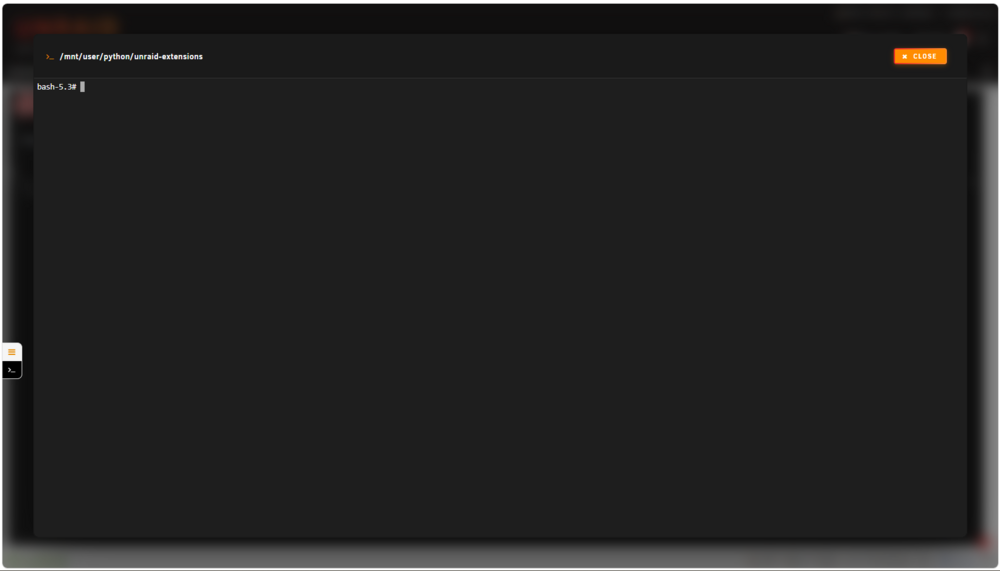
-
Did you ever find a secret knowledge base, or have you created anything since learning that you'd be willing to share? @Squid are we missing the obvious ref full developer docco for plugins? Thanks! I'm trying to build a coding agent skill with stuff I find, but it's a mess at the moment, as what it's trained on and reality are quite different, especially UI hooks with 7.2. I'd love to add some react style drawers etc. but no go so far. I can;t even get a tab to be added for a custom page, copying the netstat plg inaproach seems to fail so I'm missing something obvious.
-
hey all, I'm not a frontend developer, I've tried with some of the coding agents but failing, so I'm wondering if any of you know. I'm trying to make a plugin that injects a react style 'drawer' overlay, so on any page the drawer slides out from the right. Is this pushing this injection approach too far? no possible? Thanks John
-
Thanks @Squid , zram plg template as been fixed/uploaded. OpenClaw is not working yet so removed it, and appears there is one going through the process so I'll drop mine. Thanks again John
-
thanks for the feedback! Let me know if you need anything changed/extended etc. I'm just working through getting it in to the CA store.
-
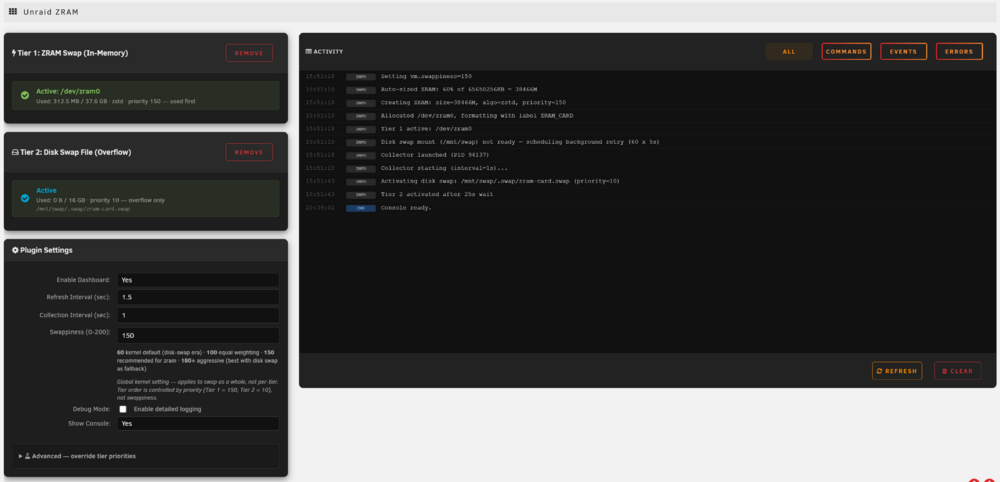
Hi, I have created a new plugin to configure and view ZRAM on [low] ram unraid servers: https://github.com/johnpwhite/unraid-plg-zram For those who don't know what it is, it is a module to create compressed block devices in ram. This plugin supports compressed swap in ram and disk swap fall back. It's really useful if you're running Unraid on a server with low memory, you can squeeze more out of it and a little cpu/latency cost. Go forth and multiply those docker containers! More details here: https://en.wikipedia.org/wiki/Zram It's available in the CA App Store, else you may install it manually with this link: https://github.com/johnpwhite/unraid-plg-zram/raw/main/unraid-zram-card.plg The dashboard card: The settings page:
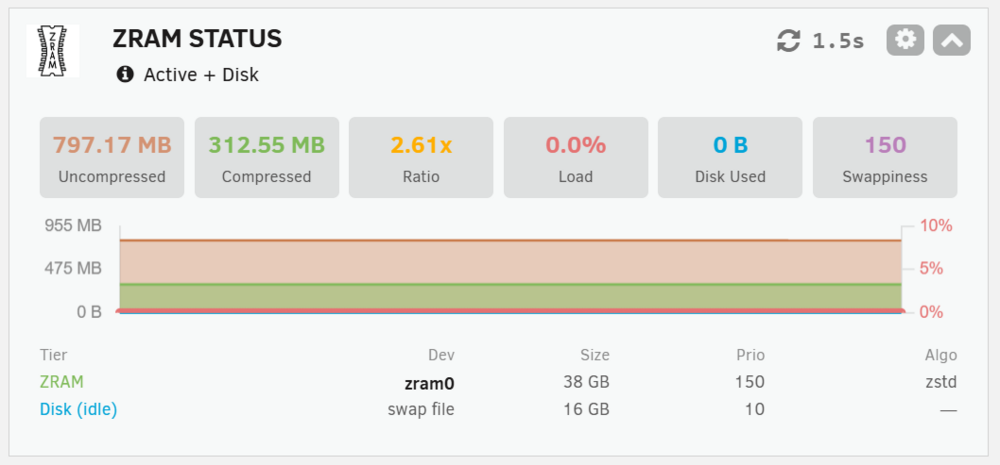
-
I think I'm being dumb. I've installed it, I see it in the plugin list, but how do I load it?? I'd love 2 buttons in the filemanager view (I think this was a plug in though!) to Compress (whatever is selected, folder or file(s)) and uncompress button enabled if a supported file selected, with a pop up to choose the options (location, format, compression factor etc.)
-
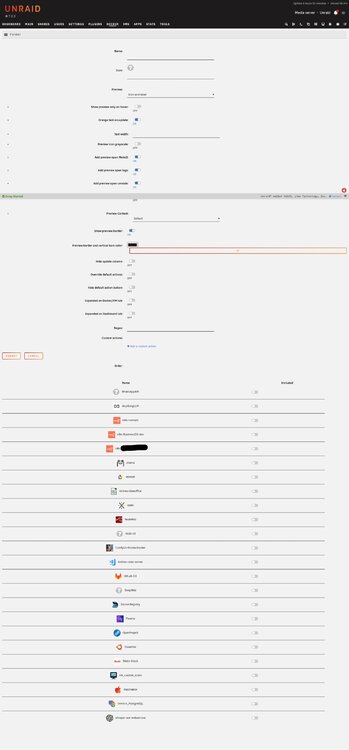
the add folder page looks a mess on the latest version 7.2.3, see attached. You can ignore the footer half way across that's a different issue with unriad not playing nice with edge's full page capture feature,
-
When you attempt to instance an image using the search dockerhub option, it offers to perform a test deploy to infer the variables and ports etc. The popup formatting is a bit off, not a biggy but just looks very cumbersome. It's also not intelligent, a bit brute force on the keys it proposes, such as YARn versions etc. which aren't needed.
-
When updating a container, the various volume layer tasks are now interleaved with new lines, you can't scroll up to watch progress when there are many layers (and excess lines) as the dialouge window forces a scroll back to the bottom. Also, a cancel option would be great, especially on update all. today my internet had issues so it was super slow and the whole instance blocked while updating (for hours), maybe docker updates shouldn't block the UI on other tabs? Thanks!!





