





jbrodriguez
Community Developer
-
Joined
-
Last visited
Everything posted by jbrodriguez
-
Thanks for the feedback, I thought I addedd pull down to refresh to screens where it's useful, seems like this one slipped through the cracks, I'll look into it.
-
It has a timeout of ~5 seconds, so not sure why it keeps spinning ? You're running it inside your LAN right ? About the logs, you need to have the ControlR plugin installed, can you confirm you have it running ?
-
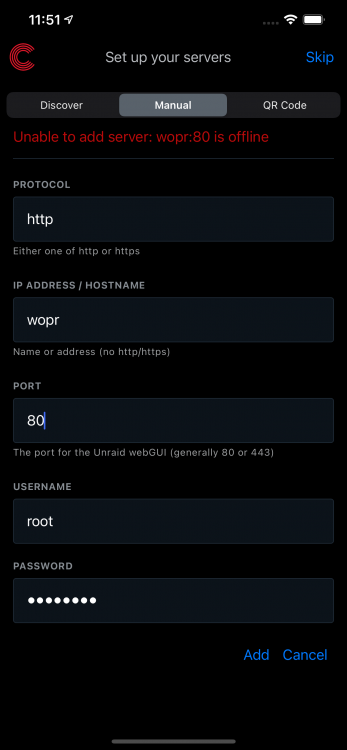
Thanks for the screenshot, I need to improve that error message. Can you confirm you're not using SSL and your webUI is running on port 80 ?
-
That's odd. if you try manual, it doesn't show any error at all at the top of the page ? In Discover, it never stops spinning ? Never shows your server in the list ?
-
ControlR 5.0.0 is now available on the App Store and Play Store This is a complete overhaul of the app, celebrating a great milestone: the 5 year anniversary of ControlR !!! Among the features, you will find: - Completely redesigned user experience, supporting the system theme (dark/light), system notch and other device-specific features - Dockers and Vms have their own page, more real estate to manage them. You can also perform a quick search, useful if you have many dockers/vms. - Adding a server is now easier, using the avahi(mDNS) service built-in in Unraid servers - Enhanced privacy: server data is now encrypted with a security key that's stored in each device keychain - Many other improvements to make the app faster and more responsive Since this version sports a brand new architecture, you will need to re-add your server(s). As mentioned in my previous post, remember you require iOS 11+ to run the app (for iPhone users). Also, if you're interested in knowing the technologies behind ControlR, make sure to check out my article React Native app built with zustand and tailwind
-
Upgraded the plugin ! 2021-07-11a - 2.23.2 - Implement onDemand origin extraction Just a small fix 🙌
-
I'll be releasing an app upgrade very soon™, which brings some breaking changes, so I wanted to give everyone a quick heads up: - Requires iOS 11+, dropping support for iOS 9 and 10 This is due to enhancements that will be listed in the release post Android has no change at the moment (Android 5+, API level 21), but this may change in a future release - Changes in app permissions The app will request some additional permissions, related to security features, due to a change in how servers data is stored locally - User permission system is deprecated Unraid is basically a single user system (root), creating user permission on top of it is cumbersome The controlr plugin still presents the ui interface to set permission for dockers and vms, but this will change in an upcoming release - Some settings have been deprecated Timeouts when adding servers, how to detect if a server is online or not, background refresh are no longer available due to enhancements, changes in logic and analysis of most used features These are the most important changes, I'll update the post if I think of something else
-
Upgraded the plugin ! 2021-07-04 - 2.23.0 - Implement origin endpoint - Run npm audit fix - Fix build - Switch to yarn - Add github token This is in preparation for a new release of the ControlR app, there are some big changes and some deprecations. I'll remove the permission system from the app and from the plugin. Here's a sneak peek, although there may have been some changes
-
Thanks for your comments ! 1 - Haven't tried it on Vivaldi, although everything is served locally, so not sure what could be the issue. 2- Yes, it's just a general preference to have those permissions and ownerships, but most of the time it should still work 3- Never thought about it, although Unraid basically runs with only one user (root)
-
Hi, I haven't looked at it yet, still caught up with work and other matters. I'll probably check it out in a week or two, if not I'll post back here
-
That's the general idea and what the file permission plugin does, but it should work
-
UPDATE: ControlR iOS is now available on the App Store (give it some time for the rollout to reach your region) ControlR Android is in review, but should become available shortly now available on the Play Store (give it some time for the rollout to reach your region) 🙌
-
You're probably selecting a top level folder that is too big to fit in any of the individual drives, my guess
-
UPDATE: We found the root cause of the issue !!! 🙌 Can't thank enough @Dantheman and Peter (don't have his handle), for the patience and willingness to help me test and troubleshoot. Thank you !!!! The root cause is what I had originally thought: Unassigned Devices changed its api in a recent release and that broke the app 😮 😀 I'll be publishing a new release to both stores in the coming hours, although Apple Store generally takes longer to review than Google Store. I'll post back when they're available.
-
UPDATE: We found the root cause of the issue !!! 🙌 Can't thank enough @Dantheman and Peter (don't have his handle), for the patience and willingness to help me test and troubleshoot. Thank you !!!! The root cause is what I had originally thought: Unassigned Devices changed its api in a recent release and that broke the app 😮 😀 I'll be publishing a new release to both stores in the coming hours, although Apple Store generally takes longer to review than Google Store. I'll post back when they're available.
-
Thanks mason1171, I was able to access your simulated server. The root cause is a bit elusive for me, since I can't replicate the issue at the moment. I'll keep tracking the issue here
-
UPDATE: @Dantheman has been helping me troubleshoot the issue, along with another user that contacted me via email (don't know your forum handle :)) It's a very weird bug, because I absolutely cannot replicate it locally, but I can see a soft crash in the logs, which is quite elusive at the moment. We're still testing, let's see how it goes.
-
Thanks a lot ! Yes, can you send me the data of the server that crashes, following these steps That would be helpful. I'll get to to test these simulated servers later today.
-
Thanks, will test with this one too.
-
UPDATE: I'm still unable to replicate the error. I upgraded my server to 6.9.2 and tried different scenarios, but I'm still getting into my server. Now, I'd like to try something else. If you have the issue and you're on Android, can you send me a dm ? I want to try a new approach.
-
Hi, yes, I'm tracking the issue in the app thread. I don't have a solution yet, because I'm unable to replicate the issue. Can you follow the steps in https://github.com/jbrodriguez/controlr-support to simulate the server in my environment and try to figure it out ?
-
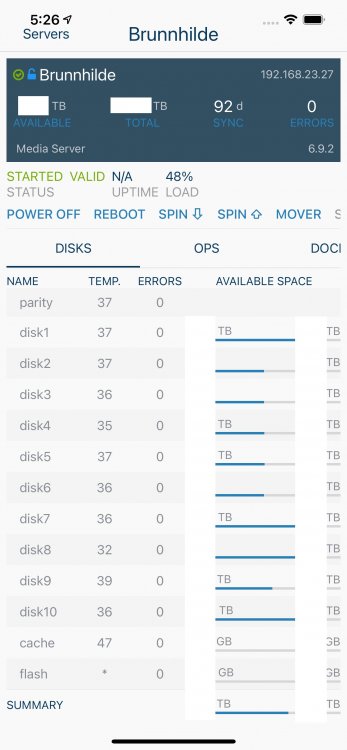
Thanks wgstarks ! I'm able to add the simulated server normally. There's unassigned.devices data in the zip file, so you have the plugin and some unassigned devices. I'm unable to figure it out at the moment, I'll have to dig deeper.
-
mmm not sure about that, why would it change cp to gcp ? That looks like gnu core utils from a macOS install, not sure what they're doing in Unraid Try /usr/bin/cp /tmp/controlr.zip /boot/controlr.zip
-
So that's why I pointed to /boot There are a couple of options - From unraid terminal cp /tmp/controlr.zip /boot/controlr.zip after that you can access the zip file as it is in your flash drive - From your PC cd <any folder you want> scp <unraid-server>:/tmp/controlr.zip . For scp, you should use the same syntax as for ssh
-
You're right. The zip file is created in the /tmp folder. I'll update the instructions




