





Sh3rL0cK
Members
-
Joined
-
Last visited
-
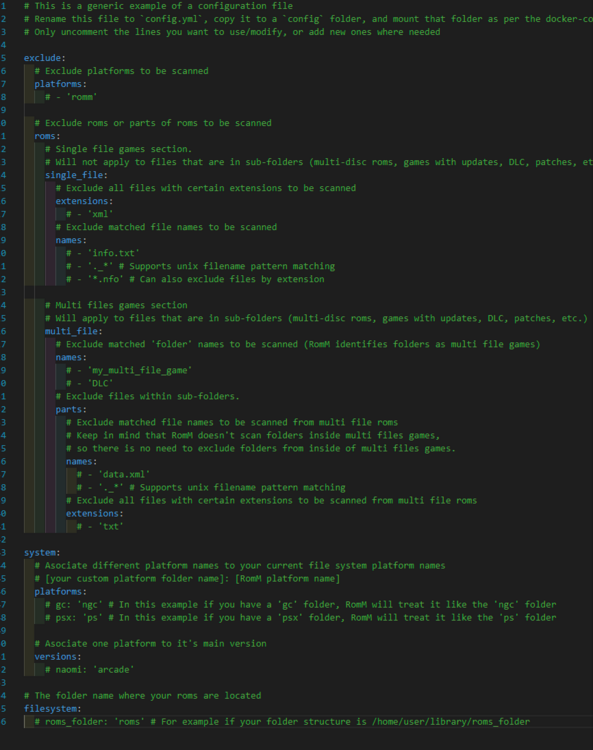
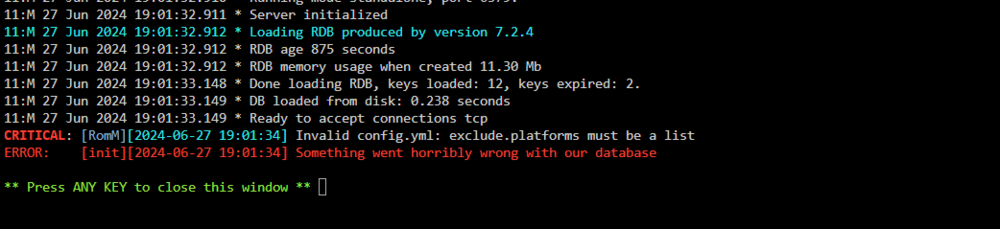
Found my solution. Used this example file instead of the stock one. https://github.com/rommapp/romm/blob/release/examples/config.es-de.example.yml Think you need to specify all your platforms in the config and it doesn't like the # commments.
-
Getting the same error as mstrlargo. App loads fine with blank config.yml but as soon as I copy the example .yml and restart I get the Invalid config.yml error.
-
Thanks for the help! Parity drive swapped out and rebuilding 21 hours to go
-
Jorge, Any issue you think with just swaping it out? I purchased 2 new 8TBs that I wanted to upgrade to. I know I need to swap the Parity out first so could I just do it now and not worry about this?
-
Also disk ST91000640NS_9XG3ZG3E-20230620-2117 disk25 (sdc) has a relocated sector count of 3, but that is one of the drives i'm trying to get rid of. I just installed 2 new 8TB Seagate ironwolf drives. As soon as this parity check was over (have 2 hours remaing) I was going to check the data on the disks and swap the parity drive with one of the new IW drives. Do you think I am ok to do that or is it a risky move at this time?
-
Yes I have one but when I go to attributes it doesn't say anything highlited like this one. Diag attached. The drive in question is ParityWDC_WD4000F9YZ-09N20L0_WD-WMC130117163 - 4 TB (sdal) jarvis-diagnostics-20230620-2117.zip
-
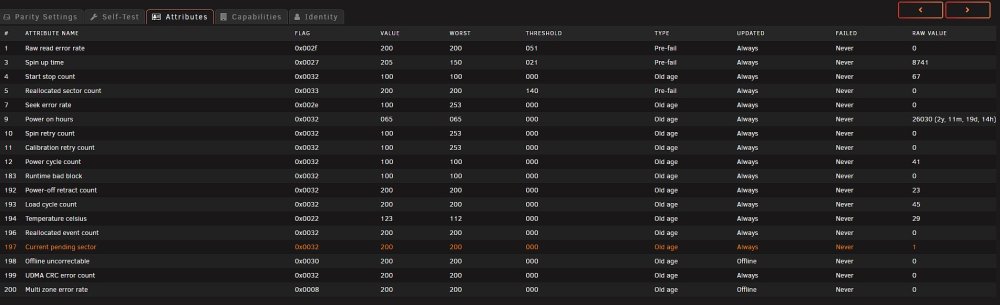
Hi Guys, Going through some movement on my array. Long story short I had a jbod case of about 24 1.2TB 2.5" SAS drives. Wanted to get away from using 2.5" drives because... obvously the limited sizes and lifespane of them and move back to my 4TB 3.5" drives. I used to have a chembro case with 12 3.5" bays but the mobo crapped the bed on me and I switched over to a dell R640 1U with an HBA card connected to a Dell PS6400 that I made a mod on to use the Dell MD2100 controllers so I could just use the 6400 chassis as a jbod. Anyway long story short that was a really bad idea.... now onto my next really bad idea. Using the Dell H200 HBA card I realized I can just use the backplane of my chembro case and some mini SAS to SATA adapters to just take the mobo out and use it as a JBOD inclosure by jumping the PSU. Well im in the process of swapping out each of the low numbered drive from the 1.2 TB to the 4TB drives. I can't add any more because I maxxed out the 30 drive limit. So I am slowy moving the data off of a 1.2 on to the 4TB drives and then replacing the 1.2s with the 4TB then letting the parity rebuild each time. When I get all 12 of the 4TBs in there I am going to pull the remaining 1.2 TB drives and then create a new config because I am too chicken to do it the other way of just making a new config with the 4TB drives not already in the array. Just worries me that the parity would not be able to rebuld because of to many changes. So I already as you may have guessed replaced the old 1.2 parity drive with a 4TB one. Today now on my 8th 4TB drive my parity drive threw a smart pending sector count error. It is only 1 right now and the reallocated sector count is still at 0..... So I humbly ask what is your opinion of this do you think I am screwed.... I have about 6 hours of the current parity rebuild. I was thinking after this parity rebuild to replace that parity drive with a new on and rebuild again. Any consern about something messing up at that point? What do you think I should do/best couse of action?
-
Hi everyone, Been having an issue the last couple of weeks. My unraid box randomly locks up and I have to go and hard reset. Ran all hardware tests on my hardware all passes. I haven't setup any new dockers but just in-case I turned every docker off and all my VMs for a bit and it still did it. Only one change was I installed two NVMe SSDs to work as a cache pool. Had some issues setting them up as a pool and accidentlly wiped my appdata in the process but that is all working fine. I have no clue what it could be. Nothing is jumping out in the logs in red or anything that doesn't look right at all. Attached the diag output. Any help is appreciated Thanks jarvis-diagnostics-20230131-1527.zip
-
jarvis-diagnostics-20230115-2002.zip Diagnostic's attached here
-
I installed a second NVME SSD in my box and added it to the cache pool now Balance on '/mnt/cache' is running and does not progress. Has been running for 3 days and still says the same thing below 0 out of about 26 chuncks blanaced. Balance on '/mnt/cache' is running 0 out of about 26 chunks balanced (9 considered), 100% left I am on Version: 6.11.5
-
The option for Primary vDisk Size is missing when creating/editing windows 10 VMs. Seems to be on the webUI form page for only Windows 10 option. All other vm types have that option.


