





jrhamilt
Members
-
Joined
-
Last visited
Everything posted by jrhamilt
-
Had to enable the option for the host to be discoverable. In docker settings, disable docker, change the setting, and enable docker... Problem solved.
-
Will do. Thanks! Believe this had to do with me adjusting the server location while it was running.
-
New Diags. whitenas-diagnostics-20240720-1241.zip Data appears to be back on the drive according to Samba share. Anything else critical?
-
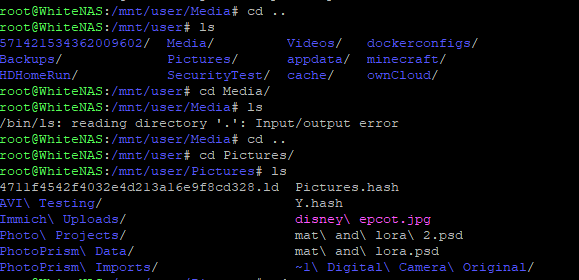
Not sure what's going on. All data in the "Media" share is missing. Had been trying to move shares to be "Array" only in prep for moving material off of the cache, then noticed the data on the drive is gone. I have backups, and they are valid, but I don't understand the root issue here. Trying to restore from backups on top of the existing file folder failed, as it couldn't write the files. Tried to go and create a file over Samba, then noticed this error in the SSH session... Here is a snippet of the "input/output error" that I'm getting. Any thoughts? Diagnostics attached as well... whitenas-diagnostics-20240720-1221.zip
-
I SSL'd into the CloudFlare Tunnel container, and couldn't ping the internalip:port for owncloud. Not sure why that is, but looks like it's a Cloudflare tunnel app problem? Will check there.
-
eth0 and specifying a new IP works for me, but see above (I'm having other trouble, so maybe I'm wrong too...)
-
I've got ownCloud running fine if I put the IP Address of the container specified in the eth0 into the browser. For the rest of my services, I use Cloudflare with the "Unraid-Cloudflared-Tunnel" docker and zero-trust tunnels. Works great. I'm able to hit all of those services external to my home network. However, when I try to use the URL from the external Cloudflare tunnel, it gives me a 502 error, a request failed message and in the CloudFlare logs, and the following error message field date: {"connIndex":3"originService":"https://<internalip:port>""ingressRule":3"error":"Unable to reach the origin service. The service may be down or it may not be responding to traffic from cloudflared: dial tcp <internalip:port>: connect: no route to host"} I'm keying in on the "connect: no route to host" part of the message, but I can't figure out why this one doesn't work... It's the only one that's SSL by default, and I've set the "no tls verify" setting on in Cloudflare... That seems to be the usual recommendation, but I know it's on... Help?
-
Any preferred method to do that to increase the probability of success? Right now, cache primarily has appdata and dockerconfigs, and a couple of items for the mover.
-
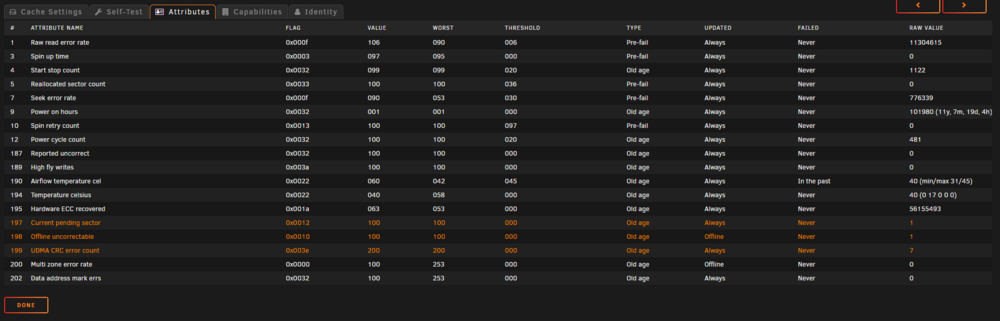
I plan to replace the cache drive, but am not sure if there are standard steps (couldn't find an "official" answer after several searches), and whether I ought to adjust those steps given the pending sector. Will probably replace with 1TB SSD. Learned long ago to post on the forum first to not make a mistake and lose data (or in this case, containers). Here's the diagnostics.whitenas-diagnostics-20240719-0821.zip Screenshot of the attributes. It's certainly time to replace it! Thanks!
-
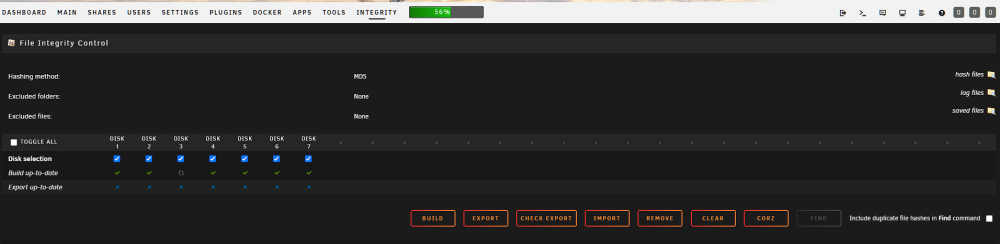
Sorry, this seems stupid... How do I "run a check"? No button or other mechanism here or in the settings (as far as I can see). Do I need to run an export first? The exports are ancient... (It probably has not been running...)
-
Disk issues resolved. I hope. Disk 7 rebuilt on new drive. Disk 7 going back with RMA, failed in under 3 years. Disk 7 doesn't appear to have been selected in the plugin settings somehow? Dont know. Isn't clear that it has been running recently... What do those steps look like to ID the corrupt files? Any help I can get finding them here is awesome. Will get a other drive running as second parity after the data restore...
-
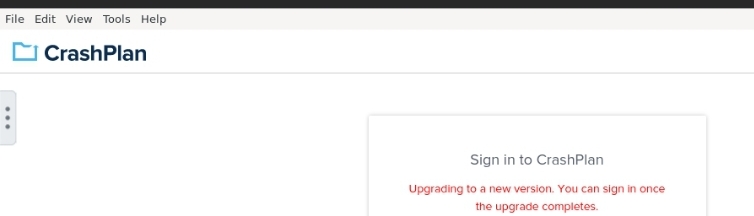
I can't get logged in... Has worked for yyears, and the data is there, but after a double disk failure, I have some restores to do. Says that it's "being updated", but has said that now for weeks. All apps and plugins updated, including this one. Help? Image cropped to not share user name, etc, but this happens after I try to login. I did change password in CrashPlan recently... Could that be it?
-
Turns out, I have the "Dynamic File Integrity" plugin... Should this be able to find any of the file corruption?
-
Huh. Drive 7 now throwing a few more errors and has something in the SMART file. Next steps? (Haven't finished building second parity because of the errors... Disk 7 had 128 errors during that rebuild. WDC_WD40EFAX-68JH4N0_WD-WX42D308JR81-20230422-1004.txt
-
Understand that another file system type would be better... And longer term I can head that way. In the mean time, is there anything that you know of that will help identify and replace corrupt files? As for parity, my intent is to add a second parity disk. Does it need pre-cleared? Can I just add it to the array? I feel like I should do that before changing file system types.
-
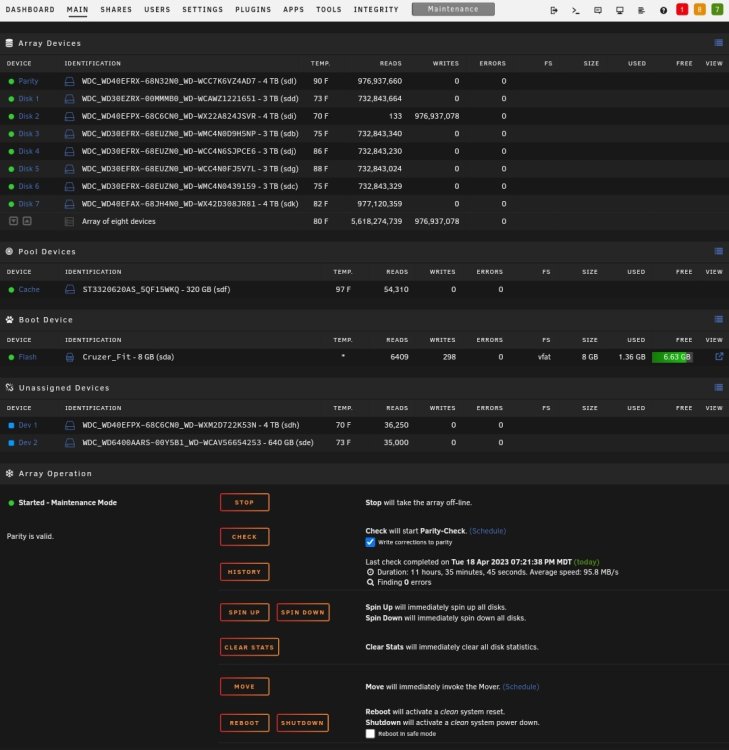
Finished, no errors, awaiting next steps, but going to go with this... Another question (3rd one)... I plan to use one of the blank 4tb drives as a parity drive. What order of operations should I follow? Get the parity drive cleared and added then recover stuff? Or other way around... Thank you so much!!!
-
The re-wrotento disk 2 is nearly complete. Couple next step questions: Will I need to redo the check disk activities for the now new disk 2 given this update? Any recommended tools for recovering potentially lost files? (Thinking checksum evaluators, etc that can work from Windows to see if downloaded backups match files in Unraid...) Backup solution is CrashPlan running on the Unraid box itself. Once array is running can do a restore there, but seems wasteful. Should only restore damage / corrupted files if possible...
-
They happened close in time. I'll try to rebuild overwriting the "new disk 7" and see if they pop up again.
-
I have the "new disk 7" that I could overwrite... It was built with the 18k or so of read errors, and the "better" parity state... Do you think that at this point, we are better off on this route with "old disk 7"? I kinda think we are, but I also acknowledge that I'm not sure we will get another chance at reading from "old disk 2" again...
-
During the Disk 2 rebuild, there were 1151 read errors on Disk 7. I did not cancel. Subsequent to that rebuild (with the read errors), we ran the check disk actions per your notes above. Per your most recent instructions, I have now rebooted, and attached the Diags. Next steps? I don't know what caused the read errors. If we need to rebuild again, I have no problem with doing that... Just being "slow and steady" through this part. whitenas-diagnostics-20230417-2247.zip
-
Seems like, even with the read errors from "original disk 7", and the potential for bad sectors in 2 from the rebuild, this is the best path forward, right? Now, what's to be done with Disk 7? When I bring the disk online I plan to have the backup service try and restore all the files it backed up in place overwriting things as it goes... Then will do some other checks on the data that wasn't backed up. I also plan to add a second parity. Thoughts on when I should do that?
-
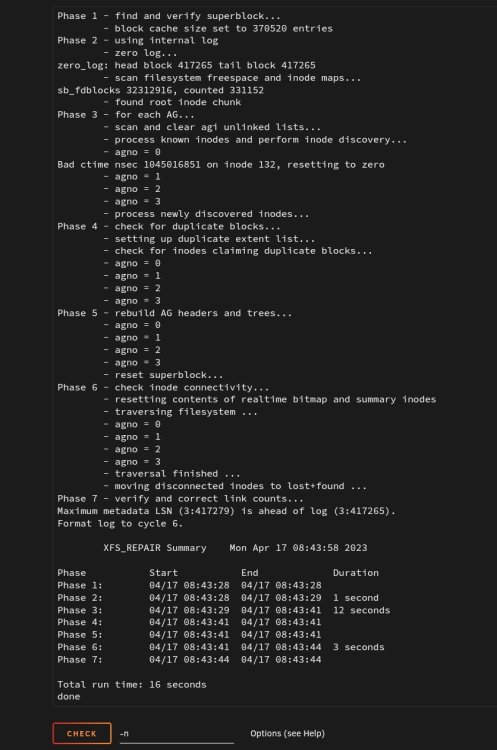
Done. Didn't ask for L, I don't think.
-
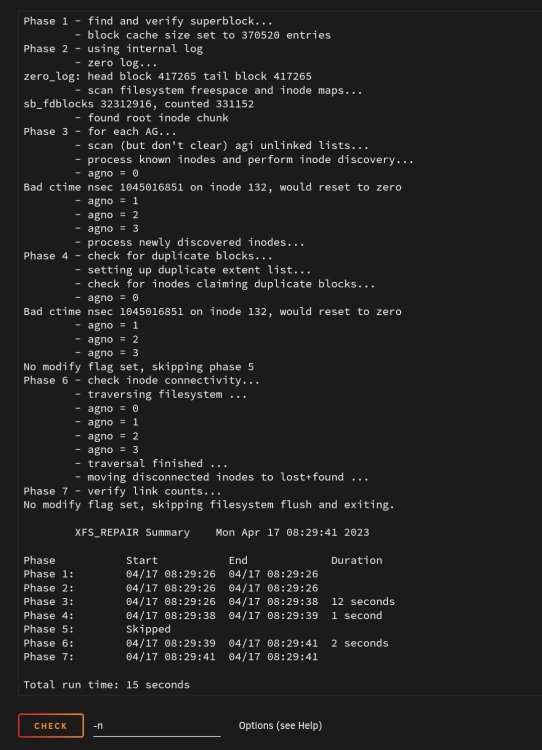
Here are the results.
-
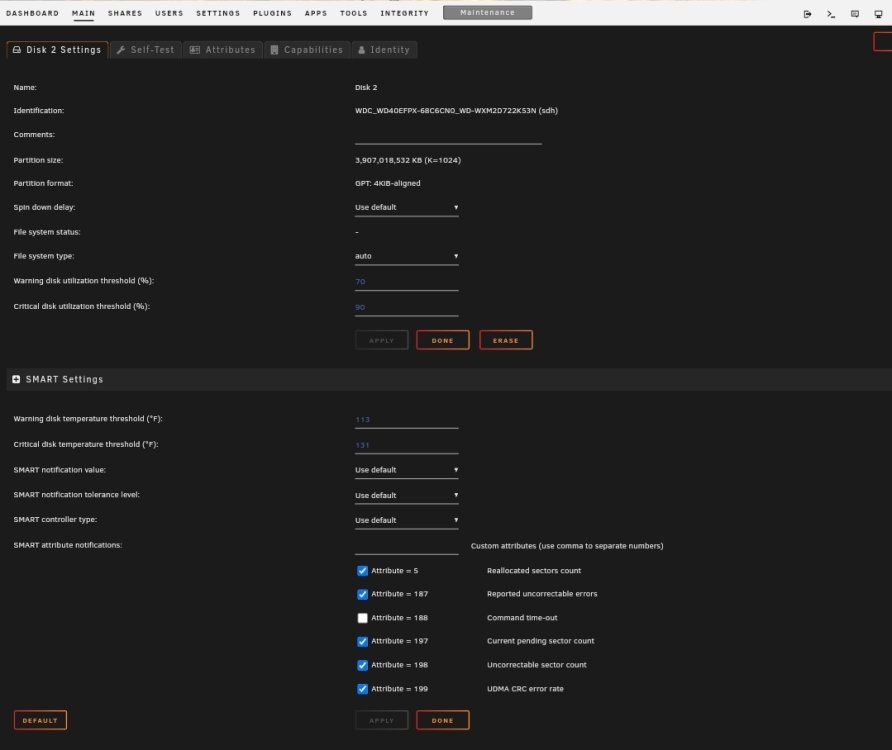
Here are some screenshots of the disk 2 details and the array status overall. Default for the system for filesystem is XFS.
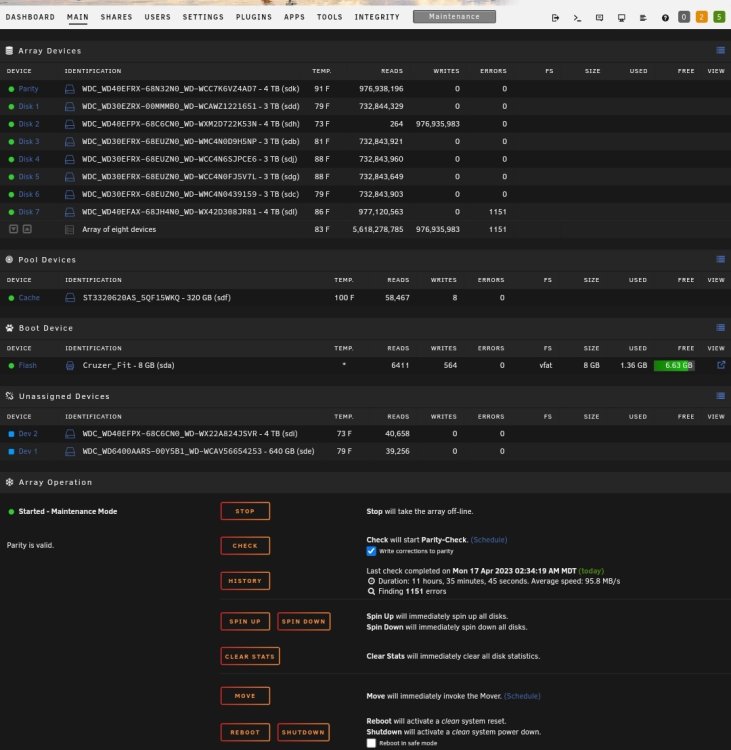
-
Hmmm. The File System type for Disk 2 is "auto", so there is no check disk section. I think all the drives were xfs. Should I "set" disk 2 to XFS first? Is that a doable thing?


