





jrhamilt
Members
-
Joined
-
Last visited
Everything posted by jrhamilt
-
Can't do that from maintenance mode, right? Need to actually mount the drives with a normal startup, right? I did finish the rebuild of Disk 2, (with the 1151 read errors from Disk7 per above). Does that change anything? Do I just run it on the file system itself since it's not emulated?
-
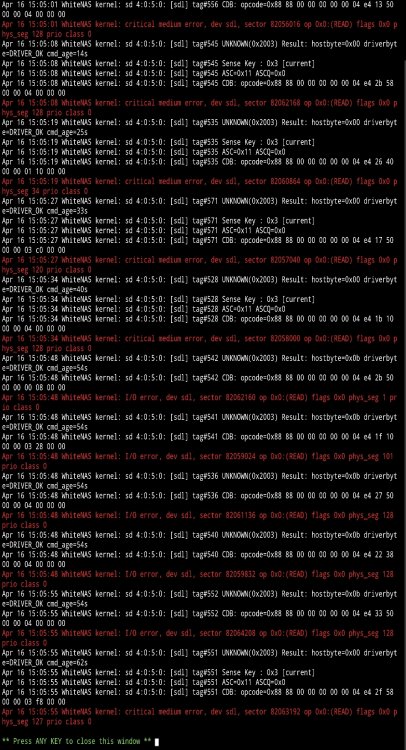
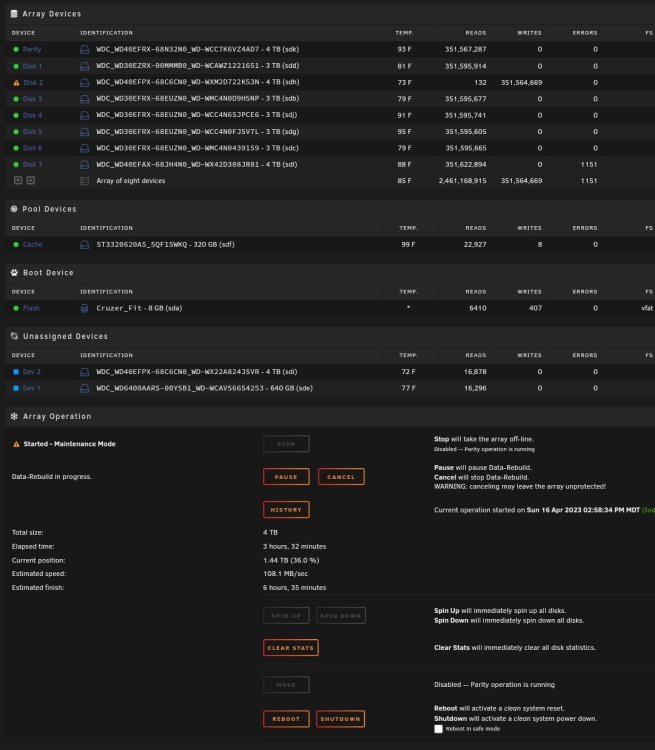
So, thinking that not much could be lost by trying a sync, I assigned a new drive to the disk2 slot, and started a rebuild. All of that looked pretty normal, but I did wind up getting some read errors from the "good disk 7". I didn't write from Disk 2 to Disk 7, this one should be unmolested, but I guess I'm realizing at this point, that both drives really are most likely bad... I don't have a good feel for why the reads failed... Can't get a diagnostic right now, but this is where it's at...
-
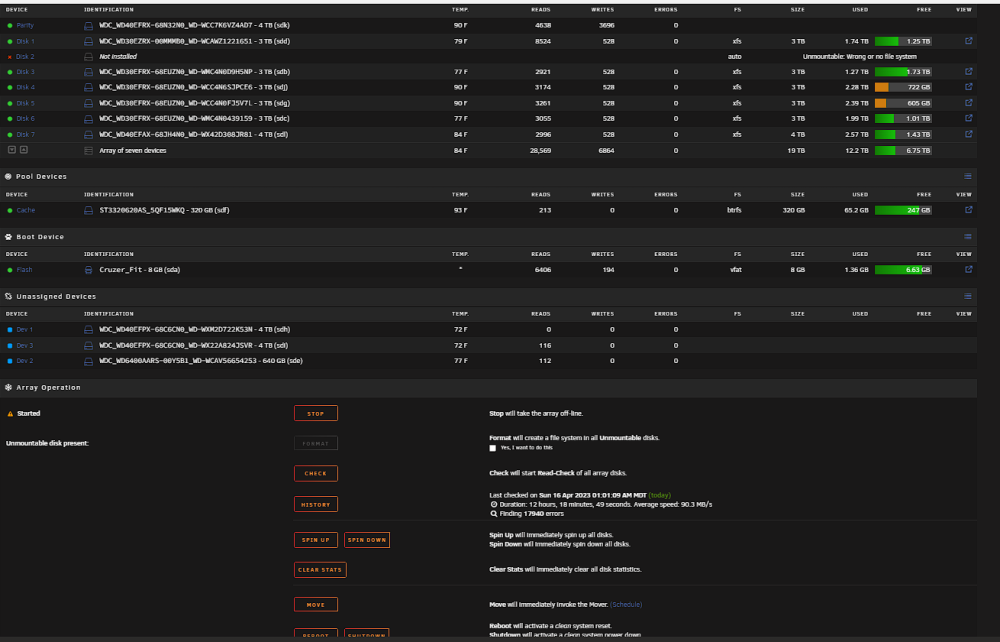
That doesn't look right... That's starting the array as "unassigned". I stopped the array as soon as diags and screen shot were complete... What now? whitenas-diagnostics-20230416-0851.zip
-
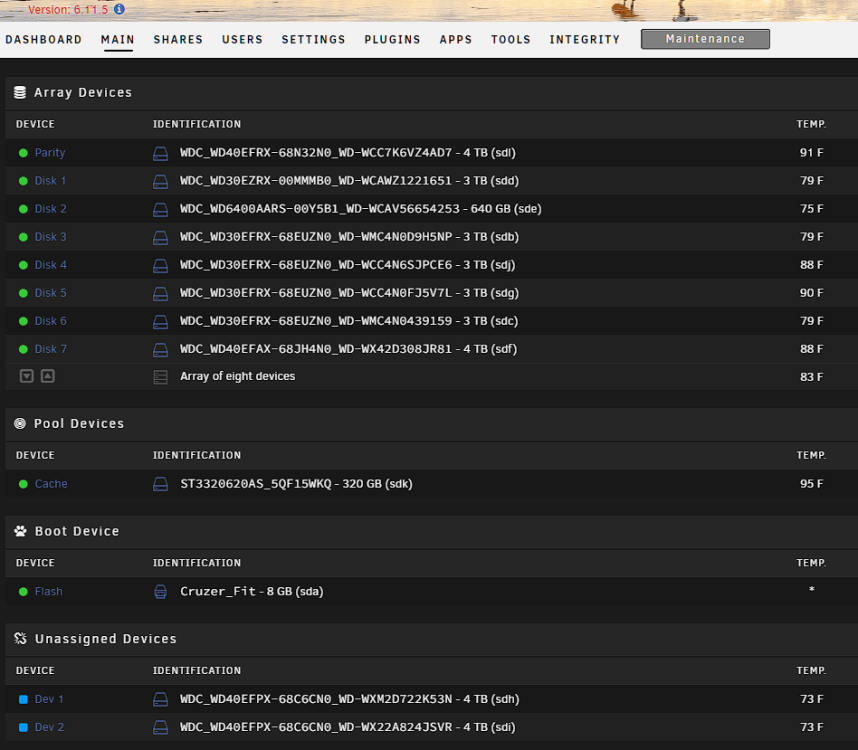
Hmmm - if I unassign and then start the array, we're not done, right? That's just going to emulate Disk 2 for now. Correct? Then I have to rebuild on Disk 2? Is the point to check the diags before we commit to rebuilding on 2? Here's the screen after the start in maintenance...
-
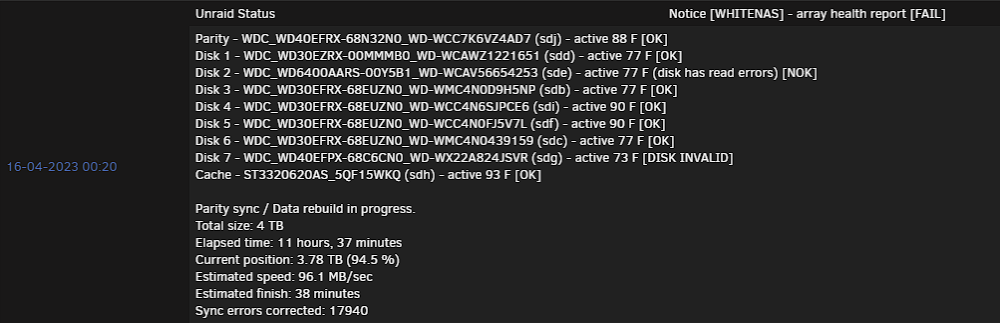
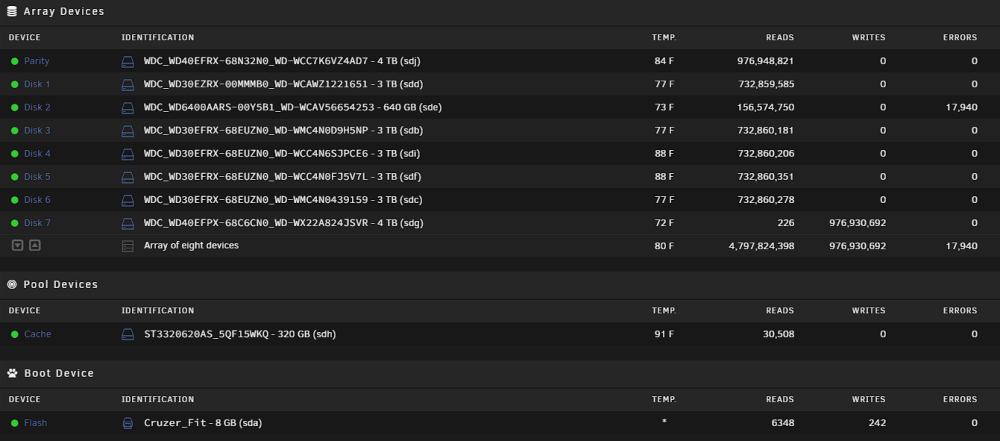
I would like to try it, and would appreciate your instructions. At the end of my previous build, it noted that disk 7 is invalid. I believe that with it being marked as invalid, that there is no way that I can successfully turn the array on, and I don't think that a "check disk" on disk 2 is going to do anything good. I think the steps are something like, put the other disk back in (the old, probably good disk 7), force it to think the previous configuration (current bad disk 2, old probably good disk 7) is good, (new config? parity correct check mark? start in maintenance? something like that)... then shutdown, pull Disk 2 out, start array. Assign new (blank) 4 TB drive as Disk 2. Start in Maintenance. Sync. I think that series of steps will be as good as I can get it... But again, would like instructions from the professional. I don't need to use the array while we do any of this. It's probably better that it's not used. (I've downloaded the super critical data from my backups, so having this down for a week isn't horrible.) Here is the final result from the main page.
-
I'm thinking since this is getting so many errors (up to 18,000), that I will let this finish. Then, is there a way for me to put the old "probably good" drive back in the array, force Unraid to consider that drive and parity to be correct, and rebuild on top of Disk 2? Then I'll have a "Disk 2 rebuild" and a "Disk 7 rebuild" and the old Disk 2 (if it still runs) and the old Disk 7, and my online backup - and from there it just is what it is... And when I find failed files, I've got options on trying to find them...
-
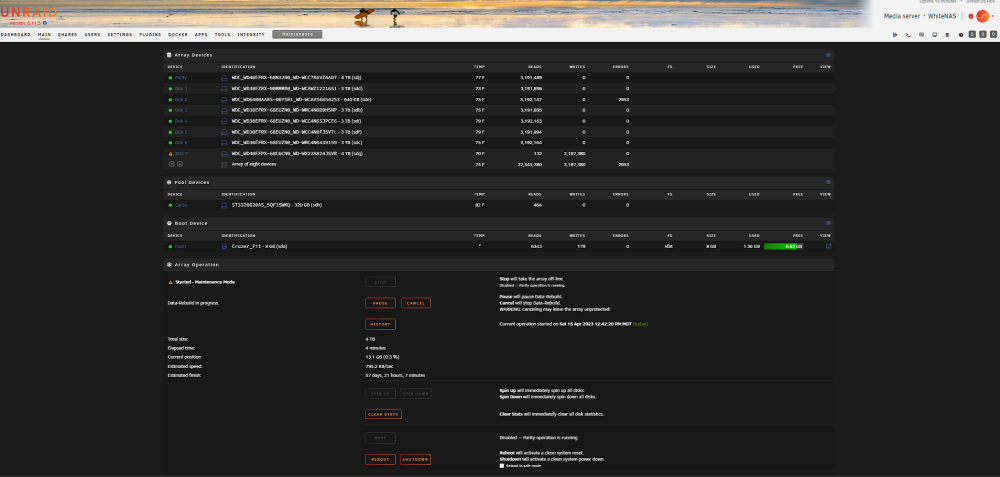
I've removed the "potentially good" disk 7, and have a new disk in it's place. I'm starting the array in maintenance mode and trying to rebuild to Disk 7... Disk 2 is starting to throw read errors... Not sure what to do, going to let it rebuild? (I still have the old disk 7, which I think / hope is good...) Need help!
-
The disk wasn't disabled for too long - and I was watching everything. A couple "quiescent" hours. But, it's a lot of data and there are other users - though typically they wouldn't be writing anything there. And all of the dockers were disabled. And the mover was disabled. I suppose I did turn the array back on and it took me a little while (again, couple hours) to realize that Disk 7 was offline... Thinking it through, if there were any changes to the emulated disk 7, and we wind up rebuilding Disk 2, then I've effectively corrupted Disk 2 if it rebuilds in those areas (because disk 7 isn't what we said it was). I could remove disk 7 and check file modification times? But that doesn't help by itself... - I need to check the modification times on the "emulated" disk 7 and compare to the real disk 7. That would require me to start the array and "read" the contents of the emulated disk 7 (enough to get the file properties). Can I start the array "read only" in order to check that out? If the file mod times on Disk 7 "emulated" and Disk 7 "actual" match, is that sufficient?
-
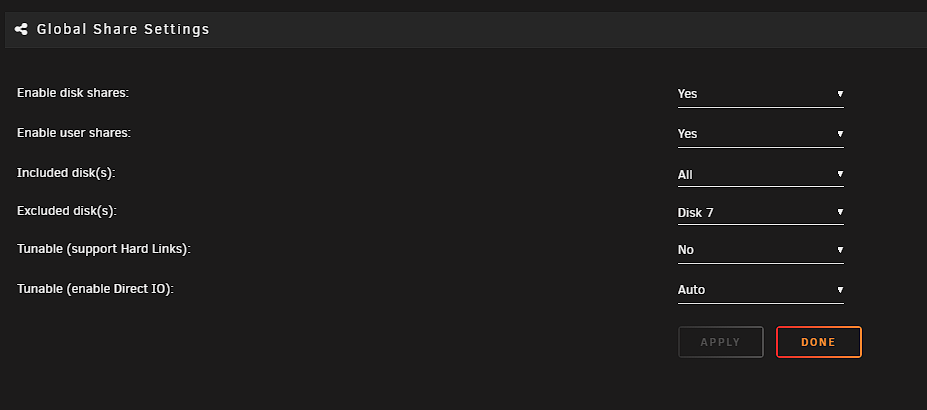
Maybe it would be better to put a new "cleared" drive in place of Disk 7 and "try" the rebuild first? I don't know. I'm going to be out of town for the week, so I'm not going to be able to physically touch things for a bit... And, here's the setting that I changed before Disk 7 went weird - I assume that this would prevent writes to the disk. (Don't have any dockers that would write to it either - they were all disabled).
-
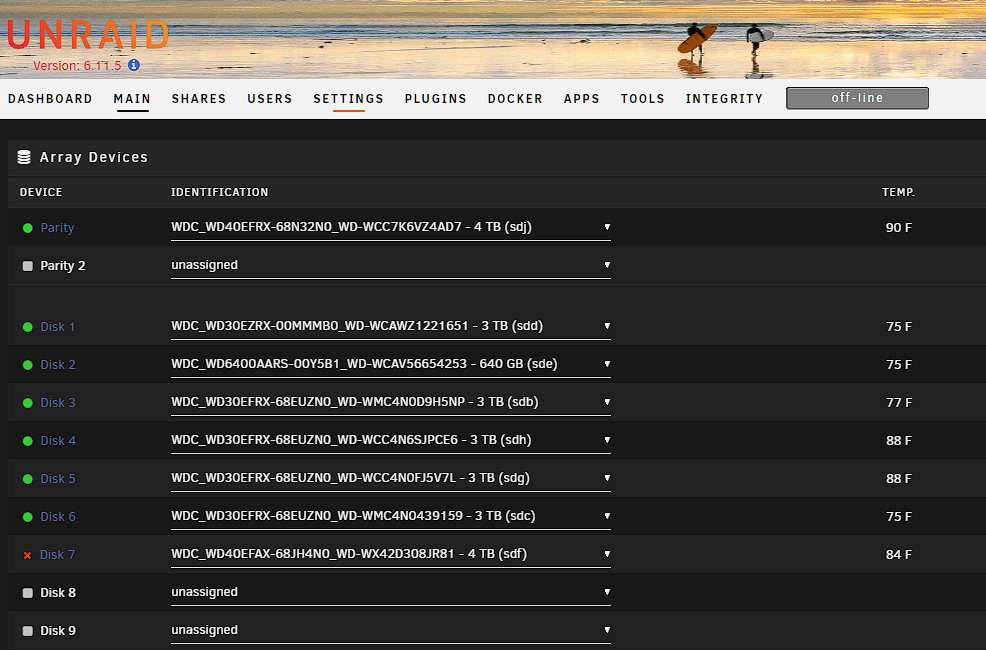
I've got a unique problem here, and hopefully some big brains here can help out. I'm having problems with Disk 2 and Disk 7. I know this is typically a "data's lost, and move on" (fortunately, all of the critical data is backed up to the cloud I believe... So this should be just an effort in trying to avoid a massive download). Two days ago, Disk 7 wound up disappearing. It looked like a drive disconnect, I reseated the drive, it came online, and rebuilt perfectly, no errors. Unfortunately today, when writing some data in the array, Disk 2 started spitting some errors. "Current_Pending_Sector" errors. My take is that this drive is probably toast, and while trying to figure things out, Disk 7 disappeared again. Got it reconnected, but now I'm hesitating... I'm pretty certain that the contents of Disk 7 are stable and correct. I had temporarily removed it as a target from the shares, so I don't think there's anything that's changed with regard to that drive... Screenshot below is of the current state. My fear is that if I start rebuilding the array, and try and rebuild from Parity on top of Disk 7, I'm going to be really hosed. I have 2 disks coming... Assuming that we can figure something out to get Disk 7 forced back in, then here is the plan for those 2 drives. I plan to use 1 to replace Disk 2 - I think that's the first priority... The other replaces Disk 7 (and I may connect it somewhere else). Third step is to take the drive that *was* Disk 7 and really run it through it's paces to make sure it's good. If it's good, it goes back in as Parity 2... So, questions: 1) Is there a way to confirm that there was no writing to Disk 7 (or the emulated Disk 7) after we started hitting the errors on Disk 2? Does that even matter? 2) Is there a way to confirm that Disk 7 was up when I removed it from the "share target" (I'm pretty sure this was the case...) 3) Is there a way to force Disk 7 in without rebuilding it? 4) Does the plan seem to make sense to you for the drive movement? Thanks so much for the help! whitenas-diagnostics-20230414-1950.zip
-
I followed the steps of rebooting the server, checking the SMART reports, and rebuilding on the drive found here: https://wiki.unraid.net/Manual/Storage_Management#Rebuilding_a_drive_onto_itself Everything seems to be working alright. No issues in the rebuild. Everything working fine. Looks like it was just a read hiccup...
-
All, When logging into my array this morning, I got a notification that one of my disks (disk 5) is disabled, and it's contents are being emulated. Diagnostics are attached. The smart report for the drive basically shows that the drive isn't there, so there's nothing there at the moment. Looks like the errors occurred early this morning, but there might have been earlier issues. I know rule number one with unraid is to post before you do anything, so I haven't rebooted or anything else. I can buy another drive to replace the one at issue. I also have enough space on the array that I could move the contents onto other drives pretty easily - but I know that once there is a failure, things can get interesting, so I want to ask for advice before I move. Thank you! Jan 7 06:10:58 WhiteNAS kernel: ata7: SATA link up 6.0 Gbps (SStatus 133 SControl 300) Jan 7 06:10:58 WhiteNAS kernel: ata7.00: configured for UDMA/133 Jan 7 06:10:58 WhiteNAS kernel: ata7: EH complete Jan 7 06:28:47 WhiteNAS kernel: md: disk5 read error, sector=557471976 Jan 7 06:28:47 WhiteNAS kernel: md: disk5 read error, sector=557471984 Jan 7 06:28:47 WhiteNAS kernel: md: disk5 read error, sector=557471992 Jan 7 06:28:47 WhiteNAS kernel: md: disk5 read error, sector=557472000 Jan 7 06:28:47 WhiteNAS kernel: md: disk5 read error, sector=557472008 Jan 7 06:28:47 WhiteNAS kernel: md: disk5 read error, sector=557472016 Jan 7 06:28:47 WhiteNAS kernel: md: disk5 read error, sector=557472024 Jan 7 06:28:47 WhiteNAS kernel: md: disk5 read error, sector=557472032 Jan 7 06:28:47 WhiteNAS kernel: md: disk5 read error, sector=557472040 Jan 7 06:28:47 WhiteNAS kernel: md: disk5 read error, sector=557472048 Jan 7 06:28:47 WhiteNAS kernel: md: disk5 read error, sector=557472056 Jan 7 06:28:47 WhiteNAS kernel: md: disk5 read error, sector=557472064 Jan 7 06:28:47 WhiteNAS kernel: md: disk5 read error, sector=557472072 Jan 7 06:28:47 WhiteNAS kernel: md: disk5 read error, sector=557472080 Jan 7 06:28:47 WhiteNAS kernel: md: disk5 read error, sector=557472088 Jan 7 06:28:47 WhiteNAS kernel: md: disk5 read error, sector=557472096 Jan 7 06:28:47 WhiteNAS kernel: md: disk5 read error, sector=557472104 Jan 7 06:28:47 WhiteNAS kernel: md: disk5 read error, sector=557472112 Jan 7 06:28:47 WhiteNAS kernel: md: disk5 read error, sector=557472120 Jan 7 06:28:47 WhiteNAS kernel: md: disk5 read error, sector=557472128 Jan 7 06:28:47 WhiteNAS kernel: md: disk5 read error, sector=557472136 Jan 7 06:28:47 WhiteNAS kernel: md: disk5 read error, sector=557472144 Jan 7 06:28:47 WhiteNAS kernel: md: disk5 read error, sector=557472152 Jan 7 06:28:47 WhiteNAS kernel: md: disk5 read error, sector=557472160 Jan 7 06:28:47 WhiteNAS kernel: md: disk5 read error, sector=557472168 Jan 7 06:28:47 WhiteNAS kernel: md: disk5 read error, sector=557472176 Jan 7 06:28:47 WhiteNAS kernel: md: disk5 read error, sector=557472184 Jan 7 06:28:47 WhiteNAS kernel: md: disk5 read error, sector=557472192 Jan 7 06:28:47 WhiteNAS kernel: md: disk5 read error, sector=557472200 Jan 7 06:28:47 WhiteNAS kernel: md: disk5 read error, sector=557472208 Jan 7 06:28:47 WhiteNAS kernel: md: disk5 read error, sector=557472216 Jan 7 06:28:47 WhiteNAS kernel: md: disk5 read error, sector=557472224 Jan 7 06:28:47 WhiteNAS kernel: md: disk5 write error, sector=557471976 Jan 7 06:28:47 WhiteNAS kernel: md: disk5 write error, sector=557471984 Jan 7 06:28:47 WhiteNAS kernel: md: disk5 write error, sector=557471992 Jan 7 06:28:47 WhiteNAS kernel: md: disk5 write error, sector=557472000 Jan 7 06:28:47 WhiteNAS kernel: md: disk5 write error, sector=557472008 Jan 7 06:28:47 WhiteNAS kernel: md: disk5 write error, sector=557472016 Jan 7 06:28:47 WhiteNAS kernel: md: disk5 write error, sector=557472024 Jan 7 06:28:47 WhiteNAS kernel: md: disk5 write error, sector=557472032 Jan 7 06:28:47 WhiteNAS kernel: md: disk5 write error, sector=557472040 Jan 7 06:28:47 WhiteNAS kernel: md: disk5 write error, sector=557472048 Jan 7 06:28:47 WhiteNAS kernel: md: disk5 write error, sector=557472056 Jan 7 06:28:47 WhiteNAS kernel: md: disk5 write error, sector=557472064 Jan 7 06:28:47 WhiteNAS kernel: md: disk5 write error, sector=557472072 Jan 7 06:28:47 WhiteNAS kernel: md: disk5 write error, sector=557472080 Jan 7 06:28:47 WhiteNAS kernel: md: disk5 write error, sector=557472088 Jan 7 06:28:47 WhiteNAS kernel: md: disk5 write error, sector=557472096 Jan 7 06:28:47 WhiteNAS kernel: md: disk5 write error, sector=557472104 Jan 7 06:28:47 WhiteNAS kernel: md: disk5 write error, sector=557472112 Jan 7 06:28:47 WhiteNAS kernel: md: disk5 write error, sector=557472120 Jan 7 06:28:47 WhiteNAS kernel: md: disk5 write error, sector=557472128 Jan 7 06:28:47 WhiteNAS kernel: md: disk5 write error, sector=557472136 Jan 7 06:28:47 WhiteNAS kernel: md: disk5 write error, sector=557472144 Jan 7 06:28:47 WhiteNAS kernel: md: disk5 write error, sector=557472152 Jan 7 06:28:47 WhiteNAS kernel: md: disk5 write error, sector=557472160 Jan 7 06:28:47 WhiteNAS kernel: md: disk5 write error, sector=557472168 Jan 7 06:28:47 WhiteNAS kernel: md: disk5 write error, sector=557472176 Jan 7 06:28:47 WhiteNAS kernel: md: disk5 write error, sector=557472184 Jan 7 06:28:47 WhiteNAS kernel: md: disk5 write error, sector=557472192 Jan 7 06:28:47 WhiteNAS kernel: md: disk5 write error, sector=557472200 Jan 7 06:28:47 WhiteNAS kernel: md: disk5 write error, sector=557472208 Jan 7 06:28:47 WhiteNAS kernel: md: disk5 write error, sector=557472216 Jan 7 06:28:47 WhiteNAS kernel: md: disk5 write error, sector=557472224 Jan 7 06:29:01 WhiteNAS sSMTP[2326]: Creating SSL connection to host Jan 7 06:29:01 WhiteNAS sSMTP[2326]: SSL connection using TLS_AES_256_GCM_SHA384 whitenas-diagnostics-20230107-0942.zip
-
Thanks! Drive is back online.
-
Current SMART report for the drive in question attached... Waiting for further guidance on how to get this drive back into the array (or whether we even should at this point...) whitenas-smart-20220320-1403.zip
-
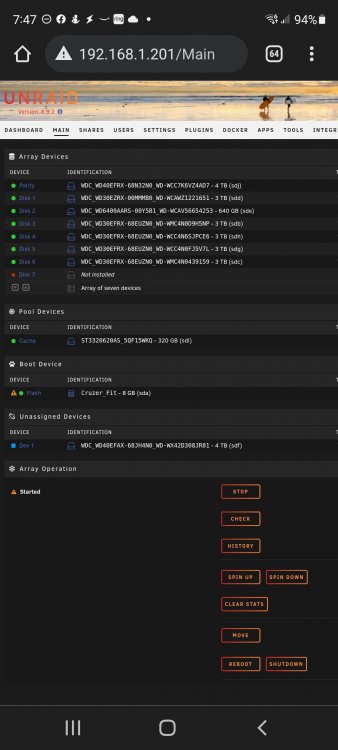
Great! Put drive onto a different sata controller, and now it shows up, but isn't on the array... Can you help me make sure that I get it added back to the array correctly?
-
whitenas-diagnostics-20220319-1359.zip So, Disk 7 is listed as disabled... I *think* the Parity drive is now virtually supplying data. I don't seem to be able to get a good smart report off the drive... What should I do next? Diagnostics attached...
-
Got another question - is there anything in the Docker that limits the bandwidth? I know that I'm not using very much of my connection, and I have at least 10Mbps upload internet service, but the backup in Crashplan seems to max out at about 1.5Mbps (Speed test verifies that my connection gets 10Mbps...) Thoughts?
-
Thanks Leifgg! Sure enough it worked. I had been having trouble even getting RDP to work, and once I got it working, I didn't want to reset the dockers anymore than necessary, but a quick reset worked. Thanks again!
-
It looks like the versions are out of sync on my machine - the server is running 4.5.0, and the client is at 4.4.1 - producing the dreaded "Cannot connect to backup engine" error. Is this the expected configuration? Is there anything I can do to correct it? Or, do we just have to wait until the Linux Client is updated for us to be able to use it again... Thanks!
-
After a good start, I've been having a rough go of things. I "adopted" a backup from a different system on the start, and everything started coming up fine. I then made a change to add in more directory mappings to the docker, and the docker restarted. At that point, Crashplan and unRAID went nuts. I couldn't connect to the client anymore, and after a little while, unRAID itself became completely unresponsive. I tried lots of things... (and unfortunately, had several hard reboots of the unRAID box) <not in any order> a: Removed the container and started over. (no improvement) b: Removed the image and started over. (no improvement) c: Removed the image and deleted the configurations and started over. (was able to start the service the first time, but any subsequent starts would blow up). ... and many other things. Here's what I wound up finding. First, the my.service.xml file had been changed. The serviceHost was pointed back to 127.0.0.1. Additionally, the java heap size had been changed in both the my.service.xml file and the run.conf file to 4096. Correcting these items allowed the docker crashplan service (is that the right word?) to restart successfully, and allowed me to reconnect the app. I theorize that adopting the other backup updated the config files and through things batty. As far as unRAID losing it's marbles, my unRAID machine only has 4GB of physical memory, so I wonder if changing the Java Heap Size to the full physical memory allocation caused it to choke... Anybody else have insights? Is there any other data that would be helpful? Other than the configs getting overwritten (which probably belongs here), I'm concerned that my server errors are a bigger issue. Have started a separate post just for the nasty crashes I'm getting. It's here: http://lime-technology.com/forum/index.php?topic=37420.0
-
After a good start, I've been having a rough go of things. I "adopted" a backup from a different system on the start, and everything started coming up fine. I then made a change to add in more directory mappings to the docker, and the docker restarted. At that point, Crashplan and unRAID went nuts. I couldn't connect to the client anymore, and after a little while, unRAID itself became completely unresponsive. I tried lots of things... (and unfortunately, had several hard reboots of the unRAID box) <not in any order> a: Removed the container and started over. (no improvement) b: Removed the image and started over. (no improvement) c: Removed the image and deleted the configurations and started over. (was able to start the service the first time, but any subsequent starts would blow up). ... and many other things. Here's what I wound up finding. First, the my.service.xml file had been changed. The serviceHost was pointed back to 127.0.0.1. Additionally, the java heap size had been changed in both the my.service.xml file and the run.conf file to 4096. Correcting these items allowed the docker crashplan service (is that the right word?) to restart successfully, and allowed me to reconnect the app. I theorize that adopting the other backup updated the config files and through things batty. As far as unRAID losing it's marbles, my unRAID machine only has 4GB of physical memory, so I wonder if changing the Java Heap Size to the full physical memory allocation caused it to choke... Anybody else have insights? Is there any other data that would be helpful?
-
Seems to have worked. Why did that work for gfjardim in the above screenshot? Update: Everything is working fine - still not sure why the above screenshot didn't work for me in term of folder mappings. Have the client connected, and am resuming previous backups.
-
Alright. I'm a Crashplan expert (running it for years on Windows PC), been running unRaid for several months, have just (today) upgraded to 6beta12, am a docker novice, and am having some trouble. Here's what I've done. All completed (except the btrfs reformat) using the GUI. (After saying "except the btrfs reformat", I just wonder to myself if that might be my issue, that I didn't format it right... don't know). 1) Got the Cache drive converted to btrfs. 2) Started array. 3) Created Docker at /mnt/cache/docker.img 4) Got Docker started and running. (Everything *looks* okay, but I'm not sure). 5) Added templates - https://github.com/gfjardim/docker-containers/tree/templates 6) Picked the "Crashplan" Template. 7) Configured pretty vanilla, matching the screenshot from above (with the config mapped here: /boot/config/custom/appdata/crashplan) Looked like there was a chown issue on the start, but I can't find it now... 9) Tried to start Crashplan, and it stops in just a second or two. Checked the logs, and here's what it says each time I try to start. *** Running /etc/my_init.d/config.sh... chown: changing ownership of ‘/config/id’: Operation not permitted chown: changing ownership of ‘/config/cache’: Operation not permitted chown: changing ownership of ‘/config/log’: Operation not permitted chown: changing ownership of ‘/config/conf/custom_sample.properties’: Operation not permitted chown: changing ownership of ‘/config/conf/default.service.xml’: Operation not permitted chown: changing ownership of ‘/config/conf/service.log.properties’: Operation not permitted chown: changing ownership of ‘/config/conf/ui.log.properties’: Operation not permitted chown: changing ownership of ‘/config/conf/ui.properties’: Operation not permitted chown: changing ownership of ‘/config/conf/upgradeui.log.properties’: Operation not permitted chown: changing ownership of ‘/config/conf/upgradeui.properties’: Operation not permitted chown: changing ownership of ‘/config/conf’: Operation not permitted chown: changing ownership of ‘/config/bin/run.conf’: Operation not permitted chown: changing ownership of ‘/config/bin’: Operation not permitted chown: changing ownership of ‘/config’: Operation not permitted *** /etc/my_init.d/config.sh failed with status 1 *** Killing all processes... Any thoughts? I don't know much about docker, so will need a little help in that regard if there's a config issue there. Thanks for the help!


