





koyaanisqatsi
Members
-
Joined
-
Last visited
-
Dang, OK. I was hoping it wasn't a hardware thing. Are there any known controllers that don't behave this way? Or would I need to use multiple controllers to avoid this? Not sure spin-up groups will help this one because each disk holds a different kind of data. But I'll check it out. I just looked over the hardware compatibility page and controller threads, and saw the notes about avoiding Marvell controllers for unRAID 6.x, and of course I have a Marvell 9845. So, I'm looking to replace it now. I'll see if the behavior improves after that. Thanks!
-
Hello, I am having a problem when a disk spins up, access to the entire array hangs until the spin-up is complete. If I am listening to music, spinning up any other disk will cause breaks in the music playback (My iTunes library is on a share). It doesn't matter whether the spin-up is the result of accessing another share/disk or just by doing it in the web UI. Is there a config I can adjust to help reduce or eliminate this? Unraid server Plus, version 6.9.2 Thanks,
-
Which Docker image are you using? I'm just finally getting back to updating my cacti image (chestersgarage/cacti), and the 1.2.x versions of cacti are substantially different from 1.1.38, which completely broke my Docker build and my latest attempt at updating the image. So I'm sort of in the same boat as you right now. But I should have things figured out in the coming weeks.
-
If you have recently rebooted unRAID or restarted your Cacti container, this can happen. I have worked around it so far by enabling Advanced View in the Docker screen, and then force-update the Cacti container. This causes it to go through an initial setup that reestablishes the DB connection properly. It's a bug in the image I'm working on. But I've had some life changes that tore me away from this project for a long time. I have every intention to come back to it and refine the image. To be clear, this workaround only works with my image: chestersgarage/cacti
-
It was too much of a rabbit hole, so I built my own container. It aims to be fully fault-tolerant, self-healing and modular. And it's a bit smaller than the other leading brand, running on Alpine Linux rather than Ubuntu. I haven't figured out the unRAID template thing to make a Docker container work natively with unRAID yet, so please offer some tips on that. I read the docs on it a while back, and I need to go over them again. But here's how it works on the command line, for now. DISCLAIMER: This is a work-in-progress. It may have significant bugs, and lacks a certain level of fit and finish. I use it, but I have not exercised it very much to shake out more than obvious issues. docker run -d --rm \ --net='bridge' \ -p 1984:80/tcp \ -v '/mnt/cache/appdata/cacti/backups':'/var/backups':'rw' \ -v '/mnt/cache/appdata/cacti/mysql-data':'/var/lib/mysql':'rw' \ -v '/mnt/cache/appdata/cacti/mysql-conf':'/etc/mysql':'rw' \ -v '/mnt/cache/appdata/cacti/cacti-data':'/var/lib/cacti/rra':'rw' \ -v '/mnt/cache/appdata/cacti/apache-conf':'/etc/apache2':'rw' \ -v '/mnt/cache/appdata/cacti/php-conf':'/etc/php7':'rw' \ -e TZ="America/Los_Angeles" \ -e MYSQL='mysql root password' \ -e CACTI='cacti user db password' \ --name cacti \ chestersgarage/cacti:latest The settings are intentionally a little different from the QuantumObject container in order to avoid conflicts. Being able to easily maintain configs and data outside of the container are key improvements. The container will look for existing configs and data at each startup, and if some are missing or not recognized, it will initialize those elements of the application from defaults. What I like to do is let it start up fresh, then manipulate the configs after that point. The migration instructions take that approach as well. Take a look at the source here: https://github.com/ChestersGarage/cacti https://hub.docker.com/r/chestersgarage/cacti/ Migration instructions provided in the source repos linked above. I'm hoping to have the container fully compliant with the unRAID Docker implementation in a week or two. Enjoy!
-
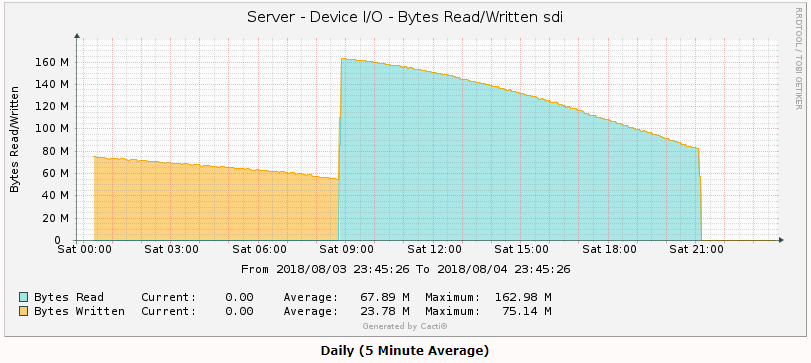
I turned on turbo/reconstruct-write part way through a 600GB move from one disk to another, and this is what I got in stats. Roughly twice the write throughput Cacti graphs: sdc is parity sdh is the source disk sdi is the destination disk
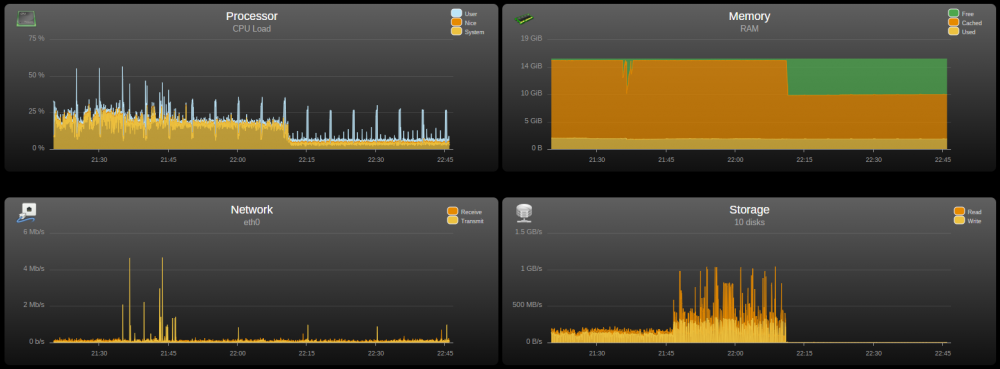
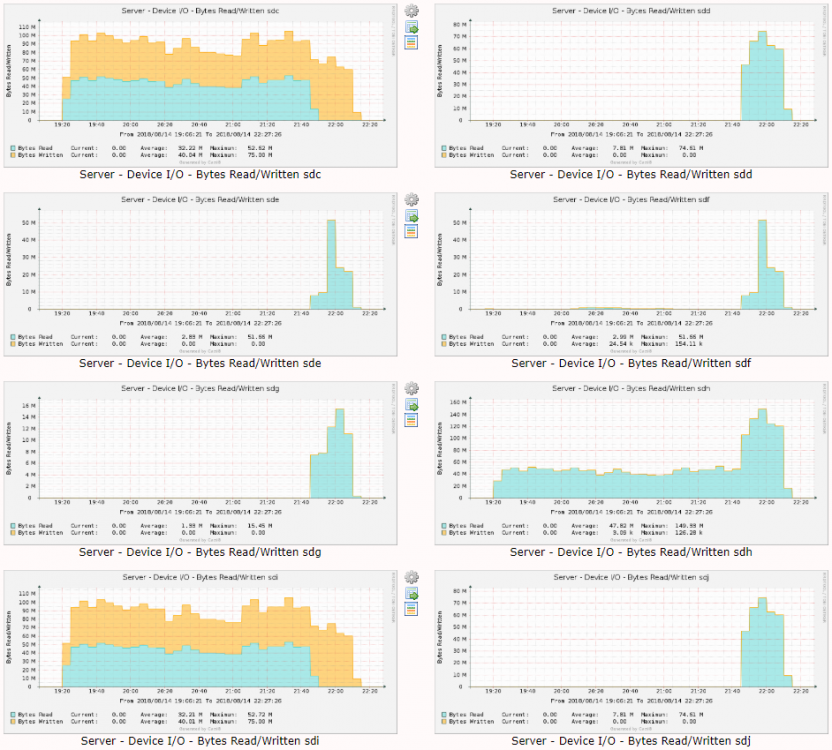
-
Well, I have a great solution to the persistent storage, as long as you're in the Pacific timezone. ? I was able to grab the mysql data and configs from a container I had started, but not configured yet, and clean them up a it. I created a nifty little starter package that you extract into your Cacti appdata folder before starting the container in unRAID. But the way the container sets the timezone when it starts up is not working with the starter data. I should be able to figure it out, though. I'm determined to either make this work the way I want, or just build my own container. Depends on how much of a rabbit hole this turns into.
-
Awesome! Glad you got it working. I'm still messing around with mine. I had some things to do today, so haven't been working on it most of the afternoon. I want to stop MySQL before taking a copy of the initial data, just to make sure there are no data consistency issues. Then I'm going to try and package it all up so it's easy for others to use. The time zone thing seems really inconsistent. I'm not sure what to make of that.
-
The issue with persistent storage is that the container starts up with the expectation that the mysql database already exists, because mysql is preinstalled. You can't point /var/lib/mysql at an empty folder. But I'm hoping I can point it at a folder with all the right mysql data in it already. I'm working right now on starting up a generic container, then making a copy of the mysql data location before anything is done to it. THEN, I'll attach that as a volume to a new container and configure from there. All said and done, I'd like to offer the "starter pack" as a download so others can just get going with just unpacking the download to a folder that holds all the sub-folders below. Since my last post, I've identified (most of the?) the volumes I'll be mounting, for optimum customization: -v '/mnt/cache/appdata/Cacti/mysql-data':'/var/lib/mysql':'rw' \ -v '/mnt/cache/appdata/Cacti/mysql-conf':'/etc/mysql':'rw' \ -v '/mnt/cache/appdata/Cacti/cacti-data':'/opt/cacti/rra':'rw' \ -v '/mnt/cache/appdata/Cacti/apache-conf':'/etc/apache2':'rw' \ -v '/mnt/cache/appdata/Cacti/php-conf':'/etc/php':'rw' \
-
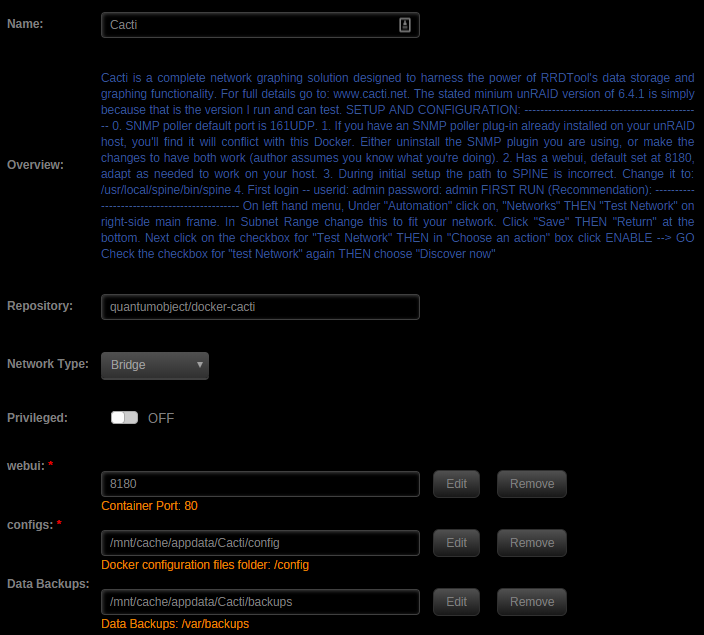
If you run it as documented, it's completely volatile, and you lose everything if you delete the container. unRAID always deletes containers when they are stopped. I'm still working (slowly) on addressing that in my installation. Last night I discovered the backup and restore commands are robust, though not enough to establish a persistent storage set up. But they do allow for easily not losing your data history. I've set up a cron task inside the container to run a backup every hour. And the backups are kept on persistent storage. Then when I have to restart the container or reboot, I just run the restore command and the new container comes back to life. Next step for me is to pick apart the backups and see what is in them, which will tell me what I need to capture and mount as external volumes, for a truly persistent and self-healing configuration. Here's how I'm starting (actually unRAID is starting) the container right now, which just uses the backup/restore commands: docker run -d \ --name='Cacti' \ --net='bridge' \ -e TZ="America/Los_Angeles" \ -e HOST_OS="unRAID" \ -p '8180:80/tcp' \ -v '/mnt/cache/appdata/Cacti/config':'/config':'rw' \ -v '/mnt/cache/appdata/Cacti/backups':'/var/backups':'rw' \ 'quantumobject/docker-cacti' What this looks like in unRAID: Then in an unRAID terminal, run: docker exec -it Cacti /sbin/restore Log into the container: docker exec -it Cacti /bin/bash Edit the crontab: crontab -e And paste in the schedule: 4 * * * * /sbin/backup This runs a backup at :04 minutes after the hour, every hour. I'll post the final setup once I get fully persistent storage working. EDIT: Regarding the time zone edit to /opt/cacti/graph_image.php; I haven't addressed that yet, and it's apparently not always necessary. You'll need to edit the file every time you start a new container, if you're seeing the issue. I needed it on one container, but not another, even though both were running on the same host.
-
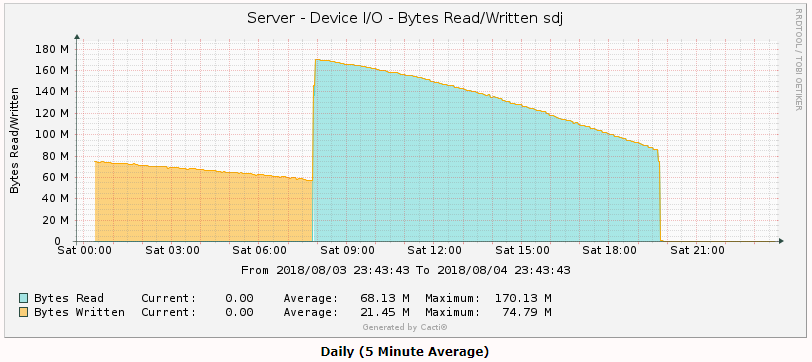
Last stage of a pre-clear (the Post-Read) on a pair of 6TB WD Reds. The yellow before it was the end of the zeroing pass. I pre-cleared two disks at once, and one of them was noticeably slower overall. That curve show the data transfer speed variance across the disk.
-
K, looks like adding: putenv('TZ=America/Los_Angeles'); just beaneath the <?php line in /opt/cacti/graph_image.php has resolved the issue. (https://forums.cacti.net/viewtopic.php?f=2&t=47931) Now I just need to figure out the persistent storage issue. If anyone is working on that, I'd love to see your notes!
-
Huh, OK. Data started showing up in my graphs at 9:40 this morning, which is 7 hours after I posted above, or the same offset as my time zone. So I seem to have a TZ issue. I did set -e TZ=America/Los_Angeles (In fact I just saw that it's set twice, and removed one.). But the graphs are slid off the data itself. So it seems like the TZ isn't getting to all the components. From php.ini (both): [Date] ; Defines the default timezone used by the date functions ; http://php.net/date.timezone date.timezone = "America/Los_Angeles" System time, according to the container, is correct: sh-4.3# date Fri Aug 3 23:46:43 PDT 2018 sh-4.3# my.cnf: default-time-zone = America/Los_Angeles Container startup: root@localhost:# /usr/local/emhttp/plugins/dynamix.docker.manager/scripts/docker run -d --name='Cacti' --net='bridge' -e TZ="America/Los_Angeles" -e HOST_OS="unRAID" -p '8180:80/tcp' -v '/mnt/cache/appdata/Cacti':'/config':'rw' 'quantumobject/docker-cacti' ccddc228f9e6c3c454c8197a797d32d292ad2a2f3b9fe6e0306adc9f17432e2a The command finished successfully! What else can I check? Thanks!
-
All I'm getting is empty graphs. Looks like my RRDs are getting NaN values. But all the troubleshooting steps are showing the right things. Suggestions on what to look at? I've been through all of these, except the MySQL and RRDtool update steps, because I don't understand the instructions. https://docs.cacti.net/manual:087:4_help.2_debugging#debugging
-
Amazon Drive does have an API, but it's not an AWS service. So it's not supported (yet?) by awscli nor s3cmd, which are the tools used in the various s3backup Docker images. If you're thinking of something other than Amazon Drive, I couldn't find it. All the searches I did for Amazon Cloud Storage brought me back to S3. But Amazon Drive is the consumer-facing service that is similar to Dropbox or OneDrive.



