Wow. A very interesting case.
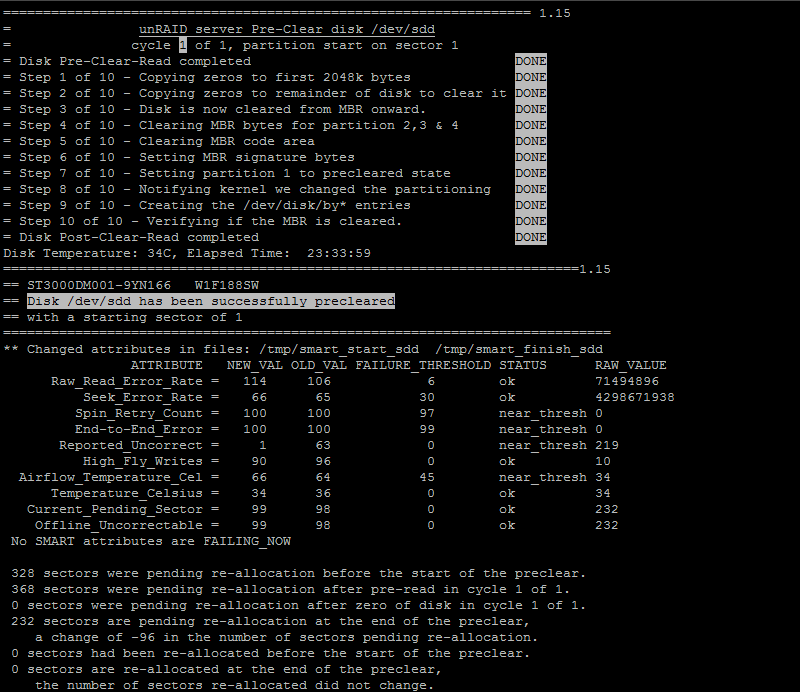
So the two big drive issues we monitor are reallocated sectors and pending reallocations. If there are pending reallocation, then the preclear procedure, as it enounters each one, should either clear it (drive decides no reallocation was needed after all), or reallocate it (using one of a limited number of spare sectors reserved for this purpose).
Your before and afters are listed below:
368 pending, and 0 actual reallocations - begin
232 pending, and 0 actual reallocations - end
It might have been predicted you'd end up with
0 pending, 368 reallocations
If this had happened I'd advise you to preclear again and see if any more pending or reallocations occur. If they don't after a few tries, the drive may be ok to use. But if they keep shifting I would be nervous and RMA it.
But that's not what happened. It may have been that during the preclear those 368 sectors pending reallocations were determined to be ok, but 232 others were found to be bad. Or maybe some of the 368 were found to be bad, but not bad enough to cause an actual reallocation. Not knowing exactly how the SMART logic works makes figuring out why this happened impossible.
The good news is you don't have any actual reallocated sectors. I have seen some drives exhibit a confusing phenomenon similar to yours where a bunch of pending sectors develop, but then suddenly after a parity check, the pending count goes to 0, with no actual reallocations, and they stay at 0 and work great. I think this points to a bug of some kind in the SMART logic, but these drives I tend to trust.
But I don't really trust this. Seagates don't have a great reputation. You could try another preclear cycle and see what happens. My guess is the pending sector counts will continue to change, and the jury is out if you are going to get any actual reallocations. I cannot tell you this is a healthy or an unhealthy situation - only that it would make me nervous.
Short answer, I'd probably RMA this drive. That or watch it through a few preclears, and if nothing reallocates and there are no read errors in the logs, use it.
Well now, was not expecting it to be such a phenomenon that's for sure!
Your insights are very appreciated. I believe this drive came with a 2 year limited warranty, purchased from amazon on 11.25.2012. I have used it to house my media for my plex server, inside my desktop, since its purchase so it definitely got some decent usage. It was almost full which was why I started looking for another solution and ended up with unRAID. The model number on this one is (ST3000DM001). I only ran one pre-clear as I wasn't expecting any problems.
I am currently running a pre-clear on one of the two older models I planned to place in the build (ST33000651AS) which were purchased from amazon on 7.5.2011. I'm curious as to the responses from those drives as they were used in an external backup raid 1 case. I will definitely post the output of those as well but was only planning on running 1 pre-clear pass on each drive since they had all been used before.
I haven't setup anything else up on my unRAID build, other than the preliminary add-on installs (unMENU & Control Panel) until these drives were ready to be installed, the pre-clear time is lengthy on 3TB drives to say the least so running it over and over again on 1 drive just continues to delay me. I'm not opposed to this as I am very much a draw twice cut once person.
I have personally never had to RMA a HDD in the 3ish years I've been fiddling with computers personally now so I'm not quite sure what to expect or even if there would be any replacement based upon the time-frame and drives themselves. Could you elaborate a bit on if RMA'ing this drive or any of the three drives I have would be worth it?
Seriously, thanks for all the help. These forums continually surprise me the more I read as to how helpful and knowledge people are.
Edit: Did not realize the command output included drive model #, none the less I'll keep it included for continuity sake.