





Everything posted by xFlawless11x
-
Thanks for reviewing! I do have plex transcode going to ram and have for several years but this is the first time I've gotten that OOM warning. I'll trim some of the RAM allocated to the HA-VM for now and see if it happens again next time there is a heavy transcode overlap.
-
My Fix Common Problems is set to run on the first of the month and notified me of a new error I haven't personally seen before related to an "Out of Memory" error. It recommended posting the diagnostic file so here we are! I am assuming it's VM related somehow but have yet to be able to pinpoint it myself. Any advice is appreciated! unraid-diagnostics-20250901-1134.zip
-
I'm looking to move to an expanded case and saw this on reddit: https://www.alibaba.com/product-detail/Nas24-drive-Rackmount-Storage-Server-SupportEATX_1601393728689.html I realize it's shorter in depth then a lot of 'standard' ones but it fits my desired use case/utility space. Here's my current setup, acquired over several years and various upgrades: https://pcpartpicker.com/list/2TgcyW But the critical components are: MB: https://www.gigabyte.com/Motherboard/C246-WU4-rev-10 PSU: https://seasonic.ru/product/g-550/ Card (spare/not in use): LSI 9211-8i 8-port PCI-E Card I was leaning expanded backplane but had a follow questions/wanted some outside opinions/feedback: Expanded backplane New PSU to support the required backplane molex #s? I'd like to eventually utilize all 24 slots, so assuming I would need different card to direct support mini sas? Direct Connect Backplane New PSU? To support all the drives? Use the existing LSI in conjunction to the standard MB sata ports? Any other things I'm missing or not thinking of?
-
You know I've had this setup for a while and only recently users started reporting the "disk space" error. Every time I go in, the RAM transcode is full and not auto-clearing. Still haven't found a good fix or root cause (unless it's a bug that plex introduced sometime in 2024).
-
All set now! Thanks for the prompt replies and awesome plugin!
-
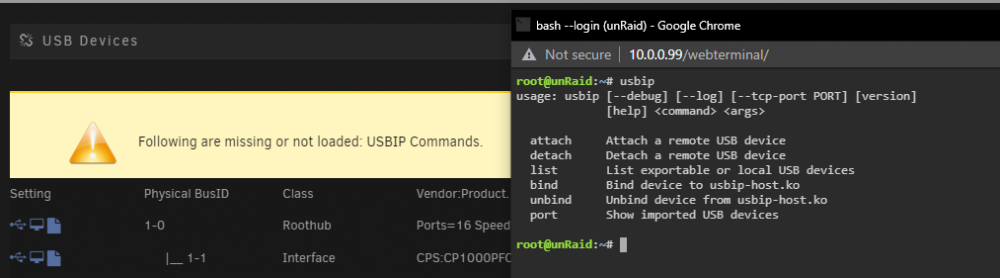
Results from command line: And yea if I disable USBIP in the plugin settings then no error and things look as expected
-
I am running 6.9.2 and not out of the gate planning to use USBIP but just wanted to make sure everything was setup correctly.
-
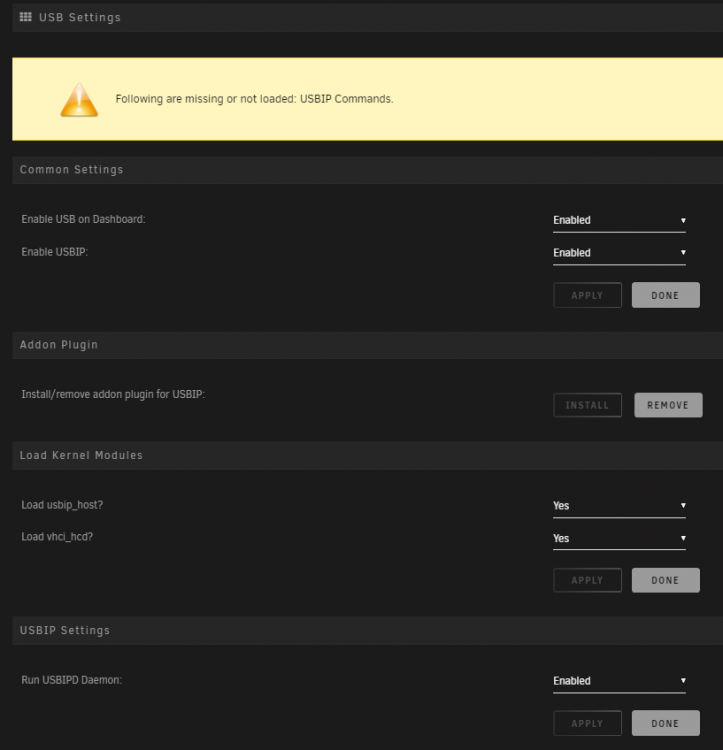
Looking to get this up and running but getting the following error message "Following are missing or not loaded: USBIP Commands." from the above replies it seems that the "usbip-1 package" is not being installed for whatever reason? I tried uninstalling both plug-ins, restarting unraid, etc however no luck. Any tips? I'm installing the latest "USB Manager (BETA)" from the App store and have not installed any versions of this plugin previously. I can see the libvirt.img was created under a system share. Here are my settings:
-
So figured I would give this a whirl, getting the error "No data in Elasticsearch index! After a crawl starts it can take up to 30 sec (refresh time) for index to be updated... Reload." I followed this guide from raqisasim. Installation right now looks like: Redis version = 6.0.9 Elasticsearch version = 5.6.16 Diskover version = v1.5.0.9 I saw from the latest Diskover Github readme that it mentions an Auth token; would that be the reason it's not crawling any data? Anyone tried to set this up recently with the latest versions have any tips? The UI loads fine and I don't see any errors or warnings in the log, they all appear to have started successfully.
-
Updated Plugin, ran a pre-clear sucessfully, logs attached for reference. ############################################################################################################################ # # # unRAID Server Preclear of disk S246J9FB804046 # # Cycle 1 of 1, partition start on sector 64. # # # # # # Step 1 of 5 - Pre-read verification: [2:22:13 @ 117 MB/s] SUCCESS # # Step 2 of 5 - Zeroing the disk: [2:21:46 @ 117 MB/s] SUCCESS # # Step 3 of 5 - Writing unRAID's Preclear signature: SUCCESS # # Step 4 of 5 - Verifying unRAID's Preclear signature: SUCCESS # # Step 5 of 5 - Post-Read verification: [2:22:57 @ 116 MB/s] SUCCESS # # # # # # # # # # # # # # # ############################################################################################################################ # Cycle elapsed time: 7:07:04 | Total elapsed time: 7:07:06 # ############################################################################################################################ ############################################################################################################################ # # # S.M.A.R.T. Status default # # # # # # ATTRIBUTE INITIAL CYCLE 1 STATUS # # 5-Reallocated_Sector_Ct 0 0 - # # 9-Power_On_Hours 17347 17354 Up 7 # # 194-Temperature_Celsius 28 42 Up 14 # # 196-Reallocated_Event_Count 0 0 - # # 197-Current_Pending_Sector 0 0 - # # 198-Offline_Uncorrectable 0 0 - # # 199-UDMA_CRC_Error_Count 0 0 - # # # # # # # # # # # ############################################################################################################################ # SMART overall-health self-assessment test result: PASSED # ############################################################################################################################ --> ATTENTION: Please take a look into the SMART report above for drive health issues. --> RESULT: Preclear Finished Successfully!. TOWER-preclear.disk-20180507-0010.zip tower-diagnostics-20180507-0016.zip
-
Enabled smart, ran a short test, downloaded (attached). I saw gfjardim mentioned there was an issue with the plugin so I'll probably just wait and re-try once that's updated as I'm in no rush to move this drive over the array. Smart-20180429-1747.zip
-
Not 100% sure the disk is okay, part of the reason for the pre-clear. It came from an old desktop that had been decommissioned for a bit, last I remember it was working fine though. Full copy of diagnostics and pre-clear logs attached. The drive in question is: ST33000651AS_9XK0AKZH Preclear.disk-20180429-0756.zip Diagnostics-20180429-0756.zip
-
Right so since I'm just re-using my own drive, I skipped the erase. It aborted in the post-read verification Plugin Version: 018.04.24 Script: gfjardim - 0.9.5-beta Operation: Clear Preclear_Disk_Log: Apr 26 16:24:38 preclear_disk_9XK0AKZH_29218: Command: /usr/local/emhttp/plugins/preclear.disk/script/preclear_disk.sh --notify 4 --frequency 4 --cycles 1 --skip-preread --no-prompt /dev/sdb Apr 26 16:24:38 preclear_disk_9XK0AKZH_29218: Preclear Disk Version: 0.9.5-beta Apr 26 16:24:38 preclear_disk_9XK0AKZH_29218: S.M.A.R.T. info type: default Apr 26 16:24:39 preclear_disk_9XK0AKZH_29218: Zeroing: dd if=/dev/zero of=/dev/sdb bs=2097152 seek=2097152 count=3000590884864 conv=notrunc iflag=count_bytes,nocache oflag=seek_bytes 2>/tmp/.preclear/sdb/dd_output Apr 26 16:24:39 preclear_disk_9XK0AKZH_29218: Zeroing: dd pid [30378] Apr 26 17:39:55 preclear_disk_9XK0AKZH_29218: smartctl exec_time: 1s Apr 26 23:30:13 preclear_disk_9XK0AKZH_29218: smartctl exec_time: 8s Apr 26 23:56:51 preclear_disk_9XK0AKZH_29218: smartctl exec_time: 7s Apr 26 23:58:59 preclear_disk_9XK0AKZH_29218: Zeroing: dd - wrote 3000560017408 of 3000592982016. Apr 26 23:59:00 preclear_disk_9XK0AKZH_29218: Zeroing: dd exit code - 0 Apr 26 23:59:01 preclear_disk_9XK0AKZH_29218: Post-Read: verifying the beggining of the disk. Apr 26 23:59:01 preclear_disk_9XK0AKZH_29218: Post-Read: dd if=/dev/sdb bs=512 count=4095 skip=1 conv=notrunc iflag=direct 2>/tmp/.preclear/sdb/dd_output | cmp - /dev/zero &>/tmp/.preclear/sdb/cmp_out Apr 26 23:59:01 preclear_disk_9XK0AKZH_29218: Post-Read: dd pid [1437] Apr 26 23:59:01 preclear_disk_9XK0AKZH_29218: Post-Read: verifying the rest of the disk. Apr 26 23:59:01 preclear_disk_9XK0AKZH_29218: Post-Read: dd if=/dev/sdb bs=2097152 skip=2097152 count=3000590884864 conv=notrunc iflag=nocache,sync,count_bytes,skip_bytes 2>/tmp/.preclear/sdb/dd_output | cmp - /dev/zero &>/tmp/.preclear/sdb/cmp_out Apr 26 23:59:01 preclear_disk_9XK0AKZH_29218: Post-Read: dd pid [1459] Apr 27 07:08:15 preclear_disk_9XK0AKZH_29218: Post-Read: dd - read 3000523292672 of 3000592982016. Apr 27 07:08:15 preclear_disk_9XK0AKZH_29218: Post-Read: dd command failed, exit code [141]. Apr 27 07:08:15 preclear_disk_9XK0AKZH_29218: Post-Read: dd output -> 434+0 records in
-
Just recently re-installed the plugin. Plugin Version: 018.04.24 Script: gfjardim - 0.9.5-beta Operation: Erase and Clear the disk Should I just skip the erase part and clear it? In the past I've only used new drives and thus just cleared but this is being re-purposed from an old desktop.
-
Is this the right place to post the results and ask questions on the clear itself? I remember there used to be a thread for that before this plugin so wasn't sure. Was clearing an older drive using "erase and clear" option, got the following error which stopped the process. Apr 25 17:11:46 preclear_disk_9XK0AKZH_24453: Command: /usr/local/emhttp/plugins/preclear.disk/script/preclear_disk.sh --erase-clear --notify 4 --frequency 4 --cycles 1 --no-prompt /dev/sdb Apr 25 17:11:46 preclear_disk_9XK0AKZH_24453: Preclear Disk Version: 0.9.5-beta Apr 25 17:11:46 preclear_disk_9XK0AKZH_24453: S.M.A.R.T. info type: default Apr 25 17:11:47 preclear_disk_9XK0AKZH_24453: Pre-Read: dd if=/dev/sdb of=/dev/null bs=2097152 skip=2097152 count=3000590884864 conv=notrunc iflag=nocache,sync,count_bytes,skip_bytes Apr 25 17:11:47 preclear_disk_9XK0AKZH_24453: Pre-Read: dd pid [25616] Apr 25 18:34:22 preclear_disk_9XK0AKZH_24453: dd[25616]: pausing (sync command issued) Apr 25 18:34:54 preclear_disk_9XK0AKZH_24453: dd[25616]: resumed Apr 26 00:21:41 preclear_disk_9XK0AKZH_24453: Pre-Read: dd - read 3000592982016 of 3000592982016. Apr 26 00:21:41 preclear_disk_9XK0AKZH_24453: Pre-Read: dd exit code - 0 Apr 26 00:21:41 preclear_disk_9XK0AKZH_24453: Erasing: openssl enc -aes-256-ctr -pass pass:'oKM2mDN6kqiPry0mztZP3xtE9uQYyMy7pgsjCZEjsAVkcHSJZwPBXjXi9fn26Z7a03BkSRqAsebJYeIRyzKppVg+XEyWK+U/WNi+D0riDiF+Zq36MXHL2v3K2W1WiFUpAy7hNGXNq5aWQbClWKltpTCXXLHEMVHpndMRSCyKdTk=' -nosalt < /dev/zero 2>/dev/null | dd of=/dev/sdb bs=2097152 seek=2097152 count=3000590884864 conv=notrunc iflag=count_bytes,nocache oflag=seek_bytes iflag=fullblock 2>/tmp/.preclear/sdb/dd_output Apr 26 00:21:41 preclear_disk_9XK0AKZH_24453: Erasing: dd pid [13610] Apr 26 07:23:55 preclear_disk_9XK0AKZH_24453: smartctl exec_time: 7s Apr 26 07:30:11 preclear_disk_9XK0AKZH_24453: smartctl exec_time: 7s Apr 26 07:39:02 preclear_disk_9XK0AKZH_24453: smartctl exec_time: 1s Apr 26 07:39:09 preclear_disk_9XK0AKZH_24453: smartctl exec_time: 8s Apr 26 07:55:47 preclear_disk_9XK0AKZH_24453: dd process hung at 3000577818624, killing.... Apr 26 07:55:47 preclear_disk_9XK0AKZH_24453: Continuing disk write on byte 3000575721472 Apr 26 07:56:01 preclear_disk_9XK0AKZH_24453: /usr/local/emhttp/plugins/preclear.disk/script/preclear_disk.sh: line 446: 13609 Exit 1 openssl enc -aes-256-ctr -pass pass:'oKM2mDN6kqiPry0mztZP3xtE9uQYyMy7pgsjCZEjsAVkcHSJZwPBXjXi9fn26Z7a03BkSRqAsebJYeIRyzKppVg+XEyWK+U/WNi+D0riDiF+Zq36MXHL2v3K2W1WiFUpAy7hNGXNq5aWQbClWKltpTCXXLHEMVHpndMRSCyKdTk=' -nosalt < /dev/zero 2> /dev/null Apr 26 07:56:01 preclear_disk_9XK0AKZH_24453: 13610 Killed | dd of=/dev/sdb bs=2097152 seek=2097152 count=3000590884864 conv=notrunc iflag=count_bytes,nocache oflag=seek_bytes iflag=fullblock 2> /tmp/.preclear/sdb/dd_output Apr 26 07:56:01 preclear_disk_9XK0AKZH_24453: Erasing: openssl enc -aes-256-ctr -pass pass:'vhk+SaVdyeTevJEBVabhQeoj4g5qT1XuobgHBZJspcEN+iY84H6/Hl1ZBwJgrIaCCWziEn9HsE8iWI2/8dQzfWBbeY0Dsxl/KD6Yvslw/WxJOhXKnMZDAKT4oqH52+tX7WL3pQgtahw8YH8XhdYjYbNof45P5WTlroTf6LKP1g0=' -nosalt < /dev/zero 2>/dev/null | dd of=/dev/sdb bs=2097152 seek=3000575721472 count=17260544 conv=notrunc iflag=count_bytes,nocache oflag=seek_bytes iflag=fullblock 2>/tmp/.preclear/sdb/dd_output Apr 26 07:56:01 preclear_disk_9XK0AKZH_24453: Erasing: dd pid [16010] Apr 26 07:56:02 preclear_disk_9XK0AKZH_24453: Erasing: dd command failed -> 8+1 records in 8+1 records out 17260544 bytes (17 MB, 16 MiB) copied, 0.0164792 s, 1.0 GB/s
-
Was setting up NZBHydra this morning, configured the downloaders and indexers, restarted and am getting a "fatal error occurred" a little googling pointed me to that the port was already in use / another instance of hydra was already running but I don't see that being the case. Any tips? Thanks! 2018-04-08 12:32:59,218 - INFO - nzbhydra - Dummy-3 - Exit registered. Stopping and closing database 2018-04-08 12:32:59,219 - INFO - nzbhydra - Dummy-3 - Database shut down 2018-04-08 12:33:00,179 - NOTICE - nzbhydra - MainThread - Starting NZBHydra 0.2.233 2018-04-08 12:33:00,179 - NOTICE - nzbhydra - MainThread - Base path is /app/hydra 2018-04-08 12:33:00,179 - NOTICE - nzbhydra - MainThread - Loading settings from /config/hydra/settings.cfg 2018-04-08 12:33:00,184 - INFO - log - MainThread - Logging to file /config/hydra/nzbhydra.log as defined in the command line 2018-04-08 12:33:00,185 - INFO - log - MainThread - Setting umask of log file /config/hydra/nzbhydra.log to 0640 2018-04-08 12:33:00,185 - INFO - nzbhydra - MainThread - Started 2018-04-08 12:33:00,185 - INFO - nzbhydra - MainThread - Loading database file /config/hydra/nzbhydra.db 2018-04-08 12:33:00,189 - INFO - nzbhydra - MainThread - Starting db 2018-04-08 12:33:00,190 - INFO - indexers - MainThread - Activated indexer NZBCat 2018-04-08 12:33:00,192 - INFO - indexers - MainThread - Activated indexer nzb.su 2018-04-08 12:33:00,194 - INFO - indexers - MainThread - Activated indexer NZBGeek 2018-04-08 12:33:00,196 - INFO - indexers - MainThread - Activated indexer Drunken Slug 2018-04-08 12:33:00,197 - INFO - indexers - MainThread - Activated indexer NZB Finder 2018-04-08 12:33:00,198 - NOTICE - nzbhydra - MainThread - Starting web app on 192.168.1.154:5075 2018-04-08 12:33:00,199 - NOTICE - nzbhydra - MainThread - Go to http://192.168.1.154:5075 for the frontend 2018-04-08 12:33:00,199 - INFO - web - MainThread - Running threaded server 2018-04-08 12:33:00,202 - ERROR - nzbhydra - MainThread - Fatal error occurred Traceback (most recent call last): File "/app/hydra/nzbhydra.py", line 214, in run web.run(host, port, basepath) File "/app/hydra/nzbhydra/web.py", line 1730, in run app.run(host=host, port=port, debug=config.settings.main.debug, threaded=config.settings.main.runThreaded, use_reloader=config.settings.main.flaskReloader) File "/app/hydra/libs/flask/app.py", line 772, in run run_simple(host, port, self, **options) File "/app/hydra/libs/werkzeug/serving.py", line 625, in run_simple inner() File "/app/hydra/libs/werkzeug/serving.py", line 603, in inner passthrough_errors, ssl_context).serve_forever() File "/app/hydra/libs/werkzeug/serving.py", line 506, in make_server passthrough_errors, ssl_context) File "/app/hydra/libs/werkzeug/serving.py", line 440, in __init__ HTTPServer.__init__(self, (host, int(port)), handler) File "/app/hydra/libs/SocketServer.py", line 420, in __init__ self.server_bind() File "/app/hydra/libs/BaseHTTPServer.py", line 108, in server_bind SocketServer.TCPServer.server_bind(self) File "/app/hydra/libs/SocketServer.py", line 434, in server_bind self.socket.bind(self.server_address) File "/app/hydra/libs/socket.py", line 228, in meth return getattr(self._sock,name)(*args) error: [Errno 99] Address not available
-
This came up for me the other day, here's a post with all the various ways. I used - http://<Insert IP Address>/log/syslog Replace the <Insert IP Address> with your respective server. You can use Tower if that works for you in general.
-
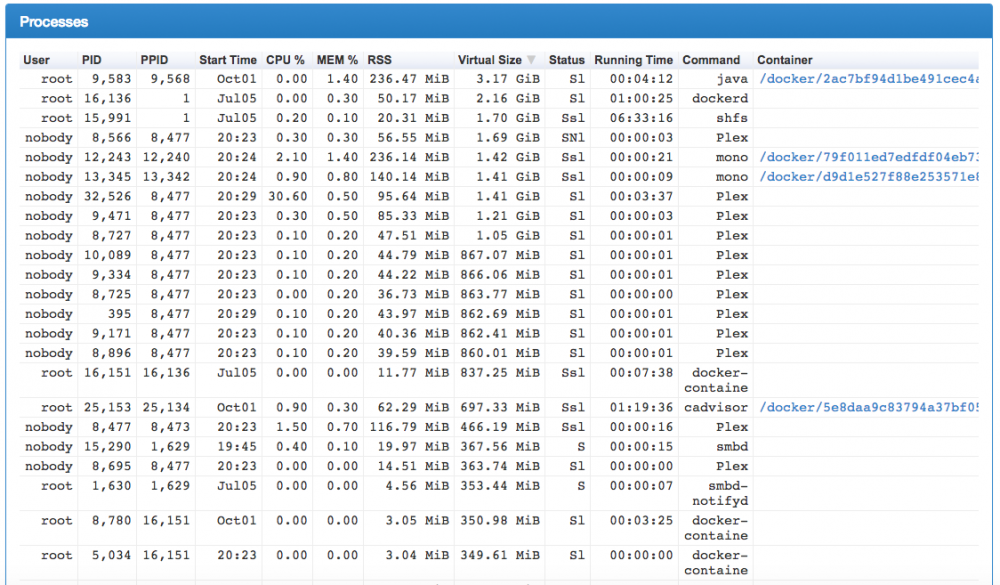
Realize this is an old topic, but wanted to get some advice. I used cAdvisor to find the largest offenders but am not sure the best way to clean it up, I could certainly do a full re-load, wanted to ask before I went that route. Thanks!
-
I've seen this error before. Basically they DeleteCleanupDisk & ParCleanupQueue are defunct options. It was a problem with a version change of NZBget iirc. If you edit the nzbget.conf file in /config with a suitable texteditor (Notepad++ on Windows I'd recommend) then search for those terms and delete both corresponding lines I think that fixes it. Make a backup first though. Appreciate the tip! Just wanted to follow up in case anyone else ran across the same issue. I did go in and delete those two lines however was still running into issues so I just re-installed the docker completely, seems to be running smoother now than ever.
-
Updated to the latest, getting a continual error that loops on forever, might have been my error somehow but any thoughts? _ _ _ | |___| (_) ___ | / __| | |/ _ \ | \__ \ | | (_) | |_|___/ |_|\___/ |_| Brought to you by linuxserver.io We do accept donations at: https://www.linuxserver.io/donations ------------------------------------- GID/UID ------------------------------------- User uid: 99 User gid: 100 ------------------------------------- [cont-init.d] 10-adduser: exited 0. [cont-init.d] 30-config: executing... [cont-init.d] 30-config: exited 0. [cont-init.d] done. [services.d] starting services [services.d] done. nzbget.conf(888): Option "DeleteCleanupDisk" is obsolete, ignored nzbget.conf(1237): Option "ParCleanupQueue" is obsolete, ignored [WARNING] nzbget.conf(888): Option "DeleteCleanupDisk" is obsolete, ignored [WARNING] nzbget.conf(1237): Option "ParCleanupQueue" is obsolete, ignored [iNFO] nzbget 17.0 server-mode nzbget.conf(888): Option "DeleteCleanupDisk" is obsolete, ignored nzbget.conf(1237): Option "ParCleanupQueue" is obsolete, ignored [WARNING] nzbget.conf(888): Option "DeleteCleanupDisk" is obsolete, ignored [WARNING] nzbget.conf(1237): Option "ParCleanupQueue" is obsolete, ignored [iNFO] nzbget 17.0 server-mode nzbget.conf(888): Option "DeleteCleanupDisk" is obsolete, ignored nzbget.conf(1237): Option "ParCleanupQueue" is obsolete, ignored [WARNING] nzbget.conf(888): Option "DeleteCleanupDisk" is obsolete, ignored [WARNING] nzbget.conf(1237): Option "ParCleanupQueue" is obsolete, ignored [iNFO] nzbget 17.0 server-mode nzbget.conf(888): Option "DeleteCleanupDisk" is obsolete, ignored nzbget.conf(1237): Option "ParCleanupQueue" is obsolete, ignored [WARNING] nzbget.conf(888): Option "DeleteCleanupDisk" is obsolete, ignored
-
Not a good idea to do if you have docker applications. The New Perms script can mess up the apps' config files due to change the permissions on it. Install Fix Common Problems, and there is a replacement script called Docker Safe New Permissions in the tools menu which avoids that issue Oh wow, thanks! Updating my post to recommend using that as well so no one makes the same mistake. It might be worth adding to utilize that Install Common Problems application & permission fix to the OP as I know a few posts related to permissions errors have come up.
-
Just wanted to follow up on my previous issue but also to say thank you for a great tool! I wouldn't have been able to format my older drives so easily without out. To avoid any of the permissions issues, I recommend using the Install Fix Common Problems, and there is a replacement script called Docker Safe New Permissions. From there it worked flawlessly.
-
Trying to move data around to get all my drives to XFS. This error is being thrown: W: 2016/06/01 16:56:55 shell.go:46: moveProgress:: rsync: mkdir "/mnt/disk4/TV Shows" failed: Permission denied (13) Disk4 is the new drive inserted where I'm trying to move all the data to from the older Disk1. Any advice on fixing it is greatly appreciated!
-
Just submitted an RMA to Seagate to get rid of the questionable one. Thanks for the advice, greatly appreciated!
-
SDE & SDC are a bit older drives but appear to have come through clear. Images Below: http://i.imgur.com/1N0YkUj.pnghttp://i.imgur.com/lpARRAr.png SDD is the one I posted about before that BJP gave some advice on, I have attached the second pre-clear. Just want to get some thoughts before I request an RMA since that drive appears to still be under warranty. Images Below: http://i.imgur.com/zjd2bE1.png Is there anything troublesome I should look out for?




