jmcskis
Members
-
Joined
-
Last visited
-
Thanks. Good to know things are looking ok. However, I did run a manual parity check (non-correcting) after everything and it turned up a bunch of errors. I expect this is because of the previous ATA bus and ICRC abort errors and filesystem correction. As far as I can tell there's no impacts to data and no other errors showed up besides a brief power outage that kicked me over to my UPS. Since there didn't seem to be an other errors or issues, should I proceed with an error correcting parity check? For reference, diagnostics immediately before running parity check: tower-diagnostics-20260917-1808_preparitycheck.zip And diagnostics after parity check: tower-diagnostics-20260919-1600.zip
-
Thanks @JorgeB . I was able to repair the file system on disk 1 and everything seems back to "normal". Out of curiosity is there anything else in my diagnostic logs that I should be looking at, or anything that looks like I'll have other problems in the near future? I understand my current round or errors is generally due to bad power/sata cables, but I'm still nervous that these errors of other impending hardware failures? Diagnostics post filesystem repair: tower-diagnostics-20260913-1103.zip
-
Alright, let's try this again. Swapped out the sata cable and for now I'm no longer seeing the ICRC abort errors or the ATA bus errors. Disk 1 is still showing up as unmountable with wrong or no file system. tower-diagnostics-20260912-0835.zip
-
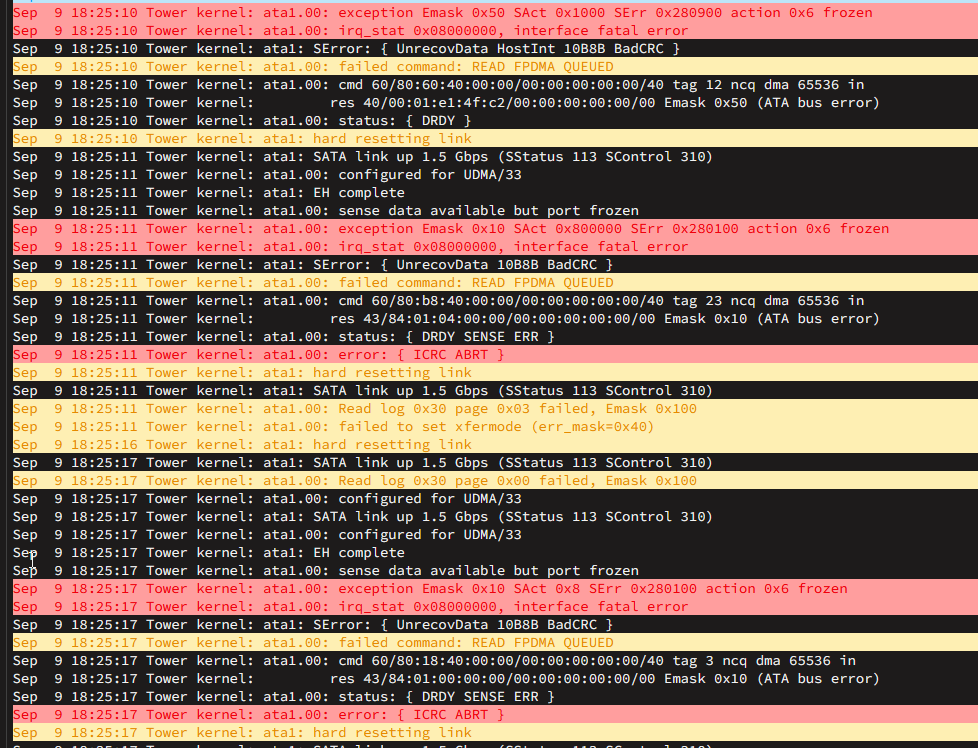
Swapped power and sata cables on disk1. New diagnosticstower-diagnostics-20260909-1824.zip Looks like I'm still getting ATA bus errors and disk1 is showing as Unmountable. I also am getting repeated "interface fatal errors"
-
After years of running Unraid with little to no issues, I have recently seen an uptick in the number and types of errors showing up. Most of the errors seemed to start showing up after I upgraded to 7.3.2, but given the errors I'm seeing I'm starting to suspect that some, or all, of my hardware is on its last legs. An incomplete timeline of how my issues have progressed: Upgraded to 7.2.5 ran into issues with Dockers not starting and running (link to post). I understand this is/was an issue since 7.2.5 and my workaround of changing a character in the setup and reapplying has been working (I assume there is a more robust fix I should implement). Cache pool showed as degraded. I gather this could be the case from unsafe shutdowns or other issues in the past and now get flagged in the current version. Based on forum posts for others seeing similar problems I ran a scrub and full smart tests. Seeing no obvious errors I ran a balance and then reset my cache pool. Cache pool is still showing as degraded, but also seems to be working ok. Upgraded to 7.3.2 from 7.2.5 Last week I noticed some random, unexplained data loss. I didn't see anything in the logs to explain what happened a docker issue (Plex, Sonarr, Radarr...) or just another hint of hardware failure. tower-diagnostics-20260827-0741.zip The biggest red flag showed up yesterday when I discovered that disk 1 was showing as unmountable, the last parity check had 500+ errors, and it looked like my most recent monthly parity check had failed and was attempting to rerun with the unmountable disk. tower-diagnostics-20260903-2118.zip I pulled diagnostics, stopped the parity check, stopped the array and performed a clean shutdown. I am currently running a memtest to see if that turns up anything else. I am looking for help confirming that my hardware is indeed dying or insights into other issues. I've upgraded/replaced my drives, RAM, CPU and PSU over time but realized I am still running the mobo and sata cables from when I originally built my server in 2014, thus why I'm suspecting hardware failure. I'm guessing there are also aspects of my setup that are no longer best practice with all of the updates to Unraid in recent years.
-
Thanks. Resetting the docker seemed to have fixed it.
-
I recently started getting a "bad parameter" execution error when I try to start the docker. I did recently update to 7.2.5 so don't know if it's maybe an issue with the latest stable release? I have the docker routed through binhex-delugevpn (I think I followed spaceinvader's video when I originally set it up), but it hasn't given me issues in the past. tower-diagnostics-20260507-1829.zip

-
Thanks. Looks like everything is back to normal.
-
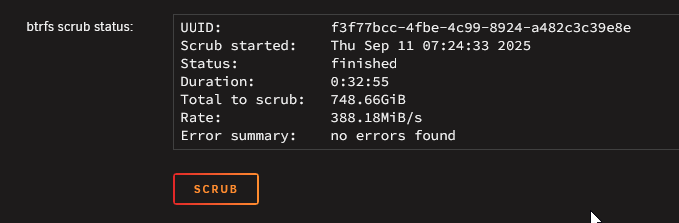
I double-checked the SATA cables and didn't get any errors when I rebooted. Ran another scrub, and didn't find any errors. Looks like I just need to re-create the docker .img is all I need to do?
-
I think I've worked out that at least part of the file system on my cache pool is corrupted, and I need to reformat and restore from a backup. Before I go down that path, though, I want to confirm with the community that my thinking is correct and I haven't missed anything else. What Happened: A few days ago, I performed a safe shutdown for some routine maintenance (just removing dust and stuff, no hardware changes). When I booted back up, everything seemed normal until the system started throwing a bunch of BTRFS errors and I/O errors. I wasn't able to grab the diagnostics before I shutdown, but did grab the syslog syslog-20250908-1352.txt When I saw the errors, I performed a clean shutdown, rebooted into safe mode, and ran diagnostics tower-diagnostics-20250908-2032.zipand was seeing different BTRFS errors this time. Based on what I could find on other threads related to BTRFS errors, I ran a scrub of the cache pool, which ran with ~6000 corrected errors and no failed errors, but no other issues with the scrub as far as I can tell. Thinking that had fixed the problem, I performed a clean shutdown, confirmed all hardware connections were secure, and rebooted as normal. After booting up, only part of my dockers started and the others can't be started. The syslog is showing a handful of BTRFS errors still, which I'm understanding to be corruption errors based on the diagnostics after the latest reboot tower-diagnostics-20250908-2225.zip Hoping this can be fixed with a reformat and restore.
-
Thanks, @JorgeB. Looks like things are back up and running.
-
Right, I knew there were some corrupts, which was part of my reason for swapping out drives. Given the corrupts should I have recreated the pool from the start instead of trying to replace drives? Just to make sure I've got my steps right for recreating the pool: Copied the data I could to the array (I did copy my docker.img but I know it's better to just recreate the .img file) Backed up appdata using CA Backup Disable docker Set all shares to not use cache Run mover From here I'm a bit unclear on the correct steps to follow, but think the process would be: stop the array unassign all pool devices restart the array stop the array set pool slots to 0 (trying to completely remove cache) restart array stop array set pool slots to 2 assign new drives to pool (sdh and sdi) restart the array format new drives to create new btrfs cache pool restore appdata recreate docker.img and restore dockers from templates copy any data back onto cache, as required
-
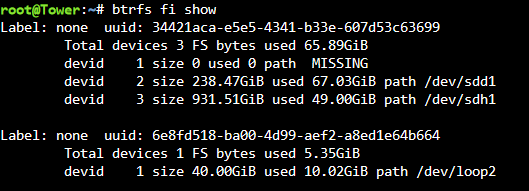
That appears to have done the trick. Although I think it's still expecting there should be 3 drives? New diags attached tower-diagnostics-20231216-0847.zip
-
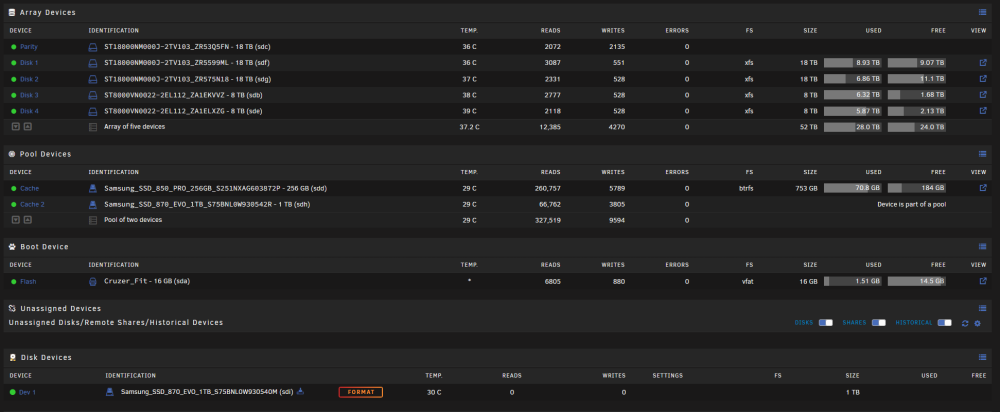
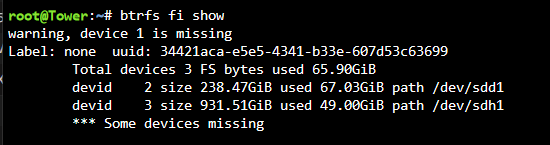
It seems to be expecting that I have 3 drives in the cache pool even though I never changed from a 2 drive pool. Is this suggesting that it's expecting /dev/sdd (currently unassigned) to be included as a 3rd drive in the pool?
-
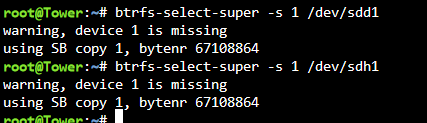
And that gives: sdd is unassigned and one of my old cache drives. sdh is the other new cache drive.