





trekkiedj
Members
-
Joined
-
Last visited
Everything posted by trekkiedj
-
@Josh.5 What @BomB191 said ^^^. This work is brilliant and no rush. Don't worry at all.
-
@Josh.5 Stellar work as always mate. Thanks so much. Just FYI I still get the Ascii unicode error if i try to point it to my movie library (the same as when it was LibraryOptimiser) Added my comment to the error on Github.
-
Thanks, i now have it running fine... almost! @Josh.5 - I have a large library, and i dont know if it is related, but if i point the container to my entire TV series library, after a few minutes the WebUI page gets replaced with the following: Traceback (most recent call last): File "/usr/local/lib/python3.5/dist-packages/tornado/web.py", line 1590, in _execute result = method(*self.path_args, **self.path_kwargs) File "/app/webserver/main.py", line 51, in get self.render("main.html", time_now=time.time()) File "/usr/local/lib/python3.5/dist-packages/tornado/web.py", line 766, in render html = self.render_string(template_name, **kwargs) File "/usr/local/lib/python3.5/dist-packages/tornado/web.py", line 907, in render_string return t.generate(**namespace) File "/usr/local/lib/python3.5/dist-packages/tornado/template.py", line 346, in generate return execute() File "main_html.generated.py", line 89, in _tt_execute if isinstance(_tt_tmp, _tt_string_types): _tt_tmp = _tt_utf8(_tt_tmp) # main-pending-tasks.html:7 (via main.html:195, page_layout.html:123) File "/usr/local/lib/python3.5/dist-packages/tornado/escape.py", line 199, in utf8 return value.encode("utf-8") UnicodeEncodeError: 'utf-8' codec can't encode character '\udce2' in position 48: surrogates not allowed The processes seem to still be running in the background as the log reflects this but the WebUI is non-functional. It's not happening if i just select a single show folder.
-
I really think we could do with some guidance from @Josh.5 as to how to configure this in unraid. This is an awesome container that solves many of my problems, if only i could get it working correctly! Notwithstanding that, this is really good work.
-
@itimpi Would you mind screenshotting your container page? I am having a nightmare getting this to work!
-
@Josh.5I cant work out how to get the to the GUI
-
@SpaceInvaderOne Likewise... I used at least 6 of your videos in the last month! @Ashe Out of interest, how many threads have you pinned for @Josh.5's container?
-
Just to add now i have been using for a week: Still cant seem to get the container to encode the Movie library as above. With TV series I did some playing on using the SSD cache pool vs /tmp on the RAM and saw no noticeable performance increase. Other than that, it is rock solid and works a treat.
-
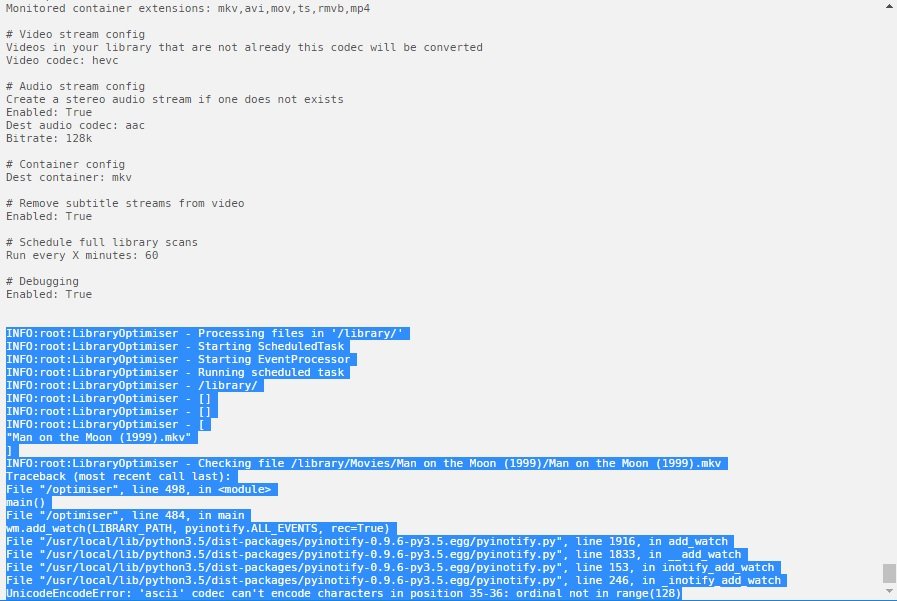
@Josh.5 Just an update on the crashing. It seems it is something to do with encoding. It only happens if the Movies path is used. I removed some movies it was having issues with but then became apparent that it was every movie!:
-
@Josh.5 this for me is a really exciting development. As a huge media fan, this solves a major hurdle in getting my library of some 150 odd series and nearly 2500 movies optimised to the latest standard. Thanks so much for your work on this!
-
Also, i guess the only other thought I have on this would be to have the ability to schedule this. Say overnight or any fixed schedule.
-
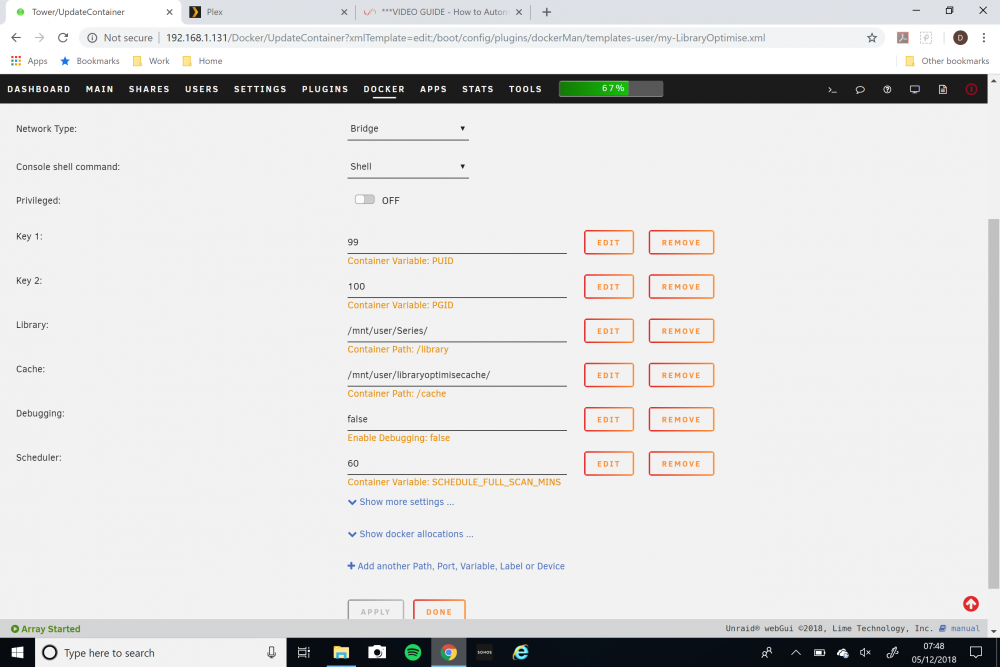
OK so i found that the container would crash if i mapped container path /library/Movies to /mnt/user/Movies and then another mapped path of /library/Series to /mnt/user/Series The configuration below though works just fine:
-
I tried adding both paths as you suggested and nothing really happened. It didn't attempt to find and transcode h264/avi files.
-
And totally agree with @SpaceInvaderOne. This is amazing work. Thanks so much.
-
@Josh.5 That path option would work fine for me. Will the container at this point accept more than one path variable?
-
I am extremely impressed. I do have a couple of thoughts though: I noticed that you mentioned that it would run as two threads, one for the main library conversion and one to monitor new additions. I haven't seen this is the case as only one transcode is happening at any one time and new additions are remaining unconverted. I like many will likely have separate shares for movies and series. How will this cope with that? I don't want to just enter /mnt/user as the Library path for obvious reasons. I just want /mnt/user/Series and /mnt/user/Movies Got to say though that this is stellar work and i don't know why someone hasn't thought of it before! Well done that man!
-
Testing this now. If this works as well as i hope, this could be the solution i have been looking for for ages! Thanks so much!

