





jtcweb
Members
-
Joined
-
Last visited
Everything posted by jtcweb
-
Yes I just downloaded the linuxserverio Plex docker a couple of days ago.
-
I know that this is where my problem is. However I cannot find the instructions to tell me how to do this. I did find these instructions but I cannot find how to get to the volume mappings as shown. I don't know if it is supposed to be in the config for that individual docker or someplace else. For Sabnzb there were places in the Docker edit for me to set the path for downloads. In the case of this Plex Docker there is a AppData Config Path under more settings. There is also a note near the top that states "/media Map this to your media, you can use several submappings here", but I cannot find anyplace in the Docker Edit screen that lets me set the /media path. ****************************************************** I figured it out by looking at the /config one and using the "Add another path" link. I still cannot find anyplace that describes how this should be filled out, I just played around with copying what was already there for /config.
-
Unable to Find Media Folders Hello, I'm trying to setup Plex Server and when I "Browse For Media Folder" I cannot find my media folders. The mnt directory is empty (within Plex) and I know that is where they are as I can see them when I browse the shares in the UnRaid WebUI I can see (for example) /mnt/user/TV Shows. It looks like I'm not starting at the root of the server when I'm browsing in the Plex setup web page. I don't see anything in the Docker -> Edit that allows me to set a path to the media. Thanks, Jerry
-
Hello, I don't know if anyone uses the Brave browser but I get stuck in a sign in loop. When I open the Plex WebUI and click on settings it sends me to the Plex website to login. I login and then go back to my UnRaid/Plex WebUI just to get sent back to the Plex website with a message "There was an error signing in". However I'm logged into the Plex website on another tab. I tried it in Chrome and it works. Regards, Jerry
-
I had this setup on my unraid server in the past but I was doing a lot of disk updating so I removed it. I created a new share to use with this and installed from the apps menu and the only thing I did in the install was select the share as "Host Path 2". When I try to add a link to create a connection I get a message "Sync Home does not have permission to access this folder." This looks like there is a problem writing to the share on the unraid server, but I am able to write to it using windows file explorer without any login to the unraid server. I've looked for rights or permissions settings and cannot find any. Can someone give my some hints as to what to look for? Thanks
-
Upgrading unraid did the trick. I hadn't been looking at that area of the system so I didn't even notice that I was behind on my updates. Thanks for the help.
-
I'm running version 6.1.2. There isn't anyplace to fill in the subdomain and token info.
-
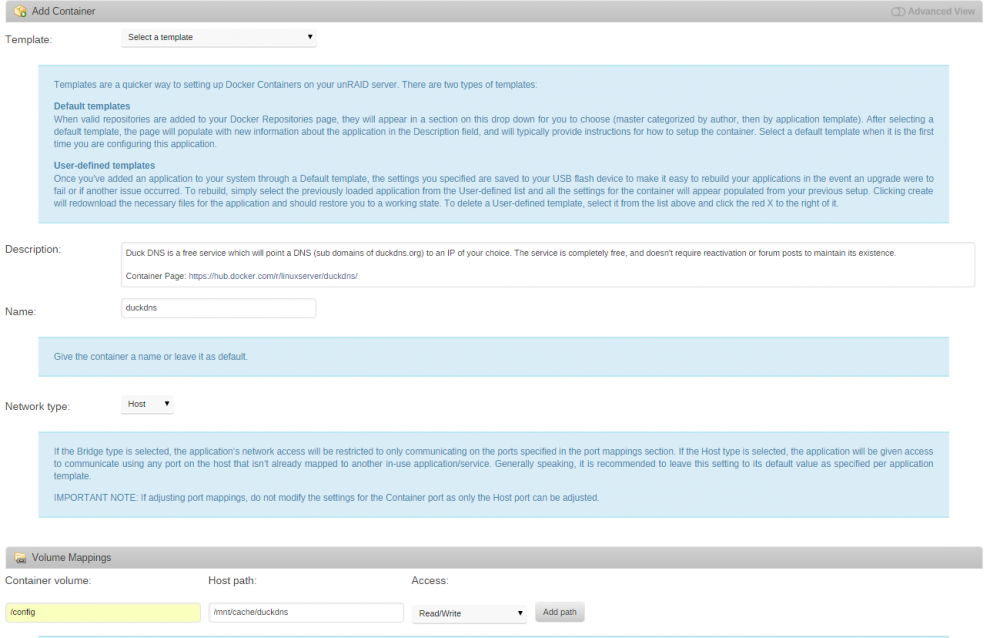
Here is my screen shot. The only thing I did was click on the container volume box and select /config and clicked on the host path box and selected my cache drive and added duckdns to the path.
-
The Create button still doesn't do anything.
-
I'm stumped trying to set this up. I'm going through the apps and selecting DuckDNS. I get to the add container page and I'm not sure what to do. Do I need to select a template? I'm not seeing anything in my list that looks like DuckDNS. Also I'm not sure what to put in the volume mappings, I tried a few things like /DuckDNS. When I click on the create button nothing happens. I don't get an error message, I don't get a waiting on server message, just nothing happens. What am I doing wrong? Thanks, Jerry
-
I just have one container volume /Sync pointing to one host volume /mnt/user/Sync/ When I try to create I get the error below. root@localhost:# /usr/local/emhttp/plugins/dynamix.docker.manager/scripts/docker run -d --name="resilio" --net="host" -e TZ="America/New_York" -v "/mnt/user/Sync/":"/Sync":rw docker: "run" requires a minimum of 1 argument. See '/usr/bin/docker run --help'. Usage: docker run [OPTIONS] IMAGE [COMMAND] [ARG...] Run a command in a new container The command failed.
-
I'm feeling a bit dense, like I'm totaling missing the basics here. I can't find anything telling me how to set this up. I added the docker to my template repository and can find it when I try to add a container I have my-resilio listed, but cannot figure out how to configure it. I can't find anything that tells me what volume mappings I need to create.
