





magiin83
Members
-
Joined
-
Last visited
Everything posted by magiin83
-
Every other docker I have that points to the array (ie Nzbget or couchpotato or sonarr) all don't have the issue of spinning up the drive. I did also try pointing filebot to /mnt/cache/Movies rather than to the array of the same folder, but the same thing actually occurred, drive spun up. I'm not blaming filebot or even this docker for that, a random spin up could even mean that the drive itself on the spindown delay needs to be reinforced again.... just saying, there's something odd about it when I don't have the issue with any other docker handling files that go to the array.
-
See above for recent issues with this. Coppit, or anyone else, do you experience the same issues? Drive spins exactly as metadata starts to grab, unlike how it should be doing like with the movie, creating a link on the cache drive
-
Ok, so after some extensive testing... there is something within filebot absolutely sending a signal to spin up the drive it's about to write the files downloaded and processed by filebot to. It's not xbmc notifications, it's not the moving of the files to the array.... it's the metadata being written when grabbing artwork and so on. As you can see in this image take from command line, permissions are a problem, since the download is done by nzbget (nobody) and filebot writes as root, and also seems to be writing DIRECTLY to the array, rather than using the cache drive.

-
120gigs... lol. It's not an issue of space. I just don't know what could be causing this, and the only thing I can notice (at least based off the log) that would be causing it is FileBot, which I know, also makes no sense. But it doesn't occur with just nzbget. To summarize in case ayone else is looking at this page and gets confused what this post is about (or has any other input which I'd greatly appreciate any help to resolve): ------------- I am having an issue that I imagine most other people using the docker are having too... All drives are spun down, file gets downloaded, then passed to filebot... which then spins up the drive it's writing to, essentially bypassing the cache drive.... why is this occurring? Or why is it sendig a signal to spin up the drive? Is there a method or command to throw in the script to disable this or is there something in one of the parameters thats doing this and I don't know it? Here's the log on the filebot side: Command shown on unraid log that displays:I use NZBGet but not any of these other things so excuse me if I miss this obvious. You say videosort script sends to /data, which is mapped to /mnt/user. I assume you mean it is sending it to a subfolder of /data. Filebot's /output is the Movies user share. Is that share configured to use the cache disk? Maybe something about that share's configuration is making it bypass cache. Post a screenshot of the Movies share page. Correct, videosort is mapped in a way that it sends to a subfolder (Movies or Television)... so if I were to ever stop using sonarr, it would rename XXXXX, if it's a movie category or tv category, then sends to the appropriate directory on the array in /data (/mnt/user/________) The movies user share as far as I know, is setting correctly, but you may have a better answer about that then I do. It was the next place I was going to check. See attached. I do really appreciate the help! It's driving me crazy what's causing this.
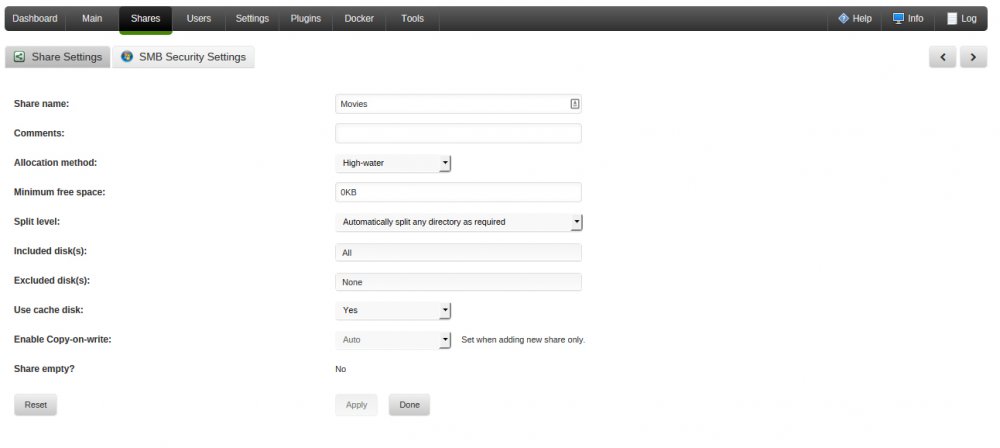 Whether the cache drive gets used or when a drive is spun up has nothing to do with filebot or any docker for that matter. If you are writing directly to one of the disks, then cache doesn't get used. Only user shares are cached. unRAID spins up drives when they are read or written. That much I understand, however, if for example: I have nzbget download something, process it, then pass it to the array, using cache drive, with settings so all downloads are technically moved later, why does it not send the signal to spin up the drive, where as with filebot, this is happening? Is it because it's download the metadata separately and is causing this? What are your volume mappings? See attached, or: Filebot: /input /mnt/cache/appdata/Downloads/dst/Movies/ /output /mnt/user/Movies /config /mnt/cache/appdata/filebot NzbGet: /data /mnt/user /config /mnt/cache/appdata/nzbget/config /downloads /mnt/cache/appdata/Downloads/ So with Nzbget and videosort script - downloads, pases to script, renames, finishes, then sends to /data... drive does not spin. With Nzbget and filebot - downloads to /downloads, filebot picks up from there in /input, then /outputs with downloading metadata
 Whether the cache drive gets used or when a drive is spun up has nothing to do with filebot or any docker for that matter. If you are writing directly to one of the disks, then cache doesn't get used. Only user shares are cached. unRAID spins up drives when they are read or written. That much I understand, however, if for example: I have nzbget download something, process it, then pass it to the array, using cache drive, with settings so all downloads are technically moved later, why does it not send the signal to spin up the drive, where as with filebot, this is happening? Is it because it's download the metadata separately and is causing this?I did, and got my answer. It was an issue with double quotes. On the other hand though, I am having an issue that I imagine most other people using the docker are having too... All drives are spun down, file gets downloaded, then passed to filebot... which then spins up the drive it's writing to, essentially bypassing the cache drive.... why is this occurring? Or why is it sendig a signal to spin up the drive? Is there a method or command to throw in the script to disable this or is there something in one of the parameters thats doing this and I don't know it? Here's the log on the filebot side: Command shown on unraid log that displays:Has anyone been successful with using more intricate rename lines other than the one originally put into the filebot.sh script here? The original line for movie renaming is: n.replaceAll(/[\`\u00b4\u2018\u2019\u02bb]/, "'"'"'").replaceAll(/[\u201c\u201d]/, '"'"'""'"'"')' I'm having an enormously hard time (which may or may not be due to the fact that I'm not completely well versed on linux cli) trying to do anything other than: {n}.{y}/{n.}.{y}.{vf}... etc etc, standard basic renaming.... however, what I'm looking to do is: {n.replaceAll(/[]/, " - ").upperInitial().space('.')}.({y})/{n.replaceAll(/[]/, " - ").upperInitial().space('.')}.{y}.{vf}.{vc}.{ac}{'-CD'+pi}" Essentially all the info after the name of the movie is easily done, but the naming of the movie to make sure no odd characters and anything that woudl throw it off or stop the process is removed. So something like Naked.Gun.-.33.1/3.(Year)/Naked.Gun.-.33.1/3.(Year).720p.BRRip.x264.MP3.mkv would be created. If anyone has a moment to help me out with something like this, I'd greatly appreciate it.

