






ThatDude
Members
-
Joined
-
Last visited
-
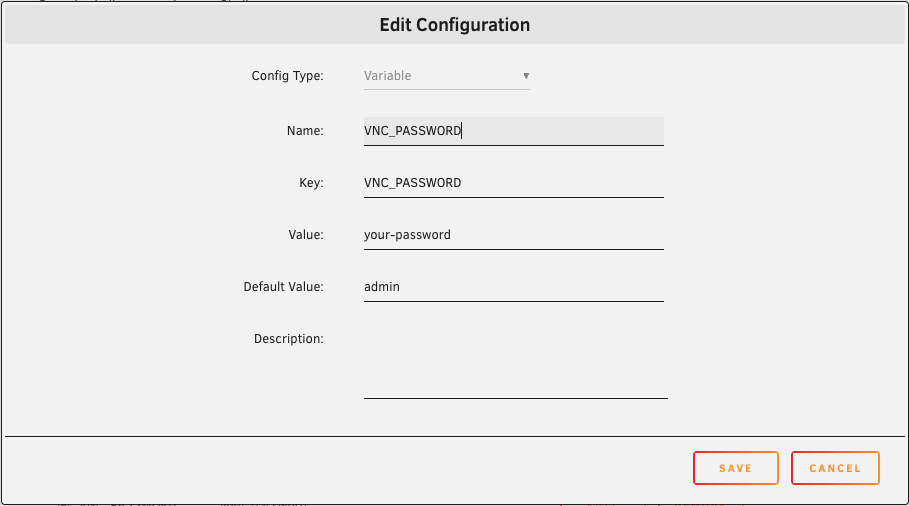
Update, just add a variable to the docker config and you're good to go. Lots of other variable on the github page.
-
Hey this is just what I was looking for, however, how are you protecting the Vorta docker webui from unauthorised access? As-is anyone with the IP and port can manipulate the backups
-
Hi don Open the terminal and type: echo "blacklist r8169" > /boot/config/modprobe.d/r8169.conf Then reboot. Please be aware that this was a old problem and may have been fixed natively in recent unraid builds. PS If for some reason your network doesn't work after the reboot you can login directly on the server and remove that file: rm /boot/config/modprobe.d/r8169.conf And reboot
-
Thanks @JorgeB Could you comment on what the formal security policy is for unRAID? It looks like a version point update is released every 4-12 weeks, is that the baseline for security patches too? I'm genuinely surprised by the responses in this thread, I think we should fully expect level 8 CVEs to be patched in a timely manner, if end users don't install those patches then sure, that's on them. Even if the devs don't want to patch anything until the next release cycle that's fine, just be upfront about it. Apologies in advance if this has already been formally answered by the devs, I didn't see it anywhere.
-
Are you being serious? Have you met 'people' ? I think a better question might be where is the formal policy on patching CVEs? unRAID is a mature paid for product relied upon by X thousands of users around the world. I'm not sure if unRAID enables SSH on a default install (it used to), but if it does what steps are taken to secure the SSH service? Such as disabling root logins by default, key based auth ONLY, enabling the 'deny hosts' plugin etc etc. Offering general advice to not expose unRAID's SSH to the internet is not a formal security policy, and does nothing to protect the unRAID box from lateral movements of hackers that have gained access to the LAN.
-
Is there a formal policy on patching critical CVE's in unRAID? It's been >3 days and you have to assume a percentage of the user base have SSH exposed either deliberately or accidentally.
-
Sorry to resurrect this old thread, I rebuilt my unRAID and forgot to backup my compsize binary, is there any chance one of you could link to yours? I recall building it being a PITA to compile
-
Man I NEVER would have found that on my own 🙂 Thank you very much indeed.
-
Would it be possible to include a list of excluded folders? My main culprit is Plex, the media folder is 58GB and I don't need to back it up as that data will re-generate in a DR scenario. Full path to exclude: "/mnt/user/appdata/plex/Library/Application Support/Plex Media Server/Media" I could work around this using your pre-run script to stop the plex docker, mv the Media folder outside of the 'appdata' path, allow the backup to happen, then move it back in the post-run-script, but I feel dirty just writing this paragraph 🙂 I'm using the compressed archive option so I end up with a series of tar files, maybe could be done with the built in tar exclude options: tar --exclude='./folder' --exclude='./upload/folder2' -zcvf /backup/filename.tgz . On a separate note, thanks for maintaining this plugin, it's brilliant.
-
That correlates - thanks for the clarification.
-
Thanks so much @bonienl I totally missed that post. If Tailscale is running as a plugin presumably I just need to run /usr/local/emhttp/webGui/scripts/reload_services from the go script to get the web interface working. I'm specifically interested in getting the Tailscale plugin operational before the array is brought online as I need to type in my encryption key before the array can start.
-
It looks like recent builds of unRAID lockdown services, which is a good thing! To enable SSH I had to edit /etc/ssh/sshd_config and add my tailscale IP in the listen section: Port 22 AddressFamily any ListenAddress 192.168.1.250 ListenAddress 100.94.227.51 <-------- here ListenAddress fd7a:115c:a1e0:ab12:4843:cd96:625e:e333 Then restart SSH with /etc/rc.d/rc.sshd restart This seems to have updated /boot/config/ssh/sshd_config which I guess means it will work across reboots (I can't test this right now) I guess there will be a similar process for the other services on unRAID
-
First of all thanks for this plugin, it's much needed IMO as running TailScale or ZeroTier in a docker doesn't work unless the array is mounted. I've installed the plugin and 'tailscale up' to add to my tailscale network. I can ping the unraid server from my remote machine but no other services work, SSH, HTTP, SMB etc. Can anyone point me in the right direction? unRAID v6.12.0
-
Thank you. SIGINT was the missing part of the puzzle, I've never come across that before. #!/bin/bash exit_script() { trap - SIGINT SIGTERM # clear the trap kill -- -$$ # Sends SIGTERM to child/sub processes } trap exit_script SIGINT SIGTERM while true; do echo "Do some task" done
-
Hi I have a bash script that starts with the array and continues running in a while loop. This script is preventing my server from shutting down (if I kill the script manually shutdown works as expected). What's the most efficient way to detect a shutdown state from within the bash script so I can have it self terminate? Something like: if exists /tmp/shutdown.txt; then exit 1; fi Many thanks


