



Skip to content
View in the app

A better way to browse. Learn more.

Unraid

A full-screen app on your home screen with push notifications, badges and more.

To install this app on iOS and iPadOS
  1. Tap the Share icon in Safari
  2. Scroll the menu and tap Add to Home Screen.
  3. Tap Add in the top-right corner.
To install this app on Android
  1. Tap the 3-dot menu (⋮) in the top-right corner of the browser.
  2. Tap Add to Home screen or Install app.
  3. Confirm by tapping Install.

csmstyle

Members
  • Joined

  • Last visited

  1. Can you clarify what you mean by this? Do I blank out the webui port from qbit settings WebUI prior to changing its networking over to gluetun or do I remove the WEBUI reference during the container install? Can I just hit edit and remove any reference of WebUI for the container config in Unraid? For some reason all I get is connection refused when trying to open the WebUI once Qbit is routed thru gluetun. I am certain I've followed all the advice about adding ports in the gluetun configuration plus adding my subnet in CIDR format.
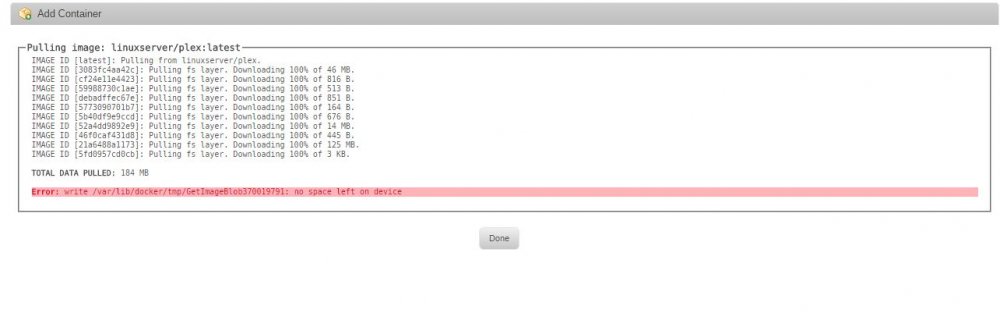
  2. Can someone point me in the right direction on installing the Docker? I keep getting an out of space error during installation. I have plenty of space from what I can see.
Account

Navigation

Search

Search

Configure browser push notifications

Chrome (Android)
  1. Tap the lock icon next to the address bar.
  2. Tap Permissions → Notifications.
  3. Adjust your preference.
Chrome (Desktop)
  1. Click the padlock icon in the address bar.
  2. Select Site settings.
  3. Find Notifications and adjust your preference.