





Strider
Members
-
Joined
-
Last visited
-
Hi there Falkens, So, I stopped the existing Sonarr application. I then added Binhex's container and created the new Sonarr application. I mapped the same drive destinations as the previous application. Once this was done, I created it and allowed it to download accordingly. When it was ready I just started it and double checked all was working. Following that, I stopped the app and moved the files from the old Sonarr installation destination to the new. The files I moved was generally all the ones with *.db. Once moved, I started Sonarr and all was working. I did need to reconfigure the indexers, but that was easy. Hope that helps?
-
Ok, so, I have managed to install your Sonarr, and copied over the DB and config files and all appears to be working. I am wondering if this was down to a MONO issue running on the other Sonarr. Without your help, I wouldn't have figured this out. So thank you for your help.
-
Ah too true, sorry for messing you around. It appears to be Needo's. Right, assuming I should change my repository to your version to try and resolve my issues. If this is the case, how can I go about this without breaking the whole setup of Sonarr?
-
Just another extract of the error log from Sonarr, if this helps. Request Failed. POST /api/release: Syntax Error after '<!' characters. http://www.newzbin.com/DTD/nzb/nzb-1.1.dtd Line 2, position 4. System.Xml.XmlException: Syntax Error after '<!' characters. http://www.newzbin.com/DTD/nzb/nzb-1.1.dtd Line 2, position 4. at System.Xml.DTDReader.CompileDeclaration () <0x00373> at System.Xml.DTDReader.ProcessDTDSubset () <0x00127> at System.Xml.DTDReader.GenerateDTDObjectModel () <0x00267> at Mono.Xml2.XmlTextReader.GenerateDTDObjectModel (string,string,string,string,int,int) <0x00337> at Mono.Xml2.XmlTextReader.ReadDoctypeDecl () <0x001b3> at Mono.Xml2.XmlTextReader.ReadDeclaration () <0x0009b> at Mono.Xml2.XmlTextReader.ReadContent () <0x0019b> at Mono.Xml2.XmlTextReader.Read () <0x00237> at System.Xml.XmlTextReader.Read () <0x000b2> at Mono.Xml.XmlFilterReader.Read () <0x0001a> at Mono.Xml.XmlFilterReader.Read () <0x0001a> at Mono.Xml.XmlFilterReader.Read () <0x00087> at System.Xml.Linq.XDocument.ReadContent (System.Xml.XmlReader,System.Xml.Linq.LoadOptions) <0x0011e> at System.Xml.Linq.XDocument.LoadCore (System.Xml.XmlReader,System.Xml.Linq.LoadOptions) <0x00047> at System.Xml.Linq.XDocument.Load (System.Xml.XmlReader,System.Xml.Linq.LoadOptions) <0x000af> at System.Xml.Linq.XDocument.Load (System.Xml.XmlReader) <0x0000f> at NzbDrone.Core.Download.NzbValidationService.Validate (string,byte[]) <0x000af> at NzbDrone.Core.Download.UsenetClientBase`1<NzbDrone.Core.Download.Clients.Sabnzbd.SabnzbdSettings>.Download (NzbDrone.Core.Parser.Model.RemoteEpisode) <0x00657> at NzbDrone.Core.Download.DownloadService.DownloadReport (NzbDrone.Core.Parser.Model.RemoteEpisode) <0x004c5> at NzbDrone.Api.Indexers.ReleaseModule.DownloadRelease (NzbDrone.Api.Indexers.ReleaseResource) <0x000c9> at NzbDrone.Api.Indexers.ReleaseModule.<.ctor>b__7_0 (object) <0x0002b> at (wrapper dynamic-method) object.CallSite.Target (System.Runtime.CompilerServices.Closure,System.Runtime.CompilerServices.CallSite,System.Func`2<object, object>,object) <0x000a0> at Nancy.Routing.Route/<>c__DisplayClass4.<Wrap>b__3 (object,System.Threading.CancellationToken) <0x00137>
-
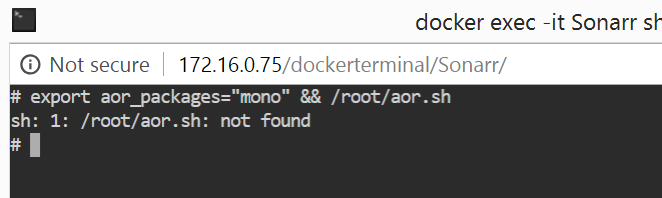
Here is a grab of the console.
-
Sorry, ignore Radarr, Wrong screengrab. It was in Sonarr.
-
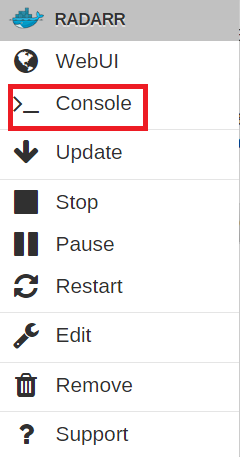
Yes, 100%. See small grab...
-
Hi Uncle, I am 90% sure this is related to Sonarr. Other applications are working fine, and if I manually search and add the file Sonarr then notices it in SAB and processes it accordingly. It comes down to Sonarr not searching for new releases based on that previous error I mentioned.
-
Hi Binhex, Thanks for helping on this. So, first problem. Copy and pasting that command I get "sh: 1: /root/aor.sh: not found". Maybe a cause for this?!?
-
Thanks for the response. I have tried multiple indexers, and removed and re-added, to no avail. Same error. I was down the Mono path only because it appears to be related to a number of recent incidents. This all started appearing out of the blue from 2 days ago. What else could I supply you that may help figure what this is? Again, thanks for responding.
-
Anybody help me on this, as everything is frozen up at the mo with Sonarr?
-
Hi everyone, I hope that you can help me out here. So, just over the past few days Sonarr has stopped grabbing new stuff. I have looked and I get the below exception error when trying to manually or automatically grab new shows. [v2.0.0.5163] System.Xml.XmlException: Syntax Error after '<!' characters. http://www.newzbin.com/DTD/nzb/nzb-1.1.dtd Line 2, position 4. Now, I have been looking around and this does appear to be an issue with the latest update, and then the older version of Mono. The fix relates to updating Mono to the latest version (https://forums.sonarr.tv/t/xmlexception-syntax-error/18599). Now my super noob status comes into play (Sorry). How do I update Mono to the latest version (5.12)(http://www.mono-project.com/download/stable/#download-lin) in Unraid container for Sonarr? Current Unraid version: 6.5.2 Current Sonarr version: 2.0.0.5163 Can someone help me out with this? Thanks in advance.

