





Jimmy90
Members
-
Joined
-
Last visited
Everything posted by Jimmy90
-
Will this be something handled by the update process when that feature is removed? Or will users need to go in and manually un-map the transcode directory when this change takes affect? I had to unmap mine
-
Try setting up Labels and assign the folder mappings to a label. I do this for manually added torrents, works fine for me. Thanks. I have set up labels with folder mapping assignments, but the files still don't seem to go there until I right click on the torrent --> Move Storage -> (the place where it should be). The destination that the folder mapping assignment is the same as the download folder when I initially add the torrent, as is the destination I give in the "Move Storage" function. It doesn't seem to appear until I force it. Pretty annoying I would chmod -R 777 that destination folder if I was dealing with the same problem, but that's just me...
-
Thanks very much Ionix!
-
Could you elaborate more on this? Do we need to remove our /transcode location in our docker and then Plex manages it? +1 Please elaborate. This is obviously confusing. Upstream is a rather vague term in this context...
-
My favorite since day 1

-
The rule of thumb is, don't let Deluge dictate what to do with your media but rather, let the other guys to do it as they properly should (SAB, Couch, Sonaar, etc..). So in essence, you need to remove any media management settings from your Deluge preferences (in its GUI) and only leave the "allow remote control/connection" thing activated. Then, fine tune your other guys to tell Deluge what to do with each specific file passed on to it when applicable. Once you have done that, you'll notice that each file given to Deluge will be populated with specific instructions in the detail tab, one by one. Good Luck and adjust one at a time, you'll get there eventually Edit: You obviously need to make sure your Deluge docker setup contains mappings that "drive" with your fetchers, so they speak the same "language". So if your fetching docker has a mapping for TVSHOWS=TV, do the same for Deluge so it knows what your fetcher is talking about when its told to put it there.
-
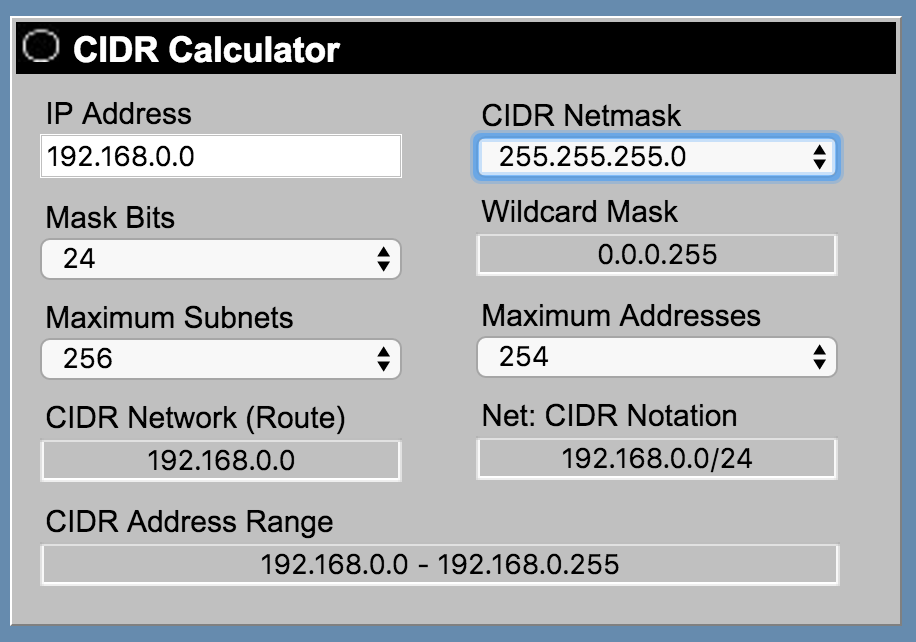
here you go...
-
LAN_NETWORK is the CIDR notation of the ip range you are using. So for instance, if your home network is 192.168.0.0 to 192.168.0.8 (or whatever), you will put 192.168.0.0 followed by the subnet. So in the end, you would end up with something like 192.168.0.0/24 (assuming your subnet is 255.255.255.0), and that is what you would put in for LAN_NETWORK. Your gateway address is most probably on 192.168.0.1 (something like that), so you don't use that.


