





steve1977
Members
-
Joined
-
Last visited
-
They were greyed out. What eventually worked was to change “Set PCIe ACS Override to Both”. No or downstream didn’t do the trick. Now it’s working again.
-
Thanks. Plan was a mirrored ZFS pool for boot/docker. This should leave me protected unless both disks die. Besides losing 8gb from my “docker/scratch” disk, I don’t see any obvious disadvantages. Am I missing any? Advantage would be to have a cleaner setup rather than the need to work with usb disks, which historically have proven to be prone to failures.
-
Thanks for your help. What do you mean by "where things stand right now"? I have not yet pulled the triggered, but planned to change my setup to migrate from the usb boot flash disk to a mirroed zfs pool that keeps 8GB for the bootdisk and remainder for docker containers and download location for the *arrs. Separately, I'll a few array disks as well as an nvme for my virtual machine. Eventually, I'd like to install the VM bare-metal to allow dual-boot into Unraid (with VM accessing bare-metal) or optionally also boot into the VM directly, which will be better for occasional gaming.
-
Please see below. Do I need to tick these boxes? I don't think I did in the past and it still worked?

-
Not sure what updated. I upgraded to 7.3.1 and now can no longer start my VM. Getting the error message below. Any thoughts? Internal error: process exited while connecting to monitor: 2026-06-20T16:[removed] qemu-system-x86_64: -device {"driver":"vfio-pci","host":"0000:04:00.0","id":"hostdev0","bus":"pci.0","addr":"0x5"}: vfio 0000:04:00.0: group 0 is not viable Please ensure all devices within the iommu_group are bound to their vfio bus driver.
-
Is there a "how-to"? I had googled and found below that says that I need to vipe / use an empty ssd/nvme to use as my internal bootdisk?
-
Tried to replace the flash disk with manual way. Formatted to fat32, extracted the zip in root folder. Manually copied over the config folder (select replace). At start-up, getting the error below. Thoughts?
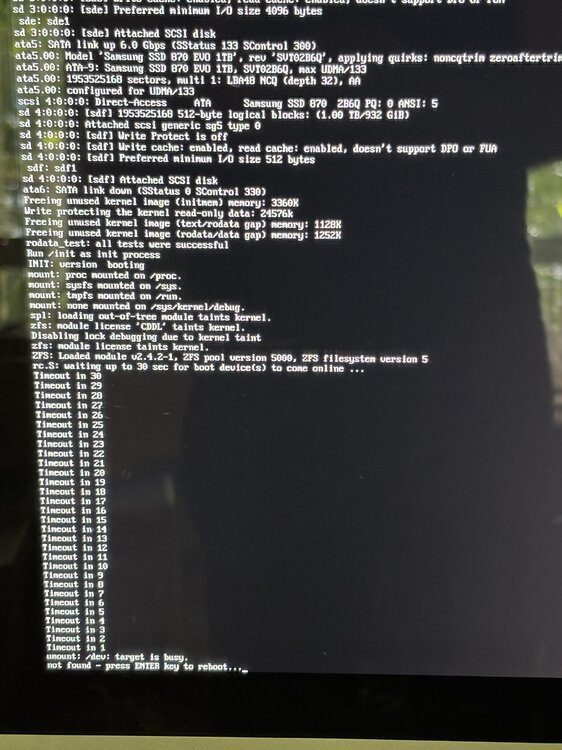
-
And no negative impact of running dockers and boot files from the same disk? Wasn’t sure whether the new internal boot requires a dedicated internal disk for boot?
-
Title says it all. Will this be possible? Currently my boot/flash is on a dedicated USB disk. Can I move it to the cache disk (SSD in ZFS mirror) and will this give me mirrored protection for failure?
-
Wise words, indeed! Big thanks to @EDACerton to all he’s doing for the community. There are a few plugins like Tailscale, UD and mover tuner that would be best embraced as native part of unraid.
-
Thanks. You’re running Mihomo in an unraid docker?
-
Curious how you are using mihomo with Tailscale?
-
Trying to restart or stop docker container, but it does not work. Even disabled docker and reenabled it. Still same issue. When trying to do it through CLI, I can see below error message. Attached diagnostic log. root@Tower:~# docker kill 971e5bde1108 Error response from daemon: cannot kill container: 971e5bde1108: tried to kill container, but did not receive an exit event tower-diagnostics-20260428-0415.zip
-
So, basically zero risk of data loss as long as I don't mount a data disk by accident as parity disk? Even if I get something wrong, data will still be there?
-
That's the one here?

