





wmcneil
Members
-
Joined
-
Last visited
-
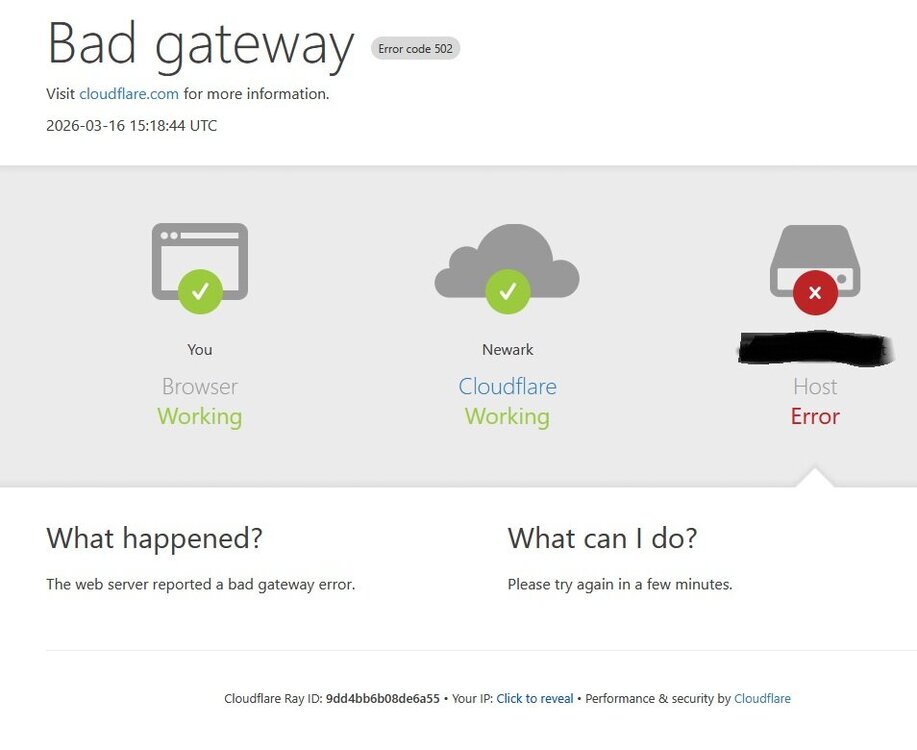
Hi, thanks for your response. 10.55.83.191 is the ultimate webserver. The webserver in this case is a BlueIris webserver running in a Win11 VM that is located on the same unRAID machine that is running the NGINX docker under unRAID. After further testing, I see that upon stopping and starting BlueIris, things are working. I will wait until the next failure to see if I can glean anything from the BlueIris log. Cloudflair claims "The HTTP 502 error is coming from your origin web server and is not caused by Cloudflare."
-
NGINX v2.14.0 works after unRAID reboot, some time later starts failing, with Cloudflare reporting Bad Gateway Error code 502: (This is a configuration that has worked correctly for the last year until recently) The error messages in the NGINX proxy-host-2_error.log: 2026/03/16 11:38:31 [error] 482#482: *16 recv() failed (104: Connection reset by peer) while reading response header from upstream, client: 162.158.155.156, server: APPLICATION.MYDOMAIN.net, request: "GET / HTTP/1.1", upstream: "http://10.55.83.191:8080/", host: "APPLICATION.MYDOMAIN.net" 2026/03/16 11:38:32 [error] 483#483: *18 recv() failed (104: Connection reset by peer) while reading response header from upstream, client: 104.23.187.209, server: APPLICATION.MYDOMAIN.net, request: "GET /ui3serviceworker.js?v=318-6.0.3.8 HTTP/1.1", upstream: "http://10.55.83.191:8080/ui3serviceworker.js?v=318-6.0.3.8", host: "APPLICATION.MYDOMAIN.net" 2026/03/16 11:38:33 [error] 484#484: *20 recv() failed (104: Connection reset by peer) while reading response header from upstream, client: 104.23.190.195, server: APPLICATION.MYDOMAIN.net, request: "GET /favicon.ico HTTP/1.1", upstream: "http://10.55.83.191:8080/favicon.ico", host: "APPLICATION.MYDOMAIN.net", referrer: "https://APPLICATION.MYDOMAIN.net/"
-
I did some testing with a packet capture application on my router, results below. As shown below, a ping from the router (10.55.83.10) to the docker vlan=br0.5 console (10.55.5.4) fails. The packet capture result shows an ARP request being sent on the vlan (PIHOLE_VLAN), but no response and the ping fails. I'm at the limits of my knowledge here, and not clear how to debug further. Ping from docker vlan=br0.5 console (10.55.5.4) to vlan gateway (10.55.5.1) (FAILS) No 10.55.5.1/24 subnet traffic captured on router interfaces LAN nor PIHOLE_VLAN Ping from docker vlan=br0.5 console (10.55.5.4) to itself (10.55.5.4) (succeeds) No 10.55.5.1/24 subnet traffic captured on router interfaces LAN nor PIHOLE_VLAN Ping from router (10.55.83.10) to vlan gateway (10.55.5.1) (succeeds) No 10.55.5.1/24 subnet traffic captured on router interfaces LAN nor PIHOLE_VLAN Ping from router (10.55.83.10) to docker vlan=br0.5 console (10.55.5.4) (FAILS) No 10.55.5.1/24 subnet traffic captured on router interfaces LAN. 10.55.5.1/24 subnet Packet Capture on router interface PIHOLE_VLAN: ARP, Request who-has 10.55.5.4 tell 10.55.5.1, length 28 Ping from docker br0 console (10.55.83.190) to vlan gateway (10.55.5.1) (succeeds) 10.55.5.1/24 subnet Packet Capture on router interface LAN: 14:18:24.383104 IP 10.55.83.190 > 10.55.5.1: ICMP echo request, id 14565, seq 1, length 64 14:18:24.383241 IP 10.55.5.1 > 10.55.83.190: ICMP echo reply, id 14565, seq 1, length 64 Ping from docker br0 console (10.55.83.190) to docker vlan=br0.5 console (10.55.5.4) (FAILS) 10.55.5.1/24 subnet Packet Capture on router interface LAN: 10.55.83.190 > 10.55.5.4: ICMP echo request, id 18095, seq 1, length 64 10.55.5.1/24 subnet Packet Capture on router interface PIHOLE_VLAN: ARP, Request who-has 10.55.5.4 tell 10.55.5.1, length 28
-
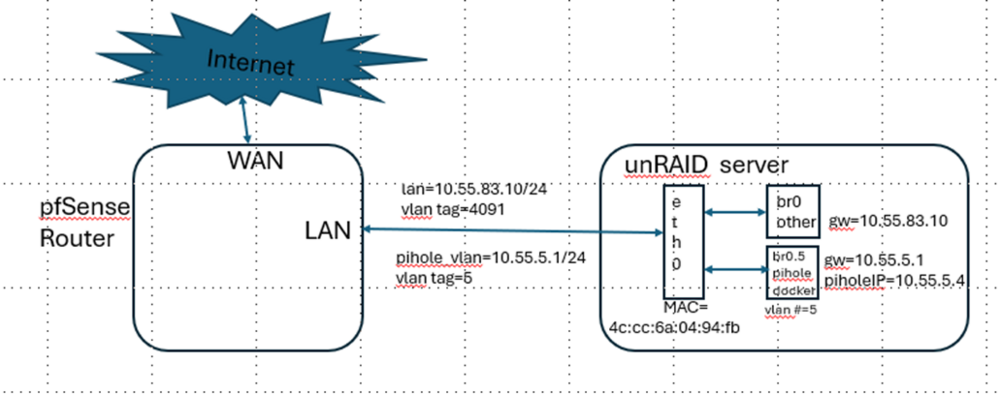
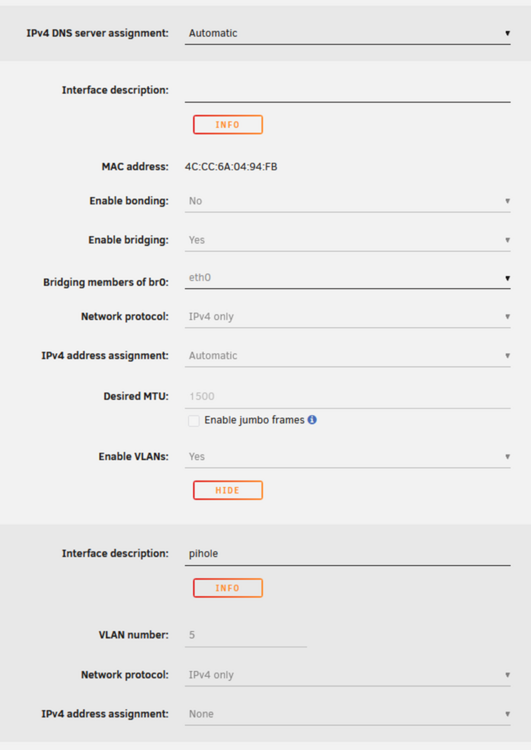
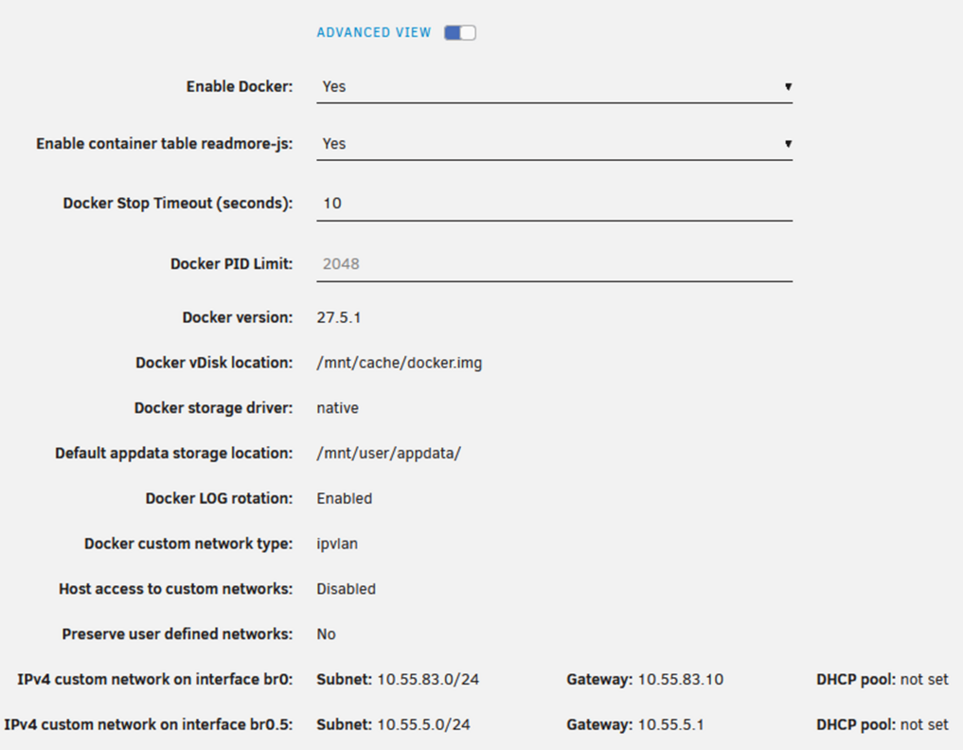
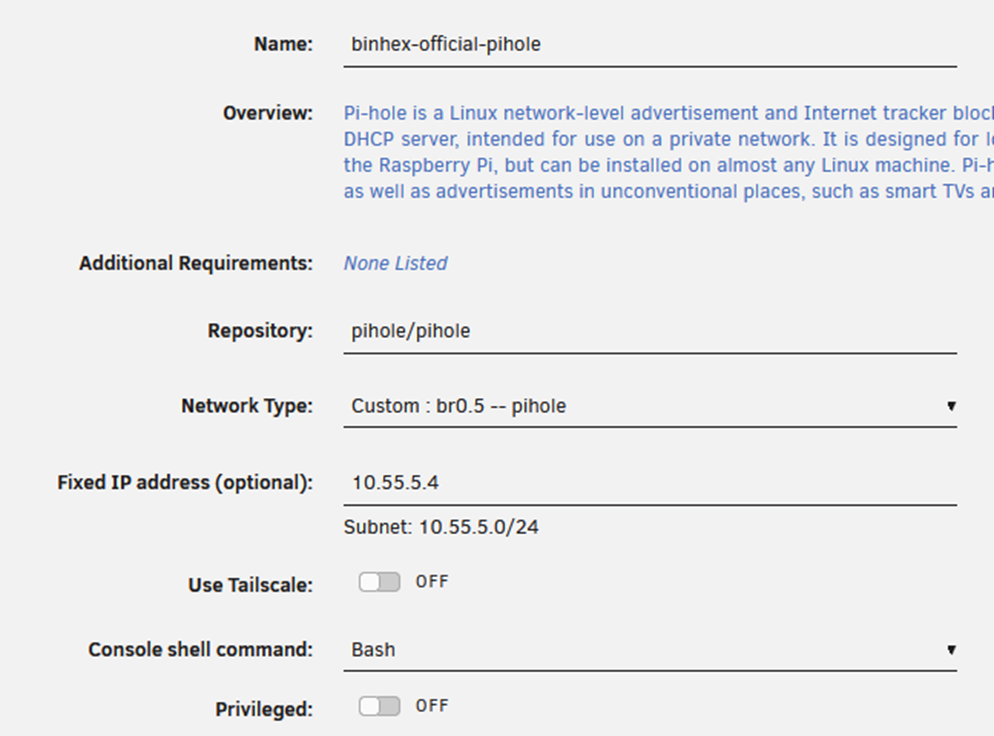
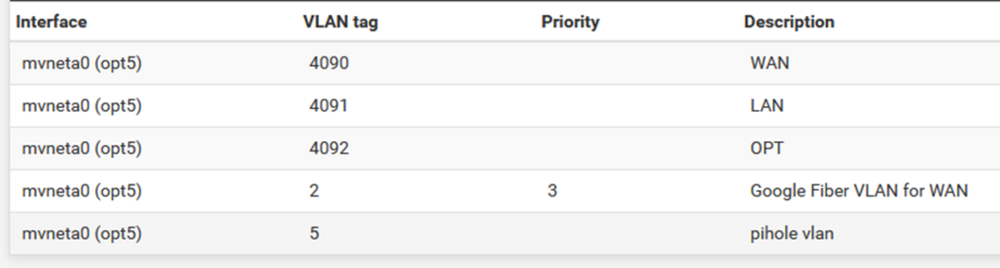
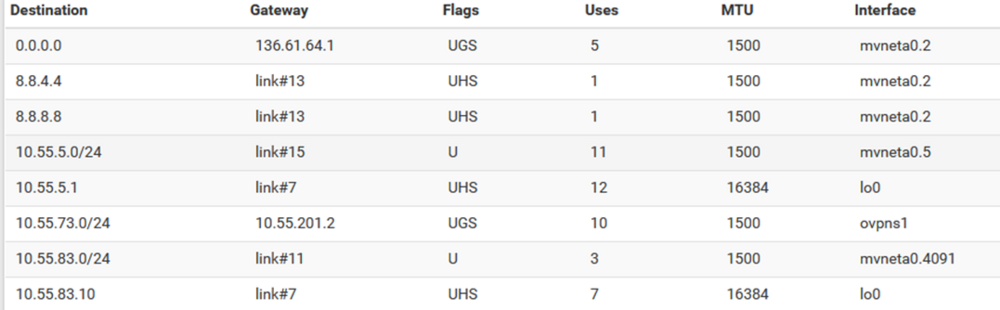
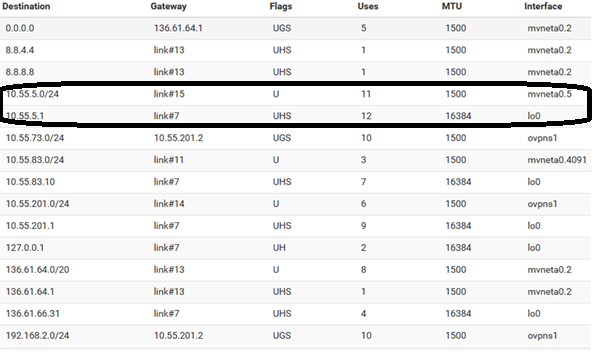
I have created a docker container on a separate VLAN. When I attempt to ping the gateway defined for the vlan from the docker container console using that vlan, it is unsuccessful. I have a “pass any” firewall rule defined on the router, which is running pfSense, so the ping should be working. After crawling though all the settings many times, including the route tables, I don’t see what is wrong. Here is a block diagram, and screenshots of all of the settings. Any help from another set of eyes is much appreciated. The network and vlan settings in unRAID: The docker settings in unraid: The network configuration for the docker container that is using the vlan: Output from “ip a” from console of docker container that is using the vlan: 1: lo: <LOOPBACK,UP,LOWER_UP> mtu 65536 qdisc noqueue state UNKNOWN group default qlen 1000 link/loopback 00:00:00:00:00:00 brd 00:00:00:00:00:00 inet 127.0.0.1/8 scope host lo valid_lft forever preferred_lft forever inet6 ::1/128 scope host proto kernel_lo valid_lft forever preferred_lft forever 2: tunl0@NONE: <NOARP> mtu 1480 qdisc noop state DOWN group default qlen 1000 link/ipip 0.0.0.0 brd 0.0.0.0 32: eth0@if6: <BROADCAST,MULTICAST,UP,LOWER_UP> mtu 1500 qdisc noqueue state UNKNOWN group default link/ether 4c:cc:6a:04:94:fb brd ff:ff:ff:ff:ff:ff link-netnsid 0 inet 10.55.5.4/24 brd 10.55.5.255 scope global eth0 valid_lft forever preferred_lft forever Output from “route” from console of docker container that is using the vlan: Kernel IP routing table Destination Gateway Genmask Flags Metric Ref Use Iface default 10.55.5.1 0.0.0.0 UG 0 0 0 eth0 10.55.5.0 * 255.255.255.0 U 0 0 0 eth0 VLAN Configuration in the router: VLAN any-to-any firewall rule in the router Routing table entries of interest in the router:

-
Thanks. I have changed that setting to Enabled, and unfortunately no change in behavior. I can not ping from the pihole_vlan console window to the gateway 10.55.5.1 . The output of ip route in the pihole_vlan console remains the same as previously posted: default via 10.55.5.1 dev eth0 10.55.5.0/24 dev eth0 proto kernel scope link src 10.55.5.4
-
4091 is a reserved vlan id that pfSense uses for untagged traffic. I did not explicitly assign it. Docker containers using br0 can ping 10.55.83.1/24 without issue My pihole_vlan console (which uses br0.5) can not access 10.55.5.1, that is of course the problem I am trying to debug. (The console also can not access any numeric IPs on the WAN either.)
-
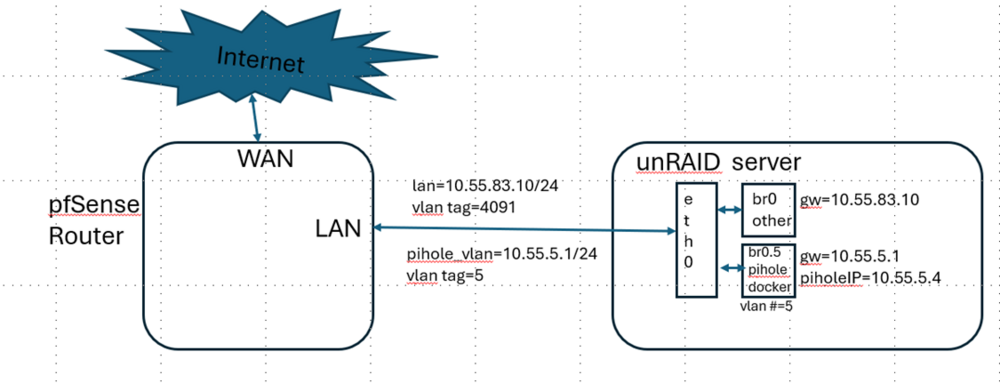
Here is a picture of what I am trying to accomplish: So the current problem I am trying to debug is that in the pihole docker container console (10.55.5.4), a ping to 10.55.5.1 fails. It is my understanding that unRAID does no blocking between VLANs (please correct me if I am wrong), so we should need only a firewall rule in the router, which is in place and for testing is set to pass any to any: The routing tables in the router and in the pihole docker container console look ok (see prior postings). I must be missing something?

-
Seems correct
-
Yes, I'm kind of stuck. Here is the output from a 'route' command run in the pihole_vlan docker container console (this shows a little more info than the 'ip route' command): Destination Gateway Genmask Flags Metric Ref Use Iface default 10.55.5.1 0.0.0.0 UG 0 0 0 eth0 10.55.5.0 * 255.255.255.0 U 0 0 0 eth0 The pihole_vlan is defined for docker as br0.5 . Is it ok that the interface in the table above shows as eth0, instead of br0.5 ? (The docker container is using br0.5 as its network interface, as shown in the picture further above. The only physical ethernet interface is eth0)
-
Thank you. I'm not sure where you think the host access needs to be added? On the router, the firewall rule I showed on my previous post should allow the 10.55.5.1/24 vlan to access the WAN. I'm following directions from here, that specify using a different vlan for the pihole: https://www.vikash.nl/pi-hole-in-docker-container-on-separate-vlan/ I haven't got the pihole GUI working yet, right now I'm just trying to get the vlan to be able to access the WAN.
-
I have stepped back to try and simply verify that I have pfSense properly configured to support the vlan (pihole_vlan) that I am using for the docker pihole container. In a console for the pihole docker container, the output of 'ip route show' looks correct: default via 10.55.5.1 dev eth0 10.55.5.0/24 dev eth0 proto kernel scope link src 10.55.5.4 In the console, a ping of the gateway (10.55.5.1) fails. In an attempt to debug, in pfSense, I have a pihole_vlan interface rule that I simplified to pass any protocol, any source, any destination: Here is the route table from pfSense, with the entries of interest circled. I am not understanding why the ping 10.55.5.1 in the docker console is not working?

-
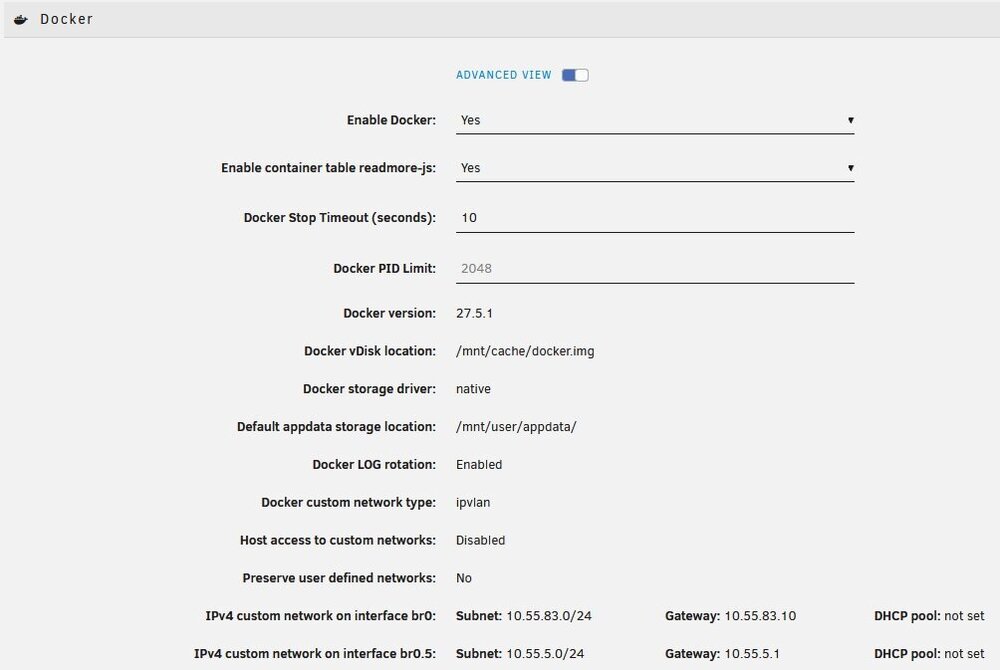
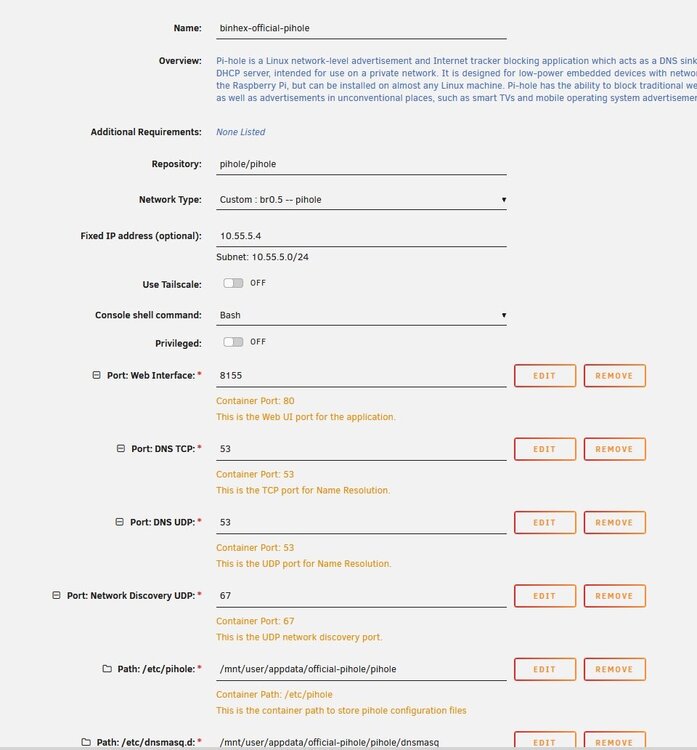
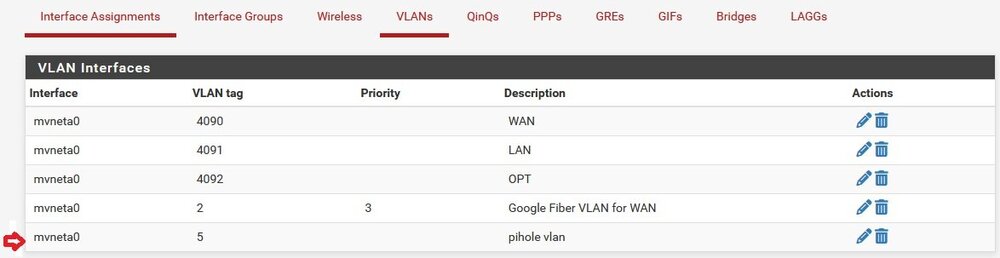
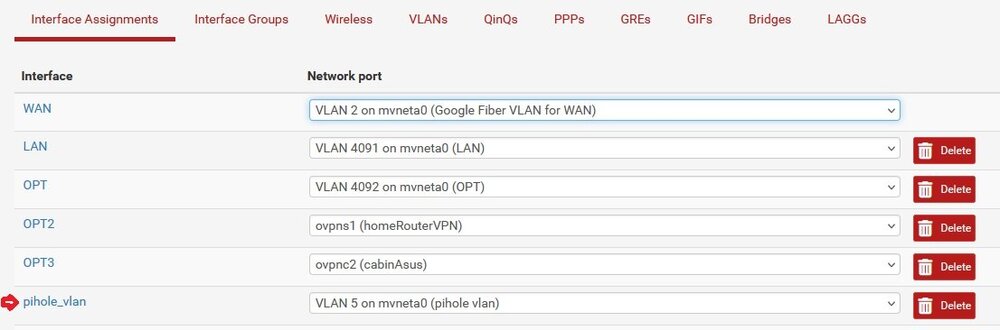
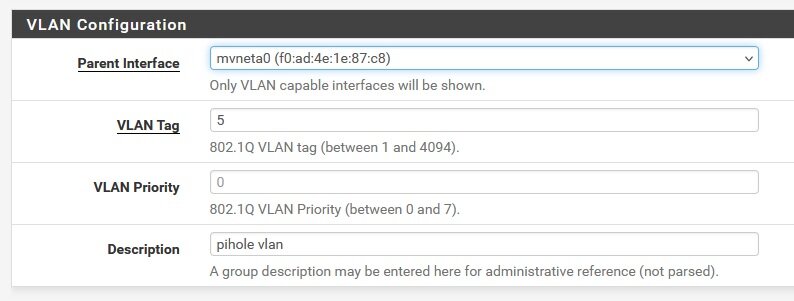
I've done a bunch of research, and have reviewed my settings repeatedly, but am over my head on how to debug further. Any help much appreciated. I have setup an unRAID binhex-official-pihole docker on its own subnet(10.55.5.0/24), and have added that subnet to my pfsense router. I can ping from my pfsense LAN (10.55.83.0/24) to the IP address that I have assigned for the pihole gui (10.55.5.4), but when I attempt to access it from a web browser on my LAN using http://10.55.5.4:8155 , I get a timeout. My pfsense LAN has a any-to-any rule for the LAN, and the ping is working, so I don't think it is a firewall issue. Attached are pictures of my settings. I haven't yet set up the rules in my pfSense router to forward DNS requests to the pihole, because I'm thinking if I can't get the GUI working, there is no point in working this further, but I may be assuming incorrectly here. The two issues I am wondering about are: The Docker gateway setting is 10.55.5.1, I'm not clear what, if anything, has to be working on the pfSense router side for this in order for the pihole gui to respond? I don't yet have the rules set up on the pfSense router side to forward DNS requests to pihole yet, could anything there be preventing the pihole gui from responding? docker vlan settings: binhex-official-pihole Docker Template settings: pfsense vlan settings:
-
It was only corruption errors, so its possible it was a bad cable. In the scenario where only a cable is replaced, what command or gui operation forces the mirror to sync? (Do you just start a scrub?)
-
@JorgeB , thanks so much for the feedback, and for the pointer to the pool monitoring FAQ, I will implement the monitoring suggestion there. I ran "/btrfs dev stats /mnt/cache" and I had one cache disk that is showing errors: [/dev/sdd1].write_io_errs 176644 [/dev/sdd1].read_io_errs 111 [/dev/sdd1].flush_io_errs 20656 [/dev/sdd1].corruption_errs 277249 [/dev/sdd1].generation_errs 0 I tried a different cable, zeroed the errors using "btrfs dev stats -z /mnt/cache", and new errors were still being generated. I tried moving the disk to a different sata slot (I have an open one), and was still getting errors from that same disk. So l installed a new cache disk, and btrfs is running now. The old cache disk is still in the machine, but it is not assigned to the pool, and I'm not getting any new errors.
-
Hello, I am getting lots of btrfs errors from one of my (two) SSD cache disks. Example messages below. I have also attached diagnostics.... I have tried running memtest for about an hour without any errors occurring.....I would appreciate any help with confirming if it is likely the disk itself gone bad, or something else. May 10 09:57:53 lily kernel: BTRFS info (device sde1): read error corrected: ino 0 off 582228443136 (dev /dev/sdd1 sector 632576) May 10 09:57:53 lily kernel: BTRFS info (device sde1): read error corrected: ino 0 off 582228447232 (dev /dev/sdd1 sector 632584) May 10 09:57:53 lily kernel: BTRFS info (device sde1): read error corrected: ino 0 off 582228451328 (dev /dev/sdd1 sector 632592) May 10 09:57:53 lily kernel: BTRFS info (device sde1): read error corrected: ino 0 off 582228455424 (dev /dev/sdd1 sector 632600) May 10 10:03:17 lily kernel: BTRFS error (device sde1): bdev /dev/sdd1 errs: wr 176644, rd 111, flush 20656, corrupt 272231, gen 0 May 10 10:03:17 lily kernel: BTRFS warning (device sde1): csum failed root 5 ino 263 off 17238224896 csum 0x8941f998 expected csum 0xc5cc3b53 mirror 1 May 10 10:03:17 lily kernel: BTRFS error (device sde1): bdev /dev/sdd1 errs: wr 176644, rd 111, flush 20656, corrupt 272232, gen 0 May 10 10:03:17 lily kernel: BTRFS warning (device sde1): csum failed root 5 ino 263 off 17238228992 csum 0x8941f998 expected csum 0x269d1fed mirror 1 May 10 10:03:17 lily kernel: BTRFS error (device sde1): bdev /dev/sdd1 errs: wr 176644, rd 111, flush 20656, corrupt 272233, gen 0 May 10 10:03:17 lily kernel: BTRFS warning (device sde1): csum failed root 5 ino 263 off 17238233088 csum 0x8941f998 expected csum 0x4a44f6b8 mirror 1 May 10 10:03:17 lily kernel: BTRFS error (device sde1): bdev /dev/sdd1 errs: wr 176644, rd 111, flush 20656, corrupt 272234, gen 0 lily-diagnostics-20240510-0959.zip


