jackley21
Members
-
Joined
-
Last visited
-
Yes Okay, that's who I originally emailed and I just sent another
-
Yea I've checked that
-
You do that my just emailing [email protected] right?
-
I got everything fixed and up and running. I was able to upgrade to unRAID 6.1.6 by using a different flash drive (so a different flash GUID was used) to get a trail license key. With the upgrade everything with unRAID is now working. My Community Applications plugin is working and I can now download dockers without issue. Since that is all working now, so is my Plex. It now auto-updated to the most current version for the web app and for the server. So I can now sign into it, works with my Apple TV 4 that I just purchased, and since I fixed the DNS issue, it is also downloading metadata again. (These were all other problems I was having) Now the only thing I gotta figure out is getting the unRAID Plus license key that I purchased but never got the email for so I can get off the trial version. But at least I am up and running again!
-
Yea I got it figured out. I didn't delete my old image but I was trying to change the path of the image in the new version. Once I set the path back to how I originally had it in my beta version it worked perfectly
-
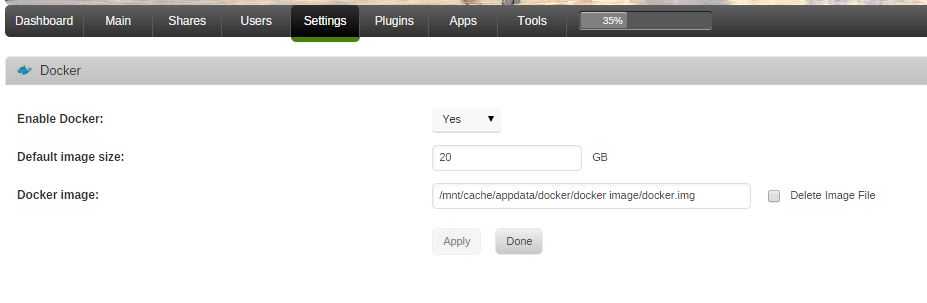
I still haven't heard anything back from Tom, but I was at least able to get a trial of unRAID 6.1.6 up and running. I can't seem to get my dockers enabled. I go to Settings > Docker and select to enable it but nothing happens when I click Apply. The image does get created on my cache drive but unRAID does not see the dockers being enabled. The Dockers tab doesn't show up and Community Applications plugin (which is now working) says my dockers aren't enabled either. What am I doing wrong? Should I be using the same image from my unRAID 6.0 beta 15 version?
-
email Tom [email protected] Yea, I emailed him last night already. So far I haven't heard anything back. I'm hoping that I do soon
-
I know that 6.0 beta 15 is older, but it was working perfectly fine so I hadn't bothered upgrading it. But I tried upgrading to the latest version of unRAID tonight. I was able to do the upgrade but ran into all sorts of problems with the registration key. I have always had the trial version of unraid (so far I have not needed anything else) so when I upgraded I requested another trial key. I got the email with the URL key link to install and that all went fine, but when I went to start my array again it wouldn't let me. It said 'too many devices attached. Please consider upgrading your registration key' (even though all I have is a cache drive, parity drive, and one data drive.) I went back to the registration page and it said my trial was expired but it wouldn't let me request an extension because my license key is still current. I decided to go ahead and buy unraid plus, i was going to need it eventually anyway, so I filled out all the order form pages and submitted my order but then received an error that my transaction could not be processed due to an incorrect street addresss and zip code (even though they were correct) but I was still charged $90 and have received no email with a new registration key. So at the moment I can go no where with the latest version of unRAID. I setup another flash drive with my old 6.0 beta 15 again. So I am hoping I can at least get this version up and running while I am trying to figure our my license key fiasco
-
I am currently running 6.0 beta 15. I am planning on upgrading to the newest version, just haven't gotten that far yet
-
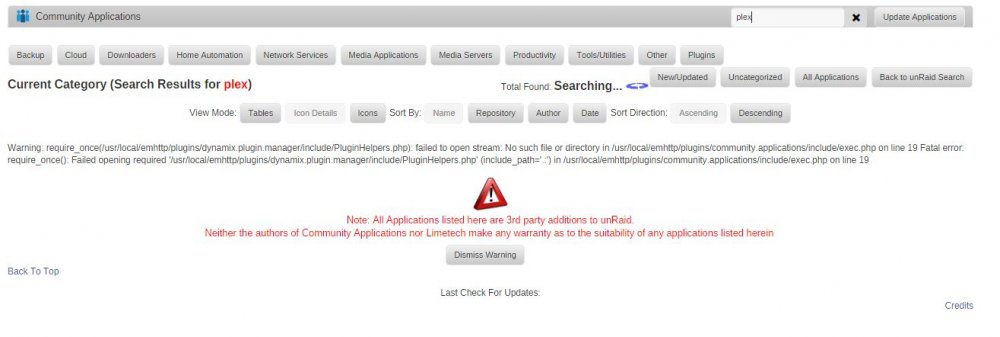
Hello, I recently installed this Community Applications plugin but I am unable to get any containers to appear. If I click on any of the tabs or search for something it just constantly says it is searching but nothing every comes up search for something