Kuroyukihimeeee
Members
-
Joined
-
Last visited
Everything posted by Kuroyukihimeeee
-
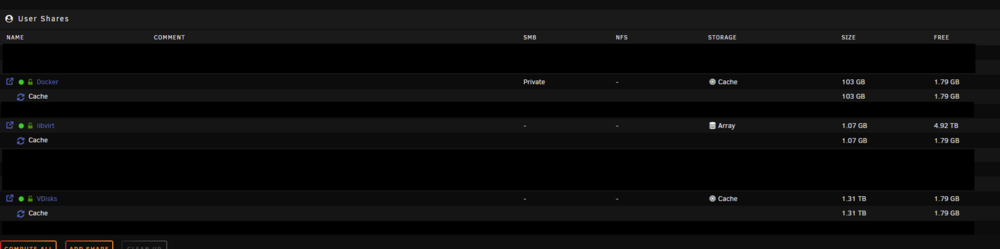
Sods law as soon as i post i found it. I had a 1000G Vdisk that was taking up 1.5TB. Not really sure why it wasnt releasing the space but i can just restore the disk from backup for now
-
Hi all, ive got a really strange cache issue where 400GB has vanished. So far I have restarted the array, restarted the server, turned off all dockers and VM's. Just cant figure out why its suddenly lost 400GB of usable storage. Server has been rock solid for years, 99% of the time its just been run mover and the space is sorted but this doesn't appear to be locked files stuck on the cache. Trim has been run from scheduler, that's given back about 1GB. Balance and scrub doesn't seem to impact this. Any unraid wizards have any clue whats ate the storage? Data, RAID1: total=1.82TiB, used=1.81TiB System, RAID1: total=32.00MiB, used=320.00KiB Metadata, RAID1: total=3.03GiB, used=1.50GiB GlobalReserve, single: total=512.00MiB, used=0.00B Cache only shows 3 folders on it Checking those shares, they add up to 1.4TB (ish)


-
aptalca and CHBMB thank you so much All working now! You guys rock. Now can get some ports closed and some services running securely with a nice SSL Labs A+ rating
-
Hey all. This is probably stupidly simple but beginner with nginx configs, 4 hours and many many google searches later im not too much further into my problem. Essentially i have stats.domain.co.uk loading up PlexPy perfectly using letsencrypt. Now trying to get requests.domain.co.uk to point to Plex Requests. My default config file below. The first and second "server_name" seem to work perfectly. http traffic is denied and https gets to PlexPy perfectly, but the 3rd server_name doesnt make it to Plex Requests. Tried even using the stats.domain.co.uk with the port for Requests and that works fine so doesnt seem to be the Docker. Any pointers as to what i need to change below? Just want requests.domain.co.uk to work alongside stats.domain.co.uk # redirect all traffic to https server { listen 80; server_name _; return 301 https://$host$request_uri; } server { listen 443 ssl; root /config/www; index index.html index.htm index.php; server_name stats.*; ssl_certificate /config/keys/letsencrypt/fullchain.pem; ssl_certificate_key /config/keys/letsencrypt/privkey.pem; ssl_dhparam /config/nginx/dhparams.pem; ssl_ciphers 'ECDHE-RSA-AES128-GCM-SHA256:ECDHE-ECDSA-AES128-GCM-SHA256:ECDHE-RSA-AES256-GCM-SHA384:ECDHE-ECDSA-AES256-GCM-SHA384:DHE-RSA-AES128-GCM-SHA256:DHE-DSS-AES128-GCM-SHA256:kEDH+AESGCM:ECDHE-RSA-AES128-SHA256:ECDHE-ECDSA-AES128-SHA256:ECDHE-RSA-AES128-SHA:ECDHE-ECDSA-AES128-SHA:ECDHE-RSA-AES256-SHA384:ECDHE-ECDSA-AES256-SHA384:ECDHE-RSA-AES256-SHA:ECDHE-ECDSA-AES256-SHA:DHE-RSA-AES128-SHA256:DHE-RSA-AES128-SHA:DHE-DSS-AES128-SHA256:DHE-RSA-AES256-SHA256:DHE-DSS-AES256-SHA:DHE-RSA-AES256-SHA:AES128-GCM-SHA256:AES256-GCM-SHA384:AES128-SHA256:AES256-SHA256:AES128-SHA:AES256-SHA:AES:CAMELLIA:DES-CBC3-SHA:!aNULL:!eNULL:!EXPORT:!DES:!RC4:!MD5:!PSK:!aECDH:!EDH-DSS-DES-CBC3-SHA:!EDH-RSA-DES-CBC3-SHA:!KRB5-DES-CBC3-SHA'; ssl_prefer_server_ciphers on; client_max_body_size 0; #PLEX STATS location / { # auth_basic "Restricted"; # auth_basic_user_file /config/nginx/.htpasswd; include /config/nginx/proxy.conf; proxy_pass http://10.0.0.11:8181; } } server { listen 443 ssl; root /config/www; index index.html index.htm index.php; server_name requests.*; ssl_certificate /config/keys/letsencrypt/fullchain.pem; ssl_certificate_key /config/keys/letsencrypt/privkey.pem; ssl_dhparam /config/nginx/dhparams.pem; ssl_ciphers 'ECDHE-RSA-AES128-GCM-SHA256:ECDHE-ECDSA-AES128-GCM-SHA256:ECDHE-RSA-AES256-GCM-SHA384:ECDHE-ECDSA-AES256-GCM-SHA384:DHE-RSA-AES128-GCM-SHA256:DHE-DSS-AES128-GCM-SHA256:kEDH+AESGCM:ECDHE-RSA-AES128-SHA256:ECDHE-ECDSA-AES128-SHA256:ECDHE-RSA-AES128-SHA:ECDHE-ECDSA-AES128-SHA:ECDHE-RSA-AES256-SHA384:ECDHE-ECDSA-AES256-SHA384:ECDHE-RSA-AES256-SHA:ECDHE-ECDSA-AES256-SHA:DHE-RSA-AES128-SHA256:DHE-RSA-AES128-SHA:DHE-DSS-AES128-SHA256:DHE-RSA-AES256-SHA256:DHE-DSS-AES256-SHA:DHE-RSA-AES256-SHA:AES128-GCM-SHA256:AES256-GCM-SHA384:AES128-SHA256:AES256-SHA256:AES128-SHA:AES256-SHA:AES:CAMELLIA:DES-CBC3-SHA:!aNULL:!eNULL:!EXPORT:!DES:!RC4:!MD5:!PSK:!aECDH:!EDH-DSS-DES-CBC3-SHA:!EDH-RSA-DES-CBC3-SHA:!KRB5-DES-CBC3-SHA'; ssl_prefer_server_ciphers on; client_max_body_size 0; #PLEX REQUESTS location / { # auth_basic "Restricted"; # auth_basic_user_file /config/nginx/.htpasswd; include /config/nginx/proxy.conf; proxy_pass http://10.0.0.11:3000/request; } }
-
Worked perfectly, ended up keeping my go file for some custom network binds and ensuring that all disks were in the right place so no data was lost. Only thing i had to do was set all shares to use cache drives again and that was pretty much it. Running much more stable now, excellent work on the wiki page. Hell, even my array is performing almost double its old speed in some cases! Something must have been really wrong with my old install.
-
Cheers guys for the pointers, Going to take down the server in the next few hours, hopefully should be quick and painless!
-
So im wondering if its possible to reinstall unRAID from scratch, ie wiping the flash drive and downloading a fresh copy and starting over. Checked wiki and forums, some say yes, some say no. Quite vague information is all i can really find and im not up for risking my data. Reasons for reinstalling is that unRAID is just causing so many issues right now i just want to nuke and start over. It will not shut down without a hard reset, dockers randomly loose file permissions resulting in me having to run the new permissions utility at least 5 times a day, array often crashes or freezes. Over my time with it, i have made many tweaks to the go file, upgraded, downgraded, swapped hardware and at this point i think it would just be faster to just start over rather than backtrack every tweak, plugin, addon, docker, etc to see where something is slightly wrong. My only concern is that i want to keep my existing array without losing data. Will unRAID just import its old array or do i need to grab some files and put them on the fresh install if its possible? I cant really dump the array anywhere because i dont have 9TB of storage laying around to use Thanks in advance!
-
Thanks, i did have a good look, but then i got offered these two cards for dirt cheap so though it cant hurt to give them a go and see if they might be able to be flashed.
-
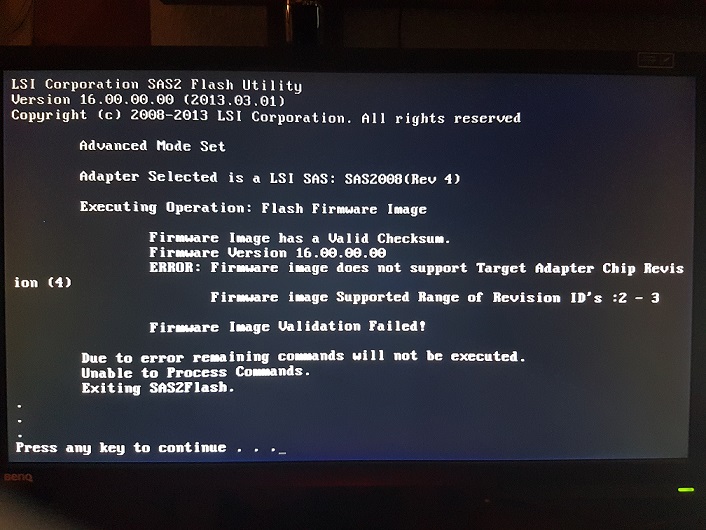
Think tbh im going to give up on both these cards. All 2008 FW isnt compatible with its revision number even though it identifies itself as a SAS2008 All 2108 FW is compatible but will not install with the signature error though Fuji says its as SAS2108 Thanks all for help, ill have to look around for some other more prominent cards that have proven that they can be flashed. Probably could mark Fuji D2616 cards as incompatible with unRAID. Setting all drives to RAID0 in the WebBIOS is the only real way to get them to work with unRAID but then you can never add or remove drives so its all for nothing.
-
As far as i can see from the links you have, it is always about SAS2008 cards! The problem is that Fujitsu is not LSI. Although the card may be "just rebranded", probably there are checks in place to prevent crossflashing with LSI or other firmware. For example, when talking about SAS2008 cards there is a key firmware (P07) that will allow you to override the "Vendor mismatch". The newer versions will not offer this opportunity and instead just quit with an error! Do you have an original Fujitsu Firmware that you can flash? Is there an HBA firmware from Fujitsu? And be careful to pick the right one! I used a tool from Fujitsu in a similar situation on a D2607 and successfully bricked the card. The computer won't post any more with the card plugged. Edit: The spec sheet for D2616 says SAS2108. Edit2: The equivalent 6 GB/s HBA from LSI/Avago is named SAS2308 and the card itself is called SAS-9217-8i http://www.avagotech.com/products/server-storage/host-bus-adapters/sas-9217-8i#specifications Sorry, wrong link. All the 2108 FW cause the signature error Still have the original files, hopefully can just flash that back. Fuji doesnt provide any files or bios's for the card that i can find. They also do not support IT mode or pass trough, only solution is to make every drive a RAID0, but then you cannot add more drives without destroying the entire config. Making it useless for unRAID in my case. Thanks for all your help so far, i was hoping this would be a quick flash but its turned into a multi day nightmare haha
-
It is a Fujitsu D2616 which according to its documentation is a SAS2108 based card. However, it identifies itself as a SAS2008 card revision 4. http://sp.ts.fujitsu.com/dmsp/Publications/public/ds-py-raid-56-6G-D2616.pdf No SAS2008 firmware i can find seems to support revision 4, nor even mentions it and the SAS2108 firmwares i have tried all give that signature error. Im at a loss at this point
-
Try this thread if you haven't already. They have newer versions of the firmware: http://forums.laptopvideo2go.com/topic/29059-sas2008-lsi92409211-firmware-files Took every firmware from this link, every one now comes up with "Error: Firmware image does not have a valid signature" Went direct to LSI, but the rom file they provide to flash using megacli i cant seem to use because megacli doesnt find my card
-
Having an issue two MegaRAID SAS2008's. On the first card, im Constantly getting "Firmware image not supported" My card seems to be a revision 4, but every firmware i can find only does up to 3. Image attached of error. Is there anyway to bypass this check and just force it to flash? On another card however, i cant even get that far. Unsure if i have bricked it or if its beyond saving but i ended up making a thread for it here. https://lime-technology.com/forum/index.php?topic=48889.0 Any help would be massively appreciated! Been at this for hours now and have been getting nowhere. Tried virtually every firmware i can find on the first card, second card i kinda gave up hope on.