





tuxflux
Members
-
Joined
-
Last visited
-
Thank you for the explanation! Will leave it as is then.
-
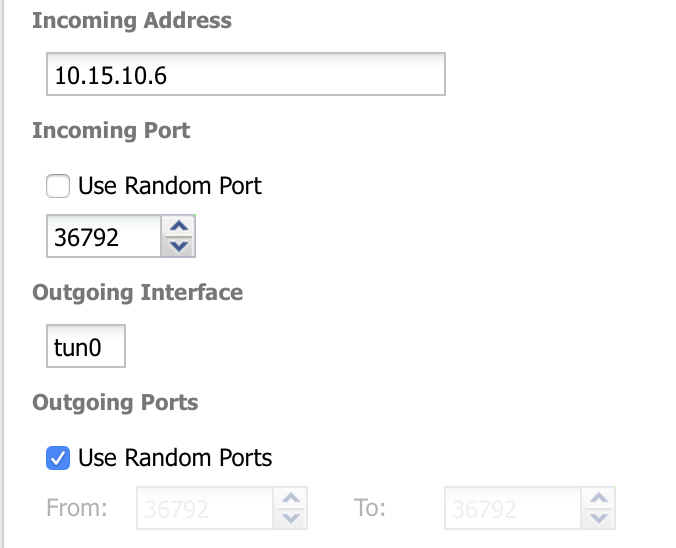
First of all, thanks for the container binhex. It's working great with PIA and port forwarding for the incoming port is working as advertised. However, I was wondering about the outgoing ports. I use a private tracker exclusively, and I'm trying to optimise for upload speeds. My network settings are in the attached image. Can I use the same port for outgoing traffic as the incoming port? I've tested and confirmed that it is open. Is there a best practice here? Any recommendations is appreciated! Using PIA as mentioned through their Swiss server.
-
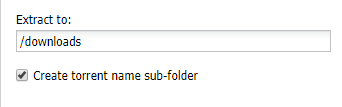
I'm having problems making a setting for a plugin stick. I use the Extractor plugin to unpack RAR's downloaded by Radarr and Sonarr and they both look for the extracted file in the original folder for the Torrent in question. The plugin has an option to create a sub-folder with the name of the torrent, which basically defaults to the torrent being extracted to the same folder and the rest of the automated process to complete successfully. However, this gets reset every time the container is restarted or updated. My server updates dockers automatically once a week, and I don't always remember to reactivate this option. I've tried several different plugins with the same result, hence I assume that this is a problem with the Unraid docker and not the plugin itself, and that's why I'm asking in this thread. Any ideas?
-
Pretty secure password wise. 30 character random letters and symbols stored via self hosted Bitwarden. Can anyone comment on the safety of the webdav protocol itself and how it holds up compared to others like SFTP?
-
I was wondering how secure WebDAV access is via Nextcloud. I have mounted my main Unraid storage share as external storage in NextCloud to be able to access files via the Windows Explorer on my work computer, and I'm wondering how secure this is. I'm using spaceinvaderone's Let'sEncrypt reverse proxy setup on my own domain for web access. However, I have concerns about exposing my server like this. The reason for doing it, is that my work computer is locked for software installation, so I cannot run OpenVPN to get access that way. I'd be happy if someone would comment on this.
-
Right. I changed out [audio] portion to [audio] output = audioresample ! audio/x-raw,rate=48000,channels=2,format=S16LE ! audioconvert ! wavenc ! filesink location=/tmp/snapfifo Still no sound. Also, tried running the local scan through the console and got the following output: /usr/local/lib/python2.7/dist-packages/mopidy/ext.py:202: PkgResourcesDeprecationWarning: Parameters to load are deprecated. Call .resolve and .require separately. extension_class = entry_point.load(require=False) INFO Starting Mopidy 2.2.2 INFO Loading config from builtin defaults INFO Loading config from /root/.config/mopidy/mopidy.conf INFO Loading config from command line options INFO Enabled extensions: mopify, iris, mpd, http, stream, spotify_tunigo, m3u, youtube, simple-webclient, tunein, local-images, softwaremixer, file, musicbox_webclient, party, api_explorer, local-sqlite INFO Disabled extensions: spotify, local, scrobbler, soundcloud WARNING Found local configuration errors, the extension has been automatically disabled: WARNING local/media_dir must be set. WARNING Found scrobbler configuration errors, the extension has been automatically disabled: WARNING scrobbler/username must be set. WARNING scrobbler/password must be set. WARNING Found soundcloud configuration errors, the extension has been automatically disabled: WARNING soundcloud/auth_token must be set. WARNING Found spotify configuration errors, the extension has been automatically disabled: WARNING spotify/username must be set. WARNING spotify/client_secret must be set. WARNING spotify/password must be set. WARNING spotify/client_id must be set. WARNING Please fix the extension configuration errors or disable the extensions to silence these messages. ERROR Unable to run command provided by disabled extension local Configurations for most of the warning messages are set. I'm browsing Spotify and playing files OK, but with no sound,.
-
I'm having trouble getting sound output and being able to see local files. Spotify loads up, but the server keeps connecting and disconnecting. This is my conf file. I'm guessing the [audio] portion is wrong. I've tried some other variations like: mixer = software mixer_volume = output = autoaudiosink buffer_time = But to no avail. [core] data_dir = /var/lib/mopidy [local] media_dir = /media [m3u] playlists_dir = /var/lib/mopidy/playlists [logging] config_file = /etc/mopidy/logging.conf debug_file = /var/log/mopidy/mopidy-debug.log [mpd] hostname = 192.168.1.3 port = 6600 [http] hostname = 192.168.1.3 port = 6680 [audio] output = lamemp3enc ! shout2send async=false mount=mopidy ip=192.168.1.43 port=8000 password=hackme [spotify] username password= client_id = client_secret = [spotify_web] client_id = client_secret = [iris] snapcast_enabled = true snapcast_port = 6680 [stream] enabled = true protocols = http https mms rtmp rtmps rtsp timeout = 5000 Any ideas on what parts of the config I need to change? Docker is mapping /media to my NAS folder with music files. The IP set for the container is 192.168.1.3, ports at default.
-
That worked. It had to be something simple. But once I logged in (which took forever), the prompts to add or replace doesn't work properly. If I click either one of them, it goes to the next step, but bounces back to the first again after 1 second, I've had a lot of issues with the service generally (not specific to the container), and I don't think I'm gonna keep it anyway. With redundancy on the server and the important stuff backed up to an additional RAID1 array, I'm pretty safe from catastrophe I reckon.
-
I got an e-mail from CrashPlan saying that my server hasn't been backed up for 3 days. When I go to check, my CrashPlan container will not start the WebUI. I just get the red X next to the CrashPlan logo and nothing appears in the opened window. The logs indicate nothing that everything isn't working. I've tried starting with a fresh appdata folder and reinstalling the docker, but nothing seems to get it to start. I'm quite frankly at a loss. Suggestions please? Edit: This came out of the log once I tried to connect. Last line is marked red. 08/11/2018 16:02:03 Got connection from client 127.0.0.1 08/11/2018 16:02:03 other clients: 08/11/2018 16:02:03 Got 'ws' WebSockets handshake 08/11/2018 16:02:03 Got protocol: binary 08/11/2018 16:02:03 - webSocketsHandshake: using binary/raw encoding 08/11/2018 16:02:03 - WebSockets client version hybi-13 08/11/2018 16:02:03 Disabled X server key autorepeat. 08/11/2018 16:02:03 to force back on run: 'xset r on' (3 times) 08/11/2018 16:02:03 incr accepted_client=1 for 127.0.0.1:51410 sock=10 08/11/2018 16:02:03 webSocketsDecodeHybi: got frame without mask 08/11/2018 16:02:03 rfbProcessClientProtocolVersion: read: I/O error It also keeps outputting e":"No such container: 1377b9fc5835"}

