






littlered
Members
-
Joined
-
Last visited
Everything posted by littlered
-
I made a mistake then. My docker configurations are gone. I misunderstood your question. I assumed you wanted to know what that share should be set to when you have finished fixing your cache disk. The point of that particular step in those instructions is to move everything off of the cache disk so you can replace (or in your case, format) it. Then later it has another step that will move it all back. Reread all of the steps and see if it makes sense as a whole.
-
Thanks, but based on the instructions provided here > https://lime-technology.com/forum/index.php?topic=48508.msg516110#msg516110 it says to "change to "Yes" all cache shares with "Use cache disk:" set to "Only" or "Prefer" and there is a user share called "Docker" which is currently set to "Only". I don't think it should be changed to 'Yes' because that's where all the docker containers are located and if I click to invoke the Mover it will move the files in the disk pool but just wanted to confirm. If you go to the settings page for a user share and turn on Help it will explain the various settings including the use cache setting. The Help button is a toggle and will stay on until you turn it off. If it is turned on the webUI will show you help for any of its pages. Try that and let me know if you don't understand why Yes is the wrong answer.

-
Quick question - I am going through the steps as per the FAQ, but I have Docker user share. Should I also set it Use Cache Disk to 'Yes'?
-
Ok, thanks! If you expect to add additional cache drives in the future then btrfs is the only choice. If you will only use a single cache drive then many people here think XFS is more reliable.
-
Should I keep using btrfs for the cache or change it to xfs? What would you recommend?
-
How do I go about doing that? Would I lose the docker configurations?
-
Tools - Diagnostics Here is the diagnostics file. Check_Disk_Filesystems-Drives_formatted_with_BTRFS I ran the tool on the cache drive and this is the result: scrub status for 15f4a7a5-7e67-4411-af76-2791c4b724b6 scrub started at Mon Jan 16 13:32:20 2017 and finished after 00:01:58 total bytes scrubbed: 48.51GiB with 0 errors
-
Tools - Diagnostics Here is the diagnostics file. unraid-diagnostics-20170116-1304.zip
-
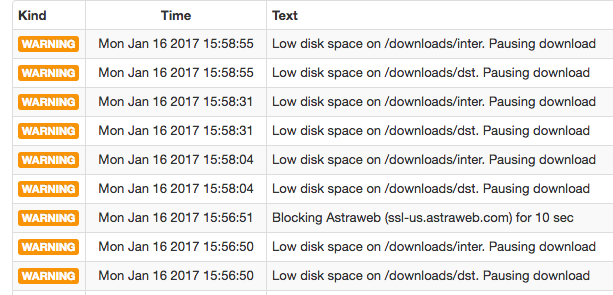
As of the last few days, I keep getting an error "Low disk space on /downloads/dst. Pausing download" and "Low disk space on /downloads/inter. Pausing download" and the downloads keep pausing. My docker container is located on a cache drive and I do have a lot of space left on it. In the docker container log, I see this error: [ERROR] Error saving diskstate: Could not rename file /config/queue/stats.new to /config/queue/stats: No space left on device Thank you in advance!
-
Hello, I am trying to switch from Limetech Plex docker over to the Linuxserver docker and I have a couple of questions: [*]When I remove the Limetech docker, do I need to remove the image too? [*]When I add the Linuxserver docker, do I need to rebuild the library? Thank you in advance!

