




Skip to content
View in the app

A better way to browse. Learn more.

Unraid

A full-screen app on your home screen with push notifications, badges and more.

To install this app on iOS and iPadOS
  1. Tap the Share icon in Safari
  2. Scroll the menu and tap Add to Home Screen.
  3. Tap Add in the top-right corner.
To install this app on Android
  1. Tap the 3-dot menu (⋮) in the top-right corner of the browser.
  2. Tap Add to Home screen or Install app.
  3. Confirm by tapping Install.

zcranium

Members
  • Joined

  • Last visited

  1. This also worked for me. Currently running the SCRUB and told it to fix errors if found. Thank you for the information!!
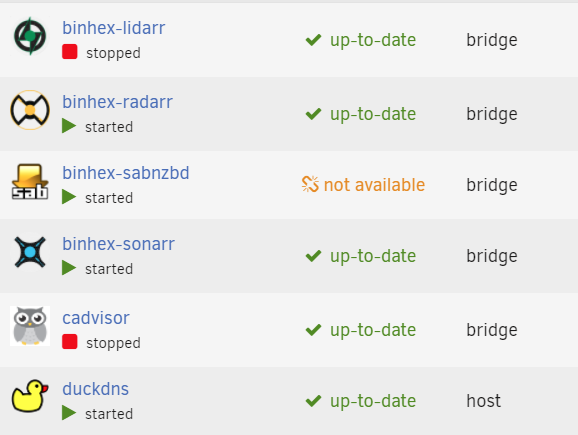
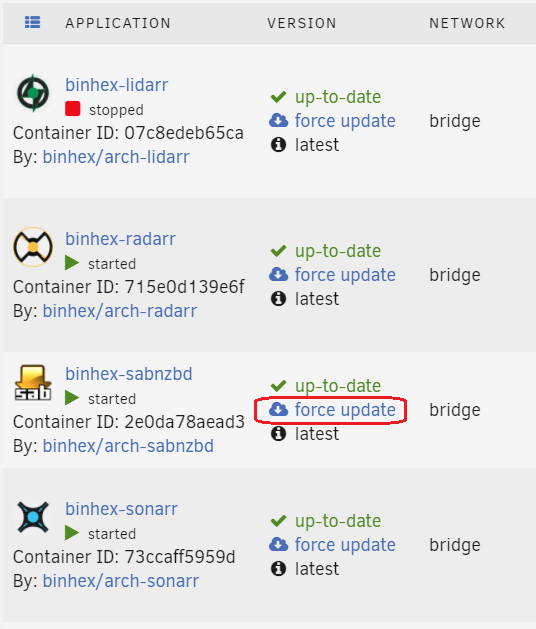
  2. For the past week or so, my DOCKER page has been showing "not available" under the version column for binhex-sabnzbd. All of my other dockers show that they are up-to-date, or if needing updating, indicate so, until I update them. I have attempted to restart my unRAID server, with no change to to the version column; the docker works just fine. Any suggestions? Update: I switched to ADVANCED VIEW on the DOCKER page, did a force update, and things appear to be resolved. I've been running unRAID for years, and have been using DOCKERS since they became available and have never seen this before. Any ideas why this happened?
Account

Navigation

Search

Search

Configure browser push notifications

Chrome (Android)
  1. Tap the lock icon next to the address bar.
  2. Tap Permissions → Notifications.
  3. Adjust your preference.
Chrome (Desktop)
  1. Click the padlock icon in the address bar.
  2. Select Site settings.
  3. Find Notifications and adjust your preference.