harriedr
Members
-
Joined
-
Last visited
-
We can close this out - I was able to build a new cache pool and backup from my last backup from May 2023 (not ideal, but nothing I can't handle). Thanks for humoring, downloading the more up to date backup app now :-S
-
Dangit - I'm sure there is a resource that you can point me to to figure this out, or how cooked am I...I found a folder called appdatabackup last one was may of 2023 for some reason....
-
I tested upon tested the wires against the other ssd i had, the drive was dead. So if I swap out a fresh ssd and fire it up it will rebuild? Or what are my options...the cache is my least knowledgeable part of this build, and I almost think I set it up incorrectly.
-
Thanks for the quick response, I did see this too upon a reboot. I shutdown and check wires/cables everything seemed ok- I'm thinking the drive is dead, but I dont have one to swap right now. Is it ok to start the array with the missing drive? "Start will remove the missing cache disk and then bring the array on-line."
-
It's been a long while since I've had any hiccups with my system, but ran an update to plex just now and poof, my docker wont start up. Attached is diagnostics tower-diagnostics-20241029-1048.zip
-
Mine are like this as well - still hanging on the "binhex/arch-nzbget:unrar-compile" EDIT I should say it is now working after I went into nzbget and reloaded through the settings. I have a user script that restarts it every hour but that was not fixing this...nor would a restart of the container from unraid GUI- only thru the setting within nzbget would it clear up the hang
-
harriedr changed their profile photo
-
Bravo - this looks/feels amazing...as of right now it seems to have solved the issues I had before with the memory leaks or whatever was happening! Thanks as always for your dev on this!
-
Also with the new gui updates, is there a way to see the file size difference?
-
Not using any custom settings and based on my quick research I have no idea what yadif is, so I would think I'm not using it...
-
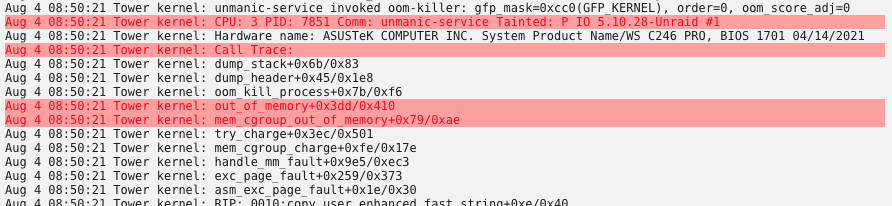
I too keep getting these issues and it doesn't matter if I limit RAM or not - I'm just trying to figure out what is going on. I have had to completely stop running this docker because of the OOM and it periodically freezing/locking me out of my system. I've ran multiple test scenarios and this is the only docker I've been having this issues with and it started around my last post (Early July if I recall)...
-
Do I need to move any data off of the cache drives before the reformat?
-
Ok thanks for the speedy reply - running a memtest now - if that turns out fine do I go back to the drawing board?
-
Checked on the server this morning and about 3 of my dockers had stopped running, I tried to start them and got 403 errors - so I went ahead and proceeded to delete my docker image and try to recreate it, but when I go to my docker tab it says "Docker Service failed to start." The weeks leading up to this I've had a few lock ups where I couldn't not get to the webgui - I've tried to run a memtest but it just hangs and never does anything- just says it is starting and stays on that screen... any help would be appreciated as I am running out of ideas tower-diagnostics-20210803-0933.zip
-
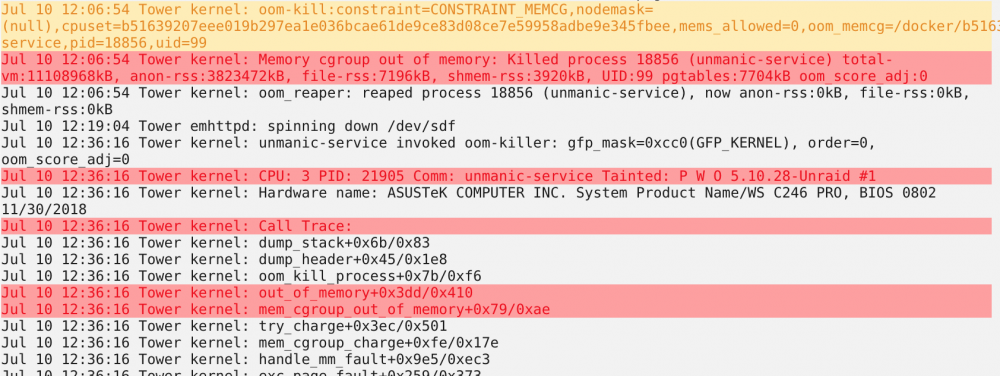
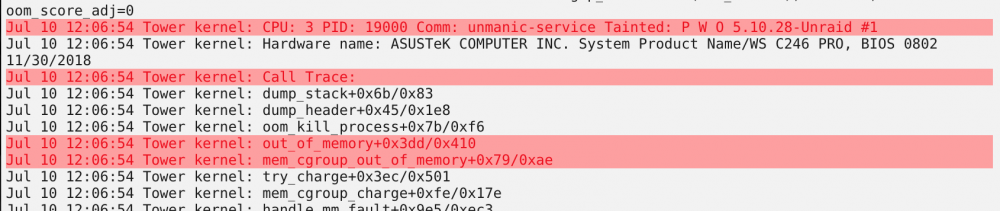
I've updated to the latest version and I keep getting these kind of out of memory errors, and I was wondering why unmanic is the only culprit?
-
I've been running very smoothly in unraid for a long time. I had updated the OS maybe 2-3 weeks ago and since I have had some issues (I'm not saying the update is causing it, but I wanted to mention it). I've attached a few docs to hopefully help diagnose the culprit. The only other things worth noting is one of my cache drives has been running hot off and on, so not sure if that is playing a role either... syslog tower-diagnostics-20210710-0929.zip