





H9lppo
Members
-
Joined
-
H9lppo changed their profile photo
-
Hello, I am having the same problem, can't start Radarr. Thanks. 2020-11-29 09:03:53,562 DEBG fd 8 closed, stopped monitoring <POutputDispatcher at 23149522694640 for <Subprocess at 23149522974704 with name radarr in state STARTING> (stdout)> 2020-11-29 09:03:53,562 DEBG fd 10 closed, stopped monitoring <POutputDispatcher at 23149522975904 for <Subprocess at 23149522974704 with name radarr in state STARTING> (stderr)> 2020-11-29 09:03:53,562 INFO exited: radarr (exit status 2; not expected) 2020-11-29 09:03:53,562 DEBG received SIGCHLD indicating a child quit 2020-11-29 09:03:56,566 INFO spawned: 'radarr' with pid 67 2020-11-29 09:03:56,576 DEBG 'radarr' stderr output: Cannot open assembly '/usr/lib/radarr/Radarr.exe': No such file or directory. 2020-11-29 09:03:56,581 DEBG fd 8 closed, stopped monitoring <POutputDispatcher at 23149523378080 for <Subprocess at 23149522974704 with name radarr in state STARTING> (stdout)> 2020-11-29 09:03:56,581 DEBG fd 10 closed, stopped monitoring <POutputDispatcher at 23149522740944 for <Subprocess at 23149522974704 with name radarr in state STARTING> (stderr)> 2020-11-29 09:03:56,581 INFO exited: radarr (exit status 2; not expected) 2020-11-29 09:03:56,581 DEBG received SIGCHLD indicating a child quit 2020-11-29 09:03:57,583 INFO gave up: radarr entered FATAL state, too many start retries too quickly
-
Thanks Maor for the reply, I just checked it, it'll require recompiling the kernel in order to work but that's really beyond my knowledge. I will try to set it in BIOS.
-
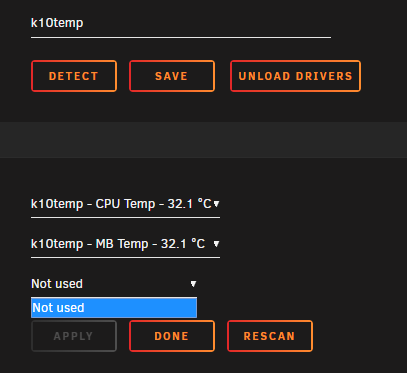
Hello, today I upgraded my MOBO to PRIME X470-PRO. with the latest BIOS update, can't get all core temp and fans speed only CPU and MB with this driver k10temp, also Fan Auto Control didn't detect PWM fan. I added diagnostics also, I have read that there is no driver yet for IT8665E. I'd appreciate it if anyone can help. Thanks here is the output of sensors-detect root@Tower:~# sensors-detect --auto # sensors-detect version 3.6.0 # Board: ASUSTeK COMPUTER INC. PRIME X470-PRO # Kernel: 4.19.98-Unraid x86_64 # Processor: AMD Ryzen 5 1600 Six-Core Processor (23/1/1) Running in automatic mode, default answers to all questions are assumed. Some south bridges, CPUs or memory controllers contain embedded sensors. Do you want to scan for them? This is totally safe. (YES/no): Silicon Integrated Systems SIS5595... No VIA VT82C686 Integrated Sensors... No VIA VT8231 Integrated Sensors... No AMD K8 thermal sensors... No AMD Family 10h thermal sensors... No AMD Family 11h thermal sensors... No AMD Family 12h and 14h thermal sensors... No AMD Family 15h thermal sensors... No AMD Family 16h thermal sensors... No AMD Family 17h thermal sensors... Success! (driver `k10temp') AMD Family 15h power sensors... No AMD Family 16h power sensors... No Hygon Family 18h thermal sensors... No Intel digital thermal sensor... No Intel AMB FB-DIMM thermal sensor... No Intel 5500/5520/X58 thermal sensor... No VIA C7 thermal sensor... No VIA Nano thermal sensor... No Some Super I/O chips contain embedded sensors. We have to write to standard I/O ports to probe them. This is usually safe. Do you want to scan for Super I/O sensors? (YES/no): Probing for Super-I/O at 0x2e/0x2f Trying family `National Semiconductor/ITE'... No Trying family `SMSC'... No Trying family `VIA/Winbond/Nuvoton/Fintek'... No Trying family `ITE'... Yes Found `ITE IT8665E Super IO Sensors' Success! (address 0x290, driver `to-be-written') Probing for Super-I/O at 0x4e/0x4f Trying family `National Semiconductor/ITE'... No Trying family `SMSC'... No Trying family `VIA/Winbond/Nuvoton/Fintek'... No Trying family `ITE'... No Some systems (mainly servers) implement IPMI, a set of common interfaces through which system health data may be retrieved, amongst other things. We first try to get the information from SMBIOS. If we don't find it there, we have to read from arbitrary I/O ports to probe for such interfaces. This is normally safe. Do you want to scan for IPMI interfaces? (YES/no): Probing for `IPMI BMC KCS' at 0xca0... No Probing for `IPMI BMC SMIC' at 0xca8... No Some hardware monitoring chips are accessible through the ISA I/O ports. We have to write to arbitrary I/O ports to probe them. This is usually safe though. Yes, you do have ISA I/O ports even if you do not have any ISA slots! Do you want to scan the ISA I/O ports? (yes/NO): Lastly, we can probe the I2C/SMBus adapters for connected hardware monitoring devices. This is the most risky part, and while it works reasonably well on most systems, it has been reported to cause trouble on some systems. Do you want to probe the I2C/SMBus adapters now? (YES/no): Using driver `i2c-piix4' for device 0000:00:14.0: AMD KERNCZ SMBus Module i2c-dev loaded successfully. Next adapter: SMBus PIIX4 adapter port 0 at 0b00 (i2c-0) Do you want to scan it? (YES/no/selectively): Client found at address 0x50 Probing for `Analog Devices ADM1033'... No Probing for `Analog Devices ADM1034'... No Probing for `SPD EEPROM'... Yes (confidence 8, not a hardware monitoring chip) Probing for `EDID EEPROM'... No Client found at address 0x52 Probing for `Analog Devices ADM1033'... No Probing for `Analog Devices ADM1034'... No Probing for `SPD EEPROM'... Yes (confidence 8, not a hardware monitoring chip) Client found at address 0x53 Probing for `Analog Devices ADM1033'... No Probing for `Analog Devices ADM1034'... No Probing for `SPD EEPROM'... Yes (confidence 8, not a hardware monitoring chip) Next adapter: SMBus PIIX4 adapter port 2 at 0b00 (i2c-1) Do you want to scan it? (YES/no/selectively): Next adapter: SMBus PIIX4 adapter port 3 at 0b00 (i2c-2) Do you want to scan it? (YES/no/selectively): Next adapter: SMBus PIIX4 adapter port 4 at 0b00 (i2c-3) Do you want to scan it? (YES/no/selectively): Now follows a summary of the probes I have just done. Driver `k10temp' (autoloaded): * Chip `AMD Family 17h thermal sensors' (confidence: 9) Driver `to-be-written': * ISA bus, address 0x290 Chip `ITE IT8665E Super IO Sensors' (confidence: 9) Note: there is no driver for ITE IT8665E Super IO Sensors yet. Check https://hwmon.wiki.kernel.org/device_support_status for updates. No modules to load, skipping modules configuration. Unloading i2c-dev... OK i have tried this as a way around modprobe it87 force_id=0x8620 root@Tower:~# modprobe it87 force_id=0x8620 modprobe: ERROR: could not insert 'it87': Device or resource busy and the logs show Tower kernel: it87: Found IT8620E chip at 0x290, revision 6 Tower kernel: it87: Beeping is supported Tower kernel: ACPI Warning: SystemIO range 0x0000000000000295-0x0000000000000296 conflicts with OpRegion 0x0000000000000290-0x0000000000000299 (\AMW0.HWM) (20180810/utaddress-204) Tower kernel: ACPI: If an ACPI driver is available for this device, you should use it instead of the native driver tower-diagnostics-20200210-2133.zip
-
I am also experiencing the same issue going from 6.7.2 to 6.8.0 on ASRock B450M Pro4 with AMD Ryzen 5 1600 and 1 Quad port NIC, pfsense does not boot! But With @bastl workaround by removing <cpu mode='host-passthrough' check='none'> pfsense boot like before. Big thanks for sharing that workaround @bastl.

