





Blackrazid
Members
-
Joined
-
Last visited
-
Update: For me the issue was related to me had uninstalled C2 Identity Edge server and obiviously missed something, becasuse as soon as i reinstalled it, i had no issues with SMB or anything like that.
-
Will double check, the weird part is that it worked this morning, and then i did the changes i describe and obviously fucked everything So ye, its obviously a permission issue, i manged to get NFS up and running without problems, but SMB is somehow "broken" atm.
-
I need some help. today I got these problems showing up: Dec 8 14:16:54 Cereberus kernel: CIFS: VFS: \\192.168.1.122 Send error in SessSetup = -512 Dec 8 14:17:04 Cereberus kernel: CIFS: VFS: \\THE-DISKSTATION Send error in SessSetup = -512 This is related i think to the fact that all of a sudden my SMB shares from my Synology Nas dosent mount anymore. It fails everytime. What i did and have reverted and tried and rebooted was. On synology i activated: ENABLE SMB 3 Multichanel(by doing this i was forced at the same time to activate:enable asynchrounus read) , I also activated that in Unraid. After this nothing works. So i deactivated SMB 3 multichannel on synology and Unraid. still cant get it to mount. on my computer i am able to connect to both the ip by \\192.168.1.122 and browse my shares, or by \\The-something and do the same. if i through unraid "add smb share" and make it search for servers, it takes quite some time, but finally the synology nas shows up, and i pick it, i then enter username and passord, and i can get it to load the shares and finalyze the guide for that, but when i mount i get this error. I even tried to create an new user for unraid on the synology. Any suggestions? Its very frustrating, and I am sure its user error, but i cant figure it out I am also seeing the green dot: (remote server is online) cereberus-diagnostics-20231208-1516.zip


-
I am pulling this one from the grave. when i try to run the command ls -l /dev/serial/by-id/ I get the following error: ls: cannot access '/dev/serial/by-id/': No such file or directory I am running this from the terminal in unraid. There is no directory called Serial. I see the Aeostick in System hardware. Bus 001 Device 004 Port 1-6ID 0658:0200 Sigma Designs, Inc. Aeotec Z-Stick Gen5 (ZW090) - UZB how/what should i do to get this working with this docker? I am running Unraid OS 6.11.5
-
Problem solved, I am a noob and blind. Thanks for making it clear
-
I have ? look first screenshot EDIT I DONT Thanks
-
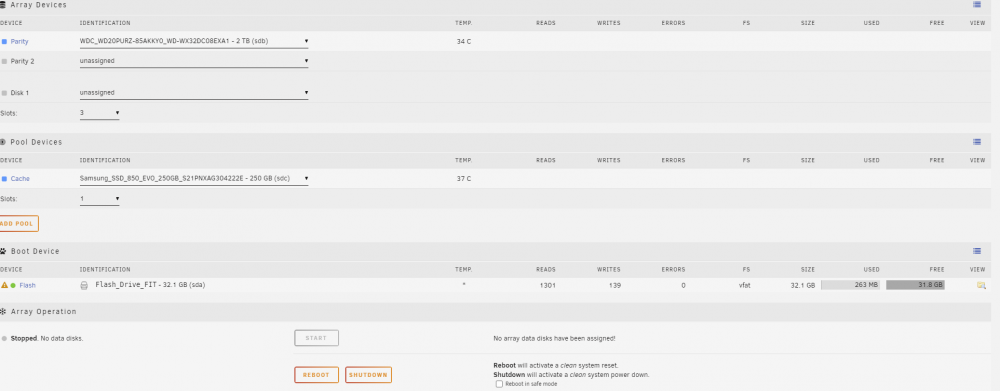
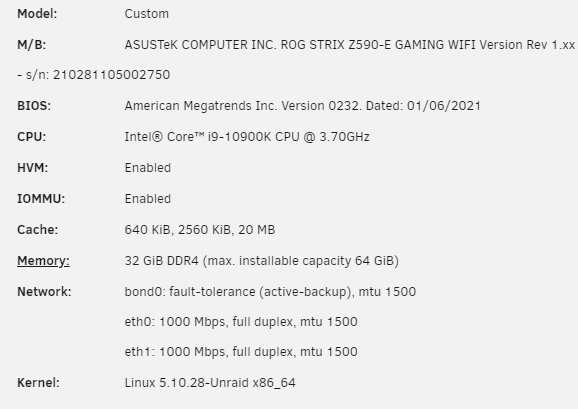
Completley new hardware in terms of unraid enviroment, New licens ( basic) 2 disks, 1 2tb "ordinary" hdd, and 1 ssd. I cant start the array. I am obivously doing something wrong or missing a step In the past on another server i used one of my old pro liceneses and it just worked without problems, now that server failed(massive hardware failure a few months ago) and before buying the "basic" license, i tried to apply that license to the new server, but i got "invalid licens", so i bought the basic and applied to the new server. But i cant get the array to start, I tried to start, autostart and so on, but nothing. would appreciate help!
-
Latest available (non beta of plex) Nvidia driver: v455.38 Regardig grp statistics - YES thats the one and yes on reinstall and tried to transcode

-
yes mutiple times, its ovbious that i am failing:) Also using for the "dashboard" gpu staticstics to see if stuffs happens
-
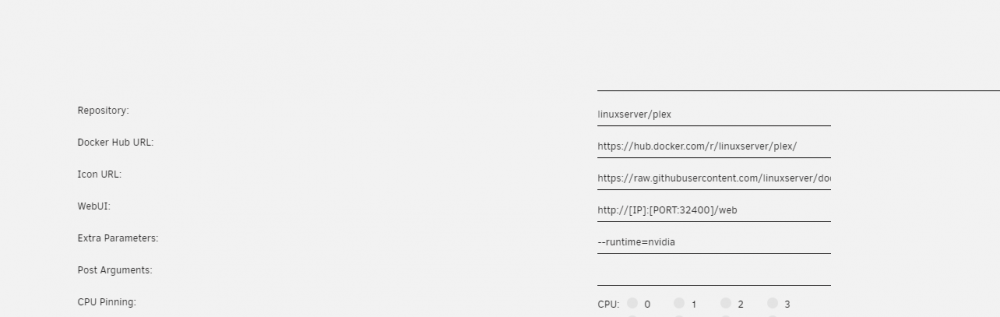
I did input this under advanced (extra paramters) --runtime=nvidia
-
So i have a question since i cant download Nvidia Unraid anymore (as of yesterday i cant find it anywhere do dl, espically not from the community applications), I have issues getting hardware transcoding to work with plex. The setup atm is: I7 - 4770K Nvidia Geforce RTX 2080 and since icant use the Nvidia unriad, i saw that you could dl Beta 35 of 6.9 and also install the "nvidia" driver from CA, (i have done both) I have ticked the "tick" in plex aswell, I have added GUID for the GPU in the Docker container for plex. But as far as I can see i punish my CPU and not my GPU. Any1 have a guide on how to solve this?
-
So i have a question since i cant download Nvidia Unraid anymore (as of yesterday i cant find it anywhere do dl, espically not from the community applications), I have issues getting hardware transcoding to work with plex. The setup atm is: I7 - 4770K Nvidia Geforce RTX 2080 and since icant use the Nvidia unriad, i saw that you could dl Beta 35 of 6.9 and also install the "nvidia" driver from CA, (i have done both) I have ticked the "tick" in plex aswell, I have added GUID for the GPU in the Docker container for plex. But as far as I can see i punish my CPU and not my GPU. Any1 have a guide on how to solve this?



