





sloob
Members
-
Joined
-
Last visited
Everything posted by sloob
-
Anyone? This is for our office and I kinda put my neck on the line and it keeps crashing. any help appreciated
-
Hello everyone. I recently acquired a brand new machine to run unraid. specs are as follows; MOBO: ROG STRIX B550-F GAMING (WI-FI) (Most recent BIOS version) CPU: AMD Ryzen 5 5600X 6-Core @ 3700 MHz HBA card: INSPUR 9211-8i 6Gbps HBA LSI FW:P20 IT Mode ZFS FreeNAS unRAID+2* SFF-8087 SATA RAM 32GB Corsair Vengeance RGB PRO DDR4 3200MHz PSU: Corsair gold 850W Drives: Western Digital Red 6TB Cache: Samsung 970 EVO Plus 1TB NVMe M.2 Internal SSD (MZ-V7S1T0/AM) Flash drive: SanDisk 32GB Cruzer Fit USB Flash Drive - SDCZ33-032G-G35 Everything runs well but about once a week we get a kernel panic crash. I ran the mem test for a few hours and got no issues. The server is plugged in a working UPS. Can anyone figure this out? jarvis-diagnostics-20220322-1213.zip
-
Good day all! Yesterday I came back from work and found that I couldn't check my security cameras. When I tried logging into my unraid's web UI I realized I couldn't ping it or see it on my network. This is quite sudden and I have not changed anything on my server recently. I managed to get diagnostics via the command line. When trying to boot into GUI mode I just have a blank screen with a flashing "_" cursor. Here is what the display looks like when booting normally. I do have a USB drive backup dating from yesterday. Thank you and hopefully this is simple to fix! unraid-diagnostics-20220315-1547.zip
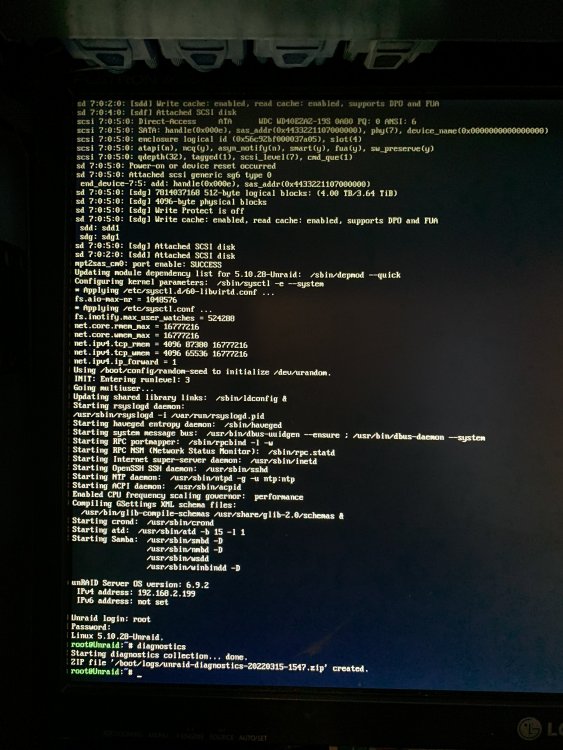
-
Like many people here I followed spaceinvader one guide to give online access to nextcloud using a domain name. I followed his guide to the letter and everything seems to be working fine other than my router not supporting NAT reflection. This means that I can only access my nextcloud GUI via my domain name using a VPN or when I'm away from home. which is fine by me, EXCEPT that I can no longer access my nextcloud GUI AT ALL on my home network, when I try to access it via localhost:444 it gets redirected to my domain name (nextcloud.mydomain.com). is there a way I can retain the ability to connect to owncloud on my home network? This problem is only with nextcloud, I can access sonarr with both my domain and my local ip depending on if I'm connected to my local network or not.
-
Here is the new diagnostic unraid-diagnostics-20210925-1038.zip
-
Thanks alot! I'm worried about that disk 3 issue, it's not the first time it happened and I've changed everything (psu,ram,mobo,cpu,cables,disk) except the server case (it uses a sata backplane) so I fear I will need to also change the server case or the backplane
-
I frankly don't remember why I chose 40GB for my docker img, and no it never filled up so I could reduce it to 20GB. I rebooted the server and all is fine for the moment. I will change my appdata share to cache only to improve the performance. Do you have an idea as to why my docker image got corrupted?
-
Hi, Every now and then my server decides it need my attention and start corrupting disks/docker images. Few months ago I decided I would buy brand new PSU,Cpu,Ram,Mobo,SSD and sata cables to hopefully resolve the issue. It did last for a while but this morning my log filled up and my dockers were unresponsive. Hopefully the diagnostic can shed some light as to what happened. Thanks everyone unraid-diagnostics-20210924-1511.zip
-
You were absolutely right! it works now! 1000 thanks!
-
I'm having a problem since the latest update, My FTB server won't start. gives me the following error: ---Setting umask to 000--- ---Checking for 'runtime' folder--- ---'runtime' folder found--- ---Checking if Runtime is installed--- ---Runtime found--- ---Checking for Minecraft Server executable --- ---Minecraft Server executable found--- ---Preparing Server--- ---Checking for 'server.properties'--- ---'server.properties' found... ---Checking for old logs--- ---Starting Server--- ---Waiting for logs, please stand by...--- Cannot exec '/serverdata/serverfiles/runtime/jre1.8.0_211': Permission denied Strange thing is I'm using jre1.8.0_241
-
This might be a long shot but I'm having a problem with setting up my mindcrack FTB server using this docker. I was able to get a normal server running and also a forge server fully working too using your very detailed steps. The mindcrack server also works flawlessly when ran on a windows desktop but I can't get it to work in the docker. Basically I first get the mindcrack server up and running on a pc, once it's ready I move over the server folder to the correct appdata folder (overwriting the default server that gets downloaded by default) I delete the perm.txt file, edit the newly created variable with ftbserver.jar (the name of the server .jar file) I then start the docker and get the following text in the terminal: 2019-11-22 19:43:54.436930 [info] System information Linux f2fd99e596ae 4.18.20-unRAID #1 SMP Fri Nov 23 11:38:16 PST 2018 x86_64 GNU/Linux 2019-11-22 19:43:54.461037 [info] PUID defined as '99' 2019-11-22 19:43:54.487550 [info] PGID defined as '100' 2019-11-22 19:43:55.064042 [info] UMASK defined as '000' 2019-11-22 19:43:55.097408 [info] Permissions already set for volume mappings 2019-11-22 19:43:55.129107 [info] MAX_BACKUPS defined as '10' 2019-11-22 19:43:55.164594 [info] JAVA_INITIAL_HEAP_SIZE defined as '512M' 2019-11-22 19:43:55.199649 [info] JAVA_MAX_HEAP_SIZE defined as '1024M' 2019-11-22 19:43:55.239239 [info] JAVA_MAX_THREADS defined as '1' 2019-11-22 19:43:55.264714 [info] Starting Supervisor... 2019-11-22 19:43:55,448 INFO Included extra file "/etc/supervisor/conf.d/minecraft-server.conf" during parsing 2019-11-22 19:43:55,449 INFO Set uid to user 0 succeeded 2019-11-22 19:43:55,452 INFO supervisord started with pid 8 2019-11-22 19:43:56,454 INFO spawned: 'minecraft-server' with pid 66 2019-11-22 19:43:56,454 INFO reaped unknown pid 9 2019-11-22 19:43:56,461 DEBG 'minecraft-server' stdout output: [info] Minecraft folder '/config/minecraft' already exists, rsyncing newer files... 2019-11-22 19:43:56,454 INFO spawned: 'minecraft-server' with pid 66 2019-11-22 19:43:56,454 INFO reaped unknown pid 9 2019-11-22 19:43:56,461 DEBG 'minecraft-server' stdout output: [info] Minecraft folder '/config/minecraft' already exists, rsyncing newer files... 2019-11-22 19:43:57,462 INFO success: minecraft-server entered RUNNING state, process has stayed up for > than 1 seconds (startsecs) 2019-11-22 19:43:58,175 DEBG 'minecraft-server' stdout output: [info] Starting Minecraft Java process... 2019-11-22 19:43:58,199 DEBG 'minecraft-server' stdout output: Starting server... 2019-11-22 19:43:58,234 DEBG 'minecraft-server' stdout output: [39;1m done[0m 2019-11-22 19:43:58,235 DEBG 'minecraft-server' stdout output: [info] Minecraft Java process started, successful start but Feedthebeast can't find the server, I'm positive the ip is correct (Local server anyway) anyone has an idea?
-
How can I delete plex completely? I'm having problems with my database corrupting every few days and I can't seem to find a way to completely remove my old server. I tried deleting every plex files in the appdata folder and deleting the docker. But upon re-install it somehow remembers my email/account/password so obviously I'm missing something
-
I have a problem with this docker, I was able to setup everything but I can't get SickBeard to detect the downloaded file in my p2p client folder (Transmission) once it has been snatched and is completely downloaded. I've triple checked the path to the show in /tv is ok, the path to the /downloads is also good (Also remoted to the server and the downloaded file is sitting there, but SickBeard can't see it and remains blocked at "snatched xh, xm ago. file not found. change to Skipped ?")


