





veritas2884
Members
-
Joined
-
Last visited
Everything posted by veritas2884
-
@DZMM Just wanted to drop a thank you note. Finally finished my 26TB upload. 100% cloud based now. Had 12 simultaneous streams last night and no issues. You're a legend.
-
Got it. Again, thank you very much. This is the second time this week you've come through with an awesome solution for me. Much Appreciated!
-
Thank you for that. Do you think I should have it sleep the P2000 as well as part of the script?
-
I have what may be a unique situation, but hopefully someone can point me in the right direction. I have a P2000 for use with my Plex Container and a Radeon VII for passthrough to my VMs. I suffer from the bug where the Radeon will get hung up when I close my VMs. I am using the reset script that puts the server into sleep mode and that get the card operating again without having to restart the whole server. However, I've come to find out that after I do that Plex starts using the CPU to transcode instead of the P2000. #!/bin/bash echo "disconnecting amd graphics" echo "1" | tee -a /sys/bus/pci/devices/0000\:03\:00.0/remove echo "disconnecting amd sound counterpart" echo "1" | tee -a /sys/bus/pci/devices/0000\:03\:00.1/remove echo "entered suspended state press power button to continue" echo -n mem > /sys/power/state echo "reconnecting amd gpu and sound counterpart" echo "1" | tee -a /sys/bus/pci/rescan echo "AMD graphics card sucessfully reset" This is the script I use and it only references the hardware id of the Radeon. Any idea how to make sure hardware encoding on the p2000 survives the reset fix for the Radeon?
-
I just wanted to thank you for these amazing scripts and all the help. I got them all working and had my first successful upload last night. This is a game changer! With gig/gig service I had 10 simultaneous streams and no issues.
-
From my understanding it is best to think of the MergerFS folder as not an actual folder but a shortcut to the local and cloud folders. The MergerFS system writes the data to the local storage but reads from both. Then the upload script moves the local storage files to the cloud. I don't believe the MergerFS system actually moves files after the initial write. But, again, this is a point I am fuzzy on as well, so I am hoping someone that knows 100% will chime in.
-
To follow up on the previous person’s question, I too want to know where the file physically resides when writing to the mergerfs folderol. So if mergerfs merges /rclonemount and /localstorage into /merge and I write a file to /merge Where does the file actually sit until the upload script runs?
-
1) Rclone will do a direct write to your cloud storage. But I have come to find out that RCLONE isn't reliable at doing direct writes and that is why the upload script was created. To move local files to cloud files in the background. 2) This is something I asked the creator via DM. I am hoping to find out what the direct write to MergerFS folder actual does with the file. 3) That is what it is doing. It creating a merged folder that appears to unraid/your docker container as if the content of your local folder and the content of your cloud are one folder. So Plex or whatever you have addressing your data doesn't know if it is local or in the cloud.
-
Hello again! I have been trying to get the rclone upload to work and the script keeps stopping here: 26.02.2020 13:54:01 INFO: rclone not installed - will try again later. Here are my settings # REQUIRED SETTINGS RcloneCommand="move" # choose your rclone command e.g. move, copy, sync RcloneRemoteName="secure" # Name of rclone remote mount WITHOUT ':'. RcloneUploadRemoteName="secure" # If you have a second remote created for uploads put it here. Otherwise use the same remote as RcloneRemoteName. LocalFilesShare="/mnt/user/mediacloud" # location of the local files without trailing slash you want to rclone to use RcloneMountShare="/mnt/disks/" # where your rclone mount is located without trailing slash e.g. /mnt/user/mount_rclone MinimumAge="15m" # sync files suffix ms|s|m|h|d|w|M|y ModSort="ascending" # "ascending" oldest files first, "descending" newest files first To get to my rclone mounted files they're in /mnt/disks/secure , so I have tried changing the RcloneMountShare= to RcloneMountShare=/mnt/disks/secure and RcloneMountShare=/mnt/disks and get the same error. I have two rclone mounts Name Type ==== ==== gcloud drive secure crypt These are my mount commands: rclone mount --max-read-ahead 1024k --allow-other gcloud: /mnt/disks/gcloud & rclone mount --max-read-ahead 1024k --allow-other secure: /mnt/disks/secure & Banging my head against the wall as to why I can't get the script to work. Thanks for any help!
-
Got it. I see the issue now!
-
Thank you for the reply. mergerfs -o defaults,allow_other,use_ino,fsname=mergerFS /mnt/user/mediacloud/Movies=RW:/mnt/disks/secure/Movies=RO:/mnt/user/media/Movies=RO /mnt/disks/merge/Movies This is the command I use. The mediacloud/Movies folder is the temporary location that Radarr copies the download to until my rclone chron job uploads it. The secure/Movies is the encrypted rclone mounted folder The media/Movies is my legacy folder with over a 1000 movies in it that I will eventually upload but am in no rush to. When you said you can't mix those commands, I have to say it is working. When I write a file to /mnt/disks/merge/Movies the file physically lands in the mnt/user/mediacloud/Movies folder on my array, which is the only one setup as RW.
-
Hi DZMM! First thank you for the amazing scripts. I was too far down the rabbit hole when I found these to use them wholesale, but I pulled a lot of your code to add to my existing scripts and I have everything running perfectly... except one issue. For Sonarr/Radarr when I point them to my mergerfs mount (which I have setup with a local folder as Read/Write and my Google Cloud folder as Read Only) I get a permission error when I try to add a Movie and/or Series to it. Using Midnight commander I can read and write to the mergerfs mount with no issue and I can also have Plex, Sonarr, and Radarr read from it with no issue, but it seems my Docker Containers cannot write to it. Would you or anyone else here have an idea what permission issue I have to fix to allow this to happen? **UPDATE** I was able to get it to work by going into /mnt/disks/merger folder that contains all of my mergerfs mount points and running sudo chmod -R -v 777 * The command failed on every folder that was mounted via the Read Only option, but was successful on the RW local folders. Sonarr and Radarr can now add new items. However, this command is manual and it appears I have to run it on every server reboot. Any ideas on how to automate it? Thanks again!
-
Thanks for the reply. That makes sense because the flash drive showed up in unassigned devices as able to mount. Any ideas how to fix that. A reboot sorted it this time.
-
One other thing, I recently lost my cache drive and had to redo all my dockers. This may have something to do with it.
-
I have this error the pops up on Unraid now and do not know what to do about it. The server seems to be working fine, but I am worried this might lead to something worse. Warning: parse_ini_file(/boot/config/docker.cfg): failed to open stream: No such file or directory in /usr/local/emhttp/plugins/dynamix.docker.manager/include/DockerClient.php on line 43 Warning: array_replace_recursive(): Expected parameter 2 to be an array, bool given in /usr/local/emhttp/plugins/dynamix.docker.manager/include/DockerClient.php on line 43 Warning: parse_ini_file(/boot/config/domain.cfg): failed to open stream: No such file or directory in /usr/local/emhttp/plugins/dynamix.vm.manager/include/libvirt_helpers.php on line 460 Thank you for any help!
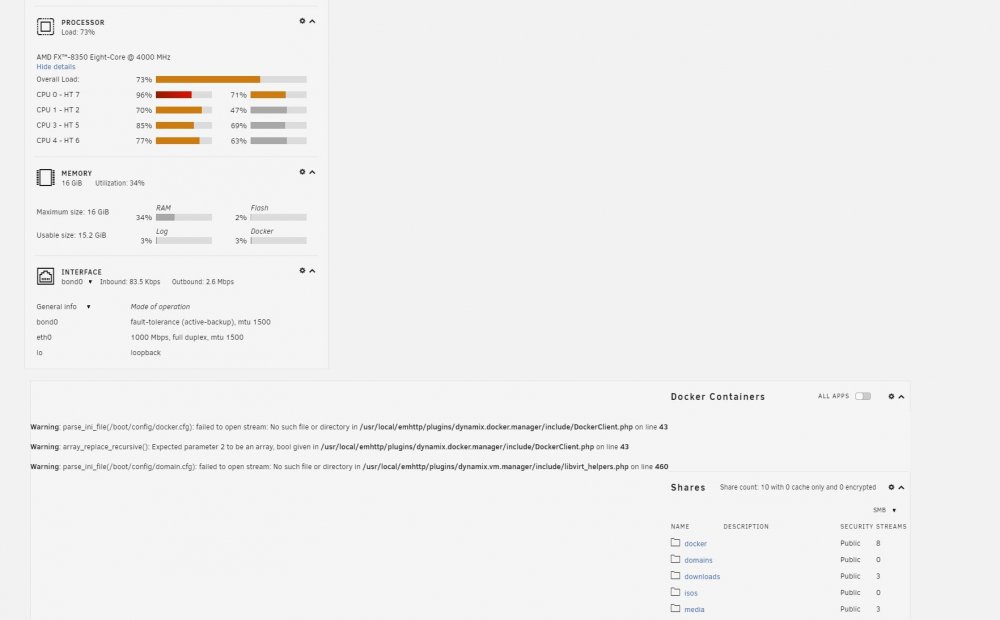
-
That was it. It generated the config file, but wasn't pointed to the place where it generated. I fixed that and am in business. Thank you!
-
DOMAINS='xxxxxx.hopto.me' This is what I have the config file set with (x's are replaced with my actual hostname) and I get this error in the logs every time I start the docker: Please enter your domain/group list in noip.conf Any help would be greatly appreciated! Thank you!


