





Brandan
Members
-
Joined
-
Last visited
Everything posted by Brandan
-
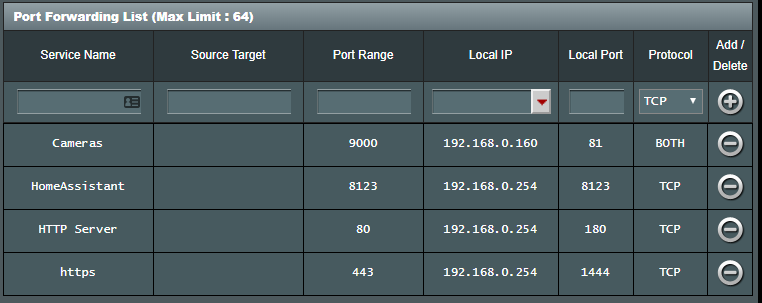
Hi All, Been trying this mornig to get LetsEncrypt working but am getting stuck on getting a certificate issued: "Timeout during connect" ------------------------------------- _ () | | ___ _ __ | | / __| | | / \ | | \__ \ | | | () | |_| |___/ |_| \__/ Brought to you by linuxserver.io We gratefully accept donations at: https://www.linuxserver.io/donate/ ------------------------------------- GID/UID ------------------------------------- User uid: 99 User gid: 100 ------------------------------------- [cont-init.d] 10-adduser: exited 0. [cont-init.d] 20-config: executing... [cont-init.d] 20-config: exited 0. [cont-init.d] 30-keygen: executing... using keys found in /config/keys [cont-init.d] 30-keygen: exited 0. [cont-init.d] 50-config: executing... Variables set: PUID=99 PGID=100 TZ=Australia/Brisbane URL=servebeer.com SUBDOMAINS=darkremote EXTRA_DOMAINS= ONLY_SUBDOMAINS=true DHLEVEL=2048 VALIDATION=http DNSPLUGIN= [email protected] STAGING= 2048 bit DH parameters present SUBDOMAINS entered, processing SUBDOMAINS entered, processing Only subdomains, no URL in cert Sub-domains processed are: -d darkremote.servebeer.com E-mail address entered: [email protected] http validation is selected Generating new certificate Saving debug log to /var/log/letsencrypt/letsencrypt.log Plugins selected: Authenticator standalone, Installer None Obtaining a new certificate Performing the following challenges: http-01 challenge for darkremote.servebeer.com Waiting for verification... Challenge failed for domain darkremote.servebeer.com http-01 challenge for darkremote.servebeer.com Cleaning up challenges Some challenges have failed. IMPORTANT NOTES: - The following errors were reported by the server: Domain: darkremote.servebeer.com Type: connection Detail: Fetching http://darkremote.servebeer.com/.well-known/acme-challenge/rqRuSRoXiqrXg9GmbfHo9h0gi8LmYjL2PHgp_rtZ1Qk: Timeout during connect (likely firewall problem) To fix these errors, please make sure that your domain name was entered correctly and the DNS A/AAAA record(s) for that domain contain(s) the right IP address. Additionally, please check that your computer has a publicly routable IP address and that no firewalls are preventing the server from communicating with the client. If you're using the webroot plugin, you should also verify that you are serving files from the webroot path you provided. ERROR: Cert does not exist! Please see the validation error above. The issue may be due to incorrect dns or port forwarding settings. Please fix your settings and recreate the container Here is my port forwarding: And here is my docker run command: root@localhost:# /usr/local/emhttp/plugins/dynamix.docker.manager/scripts/docker run -d --name='letsencrypt' --net='bridge' --privileged=true -e TZ="Australia/Brisbane" -e HOST_OS="Unraid" -e 'EMAIL'='********@gmail.com' -e 'URL'='REDACTED' -e 'SUBDOMAINS'='REDACTED' -e 'ONLY_SUBDOMAINS'='true' -e 'DHLEVEL'='2048' -e 'VALIDATION'='http' -e 'DNSPLUGIN'='' -e 'PUID'='99' -e 'PGID'='100' -p '180:80/tcp' -p '1444:443/tcp' -v '/mnt/user/appdata/letsencrypt':'/config':'rw' -v '/mnt/user':'/unraid':'rw' 'linuxserver/letsencrypt' 51200ee6003878292897acde5133facdc76a0d6cc84fb6e79e263256cfe56857 Now, I've read through threads etc and tried the following to no avail: Directed port 80 at another service to attempt to connect / confirm no ISP blocking - all good Tried setting container share to /mnt/disk1 Reinstalled the latest docker / app from CA for this about 6 times fresh One thing I wanted to check... Should I be able to access the NGINX landing page regardless of the cert being installed at HTTP port 180 / HTTPS 1444 of the IP of the unraid server? Because I can't get to it locally or externally. I only ever get 'Connection Refused'. Is it possible that the docker isn't responding to HTTP requests? How would I check? Sorry, I've tried everything I can think of and tried to find people with the same issue but a lot of them haven't resolved the issue or never responded if it was fixed 😕 Thanks in advance! Edit: This is working now. I decided to call my ISP anyway to at least see if they could see anything trying to connect. Turns out port 80 / 443 was blocked. I assumed it wasn't as I was able to remotely connect over port 80 to other services. They said it could have been Hairpin NAT on my router basically working it out for me. As a general lesson I guess - always call your ISP FIRST to make sure that those ports are going to be open on their side before you go any further.
-
Hey all, I am trying to set up LetsEncrypt but LetsEncrypt keeps giving me the message "Challenge failed for domain xxxx.duckdns.org". I have my ports forwarded correctly and have even tried re-forwarding port 80 to say my unraid web server just to test that it's accessible from the full dns/port number and that's fine (then deleted that forward). Question - Am I supposed to be able to access the http webpage of the letsencrypt docker regardless of any certs being issued? I'm just trying to make sure I can even access that port internally first. Otherwise, can an ISP block port 80 depending on the kind of request? I was obviously able to access the webpage of my server via port 80 but wasn't sure if there was anything LetsEncrypt does that could be getting blocked? If anyone has any idea's I could try to troubleshoot, it would be much appreciated! Edit: This is working now. I decided to call my ISP anyway to at least see if they could see anything trying to connect. Turns out port 80 / 443 was blocked. I assumed it wasn't as I was able to remotely connect over port 80 to other services. They said it could have been Hairpin NAT on my router basically working it out for me. As a general lesson I guess - always call your ISP FIRST to make sure that those ports are going to be open on their side before you go any further.
-
Hey all, Just wondering if anybody knows a way of passing through the CPU temperature to the virtual guest machines in Unraid? I am using an NZXT Grid+3 fan controller and software on a Windows 10 VM and it's working very well, but ideally I would love to pass through the actual host CPU temps through. At the moment, any software showing temperatures is just blank or 999 degree's. If not, that's ok. Just thought it would be better to base a curve on temps. Cheers!
-
Thanks heaps for that. Very helpful. I knew that you had iptables set up, just wasn't sure how to test it myself (not that I don't trust you haha). Thanks again!
-
Hey guys, I've sifted through this topic a bit and can't find a particular answer. As far as I can tell, there are some filters set up to prevent leakage of the VPN fails. Is there any particular way to verify when the tunnel is up or not and be certain that data isn't being leaked? Cheers!
