





Siwat2545
Members
-
Joined
-
Last visited
Everything posted by Siwat2545
-
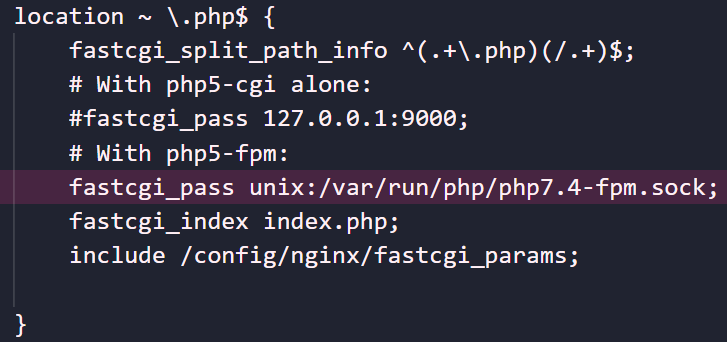
Whops, I updated it now!PR Merged.You need to use network br0 for the container and set a static IP addressThe container template has now been updated to require secret key by default.Alright, There seems to be something wrong with the build pipeline, it is fixed now. For the database, refer to https://github.com/SiwatINC/humhubHi, Thanks for reporting this, I'll look into it later.The NGINXPageSpeed Container has recently been upgraded to PHP7.4, you will need to edit the "default" configuration file to change php7.3 to php7.4
 Simply allow a docker container to connect to multiple network, eg. 192.168.0.0/24 and 192.168.2.0/24 This will allow some container that need to be on the same broadcast domain as an isolated network to function properly. Currently we can do this using post arguments and "docker network connect" but this solution are unreliably at best, every time the array start up, this solution will break that container's auto start functionality and I need to recreate the container manually every reboot. A proper GUI option is much appreciated.Hi, I personally don't use NGINX as my reverse proxy, but here's an example config of someone else who got it working.I don't use SWAG but I'm pretty sure that you can bind the swag's cert directory to something like /cert in the adguard container and access it from therecan you try port 443(https://) /80 (http://) /3000?, try all of them.This error will occur when the container is set to use host or bridge network, you must use brX (br0, br1, etc...)There seems to be a problem with my jenkins pipeline, should be fixed now.you need to turn on advance view, if that still doesn't work, delete the container and it's data directory (/mnt/user/appdata/onlyofficeds) and start overWeird, can you try force updating the container and set networking to br0?Ah, in that case, it’s a little complicated. Because I do not maintain the oods image (it use the official image) you might need to ask in the official repo.Which container are you referring to?Did you install the ssl certificate?I can't speak for ark, but I'd use any http webserver, an example of those would be NGINX (or apache if you're into htaccess and other apache specific stuff which we don't need in your case) and put your required .ini configuration file in there.Added FixedAh, if that's the case, something is wrong, you could download init.sh here https://github.com/SiwatINC/h265ize_unraid/blob/master/init.sh and paste it into your output directoryIf that directory exist, the container should automatically create init.sh in that directory for you, mind you that it does not automatically create the folder if it does not exist.Attention to people using NGINXPageSpeed. The latest container update will break your previous installation, to fix it, change the line "fastcgi_pass unix:/var/run/php/php7.2-fpm.sock;" "to fastcgi_pass unix:/var/run/php/php7.3-fpm.sock;" in the default file in site-confs folder. This is due to the upgrade from PHP7.2 to PHP7.3That should not be what show up. It should be the "Document Server is running" page. I don't use SWAG so I can't help you there so you should ask in the proxy's support thread.



