






Ryanagon
Members
-
Joined
-
Last visited
-
It looks like I may have got it working, things seem to be moving now. For anyone else, I stopped my array and then I had to go into the \\<SERVER>\flash\config\shares directory and make sure the capitalization on the share .cfg files matched. After that I started the array again. Not sure if there is an easier way to resolve but my "Clean Up" button was grayed out in the shares gui.
-
MEDIA and tempmedia are the shares that should get moved from cache to the array.
-
Hoping someone can help as I'm out of ideas. I noticed after upgrading to 7.0 that mover stopped moving. I don't use the CA Mover Tuning plugin. I did see that some of my shares settings were changed so I tried to return them to the way they were before but still didn't work. Mover log was showing duplicate file exists (for all kinds of files)... I believe I have resolved that.. I'm guessing I have something wrong still... stormwatch-diagnostics-20250126-1020.zip
-
Thanks a lot for all your help. I have ordered a larger disk and will try replacing and rebuilding to that.
-
It did seem to fix a couple of the issues but i'm left with the following: Problem: partition 1 is too big for the disk. Warning! Secondary partition table overlaps the last partition by 2113 blocks! You will need to delete this partition or resize it in another utility. Caution: Partition 1 doesn't end on a 64-sector boundary. This may result in problems with some disk encryption tools. Identified 3 problems! Partition Information: Command (? for help): i Using 1 Partition GUID code: 0FC63DAF-8483-4772-8E79-3D69D8477DE4 (Linux filesystem) Partition unique GUID: 6BA205EA-9B41-4CE8-BB0A-62860EA02B71 First sector: 64 (at 32.0 KiB) Last sector: 5860533134 (at 2.7 TiB) Partition size: 5860533071 sectors (2.7 TiB) Attribute flags: 0000000000000000 Partition name: ''
-
For some reason it is looking for the partition at sector 1 instead of 64 but I have no idea if there is a way to tell it to look at 64 instead.
-
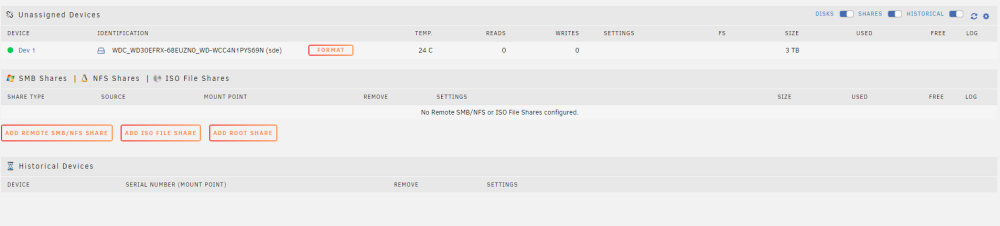
I'm sorry, getting a little lost now. This is the only option I see:
-
Ryanagon changed their profile photo
-
Yes my apologies, I swapped a cable just to be sure it wasn't an issue. stormwatch-diagnostics-20221007-1040.zip
-
Disk /dev/sdc: 119.24 GiB, 128035676160 bytes, 250069680 sectors Disk model: KINGSTON SVP180S Units: sectors of 1 * 512 = 512 bytes Sector size (logical/physical): 512 bytes / 512 bytes I/O size (minimum/optimal): 512 bytes / 512 bytes Disklabel type: dos Disk identifier: 0x00000000 Device Boot Start End Sectors Size Id Type /dev/sdc1 64 250069679 250069616 119.2G 83 Linux This is the output from the same command on the drive that will not mount: fdisk -l /dev/sde Disk /dev/sde: 2.73 TiB, 3000591900160 bytes, 5860531055 sectors Disk model: WDC WD30EFRX-68E Units: sectors of 1 * 512 = 512 bytes Sector size (logical/physical): 512 bytes / 4096 bytes I/O size (minimum/optimal): 4096 bytes / 4096 bytes Disklabel type: dos Disk identifier: 0x00000000 Device Boot Start End Sectors Size Id Type /dev/sde1 1 4294967295 4294967295 2T ee GPT Partition 1 does not start on physical sector boundary.
-
Thanks, I have attached the diagnostic server-diagnostics-20221007-0837.zip
-
Just looking for some advice here because I don't want to do anything wrong that I can't reverse. I had some major hardware failure on my old machine so I moved unraid disks to a new machine. It's been a bit of an ordeal but now I get the above message for my Disk 1 when starting the array. All disks were formatted as XFS and this disk has data on it. When I run a Check Disk I get xfs_repair: data size check failed and it is unable to repair. The drive is 3TB (1 of 3 3TB drives - the others seem find), my Parity is 4TB (and I have another 4TB drive in the array). They are all WD Red drives. SMART check says everything is ok... do I format the drive and will that have parity rebuild it? Do I replace the drive? Sorry, I haven't run across anything like this before.
-
I am trying to set up the docker with Wireguard but I feel like I am missing a key step somewhere. I setup wireguard and that seemed to go fine... added the proper port forward to my router, set up a peer with Remote Tunneled Access, downloaded the peer config file and renamed it to wg0.conf. Placed it in the \appdata\qbittorrentvpn\wireguard directory. There isn't much to the config file: [Interface] #qBittorrent PrivateKey=[KEY] Address=10.253.0.2/32 DNS=[My Router DNS] [Peer] #Home VPN PresharedKey=[KEY] PublicKey=[KEY] Endpoint=[DUCKDNS]:51820 AllowedIPs=0.0.0.0/0 Enable vpn in the docker, set VPN_TYPE to wireguard and start the docker. Everything seems to be okay and I am able to log in to qBittorrent and shortly after it disconnects. Log says [ERROR] Network is down, exiting this Docker and the docker restarts. > Repeats. Docker Extra Parameters are set to --restart unless-stopped I feel like I'm missing a step somewhere.... any help would be greatly appreciated.


